

Your costliest incident isn't the database failure. It's the silence that follows. When your service drops, you need to know how to communicate downtime to customers before the support tickets overwhelm your team. Most engineers fail here because they treat updates as an afterthought while under intense technical pressure.
Communicating downtime effectively means providing an immediate source of truth through automated status pages and scheduled updates every 30 to 60 minutes. This guide moves past the fluff to provide a repeatable communication workflow. You'll learn the technical frameworks needed to maintain trust while your systems are under fire.
We'll examine how to build a centralized source of truth and use AI assistants to draft precise updates when every minute counts. We also look at the architectural decisions behind status pages, including how regional hosting in the EU or US impacts your compliance. This approach ensures your communication is as robust as your infrastructure.
Key Takeaways
- Establish an independent status page as a central source of truth to prevent support ticket floods when your main infrastructure fails.
- Integrate monitoring tools with status pages using webhooks while maintaining a human-in-the-loop protocol for final message verification.
- Master how to communicate downtime to customers by using precise technical language instead of vague marketing terms to build long-term trust.
- Align incident communication with data sovereignty laws by choosing between EU and US hosting for your status page infrastructure.
- Streamline workflows by consolidating SSL, API, and uptime monitoring into a single dashboard with flat, transparent pricing.
The Architecture of an Outage Message: Channels and Latency
Incident transparency is the baseline for modern SaaS trust. View your communication channels through the same lens as your infrastructure: evaluate them for latency, reliability, and decoupling. If your API is down, your in-app notifications are likely down too. Relying on a system that shares a fate with your primary application creates a single point of failure for your reputation.
A decoupled "Source of Truth" is non-negotiable. Your status page must exist on an entirely different network and hosting provider than your production environment. This independence ensures that when your main stack fails, your communication line stays open. This is the first step in mastering how to communicate downtime to customers without adding to the chaos.
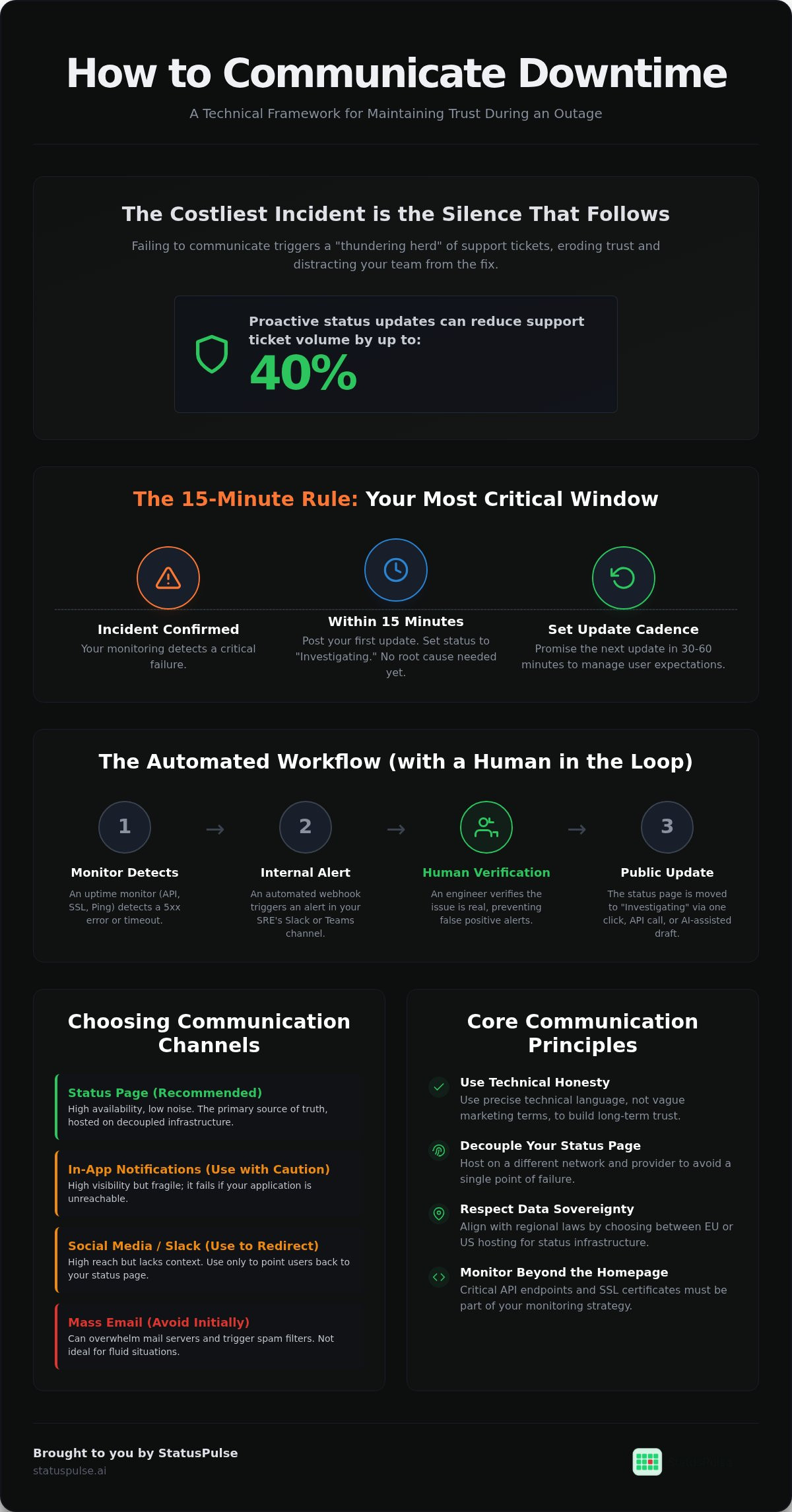
Avoid the "thundering herd" effect by skipping mass emails in the first 15 minutes. Blasting your entire user base while your team is still triaging the issue is often counterproductive. It can overwhelm your mail server and trigger spam filters. Use a centralized status page as the anchor instead. It allows users to opt-in to updates rather than forcing a noisy notification into their inbox during a fluid situation.
Comparing Communication Channels
Status pages offer high availability and low noise. They function as the primary reference point for all stakeholders. In-app notifications provide high visibility but are fragile; they fail if the application is unreachable. Social media and Slack have high reach but lack technical context. These external platforms are often too noisy for the precision required during the incident management process. Use them only to point users back to your primary status page.
The 15-Minute Rule
Speed matters more than precision during the initial detection phase. You should issue your first update within 15 minutes of an incident being confirmed. You don't need a root cause at this stage. Use an "Investigating" status to acknowledge the problem publicly. This simple act buys your engineering team time and stops users from wondering if the lights are on. It's a core component of how to communicate downtime to customers while maintaining professional authority.
Always set a clear expectation for the next update. If you tell users to expect news in 30 minutes, they're less likely to refresh the page constantly or open a support ticket. This controlled rhythm reduces stress for both your team and your users. A public status page makes this cadence easy to maintain, keeping the communication loop tight and predictable.
From Reactive to Proactive: Automating the Communication Loop
Manual updates are the first thing to fail when a team is busy fixing a production bug. Relying on an engineer to manually refresh a status page during a high-pressure outage is a recipe for radio silence. Automating the initial trigger via webhooks ensures your response is immediate and consistent. This transition toward strategic customer communications transforms a chaotic reaction into a controlled protocol.
Automated status updates can reduce support ticket volume by up to 40% during an incident. When users see an "Investigating" status the moment they arrive, they're less likely to send a query. But full automation is a trap. While internal alerts should be instant, public-facing updates require a human in the loop. A misconfigured monitor could trigger a false positive, causing unnecessary panic if it posts to your public status page without verification.
Internal stakeholder awareness is just as important as customer communication. Configure your monitoring tools to alert Slack or Microsoft Teams channels the moment a threshold is crossed. This keeps the entire team informed without requiring the engineering lead to provide constant manual updates. It allows your support and success teams to prepare their response before the first customer even notices the dip in service.
The Automated Workflow
- Step 1: An uptime monitor detects a 5xx error or a timeout exceeding your threshold.
- Step 2: An automated internal alert triggers in your SRE Slack or Microsoft Teams channel.
- Step 3: A human verifies the issue and moves the status page to "Investigating" via a single click or API call.
Monitoring Beyond the Landing Page
Simple HTTP pings to your homepage aren't enough. For B2B companies, API monitoring is more critical for maintaining trust. If your dashboard loads but your endpoints fail, your users are still blocked. You should also implement SSL certificate monitoring to prevent "silent" downtime caused by expired credentials. These technical layers are essential for anyone learning how to communicate downtime to customers with precision.
For a deeper dive into these protocols, read our API Monitoring: The Developer’s Guide. Using a tool like StatusPulse allows you to consolidate these monitors into one dashboard, ensuring your automation remains manageable rather than becoming another system to babysit.
Drafting Updates: Technical Honesty vs. Marketing Fluff
Technical users don't want vague apologies. When your service drops; they want to know exactly what is broken and why. Most corporate templates fail because they rely on marketing fluff. Terms like "revolutionary" or "seamless" have no place in an incident report. These words signal a lack of technical depth and erode the trust you're trying to rebuild.
Mastering how to communicate downtime to customers requires a commitment to radical honesty. This starts with the post-mortem. A high-quality post-mortem acts as a trust-building tool by describing the root cause without shifting blame to individuals. It demonstrates that your team understands the failure and has a technical plan to prevent recurrence. Effective communication relies on The Architecture of Incident Communication Transparency to ensure every stakeholder has the right level of detail.
Show, Don’t Tell: Example Updates
Vague updates create anxiety. If a customer sees "We are having some issues," they assume the worst. Technical precision provides a sense of control. Compare these two approaches:
- Bad: "We are having some issues and will be back soon. We apologize for the inconvenience."
- Good: "We have identified a database connection pool exhaustion in our EU-West region. Engineering is scaling the cluster to increase capacity."
The second update tells a DevOps engineer exactly what is happening. It allows them to make informed decisions about their own systems. Precision reduces the volume of speculative support tickets because it answers the "what" and "how" immediately. This is the most efficient way to handle how to communicate downtime to customers while maintaining professional authority.
AI-Assisted Incident Management
Translating complex system logs into readable updates is difficult during a "War Room" scenario. Cognitive load is high; and engineers should focus on the fix. AI can assist by summarizing error logs into a two-sentence customer update. It bridges the gap between raw data and human communication.
Human agency remains critical. AI should function as an assistant that drafts the message; but a human must always perform the final review. This ensures the update is accurate and maintains the grounded tone your users expect. Using AI to handle the initial draft reduces the time it takes to post an update, keeping you within the 15-minute response window discussed earlier. This approach balances speed with technical integrity.
Data Sovereignty: Managing Regional Expectations
Data sovereignty is often overlooked in incident management. Most advice found on community platforms is US-centric. It suggests you can host your status page anywhere. This is a mistake for global SaaS companies. If your primary application must comply with GDPR, your communication infrastructure shouldn't be an exception.
StatusPulse allows a choice between EU and US hosting specifically to help teams maintain strict data residency compliance without compromising on performance. This ensures your incident logs and subscriber data remain within your required jurisdiction. It removes the legal friction often associated with using third-party monitoring tools.
EU vs. US Hosting Requirements
Regulatory compliance for European enterprises often mandates local data residency. Storing incident logs or subscriber data on US-based servers can trigger unnecessary legal audits. Beyond the legal scope, latency is a practical concern. You don't want your status page to be slow when your main site is struggling. You want it as close to your users as possible.
This ensures the page loads quickly even when the broader internet is experiencing routing issues. Reliability also hinges on where your monitoring probes are located. Ensuring your nodes are geographically distributed helps you distinguish between a global outage and a regional ISP failure. This technical precision is vital when determining how to communicate downtime to customers accurately. Read our Uptime Monitoring: A Developer’s Guide to understand how to build a resilient monitoring strategy.
Transparency as a Legal Safe Harbor
Transparency also serves as a legal safe harbor. A public record of uptime assists in SLA dispute resolution by providing a timestamped, objective history of service availability. It helps you clearly distinguish between "planned maintenance" and "unplanned outages" in a legal context. This clarity is essential for maintaining professional authority during contract reviews.
Without this record, you're forced to rely on internal logs that may be harder to verify during a contractual audit. Using a public status page to fulfill these reporting requirements saves your team hours of manual data extraction. It transforms your status page from a simple notification tool into a verifiable system of record.
Effective communication isn't just about the words you use; it's about the infrastructure supporting them. When you consider how to communicate downtime to customers, the location of your data is a silent but powerful indicator of your commitment to privacy. It shows your enterprise clients that you value their regional regulations as much as your own uptime. To simplify your compliance workflow and maintain data sovereignty, deploy your status page in your preferred region.
Implementing a Modern Communication Stack with StatusPulse
Consolidating your monitoring and communication tools reduces the friction inherent in incident response. When your SSL certificate monitoring, API checks, and uptime monitors live in different dashboards, your team wastes time switching contexts. StatusPulse brings these signals together. This unified view is essential for anyone refining how to communicate downtime to customers without missing critical technical details.
The incident management industry often relies on per-subscriber pricing models. We find this practice unethical. It creates a "transparency tax" where you're punished financially for growing your audience or being honest with more users. StatusPulse uses a flat pricing model. We want you to communicate with as many stakeholders as possible without worrying about your next invoice.
Speed during an outage shouldn't come at the cost of professional authority. Our AI-powered incident drafting tool acts as a technical assistant; it summarizes complex logs into readable updates while leaving the final human action to you. This ensures your updates remain grounded and precise even during high-pressure "War Room" scenarios. For a broader look at the ecosystem, see our guide on Website Uptime Monitoring Tools.
Setting Up Your Status Page in 5 Minutes
You don't need complex CSS to maintain brand integrity. Our status pages are designed to be functional and clean right out of the box. You can customize the UI to match your brand colors and logo in minutes. Once the interface is set, connecting your first uptime monitor to a public status component is a simple toggle. You can also invite team members to the dashboard to collaborate on updates, ensuring the right person is always available to verify a draft.
The StatusPulse Difference
We built StatusPulse as a principled alternative to corporate bloat. You won't deal with faceless account managers or unnecessary features that slow down your response time. Our support comes from technical peers who understand the stress of a production outage. We focus on simplicity and precision; giving you exactly what you need to maintain trust and nothing you don't. Build your transparent status page with StatusPulse today and take control of your incident narrative.
Building a Resilient Communication Protocol
Effective incident management relies on speed and technical precision. By decoupling your status page from your production infrastructure and following the 15-minute response rule, you build a foundation of reliability. Automation works best with a human in the loop, ensuring that your public voice remains accurate while your engineers focus on the fix.
Mastering how to communicate downtime to customers isn't just about managing an outage; it's about protecting your long-term reputation through radical honesty. Using technical language instead of marketing fluff shows your users that you respect their time and expertise. Whether you choose EU or US hosting to meet data sovereignty requirements, your communication stack should be as robust as your code.
StatusPulse provides the tools to consolidate your monitoring and status pages into a single, transparent workflow. With AI-powered incident drafting, regional hosting options, and a flat pricing model that eliminates per-subscriber fees, you can focus on resolution instead of billing complexity. Start communicating with transparency at StatusPulse.ai. Your users will appreciate the honesty, and your support team will appreciate the reduced ticket volume.
Frequently Asked Questions
How often should I update customers during an outage?
You should update customers every 30 to 60 minutes during an active incident. Even if there's no new technical progress, a brief post acknowledging that the team is still working prevents user anxiety. This cadence establishes a predictable rhythm. It stops users from flooding your support channels for manual updates while your engineers are busy with the fix.
What is the difference between a private and a public status page?
Public status pages are accessible to the general internet, while private pages require authentication or IP whitelisting. Public pages build broad brand trust and handle general traffic. Private pages are better for internal infrastructure monitoring or sharing uptime data with specific enterprise clients under strict SLAs. Both serve as a source of truth but target different audiences.
Should I communicate downtime even if it only affects a small percentage of users?
Yes, you should communicate downtime even if it only affects a small subset of users. Transparency prevents those specific users from feeling ignored or confused. Use component-specific statuses to show that only a partial outage is occurring. This is a core part of how to communicate downtime to customers without causing a global panic for unaffected users.
Can I automate status page updates directly from my monitoring tool?
You can automate updates using webhooks or APIs from your monitoring tools. However, you should always maintain a human-in-the-loop for public messages. Automation is excellent for internal alerts, but public updates require a final check. This ensures the tone is grounded and the information is accurate before it reaches your entire user base.
How much technical detail should I include in a public incident report?
Include enough detail to explain the root cause and the impact without compromising security. Technical audiences like DevOps engineers want to know if it's a database lock or a DNS issue. Avoid vague phrases. Be specific about the affected regions or services to help your users manage their own technical stacks and make informed decisions.
What are the best channels for communicating scheduled maintenance?
The best channels are your status page, email notifications, and in-app banners. Provide at least 48 to 72 hours of notice for scheduled work. This allows your users to plan their own maintenance windows around yours. Always link back to the status page for real-time progress updates so users don't have to guess when you're finished.
How does a status page help reduce support tickets?
A status page acts as a centralized source of truth that users check before reaching out to support. When an incident is clearly marked as "Investigating" on your status page, it validates the user's experience immediately. This proactive approach is the most effective way of how to communicate downtime to customers while significantly lowering the volume of repetitive queries.
Is it better to host my status page in the EU or the US?
Choose the region that matches your primary user base and regulatory requirements. EU hosting is often necessary for GDPR compliance and data residency for European enterprises. US hosting may offer lower latency for North American users. StatusPulse provides both options to ensure you can meet your specific data sovereignty needs and maintain high availability during regional network issues.


