

Choosing a free, self-hosted tool like Uptime Kuma seems like an obvious win for the budget. However, for professional teams, the obvious choice is often the most expensive one. In the debate of Uptime Kuma vs Hosted Status Pages: When Self-Hosted Costs More Than It Saves, the real price isn't the software license. It's the engineering hours spent managing Docker images, troubleshooting Let's Encrypt renewals, and fixing the monitoring VPS when it inevitably goes down.
You likely chose self-hosting because you value data sovereignty and want to avoid the corporate bloat of legacy providers. We agree that control is vital. But monitoring requires a level of reliability that a single VPS often can't provide. This article provides a technical breakdown of the hidden infrastructure risks and a framework to calculate your true cost of ownership. We'll examine the "who watches the watchman" paradox and compare maintenance hours against managed SaaS to help you build a reliable, professional setup that doesn't require constant babysitting.
Key Takeaways
- Learn how to evaluate the total cost of ownership in the debate of Uptime Kuma vs Hosted Status Pages: When Self-Hosted Costs More Than It Saves, focusing on engineering hours rather than just server bills.
- Avoid the monitoring paradox by separating your monitoring infrastructure from your application stack to prevent a single point of failure during a network outage.
- Calculate the annual labor cost of maintaining self-hosted instances, including manual Docker image updates and Let's Encrypt certificate management.
- Improve incident response speed by utilizing professional tools for drafting customer updates instead of relying on basic up or down indicators.
- Ensure data sovereignty and compliance by choosing between EU or US hosting options while maintaining a predictable, flat-rate cost structure.
Uptime Kuma vs. Hosted Status Pages: A Technical Comparison
Uptime Kuma has become the de facto standard for developers managing homelabs or internal experiments. Its interface is clean. Its setup is fast. For basic website monitoring, it provides immediate visibility without a monthly bill. However, a technical gap exists between a hobbyist project and a production environment that customers rely on. This is the core of the debate regarding Uptime Kuma vs Hosted Status Pages: When Self-Hosted Costs More Than It Saves.
Professional environments require more than just a "green light." They need external validation that is independent of the primary infrastructure. When you self-host, you aren't just running a monitoring app. You're managing an entire stack. This includes the underlying OS, the container runtime, and the networking rules that allow notifications to leave your VPC. Managed SaaS platforms, like StatusPulse, abstract this complexity so your team can focus on fixing outages rather than maintaining the tools that report them.
Why Developers Love Uptime Kuma
Uptime Kuma's rise is well earned. It offers a transparent, open-source codebase that appeals to those who want full control over their data. The UI is modern and avoids the cluttered "enterprise" look of older tools. With over 90 notification integrations available out of the box, it connects to almost any stack. There are no per-monitor fees or licensing costs. For a developer working in a private lab, these benefits are hard to beat.
The Hidden Maintenance Tax of Self-Hosting
The "free" nature of self-hosting is often an illusion. Reliability in production requires constant vigilance. You must regularly patch OS vulnerabilities and manage Docker image updates. If you miss a security patch, your monitoring server becomes a vector for attack. It's a liability, not just a tool.
Data management is another hurdle. As your monitoring history grows, you'll need to handle database migrations and backups for SQLite or MariaDB. These tasks take time. Then there is the issue of local network restrictions. Troubleshooting why a notification failed to reach Slack because of a firewall change or managing multi-region notification latency can eat up hours of an engineer's afternoon. For teams scaling their operations, these manual tasks represent a significant drain on resources.
The Monitoring Paradox: Who Watches the Watchman?
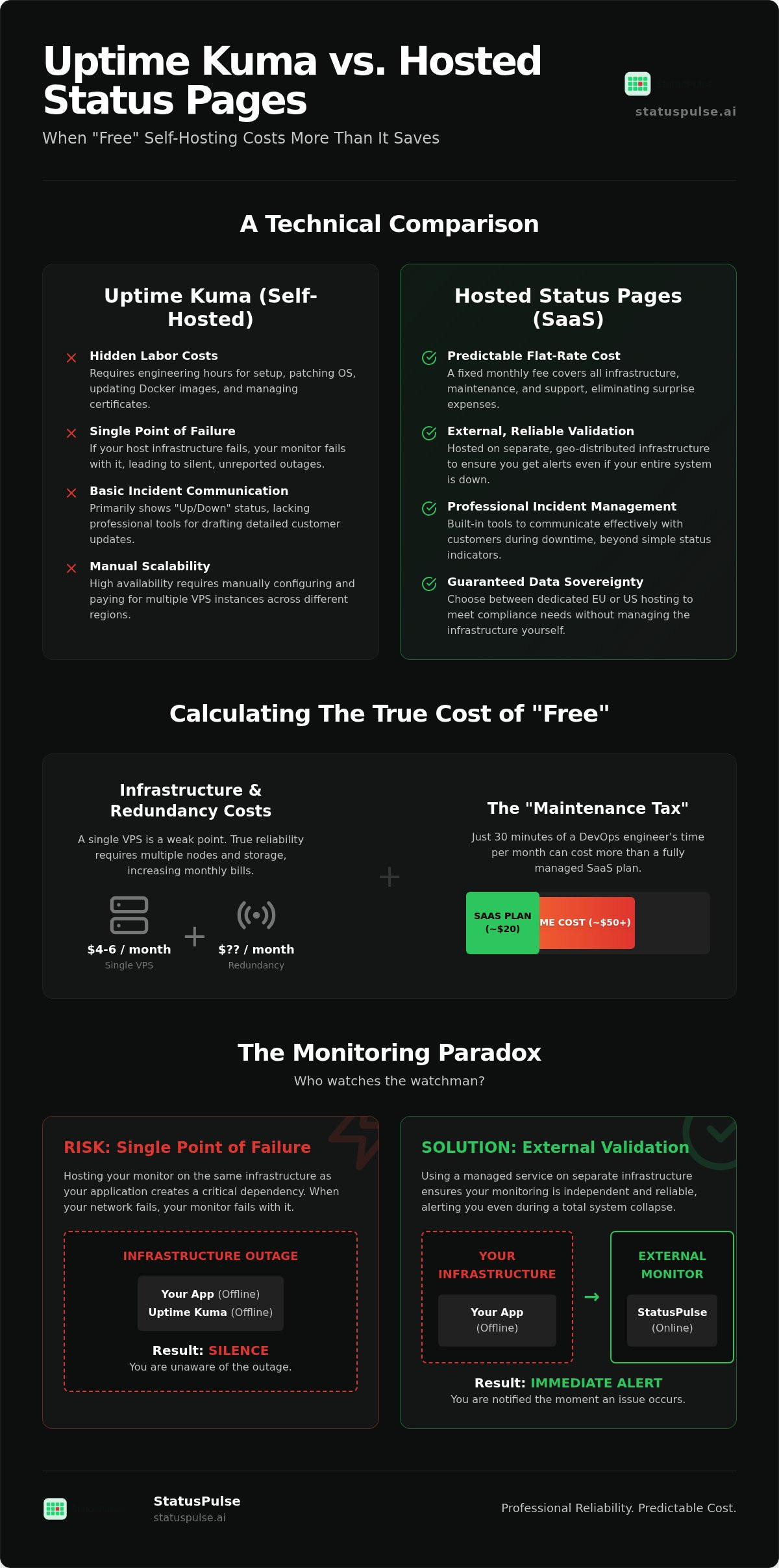
The monitoring paradox is a common architectural oversight. If you host your monitoring tool on the same infrastructure as your application, you create a circular dependency. When the server or network fails, the monitor fails with it. You end up in a situation where you are unaware of a critical outage because the system meant to alert you is also offline. This structural weakness is a major factor in the Uptime Kuma vs Hosted Status Pages: When Self-Hosted Costs More Than It Saves debate. Professional reliability requires total infrastructure separation.
Single Point of Failure (SPOF) Risks
Silent failures represent a significant risk for self-hosted setups. An Uptime Kuma instance might crash due to a memory leak or an OOM killer event on a small VPS. Without a second monitor watching the first, the failure goes unnoticed until a customer complains. Another frequent error is hosting the status page on the same domain or within the same cloud region as the main application. If your DNS provider suffers a DDoS attack or a regional data center goes dark, your status page becomes unreachable. Using StatusPulse for external validation removes this risk. It provides a dedicated monitoring layer that exists entirely outside your primary environment, ensuring you receive alerts even during a total infrastructure collapse.
Infrastructure Costs vs. Subscription Fees
The financial argument for self-hosting often ignores the reality of 2026 infrastructure pricing. A reliable entry-level VPS from providers like [VERIFY: DigitalOcean/Hetzner entry-level VPS price 2026] usually starts around $4 to $6 per month. However, a single node is a weak point. To achieve high availability, you would need multiple nodes in different regions, quickly tripling your server bill. You also need to manage storage for long-term metrics. Detailed logs and uptime history can consume several gigabytes of storage over time, requiring paid block storage expansions.
When you add the cost of engineering labor, the "free" model breaks down. If a DevOps engineer earns an average salary, spending just thirty minutes a month on server maintenance costs more than a standard SaaS plan. Managed services include geographically distributed checks by default, verifying your site from the EU, US, and Asia simultaneously. This level of redundancy is difficult and expensive to replicate manually. If you are looking for a way to simplify your stack while increasing reliability, you might find that moving to a managed status page is the most cost-effective path forward.
Incident Communication: Beyond the 'Up/Down' Binary
Monitoring is more than a binary state of red or green dots. While Uptime Kuma excels at basic uptime checks, it often falls short when a technical failure requires human explanation. In the context of Uptime Kuma vs Hosted Status Pages: When Self-Hosted Costs More Than It Saves, the real value lies in how you handle the minutes after a service goes dark. Professional incident management requires tools that bridge the gap between a server timeout and a customer-facing update.
During an outage, your team is under immense pressure to fix the root cause. Drafting manual updates for a basic status page is often the last thing on a developer's mind. Managed SaaS platforms solve this by integrating automated subscriber notifications via email or SMS. This ensures your customers are informed immediately, reducing the flood of support tickets that usually accompanies a downtime event.
Managing Public Trust During Outages
A professional status page is a business requirement, not just a technical one. It serves as a record of reliability that potential enterprise clients examine before signing a contract. High-quality historical uptime charts build customer confidence by proving that you take transparency seriously. If your status page is a simple, unbranded list of monitors, it sends a message that your infrastructure is an afterthought.
Trust is earned through clear communication during a crisis. You can read more about building this foundation in our guide on The Architecture of Incident Communication Transparency. By providing a dedicated space for updates, you maintain control of the narrative rather than letting frustrated users speculate on social media.
AI-Assisted Incident Drafting
The most difficult part of an outage is translating technical logs into plain English. StatusPulse addresses this by using AI to summarize the impact and draft incident updates for you. This feature is designed to reduce the cognitive load on developers during high-pressure "SEV 1" events. Instead of staring at a blank text box while a database is recovering, your team can review an AI-generated draft that accurately describes the situation.
Consistent communication is vital for brand integrity. AI incident management ensures that every update follows a professional tone without requiring you to re-invent the wheel for every minor blip. This level of automation is a core reason why teams transition from self-hosted workarounds to a dedicated platform like StatusPulse. It allows your engineers to stay focused on the code while the platform handles the communication layer.
Calculating the Total Cost of Ownership (TCO) in 2026
The true cost of any technical tool is rarely found on the invoice alone. For teams managing their own monitoring stack, the bill is split between server resources and your most expensive asset: engineering time. In the comparison of Uptime Kuma vs Hosted Status Pages: When Self-Hosted Costs More Than It Saves, the financial tipping point occurs much earlier than most CTOs expect. Total cost is a function of infrastructure plus labor.
A VPS invoice for a few dollars is easy to approve. However, the hours an engineer spends troubleshooting a notification failure or patching a kernel vulnerability represent a hidden drain on your product roadmap. StatusPulse offers flat pricing to keep your TCO predictable. By removing per-subscriber fees, we ensure that your costs don't spiral as your customer base grows.
The Developer Hourly Rate Formula
To find your real costs, follow this three-step calculation. First, estimate your monthly maintenance hours. For a standard self-hosted instance, expect 1 to 3 hours for OS patches, Docker image updates, and verifying backups. Second, multiply this by the average hourly rate of an SRE or DevOps engineer. In the EU, this rate is approximately [VERIFY: Average SRE hourly rate in EU 2026]. Finally, add your monthly VPS and backup storage costs. When you view monitoring through this lens, the "free" software often becomes one of your most expensive monthly line items.
Compliance and Data Sovereignty
Data sovereignty is a strategic requirement for European companies. If you host monitoring data or subscriber email lists on a US-owned cloud provider, you must manage complex GDPR compliance requirements yourself. This includes maintaining data processing agreements and ensuring encryption standards are met. EU-based hosting is a distinct advantage for companies that need to guarantee regional privacy. Ensuring your server uptime monitoring meets these standards is part of professional risk management.
StatusPulse allows you to choose between EU or US hosting for your data. This flexibility helps you meet regional requirements without the overhead of managing the underlying infrastructure. If you are ready to stop trading engineering hours for server maintenance, explore how StatusPulse simplifies your monitoring stack.
StatusPulse: Professional Reliability Without the Overhead
StatusPulse serves teams that have outgrown the manual maintenance required by self-hosted workarounds. While Uptime Kuma is an excellent entry point for labs, professional uptime requires a platform that manages its own infrastructure independently of your primary stack. In the context of Uptime Kuma vs Hosted Status Pages: When Self-Hosted Costs More Than It Saves, the transition to StatusPulse represents a shift from managing tools to managing your product. We provide native integration of monitoring, public status pages, and AI-driven incident management in a single dashboard.
Data sovereignty remains a core pillar of our architecture. You can choose between EU or US hosting to ensure your monitoring data and subscriber lists reside where they belong. This flexibility allows European SaaS companies to maintain strict compliance without the overhead of building their own regional infrastructure. Our mission is to provide a reliable, ethical alternative to both the risks of self-hosting and the bloat of legacy enterprise software.
Managed Monitoring for Modern Stacks
Reliability starts with frequency and depth. StatusPulse provides 1-minute check intervals with global latency tracking to detect performance degradation before it becomes a full outage. Our platform includes features designed for technical depth without the configuration headache:
- Integrated API monitoring to verify endpoint responses and JSON payloads.
- Automated SSL certificate tracking to prevent expiration-related downtime.
- Zero-configuration public status pages that reflect your brand identity immediately.
Flat Pricing: No Surprises
Many SaaS tools in this space implement a subscriber tax, charging you more as your popularity grows. We find this practice unethical for a tool meant to help you communicate. StatusPulse uses a flat pricing model with transparent tiers. You won't be penalized for growing your audience or communicating with more customers during an incident. This predictability is vital for growing teams that need to control their operational expenses.
Our approach focuses on precision rather than enterprise bloat. You get professional features like AI-assisted incident drafting and multi-region checks without the need for complex sales calls or multi-year contracts. It's a straightforward solution for specialists who value their time and their customers' trust. If you're ready to move beyond the hidden costs of self-hosting, StatusPulse offers the reliability your production environment demands.
Securing Your Infrastructure for the Long Term
The choice between Uptime Kuma and a managed service isn't just about software features. It's about where you want your team to spend their energy. Self-hosting requires you to manage the OS, the network, and the monitoring tool itself. This often creates a single point of failure that compromises your reliability. By calculating the total cost of ownership, it becomes clear that Uptime Kuma vs Hosted Status Pages: When Self-Hosted Costs More Than It Saves once you account for engineering hours and maintenance risks.
Professional monitoring requires external validation and automated incident communication. StatusPulse provides this through flat, transparent pricing and AI-powered incident drafting that takes the pressure off your developers during outages. With options for EU-based data sovereignty, you can maintain compliance without the infrastructure overhead. Focus on building your product instead of maintaining the watchman.
Stop babysitting your monitor. Start your StatusPulse trial today.
Your users deserve transparency. Your team deserves a tool that works as hard as they do.
Frequently Asked Questions
Is Uptime Kuma good for production monitoring?
Uptime Kuma is a capable tool for internal homelabs and development environments, but it carries risks for production monitoring. The primary concern is the lack of infrastructure separation. If your monitoring VPS goes down, you lose all visibility into your stack. Professional production environments require external validation from a platform that exists entirely outside your own network to ensure alerts always fire.
How much does it cost to host Uptime Kuma on a VPS?
The infrastructure cost for Uptime Kuma is typically between $3 and $5 per month on services like PikaPods or InstaPods. However, this figure is misleading. In the comparison of Uptime Kuma vs Hosted Status Pages: When Self-Hosted Costs More Than It Saves, the real cost is engineering time. If an SRE spends just thirty minutes a month on manual updates or troubleshooting, the labor cost quickly exceeds the price of a managed subscription.
What are the main risks of self-hosting my status page?
The biggest risk is a single point of failure where the monitor and the application go dark simultaneously. Silent failures are also common; if the monitoring container crashes due to a memory leak, you won't know until a customer reports an outage. Additionally, you are responsible for managing security patches, database backups, and Let's Encrypt renewals, which adds unnecessary operational overhead to your team.
Can Uptime Kuma monitor SSL certificates and APIs?
Yes, Uptime Kuma includes monitors for SSL certificate expiration and basic API endpoints. It can track response codes and alert you if a certificate is nearing its end date. While these features are helpful for internal tools, they lack the global latency tracking and advanced JSON payload verification that professional teams need to ensure high availability for external customers.
Why does StatusPulse offer both EU and US hosting?
StatusPulse provides hosting in both regions to support data sovereignty and regional privacy standards. Many European companies must keep monitoring data and subscriber lists within the EU to remain compliant with GDPR. By offering a choice, we ensure that you can meet your specific regulatory requirements without managing the underlying server infrastructure yourself.
Does StatusPulse charge per subscriber for status pages?
No, StatusPulse uses a flat pricing model that eliminates the subscriber tax found in legacy tools. We don't believe in penalizing you for growing your audience or communicating with more customers during a crisis. Our tiers are transparent and based on features and monitor counts, ensuring your costs remain predictable even as your user base expands.
How does AI incident management work in StatusPulse?
AI incident management acts as a technical assistant that drafts your status updates during an outage. It summarizes technical impact and logs into customer-friendly language. This feature reduces the stress on your developers during high-pressure events. Your team can review the AI-generated draft and post it in seconds, maintaining professional communication without the need to write updates from scratch.
When should I switch from Uptime Kuma to a managed service?
You should switch when the labor cost of maintenance exceeds the price of a subscription. If your team spends more than an hour a month on server patches or troubleshooting, self-hosting is no longer cost-effective. You should also transition to a managed service if you require 99.9% reliability and geographically distributed checks that stay online even if your primary cloud provider suffers a regional failure.


