

The average cost of website downtime has reached $5,600 per minute in 2026. While your engineering team scrambles to fix a broken API, your support team is likely drowning in a sea of identical "Is it down?" tickets. You shouldn't have to choose between technical recovery and customer transparency during a high-pressure outage.
Most developers agree that manual status page updates are a recipe for human error and delayed communication. It’s frustrating to use fragmented incident communication tools that charge you more every time your audience grows. You need a system that works as hard as your monitoring stack without the corporate bloat or complex pricing tiers that punish your success.
This guide provides a technical framework for evaluating tools that bridge the gap between backend response and frontend trust. You'll learn how to automate your status updates, reduce your mean time to communicate (MTTC), and move away from per-subscriber cost models. We'll examine the shift toward integrated monitoring and how to meet strict 2026 reporting regulations, including the EU Cyber Resilience Act and its mandatory 24-hour notification windows.
Key Takeaways
- Distinguish between internal coordination and external trust-building to prevent communication silos during service disruptions.
- Prioritize native integrations between monitoring and incident communication tools to lower your Mean Time to Communicate (MTTC).
- Leverage AI-assisted drafting to generate technical status updates quickly while maintaining human oversight of the final message.
- Select pricing models with flat rates instead of per-subscriber fees to ensure cost predictability during high-traffic outages.
- Align your communication stack with 2026 regulations by choosing providers that offer data sovereignty and regional hosting in the EU or US.
Beyond Alerting: Defining Incident Communication Tools
Incident communication tools are the specialized systems used to manage information flow during technical service disruptions. They differ fundamentally from monitoring tools. While monitoring focuses on detection and telemetry, communication tools focus on dissemination and stakeholder management. This distinction is the digital equivalent of an Emergency communication system; the goal is to keep humans informed while specialists work on the technical fix.
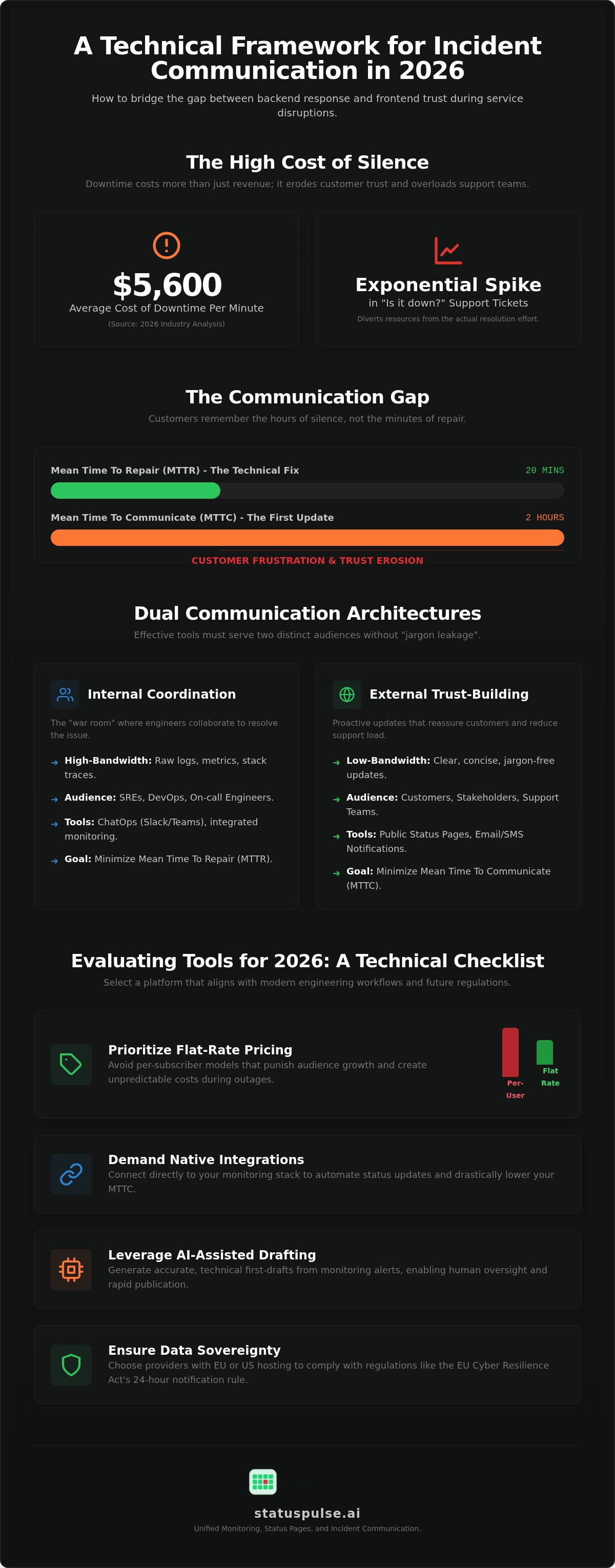
Engineering teams often prioritize Mean Time to Repair (MTTR). It is a vital metric, but it does not account for the customer experience. Mean Time to Communicate (MTTC) measures how quickly you acknowledge the issue to the outside world. If your MTTR is twenty minutes but your MTTC is two hours, your customers will remember the two hours of silence. Transparency acts as a load balancer for your support infrastructure by setting expectations before the tickets start rolling in.
The Cost of Silence During Outages
When a service goes dark without explanation, support ticket volume doesn't just grow. It spikes exponentially. Each ticket requires a manual response, pulling resources away from the resolution effort. This creates a feedback loop of stress for both the customer and the responder. The average cost of website downtime for businesses has reached $5,600 per minute as of August 2026. A large portion of that cost stems from reputational damage and the administrative overhead of managing an uninformed user base.
The psychological impact of "dark" incidents is significant. Users who feel ignored during an outage are more likely to churn, even if the technical fix was relatively fast. In early 2025, several major SaaS providers faced severe backlash not for the downtime itself, but for failing to update their status pages until the incident was already resolved. Silence is often interpreted by customers as a lack of control or, worse, a lack of integrity.
Core Components of a Communication Stack
A modern stack requires more than a simple status indicator. It needs public status pages for external trust and private pages for internal stakeholders. These pages must support automated notification channels like email, SMS, and webhooks to reach users where they are. You shouldn't expect customers to refresh a browser tab repeatedly to find out if your API is back online.
The most effective setups now include AI-assisted drafting. These tools act as assistants, pulling data from your monitoring stack to create technical summaries. This allows a human to review and publish an update in seconds. Platforms like StatusPulse integrate these components directly into the monitoring dashboard. By combining detection with dissemination, you eliminate the friction of switching between fragmented incident communication tools during a high-stress crisis.
Internal vs. External Communication Architectures
Reliable incident communication tools must support two fundamentally different workflows. Internal communication is high-bandwidth and technical. It happens in the "war room" where SREs and developers debug in real-time. External communication is low-bandwidth and high-trust. It targets customers who need to know how the outage affects their work without being buried in stack traces.
A common failure in incident response is "jargon leakage." This happens when raw monitoring logs or internal Slack discussions are copied directly into public updates. Phrases like "database replica lag" or "OOM killer triggered" mean nothing to a business user. They only want to know if their data is safe and when the service will return. Following FEMA emergency communication tips, clarity and brevity are essential during any crisis. Your architecture should act as a filter that translates technical reality into customer reassurance.
Internal Coordination: The War Room
The internal war room is where the messy work of resolution occurs. ChatOps is the backbone of this process. Modern workflows use incident communication tools to automate the creation of dedicated Slack or Teams channels as soon as a critical alert triggers. This centralizes the conversation and provides a timestamped audit trail for later post-mortems.
Effective internal tools also manage the human element of response. They should handle on-call rotations and escalation policies to ensure the right person is notified without causing alert fatigue. Integrating monitoring data directly into the chat flow allows engineers to see graphs and logs without switching contexts. This keeps the focus on the technical fix while a designated "incident commander" handles the translation for external stakeholders.
External Transparency: The Public Status Page
Your public status page is your primary tool for reducing support load. It must be hosted on infrastructure entirely separate from your main application. If your primary cloud region fails, your status page should remain online to provide updates. This redundancy is a core requirement for maintaining trust when everything else is broken.
Automation plays a vital role here, but it requires a human touch. You can set up monitoring triggers to instantly post an "Investigating" status, which provides the immediate acknowledgment customers crave. However, the subsequent technical updates should be drafted by a human or an AI assistant and reviewed before publishing. Using public status pages that integrate with your monitoring stack allows you to bridge this gap, ensuring that your customers stay informed while your engineers stay focused on the recovery.
Evaluating Incident Communication Tools for 2026
Selecting incident communication tools in 2026 requires a choice between architectural simplicity and modular complexity. Third-party connectors between your monitoring stack and your status page can fail when you need them most. A native integration reduces the moving parts. You should also watch for the "subscriber tax" found in many legacy tools. Some industry incumbents charge based on the number of users who receive an update. This model punishes you for having a large customer base. Flat pricing models are more ethical and provide the cost predictability that engineering managers need.
AI-Assisted Incident Drafting
AI-assisted drafting is about reducing the mental friction of writing technical updates. When you're debugging a production database, you don't want to switch contexts to craft a perfect status update. An AI assistant can scan your incident logs and generate a draft. It handles the translation from technical logs to customer-facing updates. The engineer remains the final authority. This human-in-the-loop approach prevents the AI from hallucinating or sharing sensitive internal details. It reduces the cognitive load of writing during a P1 outage, allowing you to focus on the technical fix.
Regional Hosting and Data Sovereignty
Data sovereignty has become a primary architectural concern for technical teams. Regulations like the EU Cyber Resilience Act now mandate a 24-hour initial notification for significant incidents. Non-compliance can result in fines of up to €15 million or 2.5% of global turnover. If your reporting data is hosted outside your jurisdiction, you may face compliance hurdles. This is especially critical for FinTech and HealthTech firms that must maintain strict data isolation. StatusPulse provides dedicated hosting in both the EU and US to support these requirements. By choosing a provider that respects regional hosting, you ensure that your incident management process aligns with local privacy standards. This approach removes the regulatory guesswork from your incident communication tools and protects your organization from non-compliance risks.
Selecting the Right Tool for Your Engineering Stack
Choosing between "best-of-breed" and "all-in-one" incident communication tools is a matter of managing technical debt. A fragmented stack requires more maintenance. You have to manage separate APIs, authentication flows, and billing cycles. For a solo developer or a small team, this overhead is often a distraction from core product work. Larger SRE teams might prefer modularity; however, they often pay for it with increased complexity during a crisis. Simplicity is a technical feature that reduces the risk of human error when stress is high.
Developer experience (DX) is equally vital. If a tool is difficult to configure or requires a complex CLI to update, your team won't use it. The best tools stay out of the way until they're needed. They should integrate with your existing CI/CD pipelines and monitoring alerts. This ensures that communication happens as a natural byproduct of your technical response rather than an additional chore for your engineers.
Scenario: The High-Growth SaaS
High-growth startups must prioritize automation to handle a rapidly scaling user base. As you acquire more customers, manual status updates become impossible to maintain. Implementing incident communication transparency early on builds a foundation of trust. It acts as a brand differentiator in a crowded market. You should specifically avoid tools that charge per-subscriber fees. These models create an ethical conflict where your communication costs spike exactly when your service is most popular. You need a flat pricing structure that supports your growth without financial penalties.
Scenario: The Regulated Enterprise
Regulated enterprises have different priorities. Audit logs and post-mortem documentation aren't just helpful features; they're compliance requirements under frameworks like NIS2 or the EU Cyber Resilience Act. You need to ensure the tool itself has 99.99% availability. It must exist entirely outside your primary infrastructure. Comparing uptime monitoring services is the first step in building this resilience. You need verified proof that your status page will stay online even if your main cloud region goes dark. Data sovereignty is also a hard requirement. You must have the choice to host your incident data in the EU or the US to meet local privacy standards.
If you're tired of managing fragmented tools and complex pricing models, consider a unified platform. You can start building a more reliable communication stack with StatusPulse to handle monitoring and status pages in one dashboard.
StatusPulse: Unified Monitoring and Communication
StatusPulse consolidates uptime, API, and SSL monitoring with public status pages in a single dashboard. Most incident communication tools require you to stitch together disparate services via webhooks or custom middleware. This fragmentation introduces latency when minutes matter. By unifying detection and dissemination, we remove the technical debt of maintaining a complex communication stack. You shouldn't have to manage multiple API keys just to tell your customers the site is down.
The platform prioritizes ethical pricing and technical precision. We don't use per-subscriber fees. This ensures your costs remain predictable even as your user base grows. You won't be penalized for being transparent with your entire audience. Our architecture is designed for specialists who value data sovereignty and regional hosting choices, allowing you to focus on resolution rather than billing complexity.
Streamlining the Incident Lifecycle
When an API monitoring check fails, the incident lifecycle begins immediately. StatusPulse triggers a workflow that alerts your on-call team while simultaneously generating an AI-powered draft for your status page. This reduces the friction between the SRE fixing the bug and the Customer Success team managing the users. The AI acts as a technical assistant. It reads the error logs and proposes a clear summary, but it requires a final human action to publish. This keeps your updates technical, honest, and fast.
Getting Started with StatusPulse
Setting up your first public status page takes less than 10 minutes. You start by configuring multi-region uptime checks to ensure global reliability. These checks monitor your endpoints from various geographic locations to prevent false positives. StatusPulse is built in Europe with a compliance-first architecture. You can choose between EU or US hosting to satisfy data sovereignty requirements under the Cyber Resilience Act or NIS2. This ensures your data stays within your required jurisdiction without sacrificing performance.
The platform also includes integrated SSL certificate monitoring to prevent outages before they happen. This proactive approach moves your team from reactive firefighting to planned maintenance. You can try the StatusPulse platform today to see how a unified monitoring and communication stack reduces your mean time to communicate. We provide the tools you need to build trust through technical transparency without the corporate bloat of legacy ITSM suites.
Future-Proofing Your Incident Response Architecture
Reliable incident management requires a functional bridge between technical fixes and customer trust. You've seen how Mean Time to Communicate (MTTC) defines your reputation during a service disruption. By consolidating monitoring and dissemination into a single stack, you remove the architectural friction that often leads to silence. This approach ensures that your engineering team stays focused on recovery while your users remain informed and calm.
Modern incident communication tools should prioritize technical integrity over enterprise bloat. You shouldn't face a "subscriber tax" or complex pricing models that punish your growth. StatusPulse offers a principled alternative. It combines uptime monitoring with AI-powered incident drafting and the choice between EU or US hosting for strict data sovereignty. There are no subscriber limits; you communicate with your entire user base at one predictable price.
It's time to replace fragmented systems with a unified, ethical platform. Build your transparent status page with StatusPulse and start treating communication as a core technical feature. You can build a more resilient, trust-based relationship with your customers today.
Frequently Asked Questions
What is the difference between an incident management tool and a status page?
Incident management tools focus on the internal technical response, such as on-call rotations and alert escalation. A status page is a customer-facing portal that communicates service health and outage progress to the public. While management tools help you fix the problem, status pages help you manage the reputation and support load associated with that problem. Many modern incident communication tools now integrate both functions into a single dashboard.
How does AI help in incident communication?
AI acts as a technical assistant that translates raw monitoring logs into human-readable incident drafts. It reduces the mental friction of writing technical updates during a high-pressure outage. By scanning your telemetry, the AI can propose a summary of the issue and the current resolution status. An engineer always reviews and approves the final draft, ensuring that the communication remains accurate and does not leak sensitive internal data.
Why should incident communication tools be hosted separately from my main stack?
Separate hosting ensures that your communication channels remain online even if your primary application or cloud region fails. If your status page shares the same infrastructure as your app, a major regional outage will take both down simultaneously. This leaves your customers in the dark and spikes your support ticket volume. Redundant, off-stack hosting is a core requirement for maintaining transparency when your primary systems are unreachable.
What are the most important metrics to track for incident communication?
The primary metrics are Mean Time to Communicate (MTTC) and the reduction in support ticket volume during an incident. MTTC measures how quickly your team acknowledges an issue after it's detected by your monitoring stack. A lower MTTC typically correlates with higher customer trust. You should also track notification delivery rates and status page engagement to ensure your updates are actually reaching your users across email, SMS, and webhooks.
Is GDPR compliance affected by where my status page is hosted?
GDPR compliance is directly impacted by the geographic location of your status page hosting and the data residency of your subscribers. For businesses serving European users, choosing incident communication tools with EU-based hosting simplifies compliance with data sovereignty requirements. This is especially vital under the 2026 Cyber Resilience Act, which mandates specific incident reporting timelines. Using regional hosting in the EU or US ensures you meet local privacy standards without complex legal workarounds.
How can I reduce alert fatigue during a major incident?
Reduce alert fatigue by using tools that group related microservice failures into a single, centralized incident. Instead of receiving fifty individual alerts for a database lag, your team should see one high-level incident with nested technical details. Implementing intelligent escalation policies also ensures that only the necessary on-call engineers are notified. This prevents burnout and keeps the technical response team focused on the fix rather than managing a noisy inbox.
Do I need a dedicated incident commander for communication?
A dedicated incident commander is necessary for larger teams to separate the technical repair from the communication workflow. The commander's job is to manage stakeholder expectations and publish updates while the engineers focus on the code. In smaller startups, one person often handles both roles, but the tasks should still be treated as distinct steps. Using automated drafting tools can help a solo responder handle both technical recovery and public transparency effectively.
How much do incident communication tools typically cost in 2026?
Costs in 2026 vary based on whether you choose a per-user model or a flat-rate subscription. Verified 2026 pricing for PagerDuty shows the Professional plan starting at $21/user/month and the Business tier at $41/user/month. AIOps features are often sold as expensive add-ons, sometimes reaching $699/month. You should also watch for per-subscriber fees that make your bill unpredictable as your user base grows. Unified platforms often offer more ethical, flat-rate pricing that includes monitoring and status pages without hidden subscriber limits.


