

Companies using a status page report an average reduction of 24% in support tickets during incidents. Despite this, many support teams still spend the first hour of a major outage manually triaging hundreds of duplicate queries. You've likely felt the pressure of a spiking queue while your engineering team is busy fixing the root cause. A strategic Zendesk status page integration stops this cycle by providing immediate technical context to your agents and customers.
We agree that flying blind during a service disruption is a recipe for churn and agent burnout. This guide teaches you how to architect an integration that surfaces real-time incident data where it's needed most. We will cover the technical steps to automate status updates and display incident banners within your help center. You'll learn to move from reactive firefighting to a proactive transparency model that lowers your Mean Time to Resolution and protects your team's bandwidth.
Key Takeaways
- Link your monitoring data to your help desk to reduce duplicate support tickets by up to 24% during service disruptions.
- Understand the technical architecture of a Zendesk status page integration using webhooks and REST APIs to sync system states.
- Evaluate the trade-offs between quick-start marketplace apps and building custom API bridges for maximum workflow control.
- Establish precise monitoring thresholds to automate status updates while avoiding the risks of alert fatigue and false positives.
- Maintain customer trust and lower Mean Time to Resolution by surfacing real-time incident context directly within support tickets.
The Support Ticket Storm: Why Status Integration is Critical
A ticket storm is a rapid, unmanageable surge in inbound support requests triggered by a service outage that exceeds a team's capacity to respond. When systems fail, users naturally turn to help desk software like Zendesk to seek answers. Without a Zendesk status page integration, this influx becomes a feedback loop. Every minute of silence from your team generates dozens of duplicate tickets. This noise buries unique, high-priority issues that actually require human intervention.
Companies using a status page report an average reduction of 24% in support tickets during incidents. This isn't just about showing a green or red light. It's about data integrity across your entire support stack. If your status page says "All Systems Operational" while your Zendesk queue is exploding, you lose credibility. Manual updates are prone to human error and lag. Transparency acts as a pressure valve, releasing the tension of a spiking queue before it breaks your team's morale.
The Cost of Reactive Communication
Reactive communication carries a heavy price tag. Support leads spend precious time during an outage manually tagging tickets to keep reports clean. This is time that should be spent on high-level coordination. The productivity loss during these events is measurable. A one-hour outage can cost thousands in lost labor as employees struggle to navigate conflicting information. When status information is delayed, customers feel ignored. This silence is often perceived as incompetence. "Dark" outages, where the company remains silent while services are down, are particularly damaging. They break the ethical contract of transparency between a SaaS provider and its users. This leads to higher churn rates as customers seek more reliable, communicative partners.
Proactive Support as a Retention Strategy
Proactive support is about meeting the user where they are. By embedding status data in the Zendesk Help Center (Guide), you provide immediate answers. This prevents the user from ever clicking the "Submit a Ticket" button. Internally, a Zendesk status page integration reduces the cognitive load on your agents. They no longer need to check Slack or a separate monitoring dashboard to confirm an outage. Real-time monitoring data appears directly in their ticket sidebar. This allows them to provide accurate, technical context to users immediately. This workflow change turns support agents into informed advisors rather than overwhelmed triagers. Solutions like StatusPulse ensure that technical SRE updates are translated into customer-friendly language automatically. This alignment keeps messaging consistent across every touchpoint, from the public status page to the private support thread.
Architecture of a Zendesk Status Integration
A Zendesk status page integration is a technical bridge designed to sync your monitoring state with Zendesk Support and Guide. It ensures that the moment a service fails, data moves from your infrastructure to your support agents and customers without manual intervention. The core components include webhooks for push notifications, REST APIs for data retrieval, and frontend widgets for display. This architecture replaces the "copy-paste" workflow where a developer Slack message is manually turned into a support macro.
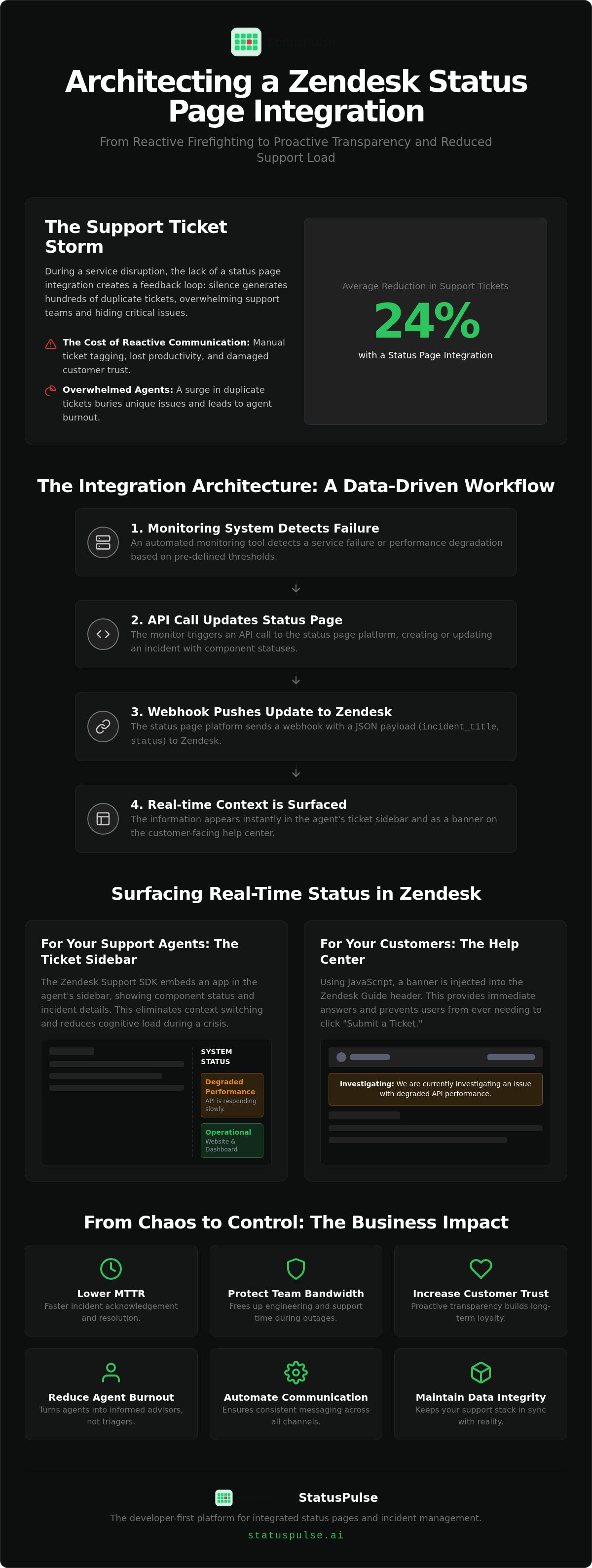
The data flow follows a logical path. A monitoring tool detects a failure. It triggers an API call to update the status page. Finally, a webhook pushes that updated incident state to Zendesk. JSON payloads serve as the carrier for this information. A typical payload includes structured fields like incident_title, current_status, and affected_components. This allows Zendesk to parse the data and display it in a human-readable format. Citing research on operational transparency shows that revealing the work going on behind the scenes increases user trust. Seeing an active investigation in their support portal reassures customers that your team is already on the job.
The Zendesk Support SDK and Sidebars
The Zendesk Apps framework allows you to render status components directly in the agent's ticket sidebar. This eliminates the need for agents to toggle between tabs during a crisis. The app pulls component-level uptime data based on the customer's account details or ticket tags. You can also manage permissions to ensure that internal-only technical notes remain hidden from the end-user while providing agents with the full context they need to resolve queries. This specific visibility reduces the mental load on your team when ticket volume spikes.
Automating the Guide (Help Center) Banner
For customer-facing transparency, you can inject status alerts into the Help Center header using JavaScript. CSS classes then reflect the incident severity. For example, a "degraded performance" status might trigger a yellow warning banner, while a "major outage" displays a red alert. To prevent these checks from slowing down page loads, use aggressive caching strategies. Fetching the status via a lightweight API call every 60 seconds ensures the information stays fresh without impacting performance. If you want to simplify this setup, StatusPulse provides pre-built integration tools that handle this logic out of the box.
Native vs. Third-Party Integrations: Evaluating Options
Choosing a Zendesk status page integration requires balancing engineering effort against long-term cost. You generally have three paths: marketplace apps, custom API middleware, or specialized platforms. Each path has distinct implications for your data sovereignty and budget. For European companies, the hosting location is a critical technical requirement. Many legacy tools default to US-based hosting. This can complicate GDPR compliance if your incident data or subscriber lists are processed outside the EU. Ethical providers offer a choice between EU and US hosting to ensure your communication stays within your regulatory framework.
Enterprise incumbents often hide the true cost of integration behind complex pricing. They frequently charge per agent or per subscriber. [VERIFY: competitor Statuspage.io entry price for Zendesk integration]. These fees bloat as your support team grows. A specialized platform like StatusPulse uses a flat pricing model. This avoids the "agent tax" common in the industry. It allows you to scale your support capacity without increasing your monitoring overhead.
Marketplace App Pros and Cons
Marketplace apps focus on speed. Most install in under 10 minutes. They are "good enough" for teams with standard workflows and no dev time. The trade-off is a lack of customization. You have limited control over the UI and must rely on the third party's uptime. If their integration fails during your outage, your agents lose visibility. You are essentially trading long-term flexibility for short-term convenience.
The Custom Webhook Approach
A custom webhook approach offers maximum control. You can build a middleware layer to filter alerts and format JSON payloads specifically for your Zendesk instance. This prevents alert fatigue by ensuring only critical incidents trigger support banners. You must manage Zendesk rate limits carefully. These range from 200 to 2,500 requests per minute depending on your plan. Handling API authentication and ongoing maintenance adds significant overhead to your engineering team. For a deeper look at these technical trade-offs, see The Architecture of Incident Communication Transparency.
Step-by-Step: Implementing a Custom Status Integration
Setting up a Zendesk status page integration requires more than just clicking "install." You need a logical map that connects your infrastructure to your support workflow. Start by defining your monitoring thresholds. Not every 500 error is an incident. Set your triggers to fire only when performance drops below a specific SLA. This prevents alert fatigue. It ensures your support team only reacts to real problems.
Configure the API endpoint in your status page provider as your primary data source. Next, map your monitoring components to Zendesk custom fields or tags. A properly configured Zendesk status page integration ensures that technical data is translated into support context automatically. For example, if your "Search API" goes down, the system tags new tickets with "search_outage." Finally, test the logic in a staging environment. Train your agents to interpret the status sidebar as the single source of truth.
Mapping Components to Ticket Categories
Support teams are often siloed by function. A database failure shouldn't distract your billing specialists. Link specific servers to relevant departments. Ensure the "Billing" status only alerts the Finance support team. Use tags to automate ticket routing based on active incidents. This keeps your queue organized even when volume spikes. It prevents agents from wasting time on manual triaging during high-stress outages.
Testing the Integration Without Scaring Users
Utilize "Scheduled Maintenance" as a safe test trigger. This allows you to verify the data flow without sending false alarms to your customers. Verify webhook delivery via logs or tools like RequestBin to inspect JSON payloads. This technical rigor is essential for maintaining high availability. For a deeper dive into these patterns, read our API Monitoring: The Developer’s Guide to High Availability in 2026.
Building these connections manually takes time and requires ongoing maintenance. You have to handle rate limits and API authentication yourself. StatusPulse simplifies this by providing a unified platform for monitoring and Zendesk visibility. You can deploy your integration and start reducing ticket volume today.
StatusPulse: The Developer-First Alternative for Zendesk
Many enterprise tools treat a Zendesk status page integration as an afterthought. They force you to manage monitoring in one silo and communication in another. StatusPulse consolidates uptime monitoring, public status pages, and Zendesk visibility into a single platform. This unified approach ensures that your support agents see the same data as your SREs. It eliminates the information lag that usually occurs during the first ten minutes of a service disruption. Your agents get real-time uptime data directly in their Zendesk Support sidebar. They don't have to guess or wait for a Slack update to confirm a system failure.
Pricing integrity is a core differentiator for our platform. Most incumbents charge per agent or per subscriber. This creates a financial penalty for growing your support team. StatusPulse uses a flat pricing model. Your costs remain predictable regardless of your ticket volume or agent count. This ethical approach allows you to focus on resolving incidents rather than managing seat licenses. Most legacy platforms become prohibitively expensive as you scale. We prefer a model that rewards growth instead of taxing your support capacity.
Data Sovereignty: EU vs. US Hosting
Compliance is a technical requirement, not an optional feature. StatusPulse allows you to choose your data region. You can host your status data in the EU to meet strict GDPR requirements or in the US for regional alignment. This choice ensures data sovereignty while reducing latency for your global support team. Reliable communication depends on infrastructure that respects your local regulatory standards. Choosing the right region ensures your incident data remains within your legal jurisdiction. You can find more StatusPulse technical specifications on our main site.
AI Incident Management for Support Clarity
Bridging the gap between technical failure and customer impact is often the hardest part of incident response. SREs focus on logs; customers focus on functionality. StatusPulse uses AI-powered tools to draft incident summaries in seconds. These tools turn complex technical logs into plain-spoken updates. The AI acts as an assistant to help your SREs finalize updates faster. This helps your team communicate the customer impact of an outage immediately. It ensures your Zendesk status page integration delivers clear information to every user. For a deeper look at this philosophy, read our guide on Uptime Monitoring: A Developer’s Guide to Reliability and Honest Communication.
Building a Transparent Support Workflow
Outages are inevitable in any technical architecture, but the resulting support ticket storm is a manageable problem. A Zendesk status page integration bridges the gap between your engineering logs and your customer-facing agents. By surfacing real-time incident data directly where your team works, you reduce the manual overhead of triaging duplicate queries. This proactive approach protects your team's morale and preserves user trust during service disruptions.
StatusPulse provides a focused alternative to bloated enterprise incumbents. Our platform offers a choice between EU and US hosting to respect your data sovereignty needs. With AI-powered incident management and flat pricing that avoids per-agent fees, you can scale your support capacity without financial penalties. It's time to move away from reactive firefighting and toward a model of quiet confidence and integrity.
Start building your transparent incident workflow with StatusPulse. Reliable systems deserve honest communication.
Frequently Asked Questions
Is there a native Zendesk status page integration?
Zendesk provides a built-in status page for its own infrastructure at status.zendesk.com. However, it doesn't offer a native feature to display your own product’s uptime within the agent interface or help center. To bridge this gap, you must use a third party Zendesk status page integration. These tools connect your monitoring stack to the Zendesk Apps framework, allowing your team to see real-time system health without leaving their ticket view.
Can I show my status page on my Zendesk Help Center?
Yes, you can embed status indicators or notification banners directly into Zendesk Guide. This is typically achieved by adding a lightweight JavaScript snippet to your Help Center theme. When an incident is active, the script fetches the current state from your status provider and renders a visible alert. This proactive approach informs users about known issues before they click the button to submit a new support request.
How does a status page integration reduce support tickets?
Transparency acts as a filter for your support queue. By surfacing active incident data through a Zendesk status page integration, you provide immediate answers to users who would otherwise open duplicate tickets. Verified data shows that companies using status pages see an average ticket reduction of 24% during outages. It shifts your support model from reactive manual triaging to proactive automated information sharing, protecting your team's bandwidth during high-stress events.
Do I need a developer to set up a Zendesk status integration?
The requirement for a developer depends on your integration path. Marketplace apps are designed for administrators and usually install in under 10 minutes without any coding. However, if you need a custom middleware layer to filter specific monitoring alerts or handle complex API authentication, you'll need engineering resources. Specialized platforms often provide the best of both worlds by offering pre-built tools that support deep technical customization without heavy dev overhead.
What is the difference between a public and private status page for Zendesk?
A public status page is accessible to your entire user base and builds broad trust through transparency. A private status page is restricted to your internal team or specific enterprise clients via SSO or IP whitelisting. Within Zendesk, a private integration is often used to give agents technical context that is too granular for the general public. This might include internal fix estimates or specific server-level logs that help agents manage expectations.
Can I integrate multiple monitoring tools into one Zendesk dashboard?
Yes, specialized status platforms act as an aggregation layer for your entire technical stack. You can feed data from uptime monitors, API checks, and SSL certificate monitors into a single status page. This unified state is then pushed to Zendesk. This prevents your support agents from having to monitor multiple technical dashboards. They receive a consolidated, human-readable view of your system health directly within their primary workspace sidebar.
Is my data hosted in the EU or the US with StatusPulse?
You have the choice between both regions. We provide EU and US hosting options to help you meet specific data sovereignty and GDPR requirements. This is a critical distinction from legacy providers who often default to US-based processing. By selecting a regional hosting location, you ensure that your incident communication data remains within your required legal jurisdiction. This choice also helps reduce latency for your regional support teams during active incidents.


