

Renewing a certificate on time is usually manageable; keeping every endpoint covered is harder when certificates are tracked manually across many servers. Expired SSL certificate risks include failed connection checks, browser warnings, and blocked access to a site or service. A replacement certificate from a trusted Certificate Authority restores validity, but it must also be deployed correctly at the endpoint.
It’s easy to assume a certificate is renewed as soon as a replacement is issued. Yet an endpoint can still serve an expired certificate if its configuration hasn’t picked up the new one. That gap can leave users unable to connect and keep a security issue unresolved after renewal.
This article explains how expiration affects connection verification, why browsers may block access, and how to check which certificates endpoints actually present. It also covers why renewal is harder to manage at scale, helping you distinguish an expired certificate from a deployment or configuration problem.
Key Takeaways
- Track certificate expiry across every endpoint, not just the certificate renewal date. A renewed certificate can still be absent from a server’s active configuration.
- Understand what connection verification checks: validity dates, the certificate chain, and whether the certificate matches the service being reached.
- Treat browser warnings as a signal to investigate the endpoint. Bypassing them can expose users to connection risks.
- Validate the certificate the endpoint actually serves with tools such as OpenSSL or sslscan, then distinguish an expired certificate from a finding that no longer applies.
- Use SSL Certificate Monitoring to keep expiry visible, and public status pages to communicate service impact when users can’t connect.
Is It So Difficult to Renew SSL Certificates on Time?
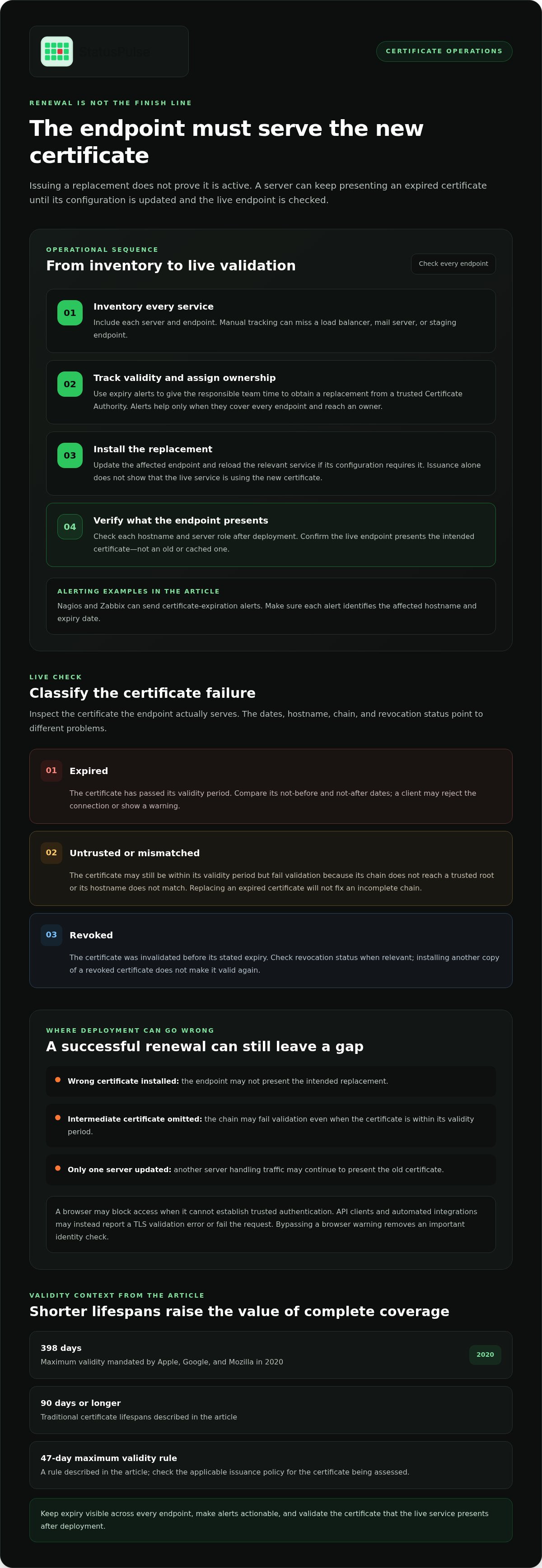
Renewal is manageable when teams track every server and endpoint. It becomes harder when an inventory misses a service or a replacement certificate isn’t deployed everywhere. Expired SSL certificate risks include failed connections and service disruption, even after a renewal has been issued.
Certificate Expiry Monitoring
Certificate expiry monitoring tracks validity dates across endpoints and alerts teams before renewal is due. Tools such as Nagios and Zabbix can send expiration alerts, giving operators time to obtain a replacement from a trusted Certificate Authority. Alerts help only if they cover every endpoint and reach someone responsible for renewal.
Manual tracking can miss a load balancer, mail server, or staging endpoint. Maintain an inventory, assign an owner to each service, and make sure alerts identify the affected hostname and expiry date. Organizations with many email servers face more operational work when teams track and renew each certificate manually.
Renewing an Expired Certificate
Renewing an expired certificate means obtaining a replacement from a trusted Certificate Authority and installing it on the affected endpoint. After deployment, check that the server presents the new certificate, not an old or cached one. Reload the relevant service if its configuration requires it.
Until the endpoint serves a valid replacement, clients may reject connections. Common deployment errors include installing the wrong certificate, omitting an intermediate certificate, or updating one server while another still handles traffic. Test each hostname and server role after deployment. Successful issuance alone doesn’t show that the live service uses the replacement.
Expired, Untrusted, and Revoked Certificates
An expired certificate has passed its validity period. An untrusted certificate may still be within that period but fail validation because its chain doesn’t reach a trusted root or its hostname doesn’t match. A revoked certificate was invalidated before its stated expiry.
Each condition needs a different check. Compare validity dates to identify expiry, inspect the hostname and certificate chain for trust errors, and check revocation status when relevant. Replacing an expired certificate won’t fix an incomplete chain. Installing a new copy of a revoked certificate won’t make it valid again.
Certificate Lifespans and Validity Limits
Certificate lifespans determine how often teams must renew and deploy certificates. Apple, Google, and Mozilla mandated a maximum validity of 398 days in 2020. Traditional certificate lifespans have been 90 days or longer, while the page describes a 47-day maximum validity rule. Shorter validity periods make reliable inventory and alerting more important.
A TLS finding may describe a validity period of 2 years, but that shouldn’t be treated as a universal current limit. Check the certificate’s not-before and not-after dates against the applicable issuance policy. To reduce expired SSL certificate risks, include every endpoint in renewal workflows and verify its live certificate after deployment.
How expired TLS certificates affect connection verification
When a TLS certificate expires, clients can’t validate the server’s identity against its validity period. The client may stop the connection or show a warning; the server’s encryption capability doesn’t automatically switch off.
Certificate Checks and Website Authentication
A TLS certificate lets a client verify that a website controls the identity named in the certificate. During the TLS handshake, the client checks the certificate’s validity dates, hostname, and chain to a trusted authority before accepting the connection.
If the certificate has expired, the date check fails even if the hostname matches. A browser may refuse the connection because it can’t establish trusted authentication. The distinction matters: encryption without verified identity doesn’t show that the server belongs to the website the user intended to reach.
For example, a browser connecting to example.com compares that hostname with the certificate and checks whether it is currently valid. If the date check fails, the browser may terminate the handshake before sending page data. Other TLS clients may report a validation error to an application, causing its request to fail or an alert to be logged.
Encrypted Connections After Expiration
An expired certificate doesn’t itself turn off encryption on the server. Instead, a standards-compliant client typically rejects the certificate or warns that it can’t verify the server, preventing a trusted TLS connection.
If a user bypasses a browser warning, the session may still be encrypted, but the user has accepted a connection without normal certificate validation. That removes an important check against impersonation. Applications that reject invalid certificates usually fail the request rather than quietly accepting the endpoint.
The practical impact depends on the client. A browser can block a page; an API client can return a TLS validation error; and an automated integration can stop exchanging data. LinkedIn experienced a certificate-related outage in 2017 that prevented millions of website users from logging in.
During investigation, distinguish certificate validation from encryption negotiation. Check the client’s error message, then inspect the certificate presented by the endpoint. A date error points to expiry; a hostname or chain error points to another validation failure. Replacing the certificate won’t resolve an unrelated hostname mismatch.
For teams tracking endpoints, SSL certificate monitoring can help surface certificate issues before clients encounter connection failures. It complements, rather than replaces, testing the live endpoint and confirming that each client can validate its identity.
Man-in-the-middle attacks, phishing, and spoofing
An expired certificate weakens an important identity check, but it doesn’t automatically let an attacker intercept traffic. The immediate danger is failed validation that users or applications bypass, especially when an attacker can impersonate a service.
In a man-in-the-middle attack, an attacker positions themselves between a client and server, then attempts to read or alter their exchange. TLS certificate verification helps the client detect an impostor by checking whether the server presents a valid certificate for the requested hostname. If the certificate has expired, a browser can warn or block the connection rather than treating the identity check as successful.
The warning matters. If a user ignores it, they may proceed without normal certificate validation. An attacker still needs a way to intercept or redirect the connection, such as control of a network path or a compromised device. Expiration alone doesn’t provide that access, but dismissing warnings can remove a signal that might help users spot an impersonated endpoint.
Phishing and spoofing use a different route. A fake Microsoft sign-in page can imitate the real service and ask for credentials without exploiting an expired certificate. A valid certificate also doesn’t prove that a page is honest: it verifies a connection to a domain, not the operator’s intent. Users should check the hostname, avoid bypassing warnings, and reach sign-in pages through known bookmarks or managed links.
Older protocol weaknesses are another distinct issue. POODLE affects SSL version 3.0, while BEAST exploits vulnerabilities in TLS 1.0 and older SSL protocols. The BEAST exploit was fixed in TLS 1.1 and later. These attacks concern protocol versions, not certificate expiry, so replacing a certificate won’t correct an outdated protocol configuration.
Similarly, CRIME is identified as CVE-2012-4929. It concerns TLS compression, not an expired certificate. Separating these findings helps responders avoid treating certificate renewal as a complete security fix. Check the endpoint’s certificate, supported protocol versions, and relevant TLS configuration as separate controls.
Downgrade exposure also deserves attention. A 2025 study of healthcare systems found that 27% still allowed fallback connections to TLS 1.0 or TLS 1.1. Healthcare systems should explicitly disable TLS 1.0 and TLS 1.1 to prevent downgrade attacks. This is a protocol-hardening measure, not a substitute for renewing certificates.
Don’t manually trust an expired certificate on public services. That workaround is appropriate only for internal systems in a controlled environment. For an external endpoint, replace the certificate and verify the hostname and chain before restoring normal client access.
Browser warnings and blocked access
Browsers can warn users or block a page when its TLS certificate has expired. The exact response depends on the browser and connection, but users may see an interstitial warning instead of the website. GitHub’s CDN certificate expired in 2020, causing site malfunctions. That example shows how a certificate issue can affect access beyond one browser session.
Can users safely bypass expired certificate warnings? Not on a public website. Bypassing the warning removes an important identity check, and users can’t tell from the warning alone whether the issue is an expired certificate or an attempted impersonation.
Chrome, Firefox, Safari, and other browsers display certificate errors when validation fails. Wording and available actions vary, but users may be unable to continue without explicitly bypassing the warning. Managed devices can apply stricter policies that prevent them from proceeding. For public services, the reliable fix is to serve a valid certificate and test the affected hostname.
Access failures can extend beyond the browser. A customer might abandon a checkout, while an employee’s browser-based dashboard becomes unavailable. Applications using the same endpoint may also fail certificate validation. Check both the website and dependent services, including API calls, rather than assuming one successful browser test covers every client.
An expired certificate can disrupt search crawling if a crawler cannot access the site. Pages may become harder to discover or refresh in search results while access remains broken. This doesn’t establish an automatic ranking penalty. Check crawl access and server responses alongside certificate validity, then confirm that important pages load after deployment.
Trust can suffer even after the certificate is fixed. A visitor who saw a warning may hesitate to enter payment details or credentials on a later visit. Review support tickets, checkout completion, and authentication errors around the incident. These signals help teams determine whether users encountered the warning and which user journeys need retesting.
During response, separate the browser symptom from the underlying fault. Record the affected hostname, browser error, and time; inspect the certificate served by that endpoint; then verify the renewed configuration. If a region or server still presents an expired certificate, monitoring checks and user reports may reveal the remaining gap.
Keep users informed if an incident prevents access. A clear service update can explain that teams are investigating connection failures, identify affected functions, and share restoration progress. Don’t tell visitors to bypass browser warnings. That shifts the risk to users instead of correcting the endpoint.
Checking endpoints for expired certificates
A certificate inventory shows what should be installed; an endpoint check shows what clients actually receive. Test every hostname and listener, including load balancers, mail services, and API domains. A renewed certificate on one server doesn’t prove every endpoint presents the same certificate.
Start with the exact hostname and port used by clients. OpenSSL can inspect the certificate presented by a TLS endpoint. For example, run openssl s_client -connect example.com:443 -servername example.com, then inspect the returned certificate’s dates, subject, issuer, and chain. The -servername option sends the hostname through SNI, which matters when one IP address serves multiple domains.
For a concise date check, pipe the endpoint certificate into OpenSSL’s certificate command and request its validity dates. Compare the not-before and not-after values with the expected certificate record. Then inspect the hostname and chain. A current date range alone doesn’t prove that the certificate matches the requested domain or chains to a trusted root.
Run a second check with sslscan when you need another view of the endpoint’s TLS configuration and certificate. Compare its output with OpenSSL. If results differ, check whether both tools reached the same IP address, port, and hostname. DNS rotation, a reverse proxy, or a load balancer can direct checks to different servers.
Build an endpoint inventory from DNS records, application configuration, and traffic routes. Include staging and production domains, alternate ports, and regional endpoints. A 2025 study of healthcare web applications found that 17% had certificate issues, including expiry within 30 days or incomplete chains. That finding supports checking both validity and chain completeness, not expiry alone.
When a scanner reports expiry, verify the live endpoint before closing the finding. If OpenSSL shows a valid replacement, repeat the check against each resolved server and confirm the hostname and chain. A finding may also be resolved when the endpoint is closed and unreachable, or returns a 400 or 404 response. Record the observed response and configuration change with the remediation.
LinkedIn’s certificate was reported renewed in May 2019, but the renewal wasn’t properly reflected by the server. That illustrates the gap between issuing a certificate and deploying it at the endpoint. After any renewal, retest the live service rather than relying on an issuance record.
To keep expiry checks in the endpoint workflow, use SSL certificate monitoring alongside direct OpenSSL or sslscan validation. Monitoring can surface certificate issues; the final check should still confirm what each endpoint presents.
StatusPulse: Public Status Pages
StatusPulse connects certificate monitoring with clear communication when an expired certificate affects service access. SSL Certificate Monitoring helps teams track certificate issues, while Uptime Monitoring and API Monitoring help identify availability problems. Public Status Pages give teams a place to share service updates when users encounter connection failures.
This is useful when an incident affects multiple endpoints or customers need a clear account of the current service impact. Monitoring supports detection; a status page supports communication. Neither replaces checking the live certificate and correcting the server configuration.
If you want to make certificate visibility and incident communication part of your operational workflow, visit statuspulse.ai.
Make certificate ownership part of service ownership
Give each production endpoint a named owner and include certificate renewal in its operational runbook. The owner should know which services depend on the endpoint, how to validate a deployment, and where to communicate during an access incident. This makes certificate maintenance part of routine service operations, not a calendar reminder detached from the system it protects.
The practical response to expired SSL certificate risks is clear ownership, paired with a way to detect problems and inform users. Build the process around your infrastructure: map domains to responsible teams, include certificate checks in deployment reviews, and define how status updates reach affected customers. Monitoring helps surface issues, while engineers remain responsible for validating and correcting the endpoint.
StatusPulse offers SSL Certificate Monitoring, Uptime Monitoring, and Public Status Pages for teams building that workflow. Contact StatusPulse about certificate monitoring to discuss how it could fit your operations. A clear owner and a tested process make the next renewal easier to manage.
Frequently Asked Questions
What Are the Risks?
The impact can extend to services users never open directly. For example, a scheduled job may call a partner API overnight, or a webhook receiver may reject callbacks while the main website appears healthy. List certificate-dependent clients, including mobile apps, integrations, and background workers. That dependency map helps reveal failures ordinary website checks can miss and identifies which teams need incident updates.
Why Is It a Risk?
It’s a risk because certificate validation varies across clients and their trust stores. A desktop browser may behave differently from a mobile application or a container using a separate CA bundle. This can create partial failures that are difficult to reproduce from one workstation. Record the client type, runtime, and trust-store configuration alongside each error to help responders narrow down the affected path.
What security risks does an expired SSL certificate create?
The key security concern is weakened identity verification, not automatic server compromise. Review application settings for disabled certificate checks, custom trust exceptions, or code that accepts invalid certificates. Those exceptions can persist after the original outage and affect future connections. Search deployment configuration and client code for verification overrides, then remove exceptions that no longer serve a controlled internal test.
What browser warnings do visitors see when a certificate expires?
Visitors typically encounter a browser interstitial or certificate error instead of the expected page. For useful triage, ask affected users for the exact error text, browser name, and operating-system version. These details help distinguish a browser-specific trust-store issue from an endpoint problem. Compare reports from a managed device and a standard browser profile, without asking users to proceed past the warning.
How can automated certificate renewal prevent expiration outages?
Automated renewal reduces manual scheduling, but safeguards should also cover potential failure points. A DNS validation change, restricted private-key permissions, or a failed deployment hook can prevent a renewal from reaching production. Alert on both issuance and deployment failures, and retain logs showing the certificate serial number installed by each job. That record helps teams find a stalled automation stage without assuming renewal was completed.
What should I do immediately if my website's SSL certificate has expired?
First, identify where the failing connection terminates: a CDN, reverse proxy, load balancer, or origin server. Check the public hostname and relevant service configuration to locate the certificate in use. Then assign an incident owner, record affected customer functions, and send support teams a clear internal update. After recovery, preserve logs and deployment details so the cause can be traced and the runbook improved.


