

Communicating with enterprise customers during an incident works best when one person owns customer updates and the team agrees on responsibilities and channels before an outage. A strong first message acknowledges the disruption, explains the known customer impact, and gives a time for the next update.
Waiting to confirm the cause can leave customers without information they need. Share verified facts early, distinguish them from what the team is still investigating, and avoid promising a resolution time.
This guide explains how to plan incident communications, report response progress, and coordinate updates across customer and internal channels. It also covers using a status page as the consistent source for incident information.
Key Takeaways
- Assign a communications lead and agree on channels, responsibilities, and update cadence before an incident occurs.
- Set expectations by stating what the team knows, what it’s doing, and when customers will hear from you next.
- Explain response progress in terms of customer impact and verified actions, not speculative causes or promised resolution times.
- Use a customer-facing status page as a consistent source of incident updates, and coordinate other channels around it.
- Tailor internal and customer messages to what each audience needs, and prepare a clear process for handling replies.
1. How to create an effective incident communication plan?
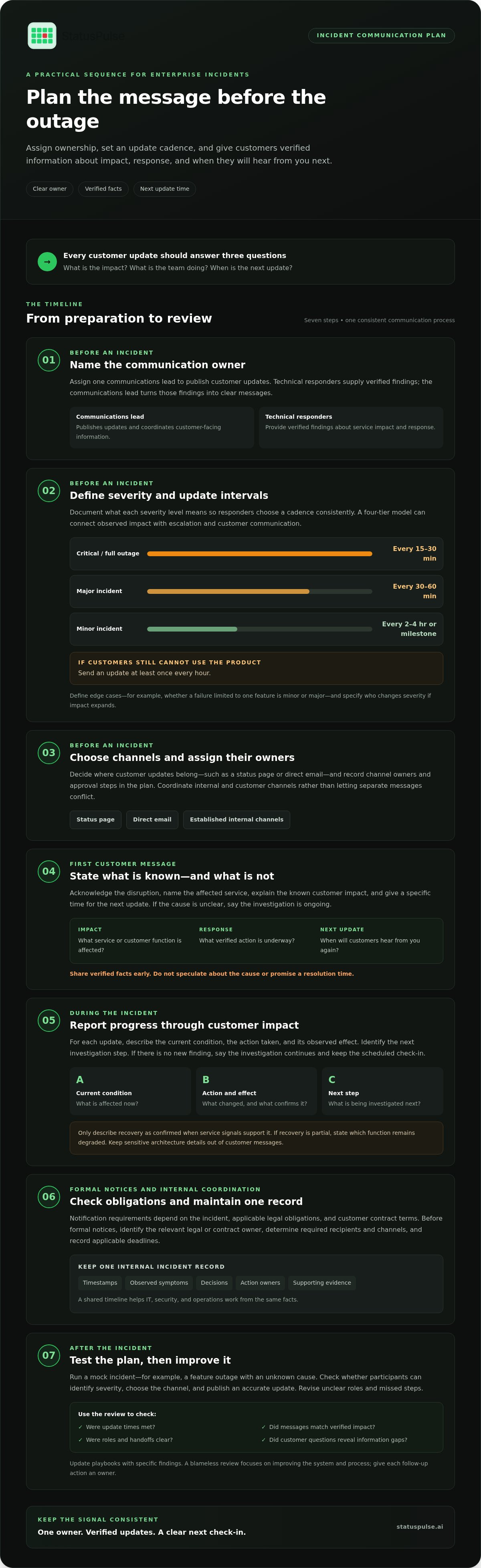
An effective plan assigns a communications lead, identifies customer channels, and sets update intervals by severity. For enterprise customers, prepare an initial message that names the affected service, explains the known impact, and gives the next update time. If the cause is unclear, acknowledge the incident and say the investigation is ongoing. The communications lead publishes updates, while technical responders provide verified findings.
US notification requirements depend on the incident, applicable legal obligations, and customer contract terms. Build a review step into the plan: identify the relevant legal or contract owner, determine required recipients and channels, and record applicable deadlines before sending formal notices.
Document a cadence for each severity level. Guidance suggests customer updates every 15–30 minutes for critical or full outages, every 30–60 minutes for major incidents, and every 2–4 hours or at key milestones for minor incidents. If customers still can’t use the product, send an update at least once every hour. Define what each severity means so responders can select the cadence consistently.
A four-tier severity model can link observed impact to escalation and communication expectations. For example, define whether a failure limited to one feature is minor or major. If the impact expands, specify who changes the severity and how the revised update schedule reaches customers. Clear criteria help teams apply the same cadence to similar incidents.
Plan channels for customers and internal participants. Decide whether incident updates belong on a status page, in direct email, or through another established channel. The National Institute of Standards and Technology recommends planning customer coordination before an incident, including participant roles and communication channels. Record channel owners and approval steps in the same plan.
Set expectations in every customer update with a simple sequence: current impact, response action, and next update time. If there’s no new finding, say the investigation continues and keep the scheduled check-in. Avoid speculative resolution estimates. When sending email, assign someone to handle replies, or use a non-transactional address if the team can’t manage incoming responses.
Test the plan with a mock incident before relying on it. Give participants a scenario, such as a feature outage with an unknown cause, and see whether they can identify the severity, choose the channel, and publish an accurate update. Then revise unclear roles and missed steps. Call-center data can help evaluate incident response and customer information, according to the Centers for Disease Control and Prevention (CDC).
2. Explaining response actions and resolution progress
Customers need to know what changed, not just which team is investigating. Explain each response action in terms of its effect on the service. For example, “traffic is being routed to a healthy region” is more informative than “network mitigation is underway.” Separate confirmed facts from hypotheses, and identify which customer functions remain affected.
Keep one internal incident record as the operational source of truth. Record timestamps, observed symptoms, decisions, action owners, and evidence such as relevant screenshots or videos. IT, security, and operations can then work from the same timeline instead of reconciling separate chat summaries. Keep sensitive architecture details out of customer-facing messages.
Give each response role clear boundaries. An incident commander coordinates decisions and escalation; technical responders investigate and execute changes; a communications owner turns verified findings into updates. The commander can approve a mitigation, while the communications owner checks that the customer impact and status match the latest report. This structure reduces conflicting explanations.
For each update, state the current condition, action taken, and observed effect. Then name the next investigation step. “We disabled the affected integration, and requests are succeeding again” is useful only if monitoring confirms that result. If recovery is partial, say which function remains degraded. Don’t call a mitigation a permanent fix until responders validate it.
What are best practices for communicating incident resolution and root cause? Confirm recovery through service signals, explain the customer impact, and distinguish the trigger from the underlying cause. Share prevention work only when owners and actions are clear, then publish a post-incident report that corrects earlier assumptions where needed.
After the incident, update response playbooks with specific findings. Record where ownership was unclear, which handoff delayed a decision, and whether customer messages matched technical evidence. A blameless review focuses on improving the system and process, not assigning fault. Give each follow-up action an owner and review its completion.
How can companies measure the effectiveness of incident communications? Compare promised and actual update times, check whether messages accurately reflected service impact, and review customer questions for recurring gaps. Call-center data can also help evaluate response and customer information, according to the Centers for Disease Control and Prevention (CDC).
A public status page can give teams one place to publish verified progress while responders coordinate internally.
3. Status pages and embedded status information
A customer-facing status page gives customers one place to check service health during an outage. Use it to identify affected services, summarize customer impact, and record the latest verified change. For example, if API requests fail but the dashboard still works, show those components separately instead of marking the entire platform unavailable.
Structure each incident entry around information customers can act on: the affected component, observed symptoms, current response state, and next investigation step. Use consistent labels such as investigating, identified, monitoring, and resolved. Choose a label based on incident evidence, not a guess about the cause. Add timestamps so enterprise teams can compare updates with their own logs.
Keep the status page current throughout the outage, including when responders have no new finding. Companies can consider updating a customer-facing status page every 30 minutes during an incident. A short check-in can say that investigation continues, identify the service still affected, and state what responders are examining next. This helps customers stay informed without implying progress the team hasn’t verified.
Use component details to distinguish overall availability from specific customer impact. One outage may affect authentication, API calls, or background processing differently. If only one region or integration is affected, describe that scope clearly. Avoid exposing internal hostnames, security controls, or architecture diagrams; customers need to understand the operational impact, not sensitive implementation details.
Connect the status page to the channels customers already use. Link it from the application interface and website footer, and introduce it during onboarding so users know where to find updates before an incident. During an outage, email or social posts can direct customers to the relevant status entry. Keep the status page as the detailed record instead of maintaining competing explanations in separate messages.
An embedded status panel can show selected service information in a product dashboard or support area. Keep it concise: display the current state and affected component, with a path to the full incident history. For example, a customer viewing API documentation can see an API disruption without searching a general company page. Ensure the embedded content is readable on mobile and doesn’t replace the full incident details.
Before publishing, have the incident owner confirm the affected service and customer-facing wording. Update the same incident record as the response changes, and mark it resolved only after recovery is verified. Consistent status labels, timestamps, and component names help customers compare updates and understand what changed.
4. Audience-specific internal and customer communications
A useful incident message answers different questions for different readers. Customers need to know which software function failed and what workarounds remain. Engineering needs request errors, affected dependencies, and recent changes. Account management needs to know which enterprise accounts are affected and which customer commitments require follow-up. Prepare separate views from the same verified incident record.
Coordinate support, engineering, and account management through one incident owner and a shared source of truth. Engineering supplies confirmed technical findings; support logs customer reports; account management identifies affected business workflows. The owner approves a consistent message, then assigns each team a delivery channel. This prevents customers from receiving conflicting descriptions of the same failure.
Internal incident communication should distinguish operational detail from decision context. In the incident channel, responders can share logs, hypotheses, and mitigation status. In a leadership update, state the business impact, current owner, open decisions, and dependencies. For example, report that invoice exports are failing, name the service owner, and note whether a rollback decision remains open.
Enterprise customers often need more technical detail than consumer audiences. Explain which service or equipment is affected, what users may observe, and what the response team has changed. Add recurrence-prevention steps once they’re verified. Don’t expose proprietary system design or internal security controls; those details rarely help customers plan around a disruption.
Put customer impact first in each message. A practical structure is: affected function, current impact, action underway, customer action if needed, and next communication point. If a data export is delayed but existing records remain available, state both facts. Acknowledge the disruption directly without minimizing its effect or blaming a team.
Choose the communication sequence before an incident. Teams may notify internal stakeholders first, then affected customers, or send both messages together when timing requires it. Record the decision owner and approved message in the incident record. Support can reuse the customer version, while account managers add account-specific context without changing the core facts.
Define what resolution means for each audience. Engineering may require healthy service signals; support may need customer reports to stop showing the symptom; account management may need confirmation that a key workflow works again. Keep those criteria distinct, then align the final message with the evidence. This makes “resolved” meaningful across teams.
Review message quality after the incident. Compare customer questions with the information provided, check whether internal teams used consistent service names, and record any conflicting statements. Use the findings to update message templates and role assignments before the next response.
5. Email, workplace chat, social media, and SMS channels
Choose channels based on audience, urgency, and the action customers need to take. Workplace chat is for responders coordinating technical work, not the customer record. Email reaches named enterprise contacts with direct instructions. A public post can alert a broad audience, while SMS can deliver a short, time-sensitive notice to recipients who use that channel.
Decide before an incident which channel carries the detailed update and which channels point back to it. For example, publish the incident record in one customer-facing location, then use email or a social post to direct affected users there. This prevents separate channels from developing conflicting versions of the outage.
Email works well when a specific customer group needs an explanation or must act. Put the affected service and required action near the start. If customers need to change a configuration, state the exact step and where to find the relevant instructions. Plan for replies, too. If the team can’t manage incoming messages, use a non-transactional email address that doesn’t accept direct replies, and provide a clear route for support requests.
Keep workplace chat organized around one incident thread. Pin the current impact summary, technical owner, and approved customer wording. Responders can discuss logs and hypotheses there, while only verified details move into customer messages. If a discussion changes the known impact, notify the communications owner before sending another update.
Social media is not a dependable primary channel because customers may not use it. Post proactively when an incident affects most or all customers, and link to the detailed incident record. Before posting, give the social media team approved wording and guidance for customer replies. For a narrowly scoped issue, direct email to affected contacts is more appropriate than a broad public announcement.
SMS suits concise notices when timing matters, such as telling a customer that a service is unavailable and pointing to the full update. Keep sensitive technical details and account information out of texts. Include enough context for recipients to understand the situation, and use the same verified service name across SMS, email, and the status message.
For each channel, document its audience, owner, purpose, and fallback. Test the process in a planned exercise: confirm the email list reaches the right stakeholders, the incident thread is accessible, and social guidance is ready. A clear channel plan helps teams deliver updates without flooding every recipient or leaving customers unsure where to look.
Set up a central place for customer incident updates so email, social posts, and SMS can direct readers to consistent information.
StatusPulse: Public Status Pages
StatusPulse provides Public Status Pages for sharing service status with enterprise customers during disruptions. Use a public page as the consistent place to show the affected service and current incident information. Uptime Monitoring, SSL Certificate Monitoring, and API Monitoring help teams track availability and issues across web services, certificates, and APIs. These tools suit teams that need monitoring alongside a customer-facing way to communicate service status.
Turn to StatusPulse when your incident plan needs a dedicated public place for status information, or when monitoring and customer updates are handled separately. Choose monitoring for the services you operate, then use a Public Status Page to keep customers informed.
Visit StatusPulse to explore Public Status Pages.
Make the plan usable before the next incident
A communication plan only works if responders can follow it under pressure. Turn it into a short exercise using a realistic failure scenario, such as a key software function becoming unavailable while the cause remains unknown. Have engineering, support, and account management practise their handoffs, message approval, and customer follow-up.
Then review the exercise as an operational test. Look for unclear ownership, missing customer context, and channels no one monitors. Update the playbook with specific changes, and assign one person to keep the instructions current. This gives the next response a tested starting point instead of a document people must interpret in real time.
A reliable approach to communicating with enterprise customers during an incident depends on clear ownership and accurate information, not polished language alone. StatusPulse can be a next step if you want to discuss how its offerings fit your incident communication workflow. Contact StatusPulse to discuss incident communications, and keep building a process your teams can use with confidence.
Frequently Asked Questions
How to create an effective incident communication plan?
Start by mapping likely failure scenarios to the people and customer groups they affect. For each scenario, identify who can verify impact, which customer accounts use the affected function, and where the latest contact details are stored. Review the plan after organizational changes, product launches, or changes to customer workflows so its assumptions remain useful.
How quickly should an update go out?
Treat detection and verification as separate steps. When monitoring or a customer report suggests a service problem, begin triage and establish whether users are affected. Publish an acknowledgment once the impact is clear enough to describe accurately. A prepared holding message can help, but it should distinguish observed symptoms from unverified explanations.
How quickly should you communicate during an outage?
Set the next communication point based on how quickly the situation could change and what customers need to decide. If customers must pause a workflow or use a workaround, communicate that as soon as it’s verified. If the impact remains stable, follow the planned check-in schedule rather than sending messages that add no useful context.
What causes delays in incident communication?
Outdated contact lists, unclear account ownership, and approval paths that rely on unavailable people can delay a message. So can uncertainty about which customers use the affected feature. Keep distribution groups current, document backup approvers, and make customer-impact information easy for responders to find. These steps reduce administrative delays during an active response.
What’s going on?
When a customer asks during an outage, answer in plain language and describe the observable consequence. For example: “The export function is currently returning errors, so new exports may not complete.” Mention an alternative workflow only after the team verifies it. Avoid internal project names, raw log excerpts, and speculative causes.
What’s the main point of contact?
Use the contact route assigned to the customer, such as their support queue or account contact, and ensure it reaches a monitored team. For a broad incident, direct customers to the shared incident record for current information. Keep account-specific questions in the customer’s established support thread so context and follow-up stay together.
Who writes the message?
A designated communications owner should shape customer-facing text, while a technical responder validates its accuracy. For a security-sensitive event, involve the relevant security and legal reviewers before sharing details. This division lets the writer improve clarity without interpreting logs or disclosing information that requires restricted handling.
What should an enterprise incident communication plan include?
Include a customer-impact map, current contact sources, fallback approvers, and guidance for sensitive or account-specific updates. Keep message templates editable rather than rigid scripts, so writers can reflect the actual incident. Record who owns the plan and when it should be reviewed, such as after changes to product architecture or customer support processes. These details help keep the plan operational over time.


