

A status page can say “all systems operational” while customers can’t log in. That gap between the page and the service turns a useful update channel into another source of doubt. The status page best practices that matter most start with one rule: monitoring, component states, and incident updates must reflect the same view of system health.
Publishing an uptime number isn’t enough. Teams need to decide which signals trigger a status change, who owns each update, and when users should hear from them. They also need to share enough technical detail to be useful without exposing internal noise or confusing customers.
This guide explains how to build a dependable status page around your service architecture and incident workflow. You’ll learn how to choose components and monitoring signals, assign ownership, set update expectations, and separate public updates from internal information. The goal is a clear source of truth users can rely on, even while an incident is unfolding.
Key Takeaways
- Make component statuses reflect verified service conditions, not assumptions or vague labels.
- Map user-facing components to the dependencies, monitoring signals, and owners behind them.
- Share customer impact, mitigation, and the next update while keeping sensitive investigation details private.
- Use status page best practices to connect detection, impact assessment, publishing, regular updates, and resolution.
- Let automation surface signals or draft updates, but keep a human responsible for public accuracy.
Status page best practices start with one reliable source of service health
A status page is useful only when its updates reflect verified service conditions. It gives customers a clear view of component health, active incidents, and planned maintenance. It should not become a separate guess about what the systems are doing.
A status page is a communication interface backed by operational signals, translating monitored service conditions into clear updates for users. A successful response from one endpoint in one location proves only that a specific request worked at that moment. It doesn’t establish that every customer can use the service, dependent systems are healthy, or other regions are unaffected.
What should a status page tell users at a glance?
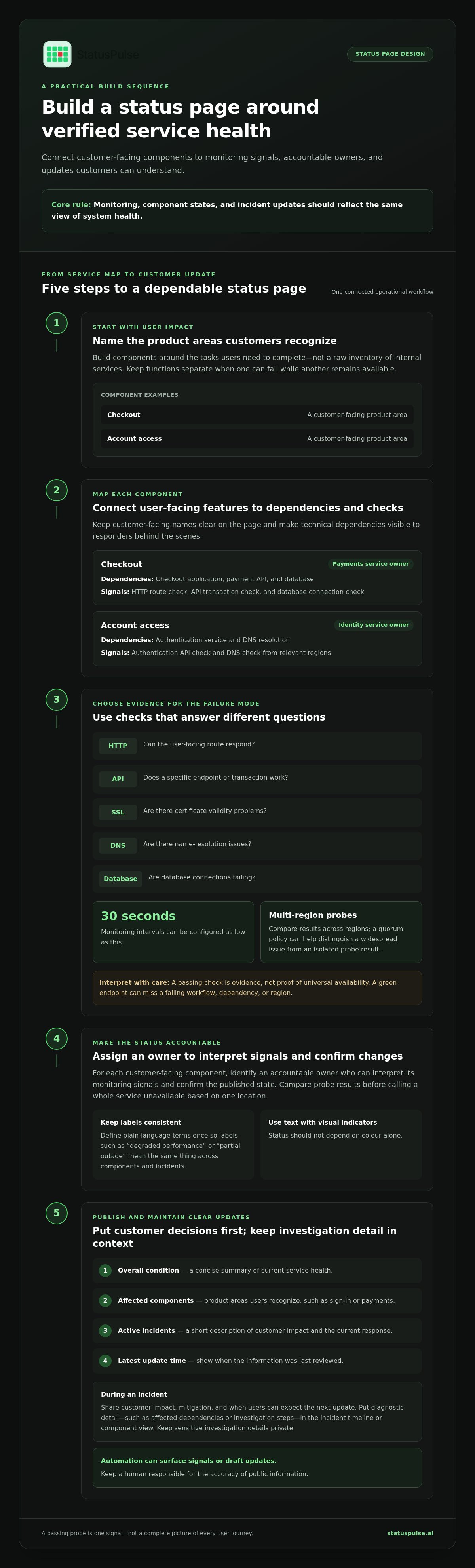
Put the information customers need to make a quick decision first. Use stable, plain-language labels and define them once so “degraded performance” or “partial outage” means the same thing across components and incidents.
- Overall condition: a concise summary of current service health.
- Affected components: product areas users recognize, such as sign-in or payments.
- Active incidents: a short description of impact and current response.
- Latest update time: a timestamp that shows when the information was last reviewed.
Keep the first view scannable. Put diagnostic detail, such as affected dependencies or investigation steps, in the incident timeline or a component view. Customers should be able to understand whether a feature is affected before they need to interpret internal service names. Use text labels alongside visual indicators so status doesn’t depend on colour alone.
Why does status accuracy depend on monitoring?
A single synthetic check can miss a regional routing failure. A web page may load while an API call, database connection, or background job is failing. Map each customer-facing component to the checks that represent its key functions, then assign an owner who can interpret those signals and confirm the published state.
For example, a “Sign-in” component might depend on the web application, an authentication API, and a database. An HTTP check can test the user-facing route, while API or database checks can help narrow down a failure. If one probe location reports an error, compare it with checks from other regions before labelling the whole service unavailable. A quorum policy can help distinguish a widespread problem from an isolated probe result.
Probe coverage should reflect the service’s protocols and architecture, not just its homepage. A disciplined uptime monitoring setup can combine protocol-level checks with multi-region probes; intervals can be configured as low as 30 seconds. Choose signals based on the functions customers use and the failure modes that matter. A passing check is evidence, not proof of universal availability.
Design status page components around user impact and technical signals
Build the component list from the tasks customers need to complete, then map each task to the systems that support it. Internal service names can help engineers investigate, but they rarely tell customers whether they can check out, receive a notification, or access a report. A useful status page keeps product areas clear on the outside and technical dependencies visible to responders behind them.
A green endpoint check does not prove that every user journey works. It confirms only that the specific check succeeded under its particular conditions. Component boundaries and probe coverage should make that limitation clear rather than imply broader health than the evidence supports.
How should teams choose status page components?
Start with the product areas customers recognize. Group related dependencies when they share a customer impact, but keep distinct functions separate when one can fail while another remains available. Component groups can show hierarchy without collapsing every service into a single “Platform” indicator.
Avoid publishing a raw inventory of databases, queues, and internal services. That list may expose implementation detail without helping users decide what to do. Keep dependency names in the operational mapping, and show a customer-facing component when a dependency’s failure affects a specific capability.
Customer-facing component: Checkout
Underlying dependency: Checkout application, payment API, and database
Monitoring signal: HTTP route check, API transaction check, and database connection check
Accountable owner: Payments service owner
Customer-facing component: Account access
Underlying dependency: Authentication service and DNS resolution
Monitoring signal: Authentication API check and DNS check from relevant regions
Accountable owner: Identity service owner
Which monitoring signals belong behind each component?
Choose probes based on the failure mode they can detect. An HTTP check can verify that a route responds, but it may not exercise the full workflow. An API check can validate a specific endpoint or transaction. SSL monitoring can reveal certificate validity problems, DNS checks can detect resolution issues, and a database check can surface connection failures. Each signal answers a different question, so don’t treat one passing probe as a universal health verdict.
Endpoint checks also have limits: a successful API response may not prove that downstream processing completed or that every region can reach the endpoint. Document what each check verifies, then map its result to a component only when that relationship reflects customer impact. StatusPulse supports protocol-level checks and multi-region probes with quorum, so teams can compare signals instead of relying on one location.
These status page best practices are easier to apply when component groups, probes, and owners stay connected. A workflow that combines uptime monitoring and public status pages keeps operational signals close to the customer-facing view, while teams remain responsible for choosing accurate component boundaries and interpreting the evidence.
Balance transparency, privacy, and useful detail on a status page
Useful incident communication gives people enough verified context to understand the impact and decide what to do next. It doesn’t require publishing every detail responders see. Separate customer impact, current mitigation, and the time of the next update from internal investigation notes, credentials, personal information, and unverified theories about the cause.
Apply a practical test to each detail: would sharing it help the intended reader understand the disruption or make a decision? If not, keep it in the incident channel or internal post-mortem. Don’t expose secrets, customer identifiers, security-sensitive implementation details, or claims about root cause that the evidence hasn’t established.
How much technical detail should an incident update include?
Lead with the affected action and scope: for example, “Some users can’t submit reports; existing reports remain available.” Add technical context only if it clarifies impact or a workaround. If responders haven’t confirmed the cause, say so plainly and separate confirmed facts from active investigation. “We’re investigating elevated errors in report submission” is more useful than a confident but unsupported diagnosis.
Updates should change as the evidence improves. Correct an earlier assessment when needed, and don’t leave a mistaken explanation in the timeline without clarification. A consistent disclosure policy helps responders make these calls under pressure; the same principles apply whether publishing to a broad audience or a limited group.
When should teams use public versus private status pages?
Use a public page for service conditions and incident updates relevant to customers generally. A private page can serve a restricted audience, such as internal teams or specific stakeholders who need operational context that isn’t intended for everyone. Make the audience and access boundary explicit, and apply the same standards for accuracy, timestamps, and corrections to both.
Private access is not a substitute for careful disclosure. Information shared with a limited group can still be forwarded or misunderstood, so keep secrets and personal data out of updates unless a separate, controlled process requires them. StatusPulse supports public and private status pages, so teams can separate customer-facing communication from updates for selected audiences.
- Public update: customer impact, affected service, mitigation in progress, and next update time.
- Restricted update: additional operational context for an authorized audience, without credentials or unnecessary personal data.
- Internal investigation: detailed logs, hypotheses, and sensitive response notes kept in incident-management tools.
These status page best practices make transparency specific, not indiscriminate. Share what readers need, state what remains unknown, and keep sensitive investigation details within the right access boundary.
Use a repeatable incident update workflow to keep status pages current
A status page goes stale when incident response has no clear handoff to publication. Define who assesses impact, who approves public wording, and who posts each update before an outage. One person may fill more than one role, but the responsibilities must be explicit. Responders should be able to act without guessing who owns the page.
Use the same five-step workflow for each incident. Record the incident owner and publishing owner in the incident process, then move through these stages:
- Detect: Capture the alert or report that started the response, including the time and affected signal.
- Assess impact: Check which user actions and components are affected, and separate confirmed scope from possible scope.
- Publish: Post a concise update with the timestamp, known impact, action underway, and next update expectation.
- Update on a stated cadence: Review the incident at the promised time, even if the status hasn’t changed. Say that the investigation continues and set the next expectation.
- Resolve: Confirm recovery against relevant signals, update affected components, and publish a short resolution summary.
What belongs in the first incident update?
Tell users what they may experience and which components are affected, using evidence the team has verified. State what responders are investigating or doing now, but don’t name a root cause before it’s established. If scope remains unclear, say so directly. A useful update might read: “Some users are seeing errors when uploading files. We’re investigating the upload service and will post another update at 14:30 UTC.”
The next-update expectation matters even when there’s no fix to report. It gives customers a reliable point to check back and gives the publishing owner a clear reminder. Choose a time or a specific event, then revise that expectation if the response changes.
How should teams manage updates through resolution?
Keep a timestamped timeline of meaningful changes: initial impact, scope changes, mitigation, recovery checks, and resolution. Don’t overwrite an earlier update if doing so would hide how the incident developed. Each entry should make clear what changed and what users should expect now.
Severity-based escalation and on-call ownership can route alerts to the responders responsible for assessing a component. The publishing owner then turns confirmed details into clear public updates. Incident tools can track work and draft summaries, but a human should review wording and accuracy before publication. At resolution, state what recovered and when; follow with a post-mortem when appropriate.
These status page best practices make communication part of incident response, not a task left until the end. Coordinate incident updates with StatusPulse by connecting monitoring, status pages, and incident-management tools in one workflow.
Make status page best practices part of the monitoring and incident system
A status page is dependable when its signals, component model, and incident workflow stay connected. Evaluate the whole operating process, not just the page design. A polished interface cannot compensate for checks that miss real failure modes or updates no one is responsible for publishing.
Use this tool-neutral checklist to assess operational fit:
- Signal coverage: Do check types, intervals, and probe regions represent the ways each service can fail?
- Component mapping: Can the team connect customer-facing components to dependencies and accountable owners?
- Access controls: Can public updates stay separate from information meant for selected stakeholders?
- Update workflow: Are incident tracking, escalation, publishing responsibility, and update expectations clear?
- History: Can users and responders follow maintenance, incident changes, and resolution over time?
What should a team evaluate in status page software?
Test the monitoring model against your actual architecture. Check whether the available protocols, probe intervals, and regions suit your failure scenarios. Then assess component groups, custom domains, private pages, embeddable status content, and branding against user needs. Don’t prioritize a feature simply because it exists; it should support a clear audience or workflow.
Evaluate the incident path, too. Incident tracking, severity-based escalation, on-call rotation, scheduled maintenance, and post-mortems can reduce handoffs when they fit the way your team responds. A separate monitoring stack may still suit teams that already have mature incident tooling. The key is a reliable connection from operational evidence to the published status, not forcing every function into one interface.
How can AI support status updates without replacing judgment?
AI can turn incident notes into a draft, but a draft is not evidence. A responder should validate the affected components, user impact, cause, mitigation, and wording against current incident data before publication. If the cause remains unknown, the update should say so rather than letting an AI-generated summary imply certainty. Give the team a consistent process for reviewing AI-drafted incident updates before they go live.
StatusPulse combines uptime monitoring, public and private status pages, and AI-assisted incident management in one platform. AI can draft incident summaries, while human review remains part of publishing. Teams can also choose EU or US hosting and assess transparent pricing without per-subscriber fees against their operational and data-residency requirements.
Use these status page best practices to compare tools against your real workflow, then explore StatusPulse monitoring and status pages as one way to connect service signals with incident communication.
Turn your status page into an operational habit
Make the next step a practical test, not another page redesign. Choose one critical customer journey and walk through a simulated failure: which signal detects it, who confirms impact, who publishes the update, and how does the team verify recovery? Any gap in that path is a concrete improvement to assign before a real incident.
Use status page best practices as a working standard. Revisit them after incidents and changes to your architecture, so component mappings and communication responsibilities keep pace with the service. If your current tools leave monitoring, public updates, and incident coordination disconnected, compare that workflow with a platform that brings those functions together. Include EU or US hosting needs in the evaluation.
Explore StatusPulse monitoring and status pages to see how monitoring, status pages, and AI-assisted incident management fit into your incident workflow. Build the process around evidence, clear ownership, and updates users can act on. That’s a solid foundation for earning trust when services are under pressure.
Frequently Asked Questions
What is a status page?
A status page is a maintained source of service information that users can reach when the main application is unavailable. To make it resilient, avoid serving it solely from the same application stack it reports on. If an outage affects that stack, customers still need a way to check updates. This separation is a practical extension of status page best practices: the communication channel should remain usable during the disruption.
What should a status page include?
Make the page usable without relying on colour alone. Pair visual indicators with text labels, and use readable contrast and clear language so users can distinguish states at a glance. Display timestamps with a stated time zone, especially if customers and responders work across regions. Test the page on mobile and with keyboard navigation; during an outage, users may be checking it from a phone or using assistive technology.
How often should you update a status page during an incident?
Choose an update schedule the incident team can sustain, and define what happens if the next update is delayed. One useful safeguard is to publish from a canonical incident record, then align support responses and other communication channels to that record. This reduces the chance that a customer sees a resolution in one place and an active incident elsewhere. Keep the incident identifier consistent across channels when one is available.
Can a status page be private?
Yes. A private page can be useful when a defined group needs service information that isn’t intended for every visitor. Treat access as an ongoing task: assign someone to manage membership, review who still needs access, and remove access when a stakeholder’s role ends. Clear ownership helps prevent a once-useful restricted page from becoming an unmanaged channel with an unclear audience.
Should a status page show every internal system?
No. Keep the detailed dependency map for responders, and avoid mirroring it directly onto the customer page. Internal services can be renamed or reorganized as architecture changes, while customer-facing functions may remain stable. Maintain a mapping between the two so engineers can update internal references without making the public page harder to understand or forcing customers to learn your service topology.
How do monitoring checks improve status page accuracy?
Checks help only if the team can tell whether the monitoring data itself is current. Define what the page should show when a probe stops reporting or its results become stale. Don’t silently treat missing data as a healthy service state. A separate check of the monitoring path can help responders distinguish a service incident from a gap in the evidence they use to assess it.
Can AI write status page incident updates?
AI can help turn structured incident notes into a concise draft, but keep text generation separate from actions that change a component’s status. Use a fixed input format, such as confirmed impact, mitigation, and changes since the last update, so drafts stay focused. Test the process against incidents with multiple affected components or an unconfirmed cause, and preserve the responder-approved version as the published record.


