

A free monitoring plan can lower your software bill while increasing the work of keeping incidents visible. The hidden costs of free monitoring services often appear in engineering time spent maintaining integrations, gaps in alert coverage, or slower investigations when a service fails. The plan may cost nothing, but the operational trade-offs do not.
Starting with a free tier is reasonable for a personal project or a service with modest response needs. The important question is when its limits affect your team. Check intervals, data retention, alert channels, usage caps, and commercial terms all shape what the plan covers.
This guide shows how to compare free and paid monitoring by total cost of ownership, not subscription price alone. You’ll account for setup and maintenance work, assess the impact of monitoring gaps, and examine the effort involved in connecting alerts to status pages and incident communication. The result should be a setup that fits your stack and response process without paying for capabilities you will not use.
Key Takeaways
- A zero subscription price does not mean zero total cost. Include engineering time, operational exposure, and switching work.
- Check how plan limits affect your coverage, including probe frequency, monitor count, data retention, and alert channels.
- Evaluate the hidden costs of free monitoring services using measured maintenance and triage time, and separate assumptions from observed costs.
- Compare free and paid options by coverage, effort, risk, and billing predictability, not just headline price.
- Choose the lowest-cost setup that meets your documented monitoring and incident-response needs.
What are the hidden costs of free monitoring services?
Total cost of ownership (TCO) is the full direct and indirect cost of using a tool over the period your team relies on it. A zero subscription price does not establish zero TCO: the Total Cost of Ownership (TCO) also includes work and operational exposure that may not appear on an invoice.
The hidden costs of free monitoring services depend on how you use the plan, what it covers, and what your team must do around it. A free tier may be sufficient as-is. Its terms may also shift work into setup, maintenance, incident investigation, or a later migration. Limits vary by provider, so inspect each one rather than assuming a particular restriction applies to every free plan.
What counts as a hidden monitoring cost?
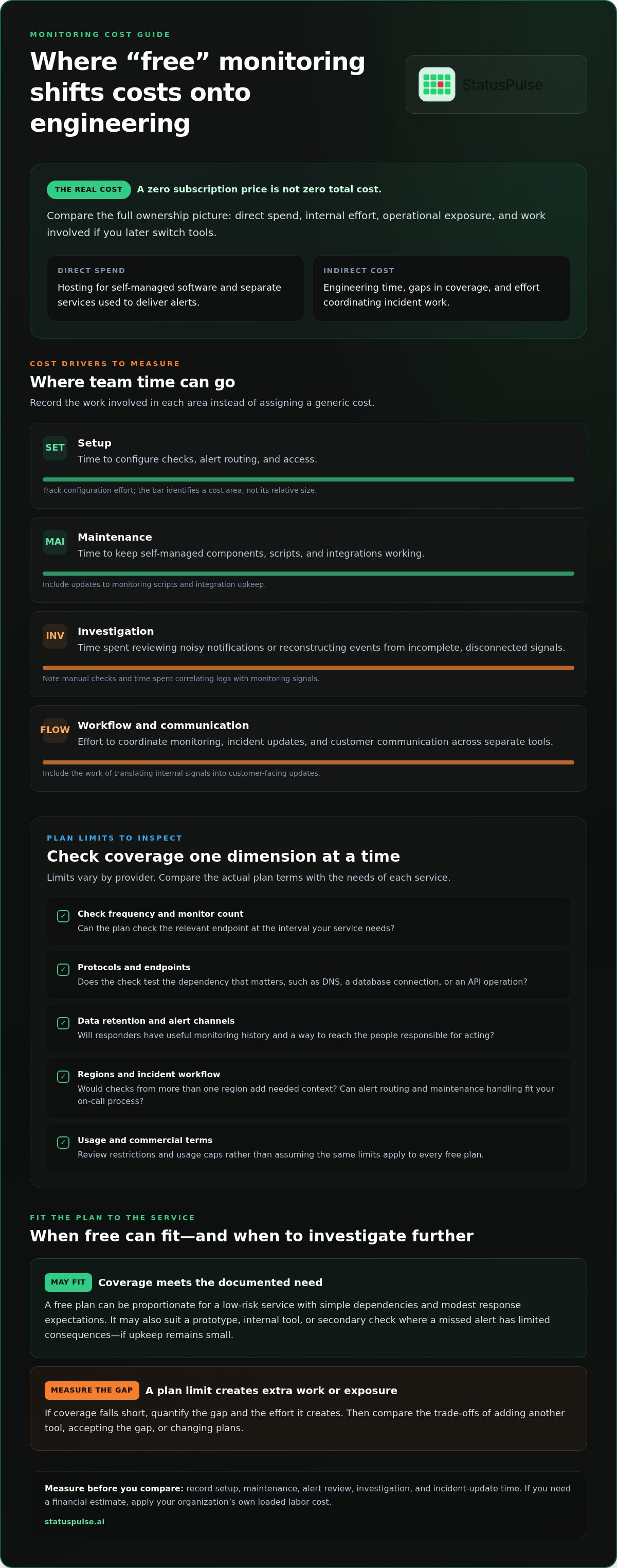
Separate direct spend from internal effort. Direct costs can include hosting for self-managed software or separate services used to deliver alerts. Internal effort includes configuring probes, maintaining integrations, reviewing noisy notifications, and investigating incidents when monitoring data lacks useful context.
Opportunity cost is engineering time diverted from planned work. A developer updating a monitoring script or reconciling alerts across tools has less time for a release, reliability improvement, or another priority. Record the hours rather than assigning a generic monetary value. If you need a financial estimate, apply your organization’s own loaded labor cost.
- Setup: time to configure checks, alert routing, and access.
- Maintenance: time to keep self-managed components and integrations working.
- Investigation: time spent reconstructing events from incomplete or disconnected signals.
- Workflow: effort to coordinate monitoring, incident updates, and customer communication across separate tools.
When can a free plan still be the right fit?
Free monitoring can suit a low-risk service with simple dependencies and modest response expectations. It may also work for a prototype, internal tool, or secondary check where a missed alert has limited consequences. The aim is not to reject free plans, but to match the plan’s actual coverage to the service’s role.
Write down the checks you need, how quickly your team must learn about a failure, and what information responders need to investigate it. Compare those requirements with the plan’s terms, including check frequency, monitor limits, data retention, alert channels, and usage or commercial restrictions. If coverage meets the need and upkeep remains small, free may be the proportionate choice. If there is a gap, quantify it before deciding whether to add another tool, accept the trade-off, or change plans.
Where free monitoring services can shift costs onto engineering teams
Plan limits create engineering costs when they leave a gap between what a service needs and what the plan checks or reports. Review the actual terms for check frequency, monitor count, data retention, and alert channels. A free tier may have generous limits in one area and restrictions in another, so assess each dimension separately.
Coverage determines what evidence responders have during an incident. If a monitor cannot check the relevant endpoint at the required interval, responders may have less timely evidence about what users are experiencing. They may need to run manual checks or compare application logs with separate monitoring signals. IBM’s discussion of Total Cost of Ownership in IT is a useful reminder to include both direct and indirect costs over time.
Coverage, check intervals, and detection gaps
Match each critical service to the protocol and endpoint the monitor can test. A basic HTTP check may not tell you whether a DNS lookup, database connection, or API operation works. Compare required checks with supported protocols, monitor limits, and interval options. A slower interval can delay detection compared with a faster one, but neither guarantees that every failure will be detected or that a service will remain available.
Region matters when users or dependencies span locations. A probe from one region may not reveal a regional issue elsewhere. Multi-region checks can provide more context, while quorum rules can help distinguish a broad failure from an issue seen by only one probe. These features are useful when regional variance matters, not a blanket requirement for every service.
Alerting, maintenance, and incident communication
Inspect how alerts reach the people responsible for acting on them. Check routing and escalation options, how they fit your on-call workflow, and whether scheduled maintenance can be handled without unnecessary alerts. Noise can come from checks that trigger on transient failures. Missing context can force responders to correlate timestamps and signals manually.
Track the work around the monitor, not just the check itself. Record time spent adjusting thresholds, maintaining integrations, reviewing alerts, and writing incident updates. When monitoring and status communication live in separate tools, someone may need to translate internal signals into customer-facing updates by hand. An integrated monitoring and incident communication platform can bring those tasks into a shared workflow. Teams with established tools and low coordination overhead may have little reason to consolidate.
Connect plan limits to your team’s uptime monitoring approach. Identify where coverage, alert handling, or communication adds measurable work, then include that effort in your comparison.
Free vs. paid monitoring: compare total cost, not the headline price
Compare free and paid plans against the same coverage requirements. A paid tier may reduce manual work or close a specific gap, but it is not automatically the better choice. Weigh the cost of the gap against the cost of the coverage required to close it.
Dimension
Free approach
Paid approach
Limits
Check plan terms for protocols, intervals, monitor counts, regions, and retention.
Check plan terms; confirm included coverage and any usage caps.
Effort
Account for setup, upkeep, integrations, and staff time.
Compare included functions with remaining configuration and maintenance work.
Risk
Assess whether gaps affect detection, investigation, or communication.
Assess whether additional coverage addresses a documented operational need.
Predictability
Review thresholds and what happens when usage exceeds them.
Check whether charges vary by users, monitors, usage, or other plan dimensions.
Which comparison criteria matter most?
Start with the service’s technical needs. List the protocols and endpoints to check, the interval that supports your response expectations, and whether probes from multiple regions would provide useful context. Then verify alerting options, data retention, and whether a public status page belongs in the same workflow.
Read the pricing model alongside the feature list. Does the bill change with user seats, monitor count, data volume, or another usage measure? A flat subscription and a metered plan create different budgeting considerations. Compare documented terms rather than filling gaps with assumptions.
The hidden costs of free monitoring services depend on your setup. Record measured engineering effort separately from estimated exposure. Consider a paid plan when its added coverage or reduced maintenance addresses a real requirement, not simply because it has more features.
When might another approach be a better fit?
Self-hosting can suit a team that already has the capacity to operate monitoring infrastructure, manage storage, maintain upgrades, and respond when the monitoring stack itself has problems. The software’s license cost is only one part of the decision. Include infrastructure and ongoing ownership work in the comparison.
A focused monitoring tool may be more proportionate if you need one function and already handle incident communication elsewhere. An integrated platform can add unnecessary scope to a very small, low-risk setup. Choose the simplest approach that meets documented coverage and response needs, and revisit it when those needs change.
How to calculate the real cost of a free monitoring service
Use a consistent period, such as a month or a year, and separate observed effort from estimates. A useful calculation reflects your team’s actual workload, the service’s importance, and its coverage requirements. Keep assumptions visible so they are not mistaken for measured costs.
Build a monitoring TCO worksheet
Record recurring costs for the current setup, then add staff effort and one-time transition work. If you convert staff hours into money, use your organization’s own loaded labor rate. Keep unverified incident impact out of the total, or label it clearly as an estimate.
- Current spend: Subscription charges, if any, plus infrastructure or separate service costs. Use current bills and plan terms.
- Staff effort: Log setup, recurring maintenance, alert review, and incident updates over the chosen period. Mark each value as measured or estimated.
- Required coverage: List the services and checks the team needs, along with its response and communication requirements.
- Migration effort: Record configuration transfer, integration changes, testing, and workflow updates separately as one-time work.
Compare recurring costs over the same period and show transition work separately. This reveals whether a different setup reduces ongoing effort or simply moves it into migration. Base the comparison on requirements your team has documented, not a generic feature checklist.
Set a threshold for changing plans
Define a review trigger before pressure builds. It could be a new service tier, a revised response expectation, or repeated manual work your team has agreed to reduce. Tie the trigger to a concrete operational change, not a general sense that the current setup is inconvenient.
- State the gap: Describe the requirement the current approach does not meet and who owns it.
- Gather evidence: Use service records and time logs to distinguish recurring problems from one-off work.
- Compare options: Evaluate each alternative against the same requirements and time period.
- Revisit after change: Update the calculation when architecture, alerting needs, or incident workflows change.
If your comparison points toward combining monitoring with incident communication, review StatusPulse’s monitoring and incident workflow as one option. Use the worksheet to judge whether that approach fits your requirements and operating costs.
Choose monitoring that fits your stack and incident workflow
Choose the lowest-cost approach that meets your documented coverage and response needs. That may be a free plan, a self-hosted setup, a focused paid tool, or an integrated platform. Compare the checks your stack needs with the work your team must do when something fails.
Where an integrated monitoring and status-page platform fits
If responders move between monitoring, incident notes, and customer updates, a shared workflow may reduce coordination work. Public or private status pages support communication during an incident, while monitoring provides signals about service health. This does not prevent outages, but it can bring evidence and updates into a more connected process.
StatusPulse combines monitoring, status pages, and incident handling. Its protocol-level probes cover HTTP, Ping, Port, SSL, DNS, API, Cron, Postgres, gRPC, WebSocket, and SMTP/IMAP. Checks run at custom intervals as low as 30 seconds, and multi-region probes with quorum add context when regional variance matters. These capabilities are most useful when they match your endpoints and response process.
AI-drafted incident summaries can help prepare an update, but responders remain responsible for reviewing and communicating it. Teams can choose EU or US hosting based on their data-residency requirements. Hosting location alone does not establish compliance.
Evaluate the fit against your requirements
Map each required protocol, endpoint, and interval to the monitoring plan. Decide whether you need regional probes, quorum, data retention, public updates, or private internal status information. If an existing focused tool already covers the requirements and works with your workflow, adding an integrated platform may not be necessary.
Account for how pricing changes as the incident workflow grows. StatusPulse uses flat pricing without per-subscriber fees, which can help when estimating the cost of communicating with a growing audience. Compare that model with your current costs and required capabilities rather than assuming every team benefits from consolidation.
For an architecture check, trace an incident from the first failed probe through investigation, internal coordination, and any customer update. This exposes handoffs and duplicated work that a feature checklist can miss. Teams considering integrated uptime monitoring and status pages can compare the workflow with their documented needs and decide whether consolidation is worth it.
Make your next monitoring decision measurable
Choose one service and turn its response requirements into a short acceptance test: what must be checked, how quickly the team needs a signal, and what information responders need to act. Review the setup after a real incident or planned change. Did the monitors provide useful evidence? Did the workflow create avoidable manual work? Those observations make your next review more reliable than assumptions about the hidden costs of free monitoring services.
Keep the decision proportionate. If the current setup meets the documented need and takes little effort to maintain, there may be no reason to change it. If it falls short, use the gap and the work it creates to compare alternatives on equal terms.
To assess whether consolidation fits your requirements, compare StatusPulse monitoring and status-page features against the needs your team has documented.
Frequently Asked Questions
Can a free monitoring service be reliable enough for production?
Yes, if its behavior matches the production service’s failure modes and response requirements. Define “reliable enough” for each monitored component. For example, decide whether the team needs to detect a failed login flow or only a server that stops responding. A check that passes while a critical user journey is broken can create false confidence, so validate that your checks reflect the failures you need to notice.
What should I check in a free monitoring plan before using it?
Look beyond the headline feature list. Check who owns the monitoring data, how to export it, and what happens to it if you close the account or reach a plan limit. Review the provider’s change notices and service terms, too. Keep a record of the terms your team accepted and track changes that could affect how you use the plan.
How much engineering time can monitoring maintenance take?
There is no dependable universal estimate. To get a useful figure for your team, distinguish planned work from interruptions. Record routine configuration changes separately from unexpected fixes after a deployment or dependency change. Note which service or integration caused the work and whether it required a specialist. This shows both the hours involved and whether monitoring depends on knowledge held by one person.
What happens if a free monitoring plan no longer fits my service?
The immediate risk is that the setup may stop providing the coverage your team expects. Check the plan terms to understand what happens when you reach a limit. The provider might block new monitors, change behavior, or prompt an upgrade. Document that behavior, assign someone to review plan notices, and update the service inventory when a monitoring dependency changes.
Is self-hosted monitoring cheaper than a free SaaS monitoring service?
It can be, especially if the team already operates the infrastructure and can absorb the monitoring stack’s needs without substantial added work. Consider failure domains, too: if the application and its monitoring run on the same infrastructure, one underlying problem could affect both. Evaluate how the team would notice and recover from a monitoring-system failure, not only the cost of running it.
Can free monitoring services monitor APIs and SSL certificates?
Some plans support these checks, but the exact behavior matters. For an API, decide whether a successful HTTP response is enough or whether the check must validate a particular response field or workflow. For a certificate, consider which conditions matter to your team, such as hostname mismatch or an incomplete chain. Compare those requirements with the plan’s documented capabilities rather than inferring them from a generic “API” or “SSL” label.
When should a team move from free monitoring to a paid plan?
Consider paying when a free plan cannot meet a requirement the service owner has accepted and a proportionate alternative will not close the gap. Before switching, define how you’ll evaluate the new plan, such as validating required checks and alert delivery in a test environment. Revisit the decision during budget planning so it reflects operational need rather than pressure from an urgent incident or a feature list.


