

The incident is resolved, but responders are still piecing together timestamps, decisions, and customer impact from alerts and team updates. Automated incident summary generation can reduce that reporting work, but a polished draft isn’t necessarily complete or accurate. A summary built from chat may miss monitoring evidence, while an automated investigation can still leave uncertainty that needs to be stated.
Responders need a shared record they can trust, not another confident-sounding version of events. A useful automated summary organizes the timeline, impact, response actions, and unresolved questions, then leaves people responsible for checking the facts and approving the narrative.
This guide explains what an incident summary should contain and how manual, template-based, and AI-assisted approaches compare. You’ll learn how input sources affect the result, where human review matters, and how to build a workflow that supports accurate handoffs and clear communication. AI should draft the narrative; responders should own the facts and decisions.
Key Takeaways
- Use automated incident summary generation to organize a draft, not to replace responder judgment.
- Check that the timeline, impact, response actions, and source records are complete before relying on a summary.
- Choose manual, template-based, or AI-assisted drafting based on the control, consistency, and editing each incident requires.
- Verify factual claims, mark unresolved questions, and assign an owner to review the summary before sharing it.
- StatusPulse uses Claude to draft incident summaries as part of its incident management workflow.
What automated incident summary generation does, and what it does not do
An incident is unfolding, and the next responder needs to know what has happened, what’s affected, and what the team has tried. That information can be scattered across alerts, chat, and operational notes. Automated incident summary generation uses software to assemble or draft a narrative from incident information. It can organize available details, but responders still validate facts, assess impact, and make decisions.
The distinction matters because “incident automation” can describe very different work. In cybersecurity, automated response may detect a threat and trigger containment actions. For a software-service incident, a summary records events and the team’s current understanding. It doesn’t, by itself, investigate root cause, remediate a fault, or decide what customers should be told.
What belongs in an incident summary?
A useful summary is concise but preserves the distinctions responders need to act. Include what happened, the current operational status, known impact, and actions taken. Keep confirmed observations separate from open questions and hypotheses.
- Confirmed facts: observations supported by the incident record, such as an alert firing or a rollback being completed.
- Unresolved questions: details still under investigation, such as whether a particular change contributed to the issue.
- Actions taken: interventions and their observed results, without implying that an action caused recovery unless the evidence supports that conclusion.
A timeline gives these details a useful sequence. For example, it can show that an alert fired before a deployment was rolled back. That order helps the team reconstruct the response, but it doesn’t prove the deployment caused the alert or that the rollback resolved the underlying fault. Sequence is not causation.
Software that turns structured information into readable language uses techniques associated with Natural Language Generation (NLG). Readable wording makes records easier to scan, but doesn’t establish that the input is complete or that an interpretation is correct.
What should automation leave to responders?
People should retain judgment over severity, customer impact, root cause, and external wording. Those decisions depend on evidence, operational context, and the audience. A draft can surface details for review, but it can’t make uncertain evidence certain.
A polished narrative can still omit a key event, merge separate observations, or present a hypothesis as fact. Before internal handoff or customer use, check every factual statement against the incident record and label what remains unknown. Reader-facing updates also require a deliberate communication choice, not just a generated paragraph. That distinction is central to incident communication transparency.
Automation can make an incident narrative easier to assemble and review. Responders own the facts, decisions, and final wording.
How an AI-assisted incident summary moves from events to a reviewable draft
A useful draft depends on a clear path from incident records to a checked account. Automated incident summary generation can help organize and express available information, but missing, ambiguous, or out-of-order records can weaken every step. Treat the result as a draft with traceable claims, not as a definitive incident record.
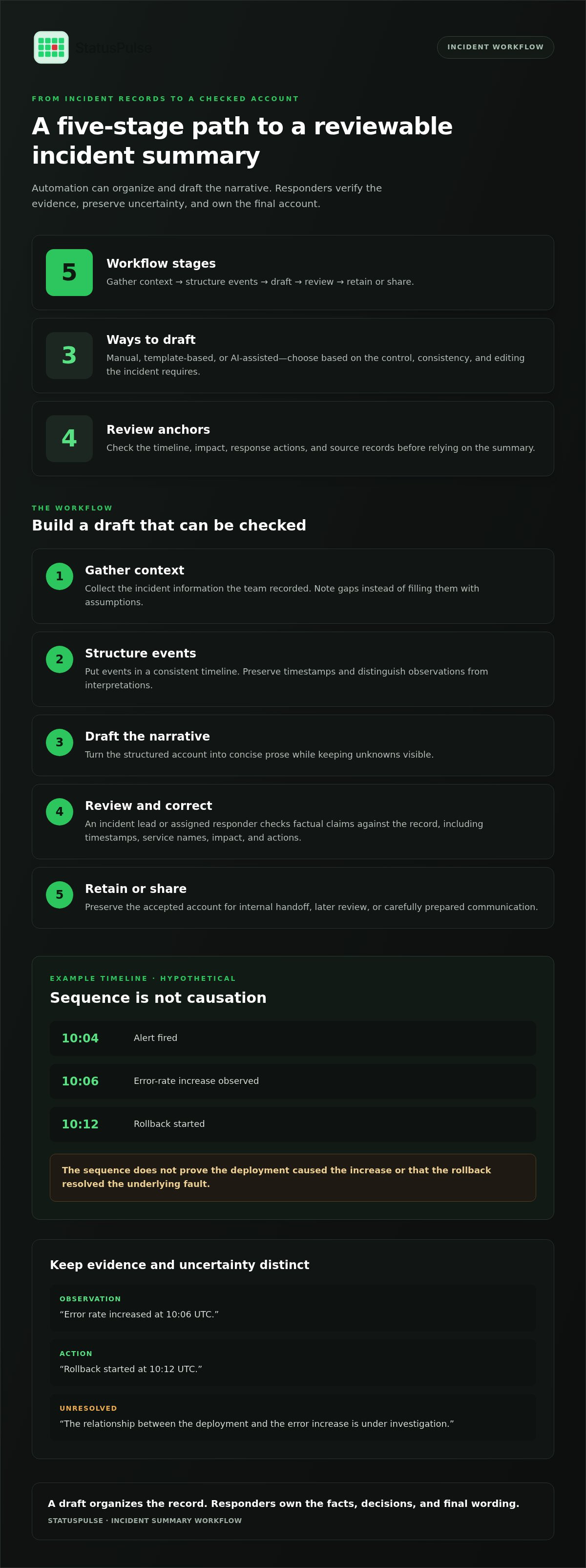
The workflow has five stages. Each depends on the accuracy and availability of the records the team has captured.
- Gather context. Collect the incident information the team has recorded. Note gaps rather than filling them with assumptions.
- Structure events. Put events in a consistent timeline, preserving timestamps and the distinction between observations and interpretations.
- Draft. Turn the structured account into concise prose, keeping unknowns visible.
- Review. Have an incident lead or assigned responder verify the claims and correct errors.
- Retain or share. Preserve the accepted account for internal handoff, later review, or carefully prepared communication.
This workflow sits within broader incident management practices, where teams coordinate response and maintain a usable record. A summary supports that work; it doesn’t replace the response process. If records are incomplete or timestamps conflict, the draft should expose that limitation instead of smoothing it away.
From incident record to structured draft
A consistent timeline lets responders inspect sequence before drawing conclusions. For example, a hypothetical record might show an alert at 10:04, an error-rate increase observed at 10:06, and a rollback started at 10:12. The first two are observations; “the deployment caused the increase” is an interpretation unless evidence establishes the link.
Label examples and uncertainty explicitly:
- Hypothetical observation: “Error rate increased at 10:06 UTC.”
- Hypothetical action: “Rollback started at 10:12 UTC.”
- Hypothetical uncertainty: “The relationship between the deployment and the error increase is under investigation.”
Review, correct, and preserve the final account
Assign a responder or incident lead to review the draft before anyone reuses it. Check timestamps, service names, impact statements, and actions against the incident record. Keep unresolved questions clearly marked rather than rewriting them as conclusions.
- Correct factual errors and record what changed.
- Keep the draft distinguishable from the accepted account.
- Retain meaningful corrections so a later post-mortem can show which claims were verified.
For handoffs, preserve both the accepted summary and the records that support it. This helps the next responder distinguish verified details from draft language and trace corrections during later review.
Manual, template-based, or AI-assisted summaries: how to compare the trade-offs
Choose a summary method based on the incident, the records available, and how much control the final narrative needs. Manual writing gives responders direct control. Templates make structure repeatable. AI-assisted drafting can reduce the work of turning available context into prose, but still needs a reviewer.
| Consideration | Manual | Template-based | AI-assisted |
|---|---|---|---|
| Control | High: the writer chooses what to include and how to phrase it. | High over fields and layout; responders supply the content. | Reviewers can edit the draft, but must check its interpretation. |
| Consistency | Can vary by author and workload. | Repeatable structure, if teams use the same template. | Can produce a consistent draft format, depending on the workflow. |
| Context handling | Depends on the writer’s knowledge and records. | Depends on what responders enter into each field. | Depends on the context available to the drafting system. |
| Editing effort | Responders write and organize the account. | Responders populate fields and turn them into a readable narrative. | Responders review, correct, and fill gaps in the draft. |
| Review | Check facts and wording before reuse. | Check facts, completeness, and interpretation. | Check facts, omissions, certainty, and ambiguous wording. |
These methods aren’t mutually exclusive. A team might use a template to define required fields, then have a responder write the account manually or use AI to draft from the available context. The best fit is the one that makes ownership and review clear, not the one that removes all human effort.
When templates beat free-form generation
Use a template when every incident needs the same reporting structure, such as fields for service, impact, status, actions, and follow-up. It prompts responders to cover expected areas and provides a practical fallback when automated incident summary generation is unsuitable. But a filled-in field can still be wrong, and an empty one can hide missing information. Consistency isn’t completeness.
When AI assistance can reduce drafting effort
AI assistance is useful when responders have context to organize but want help turning it into a readable draft. It’s a drafting and synthesis aid, not an independent source of truth. Review for omitted events, claims that sound more certain than the evidence, and wording that could have more than one meaning. Correcting a fluent but misleading sentence can take more care than editing a rough note.
For example, an uptime alert may establish that a monitored endpoint failed a check. It doesn’t, by itself, establish customer impact or explain why the failure occurred. Keep the summary anchored to verified incident records and the team’s own interpretation. That discipline complements uptime monitoring, where observed availability and clear communication both matter.
A manual summary can be the better choice for a small incident with little coordination overhead, or for a sensitive narrative that needs close control over wording. AI may be a poor fit when the underlying context is sparse, contradictory, or unsuitable for the chosen workflow. Match the method to the risk and record quality.
A practical checklist for accurate, useful automated incident summaries
A summary is ready for reuse only when its claims match the incident record and its wording fits the intended audience. Use this checklist before sharing a draft internally or adapting it for customers. Automated incident summary generation can reduce drafting work, but the review still needs a clear owner.
Quality checks before sharing a summary
- Verify the sequence. Compare event order and timestamps with the incident timeline. Check time zones and distinguish when an event occurred from when someone recorded it.
- Check service names. Confirm that affected services, components, and environments are identified correctly. Similar names can lead readers to the wrong conclusion.
- Ground impact statements. Trace each claim about customer or service impact to available evidence. If the scope is still being assessed, say so instead of presenting an estimate as settled fact.
- Separate evidence from interpretation. Label suspected causes as hypotheses until the investigation supports them. An event appearing before another event doesn’t prove causation.
- Keep uncertainty visible. State what remains unknown and avoid wording that sounds more certain than the record allows.
- Edit for purpose. Remove details that don’t help the intended reader, but retain what they need to understand the incident and its current status.
Internal operational notes and customer-facing updates serve different audiences. Responders may need technical detail, open questions, and actions still in progress. Customers usually need a clear account of service impact and current status. Review any customer version separately; an internal draft shouldn’t become an external update by default.
Ownership, privacy, and data-location decisions
Assign an incident lead or responder to approve a summary before reuse. Make ownership explicit: who checks factual claims, who approves external wording, and who can correct the retained record? A draft without an owner can circulate as though it were an accepted account.
- Access: Limit internal incident details to people who need them for response, review, or follow-up. Consider whether the summary includes sensitive operational or customer information.
- Retention: Decide how long drafts and accepted records remain available, and distinguish working copies from the final account.
- Data location: Include the location of stored incident information in your data-handling decisions. Assess it against your organization’s own requirements rather than treating location alone as proof of regulatory compliance.
- Reuse: Check the approved version again before using it in a post-mortem, handoff, or external communication.
These checks make review a defined part of the workflow, not a last-minute formality. To manage incident summaries alongside monitoring and incident handling, explore StatusPulse’s incident management platform.
Where StatusPulse fits in an incident summary workflow
Summary drafting is one part of incident handling. The surrounding workflow still needs to track incidents, coordinate alerts and severity-based escalation, and preserve learning through post-mortems. StatusPulse brings incident management together with uptime monitoring and status pages, with AI-drafted incident summaries using Claude. This places drafting within a broader operational workflow, rather than treating a generated paragraph as the whole process.
That doesn’t mean every monitoring event becomes summary input or that a summary is generated at a particular trigger. Evaluate how the draft fits alongside the incident record and your team’s review practices. Responders remain responsible for assessing accuracy and deciding what to do with it.
Evaluate summary generation in the context of incident handling
Look at the full sequence around the draft. Incident tracking gives the team a place to manage the response; alerts and severity-based escalation support coordination; post-mortems provide a later opportunity to examine what happened. An AI-drafted summary can assist with the narrative, but it doesn’t replace an investigation or a decision about impact, cause, or recovery.
Assign a responder to check the draft against the incident record before reusing it. Confirm details and preserve uncertainty. Human review is a recommended step, not a claim that drafting automatically publishes or verifies the account.
Choose a workflow that keeps people accountable
Evaluate the workflow against practical criteria: whether incident records support a useful draft, whether a named person owns review, and whether the hosting location suits your data-location needs. StatusPulse offers a choice of EU or US hosting. Its flat, transparent pricing has no per-subscriber fees, which can also matter when assessing fit for your team.
Consider whether connecting monitoring, incident handling, and status pages in one platform matches how your team works. Keep internal notes distinct from customer-facing updates, and approve the wording for each audience.
If you’re assessing how summaries fit alongside incident coordination and communication, explore the StatusPulse platform.
Use AI-assisted drafting to support a reviewable account, while responders remain accountable for facts, decisions, and approved communication. See StatusPulse incident management as part of the platform.
Make the next incident a better test
Before expanding automated incident summary generation across your operations, define what a useful draft means for your team. Choose an incident workflow, agree on who reviews the draft, and note the omissions or unclear claims that would make it unsuitable for reuse. This gives responders a practical way to assess whether the process helps, without treating polished wording as proof of accuracy.
Use what the team learns to refine its review practice. If the record lacks context, improve how responders capture it. If the draft creates extra editing, reconsider where AI assistance fits. The goal isn’t to automate accountability. It’s to give people a clearer starting point while they remain responsible for the final account.
For a closer look at how incident summaries fit within a wider operational workflow, explore StatusPulse incident management. Start with a reviewable process, learn from each incident, and improve the handoff.
Frequently Asked Questions
What is automated incident summary generation?
Automated incident summary generation is the software-assisted organization or drafting of an account of a service incident. It creates a draft, not a verified record. A useful summary helps readers understand known events, current status, and established impact while keeping unanswered questions visible. It can help an incoming responder get oriented, but it can’t independently establish root cause or decide what customers should be told.
Can AI generate an accurate incident summary without human review?
AI can draft a useful account, but it can’t guarantee accuracy without review. The result depends on the quality and completeness of the incident information available to the tool. Check timestamps, service names, impact statements, and claims about cause. If the evidence doesn’t settle a question, mark it as unknown. Fluent wording isn’t proof: a confident sentence can still misstate what responders observed.
How does AI create an incident summary?
AI-assisted summary tools organize available incident context and turn it into readable prose. The exact information used and workflow vary by tool, so don’t assume every system draws from the same records or updates at the same point in an incident. A clear event timeline helps reviewers inspect sequence. Separating observations from hypotheses also makes it easier to catch a draft that presents an interpretation as established fact.
What should an incident summary include?
Include the incident’s key events and timing, current status, known impact, actions taken, and unresolved questions. Tailor the detail to the reader: an on-call engineer may need a component name or operational action, while an executive may need a concise account of service impact. Keep public updates separate from internal notes. Don’t present a suspected cause as fact, even if it makes the narrative sound more complete.
Are automated incident summaries the same as incident reports or post-mortems?
No. A summary is a concise account that helps people coordinate during or after an incident. An incident report may preserve a broader record, while a post-mortem examines causes, response, and follow-up after the event. Teams use these terms differently, so define each document’s purpose, audience, and owner. A short handoff summary may be useful during response, while a post-mortem needs deeper analysis.
How can teams prevent AI incident summaries from inventing details?
Keep each claim traceable to an incident record that a reviewer can inspect. Compare event order and impact statements with the underlying notes, and label hypotheses and unknowns plainly. Require a responder to review the draft before treating it as an accepted record or adapting it for customers. Templates and disciplined notes can make information easier to check, but neither prevents errors unless someone verifies the content.
When should a team use templates instead of AI-generated summaries?
Use a template when a summary needs fixed fields, approved wording, or a simple structure for a low-complexity incident. It can also serve as a fallback when AI assistance isn’t suitable for the task. The trade-off is that people still need to gather the facts, fill each field, and resolve gaps. A completed template provides structure, not evidence that its contents are complete or correct.
Can an incident summary be used as a customer status update?
It can provide source material, but an internal summary and a public status update have different purposes. Internal notes may include technical details, investigation hypotheses, or actions that don’t help customers understand service status. Before adapting the account, a responder should check impact, clarity, and what information is appropriate to disclose. Treat the update as a separate communication that requires review, not as text to publish automatically.


