

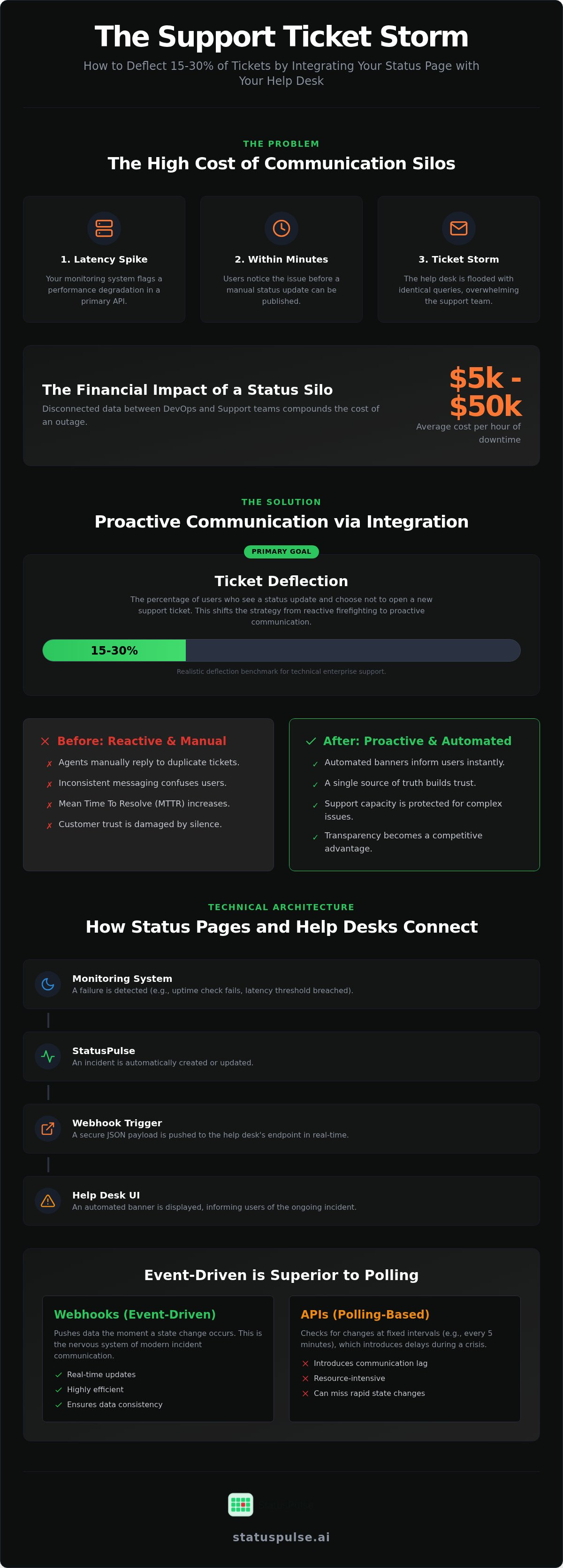
Your monitoring system flags a latency spike in your primary API. Within three minutes, your help desk is flooded with identical queries. You're now stuck manually updating a status page while your support team drowns in a ticket storm. It's an expensive, manual cycle that costs mid-sized businesses between $5,000 and $50,000 per hour of downtime.
Status page integration with help desk software is the process of linking incident communication tools directly with support ticketing systems to provide real-time service updates to users. This connection allows teams to deflect 15% to 30% of technical support tickets by informing users of known issues before they submit a request.
We agree that manual updates are a burden and enterprise incumbents often charge too much for basic automation. This article explains how to connect incident communication with support workflows to reduce volume and build user trust. We'll examine technical integration methods, honest communication strategies, and how to maintain data sovereignty without the corporate bloat. You'll learn to move from reactive firefighting to a controlled, transparent incident response.
Key Takeaways
- Eliminate communication silos by syncing infrastructure data with support workflows to stop ticket storms during outages.
- Understand the technical trade-offs between REST APIs, webhooks, and native connectors when setting up status page integration with help desk software.
- Target a realistic 15% to 30% ticket deflection rate by mapping monitoring components to granular help desk categories.
- Use automated banners within your help desk UI to inform users of ongoing incidents before they attempt to open a new ticket.
- Maintain compliance and data sovereignty by choosing incident management tools that offer dedicated EU or US hosting options.
The Support Ticket Storm: Why Status Silos Increase Churn
A status silo occurs when your infrastructure monitoring and customer support teams operate on disconnected data sets. The DevOps team sees the API failure in their monitoring dashboard; meanwhile, the support team faces a sudden wave of "Is the site down?" emails. They aren't speaking the same language. This lack of synchronization creates a support ticket storm where volume spikes faster than agents can respond.
For small to mid-sized businesses, the average cost of an hour of downtime ranges from $5,000 to $50,000. When your teams are siloed, this cost compounds. Agents spend their time manually replying to identical reports instead of helping engineers identify the root cause. This manual cycle increases the Mean Time To Resolve (MTTR) for both the outage and unrelated customer issues. Efficiency drops as the backlog grows.
The Cost of Reactive Communication
Manual updates are prone to human error. They lead to inconsistent messaging across different channels. One agent might claim the issue is resolved while another is still triaging. This inconsistency, combined with periods of radio silence, damages the psychological foundation of customer trust. The operational cost is high. Managing duplicate tickets for a brief 15-minute outage can result in hours of administrative cleanup. It pulls your most skilled specialists away from high-value tasks to perform repetitive data entry.
Defining the Integration Goal: Ticket Deflection
Effective status page integration with help desk software shifts your strategy from reactive firefighting to proactive communication. The goal is ticket deflection. This is defined as the percentage of users who see a status update and choose not to open a ticket. While some vendors claim deflection rates of 90%, a realistic benchmark for technical enterprise support is between 15% and 30%. This is a significant operational win for any lean team.
Transparency is a competitive advantage. In a market where corporate bloat and complex pricing are common, being the vendor that admits to a fault immediately is refreshing. It builds integrity. By showing the user an incident banner before they click submit, you respect their time. You also protect your support team's capacity, allowing them to focus on complex queries that AI and automation cannot solve.
Technical Architecture: How Status Pages and Help Desks Exchange Data
The architecture behind a reliable status page integration with help desk software relies on three primary mechanisms: webhooks, REST APIs, and native marketplace connectors. While marketplace apps are popular for their perceived ease of use, they are often just pre-built wrappers around a vendor's API. A robust integration requires precise data mapping to ensure that a "Critical Outage" flagged by your monitoring tool reflects correctly as an "Open Incident" within your help desk UI.
Latency is a critical factor in technical architecture. Polling-based updates check for changes at fixed intervals, which can introduce delays of several minutes during a crisis. Event-driven webhooks are superior because they push data the moment a state change occurs. Webhooks are the nervous system of incident communication. By choosing event-driven over polling-based models, you ensure that your support agents and users see the same reality at the same time.
Webhooks and Event-Driven Updates
The operational flow is straightforward. Your monitoring system detects a failure and notifies StatusPulse. StatusPulse then triggers a webhook that sends a JSON payload to your help desk's endpoint. This payload contains the incident details, allowing the help desk to display an alert banner automatically. Security is paramount when connecting these cloud tools. You should use signing secrets to verify that the incoming payload actually originated from your status page provider and hasn't been intercepted or forged.
StatusPulse favors standard webhooks for maximum flexibility across different technology stacks. This approach avoids the proprietary lock-in common with enterprise incumbents. It allows you to build custom logic or connect to niche support tools without waiting for a dedicated marketplace app to be developed.
Two-Way Sync vs. One-Way Broadcast
Most teams only require a one-way broadcast. In this model, status updates are pushed to the help desk to drive ticket deflection. It is efficient and keeps the integration simple. Two-way sync allows support tickets to trigger status page investigations or updates. While this sounds useful, it significantly increases the complexity of your integration. Two-way sync increases your API surface area and introduces potential security risks by allowing external support data to modify your public-facing status infrastructure. For most lean teams, the added maintenance and risk of two-way sync outweigh the benefits. If you need a straightforward way to keep users informed, a secure one-way push is the ethical, reliable choice.
Evaluating Integration Methods: Native Apps vs. Custom Middleware
Choosing the right architecture for your status page integration with help desk software involves balancing speed against long-term operational costs. Native apps, custom middleware, and direct API calls each carry distinct trade-offs that impact your team's agility. While a native plugin might solve the immediate problem, it often sacrifices the granular control that SRE and DevOps teams require during a complex outage.
| Method | Setup Time | Maintenance | Flexibility |
|---|---|---|---|
| Native Marketplace App | Minutes | Low | Low |
| Custom Middleware (Make/Zapier) | Hours | Medium | High |
| Direct API Integration | Days | High | Infinite |
The Marketplace Trap: Hidden Costs and Bloat
Incumbent tools often use marketplace integrations as a mechanism for ecosystem lock-in. While a plugin might be listed as "free," it frequently requires a high-tier subscription to the base product. For example, some integrations are only available on the Zendesk Suite Professional plan, which costs $115 per agent/month. Additionally, enterprise status page providers often charge per-subscriber fees [VERIFY: Atlassian Statuspage per-subscriber fee for Business tier]. This model penalizes you for being transparent with a growing user base.
StatusPulse takes a different approach. We offer flat, transparent pricing without per-subscriber fees. We believe that informing your customers shouldn't be a variable cost. By avoiding the corporate bloat of marketplace-only ecosystems, we provide the flexibility to connect your status data wherever it's needed. This ensures you maintain integrity with your users without facing an unexpected bill during high-traffic incidents.
Building Custom Connectors with APIs
Direct API integration offers the highest level of control for teams with dedicated resources. It allows you to build specific logic tailored to your infrastructure. You can configure a script to act as a logic gate: if (component_A.status != "operational") { helpdesk.sidebar.showBanner("Active API Incident"); }. This ensures that your support agents only see alerts relevant to the specific products they manage, reducing cognitive load during a crisis.
When building custom connectors, you must account for rate limiting. High-frequency polling between your status page and help desk can trigger 429 errors, causing the integration to fail exactly when you need it most. Implementing an event-driven webhook listener is a more resilient strategy. For a deeper look at managing high-availability connections, see our API Monitoring guide. Direct API usage turns your status page into a programmable assistant rather than a static billboard.
Implementation Strategy: Reducing Support Volume by 30%
Executing a successful status page integration with help desk software requires a deliberate workflow. It is not enough to simply connect the APIs; you must align the data with how your support team operates. Follow these five steps to optimize your setup for maximum ticket deflection:
- Step 1: Map monitoring components to help desk categories. This ensures a failure in your "Payment Gateway" triggers alerts for the billing support tier rather than the general queue.
- Step 2: Configure automated banners. These should appear in your help desk UI the moment an incident is created in your status provider.
- Step 3: Set up internal alerts. Notify agents via Slack or private notes 60 seconds before a public update goes live so they aren't caught off guard.
- Step 4: Use AI to draft summaries. StatusPulse's AI incident management tool can convert technical logs into support-friendly language, saving your engineers time.
- Step 5: Audit monthly. Verify that your API tokens and webhook secrets remain valid to prevent silent integration failures.
Proactive Alerting and Subscription Management
Automated alerts via email or SMS are your first line of defense. They prevent the initial wave of "Is it down?" tickets by reaching users where they already are. Allowing users to subscribe to specific components only is vital. A developer using your API shouldn't be bothered by a minor bug in the marketing site's UI. For guidance on how often to send these updates, review our guide on Incident Communication Best Practices. This granular approach builds trust without flooding inboxes.
Contextual In-App Status Banners
Users rarely check a standalone status URL during a crisis. They go straight to your help desk or product dashboard. Showing status data inside these environments is far more effective. You can use simple CSS or JS snippets to pull data from the StatusPulse API into a Zendesk or Intercom widget. This puts the information directly in the user's path.
Imagine a banner at the top of your support portal. When the API response for "system_status" is operational, the banner remains hidden. If the status changes to a major outage, the banner immediately turns a high-contrast red and displays the latest incident title. This visual cue stops a user from opening a ticket because they instantly see you are already working on the fix. You can automate this transparency with StatusPulse to protect your team's bandwidth today.
Integrating StatusPulse with Your Existing Support Stack
StatusPulse is built on the principle of technical simplicity. We avoid the proprietary lock-in common among enterprise incumbents. A status page integration with help desk software should be a tool that assists your team, not one that dictates your workflow. It must be straightforward to implement. By offering native support for both EU and US hosting, we ensure your incident data resides where your compliance requirements demand. This is a core part of our commitment to data sovereignty. It allows teams in Europe to meet GDPR standards without the legal complexity of data transfers to non-EU jurisdictions.
Flat Pricing vs. Per-Subscriber Models
Most enterprise status page tools penalize you for being popular. As your user base grows, so does your monthly bill. For instance, [VERIFY: Atlassian Statuspage per-subscriber fee for Business tier] can significantly increase total cost of ownership exactly when your support load is at its highest. We take a different ethical stance. StatusPulse uses flat pricing without per-subscriber fees. Your costs remain predictable. This allows DevOps teams to manage budgets with integrity, knowing that transparency doesn't have a variable price tag attached to customer volume.
Leveraging AI for Support-Ready Incident Summaries
One of the greatest friction points during an outage is the translation time between engineers and support agents. Engineers speak in logs; support needs to speak to customers. StatusPulse uses AI to bridge this gap by drafting incident summaries that use clear, support-friendly language. This reduces the cognitive load on your technical team during a crisis. It isn't about replacing human judgment. We utilize a human-in-the-loop approach where the AI drafts the update based on real-time monitoring data, but a specialist performs the final approval. This ensures that the information pushed to your help desk is both accurate and empathetic.
By combining uptime monitoring and status pages in a single logic flow, StatusPulse eliminates the need for manual data entry across multiple dashboards. You don't need to bolt on external monitoring tools just to see if your services are healthy. Our platform provides a direct path from detection to communication. You can automate your incident communication to build a more resilient support workflow today. This approach respects your time and your budget.
Moving Toward Proactive Incident Communication
Reliable communication isn't about hiding failures. It's about owning them before your users do. By implementing status page integration with help desk software, you replace reactive firefighting with a controlled, automated workflow. Mapping monitoring components to support categories and using event-driven webhooks protects your team's bandwidth. These technical steps ensure your support agents are never the last to know about an outage.
StatusPulse offers a principled alternative to bloated enterprise tools. Our platform provides flat pricing with no subscriber fees. Your costs stay predictable. With AI-assisted incident drafting and a choice between EU or US hosting for data sovereignty, you maintain professional authority without the corporate overhead. It's an ethical approach to incident management that respects your budget.
You can build an integrated status page with StatusPulse to start deflecting tickets today. Empower your team with the precision tools they deserve.
Frequently Asked Questions
How does status page integration reduce support tickets?
It provides a proactive information layer for your users. By showing the current system state directly in the help desk or via a banner, you prevent users from submitting a new ticket for an issue you've already acknowledged. Industry benchmarks show this can deflect 15% to 30% of technical support volume. This strategy respects the user's time and prevents your support team from being overwhelmed by repetitive manual queries during a crisis.
Can I connect StatusPulse to Zendesk or Freshdesk?
You don't necessarily need deep coding skills for basic setups, but some technical knowledge is helpful. Many integrations use no-code middleware like Zapier, though these add another point of failure. For a more resilient status page integration with help desk software, we recommend using webhooks or direct API calls. This usually requires a developer to spend a few hours configuring the payload mapping to ensure data flows correctly between systems.
Is it possible to show different statuses to different customer segments?
Yes, you can achieve this by mapping specific monitoring components to different help desk groups or categories. For example, you might show a "Legacy API" outage only to users tagged with that specific service level in your support tool. This granular approach prevents alert fatigue by ensuring users only see incidents that actually affect their specific environment. It requires careful data mapping during the initial implementation phase to be effective.
Does integrating these tools affect my website performance?
No, integrating StatusPulse with your help desk should not impact your website's front-end performance. Most integrations happen server-to-server via webhooks or are loaded asynchronously through small JavaScript snippets in your support widget. Because the status data is hosted on our infrastructure in either the EU or US, your primary servers aren't burdened by these requests. This setup ensures your status page remains available even if your main site is down.
How do webhooks work for incident communication?
Webhooks act as automated messengers between your tools. When a monitor detects a failure, StatusPulse sends a POST request with a JSON payload to your help desk's endpoint. This happens instantly, making it an event-driven system. It's more efficient than polling, which checks for updates at fixed intervals and can cause delays. Using webhooks ensures that your support team receives incident data the moment a state change is confirmed by your monitoring system.
What is the cost of integrating StatusPulse with third-party software?
We don't charge extra fees for using our API or webhooks to connect with third-party tools. Our flat pricing model includes these capabilities by default. You won't face per-subscriber fees or hidden integration taxes that scale with your usage. However, you should check your help desk provider's pricing. Some platforms, like Zendesk, may require specific plan tiers to access their API or marketplace features, which could increase your total operational costs.
Is my data safe when using EU-based status page hosting?
Your data is safe and managed under strict regulatory standards. StatusPulse offers dedicated EU-based hosting to help you comply with GDPR and the EU Data Act. This provides data sovereignty, ensuring your incident logs and subscriber information stay within European jurisdictions. Unlike providers that default to US servers, we give you the choice to keep your data residency aligned with your local legal requirements and corporate security policies.


