

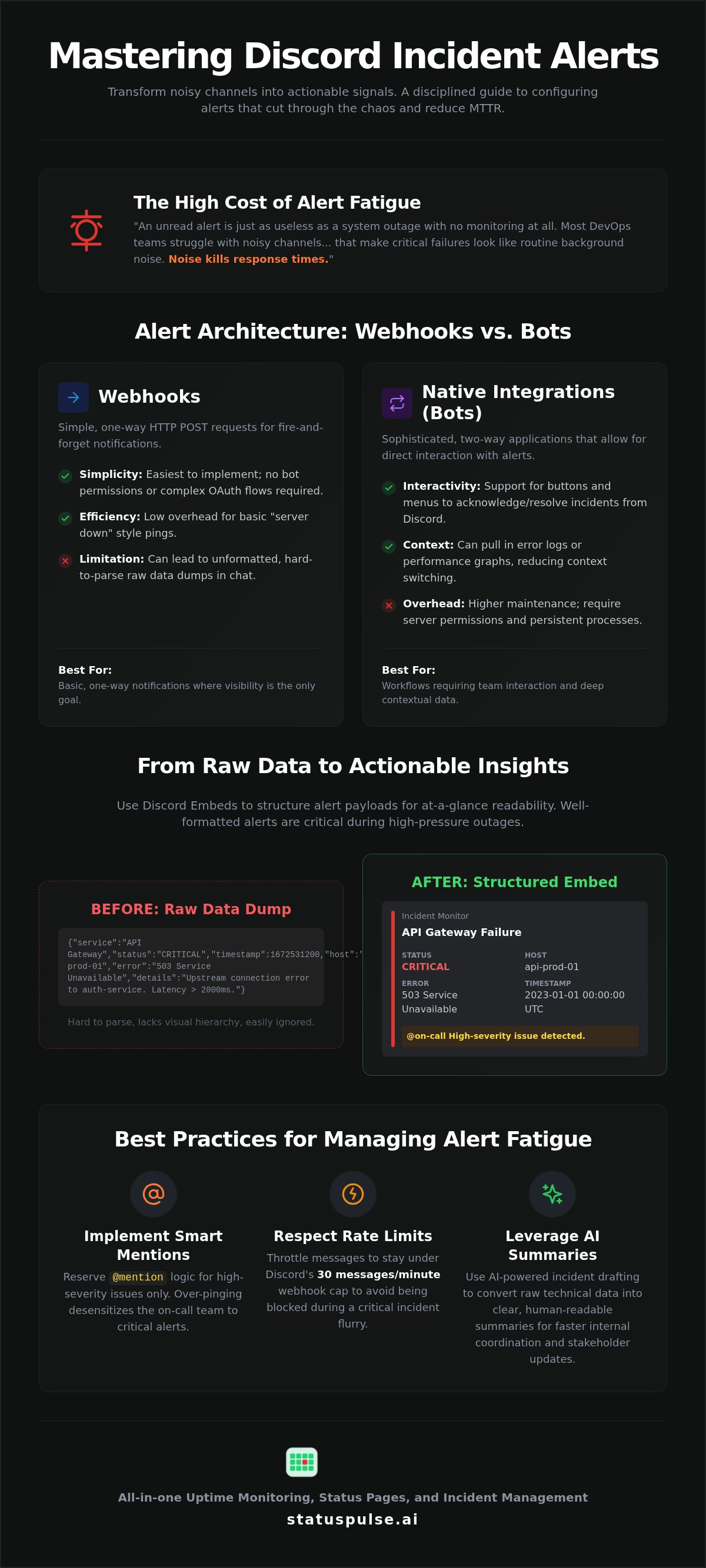
An unread alert is just as useless as a system outage with no monitoring at all. Most DevOps teams struggle with noisy channels and inconsistent formatting that make critical failures look like routine background noise. Noise kills response times. If your team is struggling with notification delays or alert fatigue, you need a more disciplined approach to sending incident alerts to Discord. Raw data dumps into a chat room don't solve problems; they just create a new place for engineers to ignore them.
We understand the frustration of managing a pipeline that either stays silent during a crisis or screams about every minor CPU spike. This guide teaches you how to configure a robust notification system using Discord's v10 API and native webhooks to significantly reduce your Mean Time to Resolution. We'll examine specific rate limits, such as the 30 messages per minute webhook cap, and payload structures for better readability. Using tools for uptime monitoring ensures your team gets the signal they need without the bloat of enterprise bots. By the end, you'll have a real-time alert pipeline that provides clear context instead of just more stress.
Key Takeaways
- Differentiate between one-way webhooks and two-way bots to select the integration that best fits your team's incident response workflow.
- Master the configuration of Discord webhooks to begin sending incident alerts to Discord without the overhead of managing custom bot infrastructure.
- Use Discord Embeds and color-coded status indicators to ensure critical notifications are actionable and readable at a glance.
- Reduce alert fatigue by implementing @mention logic for high-severity issues and throttling messages to respect the 30-per-minute rate limit.
- Leverage AI-powered incident drafting to convert raw technical data into clear, human-readable summaries for faster internal coordination.
The Architecture of Discord Alerts: Webhooks vs. Native Integrations
Discord provides two primary pathways for ingesting external data: webhooks and native bot integrations. Understanding the architectural differences between them is the first step toward sending incident alerts to Discord that actually help your team instead of just cluttering a channel. Most teams start with the simplest path, but scaling requires a more deliberate choice between one-way broadcasts and interactive workflows.
What are the technical fundamentals? What are Webhooks in this context? They are simple HTTP POST endpoints. You send a JSON payload to a unique URL, and Discord renders that data as a message. It's a fire-and-forget mechanism. There's no state management and no complex handshake. It's purely one-way communication from your monitoring tool to your chat room.
Native integrations, or bots, are more sophisticated. They require OAuth permissions and run as persistent processes. Unlike webhooks, bots support two-way communication. This allows engineers to interact with the alert directly through buttons or menus. You can acknowledge or resolve an incident without leaving the chat interface. This interactivity is the main differentiator for teams that have outgrown basic notifications.
The trade-off is between simplicity and functionality. Webhooks are easy to implement but often lead to raw data dumps. These unformatted blocks of text are difficult to parse during a high-pressure outage. Bots solve this with structured embeds and interactivity. However, they introduce higher maintenance overhead and require you to trust a third-party application with specific server permissions.
When to Choose a Simple Webhook
Webhooks are ideal for basic, one-way notifications where visibility is the only goal. If you just need a ping when a "Server Down" event occurs, a webhook is the most efficient choice. They require zero bot permissions or complex OAuth flows. The security model is straightforward but fragile. Anyone with the URL can post to your channel. Keeping that endpoint secret is your primary defense. There's no built-in authentication beyond the URL string itself.
When a Native Integration is Necessary
Choose a native integration when your workflow requires team interaction. If you want to click an "Acknowledge" button to stop an escalation, a bot is mandatory. Bots also enable deep linking. They can pull specific context from uptime monitoring platforms, such as error logs or latency graphs, directly into the thread. This reduces context switching. For teams managing multiple servers or complex permission sets, bots provide a centralized way to control access and visibility across the organization.
Step-by-Step: Configuring Discord Webhooks for Incident Data
Setting up the technical plumbing for sending incident alerts to Discord shouldn't be an afterthought. It's a core component of an effective incident response plan. To begin, open your Discord server and navigate to Server Settings. From there, select the Integrations tab and click on the Webhooks option. This interface allows you to manage all incoming data streams from external monitoring tools.
Click the "New Webhook" button to generate a fresh entry. You'll need to select the specific channel where messages should appear and copy the generated Webhook URL. This Webhook URL is a unique, sensitive endpoint that allows any application with the link to post messages directly to your server. Treat this string as a production secret; if it's leaked, anyone can spam your incident channels or spoof critical system failures.
Setting Permissions and Channel Scopes
Don't dump your alerts into a general chat room where they'll be buried by social chatter. Create a dedicated channel, such as #incidents-critical, to isolate system signals. You should also audit your server roles. Restrict the "Manage Webhooks" permission to administrators only to prevent accidental deletions or unauthorized changes. When configuring the webhook in the Discord UI, name it "Incident Monitor" or "Production Watchdog." This clear labeling helps your team identify the source of a message immediately during a high-pressure outage.
Verifying the Connection via CLI
Never assume the connection works just because the URL was generated. You should verify connectivity manually before hooking up your production monitoring. A simple CURL command is the most reliable way to test the endpoint without waiting for a real system failure. Use the following block to send a test payload:
curl -H "Content-Type: application/json" \
-X POST \
-d '{"content": "Test incident alert from CLI"}' \
[YOUR_WEBHOOK_URL]
If the request fails, check the HTTP status code. An HTTP 400 error usually indicates malformed JSON, while an HTTP 404 means the URL is invalid or has been deleted. As a best practice, don't store these URLs in plain text configuration files or public repositories. Use environment variables or a dedicated secret manager to handle the endpoint. For teams that prefer a pre-configured setup, StatusPulse provides a direct way to manage these connections without manual CLI testing.
Payload Optimization: Making Alerts Actionable for Dev Teams
Raw text is the enemy of speed during an outage. When sending incident alerts to Discord, a wall of unformatted JSON or plain text forces engineers to hunt for context. Most responders have experienced the frustration of a 2:00 AM ping that contains no actionable data. Discord's 'Embed' object solves this by providing structured fields, color-coded sidebars, and dedicated timestamp slots. These visual cues allow your team to differentiate between a minor latency spike and a total database failure in milliseconds.
Effective alerts use color to convey severity instantly. Use Red (decimal: 15158332) for 'Down' states, Yellow (15859712) for 'Degraded' performance, and Green (3066993) for 'Resolved' status. Every alert title should include the specific API endpoint or server ID affected. Vague titles like "System Error" waste time. Including the exact resource name ensures the right specialist picks up the ticket immediately without unnecessary triage steps.
Structuring JSON for the Discord API
The Discord API expects an embeds array within your POST request. Each embed can contain multiple objects like title, description, and fields. The fields array is particularly useful for key-value pairs such as 'Region' or 'Response Time'. Using the inline: true property for these fields keeps the layout compact. This prevents the message from taking up too much vertical space, especially for team members viewing alerts on mobile devices. Always include the timestamp field in ISO8601 format to ensure the alert shows the correct local time for every team member.
{
  "embeds": [{
"title": "CRITICAL: API Gateway Latency",
"color": 15158332,
"fields": [
{ "name": "Endpoint", "value": "/v1/auth", "inline": true },
{ "name": "Latency", "value": "2500ms", "inline": true }
],
"footer": { "text": "Runbook: https://wiki.internal/gateways" },
"timestamp": "2026-08-20T14:00:00Z"
  }]
}
Adding Technical Context
Contextual links are vital for rapid recovery. Include direct links to internal dashboards or StatusPulse status pages in the message footer. This allows responders to verify global status without searching for bookmarks. Avoid sending raw error logs directly to Discord. They often exceed character limits and create noise. Truncate logs to the most relevant stack trace lines and use Markdown backticks to highlight critical status codes. Bold text helps identify the environment, such as Production or Staging, at a glance. This structured approach moves your team from notification to investigation in seconds.
Managing Alert Fatigue: Filters, Roles, and Threading
Alert fatigue isn't just an annoyance; it's a systemic risk. If every minor ping triggers a mobile notification, your team will eventually ignore the one that actually matters. Proper configuration for sending incident alerts to Discord requires a careful balance between visibility and silence. You must distinguish between background noise and actionable crises to maintain a responsive SRE team.
Discord enforces a strict rate limit of 30 messages per minute per webhook. If a cascading failure triggers 1,000 pings in sixty seconds, your integration will be throttled or temporarily banned. Implement server-side throttling to collapse redundant alerts into a single notification. This preserves your webhook's reputation and prevents your engineers from waking up to a wall of identical messages.
Channel architecture is your first line of defense. Set up separate channels for different signal types. A #heartbeat-monitor channel can house routine uptime checks that don't require immediate action. Reserve your #incidents-critical channel for hard failures that need human intervention. This separation allows team members to mute low-priority channels while staying alert for high-severity pings.
Role-Based Tagging in Payloads
Stop using @everyone. It's a blunt instrument that leads to burnout. Instead, use specific Discord role IDs in the content field of your JSON payload. The syntax is <@&ROLE_ID>. This allows you to route notifications intelligently. Direct your SSL certificate alerts to the security team and API latency pings to backend engineers. This precision ensures that only the relevant specialists are interrupted, preserving the focus of the rest of the organization.
Incident Threading for Long-Running Issues
Long-running incidents often result in scattered channel messages that are impossible to track. Use Discord Threads to centralize the triage process. Your integration can be configured to create a dedicated thread for each specific incident ID. This keeps the main channel clear for new alerts while providing a focused workspace for the active crisis. It also supports The Architecture of Incident Communication Transparency by providing a clear audit trail for post-mortems.
Managing these filters and routing rules manually is a heavy lift for small teams. Using a platform like StatusPulse allows you to automate these fatigue-reduction strategies with a simple toggle, keeping your Discord server clean and your team focused.
Automating Incident Communication with StatusPulse
Manual webhook configuration provides a solid foundation, but scaling a monitoring stack requires more than just raw endpoints. Managing individual JSON payloads and rate limits across dozens of services becomes a maintenance burden. StatusPulse serves as a focused middle ground between basic webhooks and bloated enterprise platforms. It automates the pipeline for sending incident alerts to Discord while maintaining the technical depth that SRE teams require.
Transparency extends to where your data lives. We provide a choice between EU or US hosting to support your specific data sovereignty requirements. This is a deliberate move away from the "black box" approach of legacy incumbents. Our pricing model follows a similar logic of integrity. We offer flat rates without per-subscriber fees. This ensures your costs don't spike just because your Discord server grows or your team expands during a crisis.
Native Discord Integration Setup
Moving from manual scripts to a managed pipeline takes a single toggle within the StatusPulse dashboard. The native integration handles the underlying Discord v10 API requirements and rate limiting logic for you. You can map different monitoring checks to specific Discord channels based on severity or service type. For example, use our API Monitoring Guide to configure endpoints, then route latency spikes to a backend-specific channel while sending total outages to a high-priority alert room. This granular control prevents the signal-to-noise issues common in unmanaged webhook setups.
AI-Powered Incident Summaries
The most difficult part of an incident is the initial communication. During a 3 AM outage, your cognitive load is already at its limit. StatusPulse uses AI to analyze the technical failure and draft a human-readable summary for your Discord alert. Instead of a raw "500 Internal Server Error," the assistant drafts a concise update explaining the affected region and potential impact.
We believe in human agency over total automation. AI drafts are tools, not replacements for engineering judgment. Every summary requires a final human review before it is posted. This trade-off ensures that your sending incident alerts to Discord remains accurate and grounded in reality. It saves minutes of drafting time during the "golden hour" of incident response without sacrificing the technical integrity of your communication. By combining automated monitoring with structured AI assistance, your team can focus on the resolution rather than the notification formatting.
Ready to simplify your alerting pipeline? StatusPulse provides the tools you need to manage uptime, APIs, and SSL certificates with a native Discord integration that respects your time and your budget.
Refining Your Incident Response Pipeline
Transitioning from basic notifications to a structured response system is a matter of engineering discipline. You've seen how webhooks provide a lightweight entry point, while optimized payloads and threading ensure every message is actionable. By refining your strategy for sending incident alerts to Discord, you protect your team's focus and reduce response times. A quieter, more organized Discord server leads to faster resolutions and a healthier, more focused team.
Managed solutions like StatusPulse simplify this transition without the bloat of traditional enterprise platforms. We provide EU or US hosting options to support your data sovereignty needs. Our AI-powered incident management handles the heavy lifting of drafting summaries during a crisis. With a flat pricing model and no per-subscriber fees, we offer a transparent path to better reliability. You don't have to settle for notification noise or complex pricing structures that penalize your growth.
Start monitoring with StatusPulse and centralize your Discord alerts today. Building a resilient, human-centric alerting system is the first step toward more stable infrastructure and a more responsive team.
Frequently Asked Questions
What is the difference between a Discord webhook and a Discord bot?
A Discord webhook is a simple HTTP POST endpoint used for one-way data ingestion; whereas a Discord bot is a persistent application that supports two-way interaction. Webhooks are the standard choice for sending incident alerts to Discord because they require no complex setup or permissions. Bots are only necessary if you need your team to interact with the message, such as clicking buttons to acknowledge a ticket or triggering a rollback from the chat.
Can I send alerts from multiple monitoring tools to the same Discord channel?
You can send alerts from various monitoring tools to a single Discord channel by creating a unique webhook for each source. While a single webhook URL can technically accept data from multiple places, using separate URLs allows you to name each integration individually. This makes it easier to identify whether a notification originated from StatusPulse, a CI/CD pipeline, or a custom script during a high-pressure system outage.
How do I secure my Discord webhook URL from unauthorized use?
Treat your webhook URL as a sensitive production secret, similar to an API key or database password. Never hardcode these URLs in your source code or commit them to public repositories. Instead, store them in environment variables or a dedicated secret manager. If a URL is accidentally exposed, you must delete it immediately in the Discord Integrations menu and generate a new one to prevent unauthorized message injection.
Is there a rate limit for Discord webhooks during an incident storm?
Discord enforces a limit of 30 messages per minute per webhook to prevent server-side performance degradation. There is also a shared limit of 5 requests every 5 seconds if multiple webhooks target the same channel. If you exceed these thresholds, Discord returns a 429 Too Many Requests status code. StatusPulse manages these limits automatically to ensure your critical notifications aren't dropped during a high-volume incident storm.
Can Discord alerts replace specialized tools like PagerDuty or Opsgenie?
Discord is an excellent communication layer but lacks the advanced features of specialized tools like PagerDuty or Opsgenie. It doesn't natively support on-call rotations, automated phone escalations, or complex incident response workflows. While it's sufficient for many small teams, enterprise organizations often use Discord as a secondary chat-ops tool alongside a dedicated incident management platform to ensure notification reliability across multiple channels.
Does StatusPulse support Discord notifications for SSL certificate expiry?
StatusPulse provides native support for monitoring SSL certificate validity and expiry dates. When a certificate is nearing its expiration or becomes invalid, the platform handles sending incident alerts to Discord automatically. This prevents service disruptions caused by expired certificates. You can configure the notification lead time within the dashboard to ensure your security team has enough time to renew the certificate before it affects your production traffic.
How can I format Discord alerts to include buttons for resolving incidents?
Standard webhooks do not support interactive components like buttons or menus. To include buttons for resolving incidents, you must build a Discord bot using the interactions API. This requires hosting a persistent application that can receive and process incoming interaction payloads from Discord. If you prefer a simpler setup, use StatusPulse to include deep links in your webhook embeds that lead directly to your incident resolution page.
Why are my Discord alerts showing up as plain text instead of rich embeds?
Discord renders messages as plain text if you send your data in the content field of the JSON payload. To generate rich embeds with colors and fields, you must structure your request using the embeds array. Ensure your HTTP request includes the Content-Type: application/json header. If the JSON structure is malformed or the embeds key is missing, Discord will either reject the request with a 400 error or default to a plain text display.


