

If your incident response relies on manual updates to a chat channel, your status page is just another administrative burden during a crisis. High-pressure outages are stressful enough without the mental tax of context switching between monitoring tools and team conversations. You've likely seen how information silos delay remediation and leave stakeholders in the dark. It's a common friction point that costs time when you have none to spare. Implementing a robust Microsoft Teams status page integration solves this by turning your chat app into a single source of truth.
This guide explores the technical architecture for this connection using the mandatory Workflows-based webhooks required after the 2026 connector deprecation. We'll move past legacy configurations to show you how to build a transparent Chat-Ops workflow. You'll learn to centralize communication, automate stakeholder updates, and leverage AI to draft incident timelines without leaving your primary workspace. We focus on a lean, ethical approach to transparency that respects your time and your data residency requirements.
Key Takeaways
- Transition your incident response to the modern Workflows-based Microsoft Teams status page integration to avoid the April 2026 deprecation of legacy connectors.
- Learn to structure JSON payloads and status codes for precise incident data transmission between your monitoring stack and Teams channels.
- Evaluate the technical trade-offs between direct webhook connections and interactive native bot applications for two-way incident management.
- Adopt "Human-in-the-loop" practices to verify AI-assisted status drafts before they are published to public or internal stakeholders.
- Centralize your incident lifecycle to reduce context switching and improve your Time to Notify (TTN) during high-pressure outages.
Centralizing Incident Communication: Why Teams Integration Matters
Context switching is a productivity killer. During an outage, every second spent toggling between an IDE, a monitoring dashboard, and a status page is a second not spent on remediation. Fragmented tools delay resolution and increase cognitive load. A Microsoft Teams status page integration centralizes these streams into a single interface. It ensures that the engineers fixing the problem and the stakeholders watching the clock see the same data in real time. Teams serves as the hub where alerts are triaged and decisions are made.
Time to Notify (TTN) is a critical metric for modern SRE teams. It measures the gap between incident detection and stakeholder notification. High TTN erodes customer trust and can lead to expensive SLA penalties. By 2026, Teams has evolved into the primary command center for DevOps workflows. Moving from manual status updates to automated, chat-driven transparency is now a requirement for maintaining operational velocity. Manual overhead is the enemy of uptime.
The Information Silo Problem in DevOps
Monitoring data often stays trapped in engineering-only tools. Non-technical stakeholders don't have access to these dashboards, which creates a dangerous information vacuum. This silence often leads to a flood of support tickets that distract the team from the actual fix. Manual updates to a status page add significant friction when the team is already under pressure. Using a webhook to push updates directly into Teams bridges this gap. It provides a unified view that connects technical reality with stakeholder expectations. StatusPulse facilitates this by ensuring updates are a byproduct of the work, not an additional task.
Transparency as a Technical Virtue
Honesty is a strategic technical asset. Providing real-time status updates isn't just about PR; it's about reducing the noise that hinders recovery. This approach follows the Architecture of Incident Communication Transparency, where data flows openly between systems. Building a culture of honesty helps technical teams prove their reliability even during failure. It's an ethical edge that differentiates a principled, focused team from a faceless corporation. Clear communication reduces the stress of technical disruptions for everyone involved. It's about building trust through consistent, straightforward updates.
The Mechanics of Status Page Webhooks and API Payloads
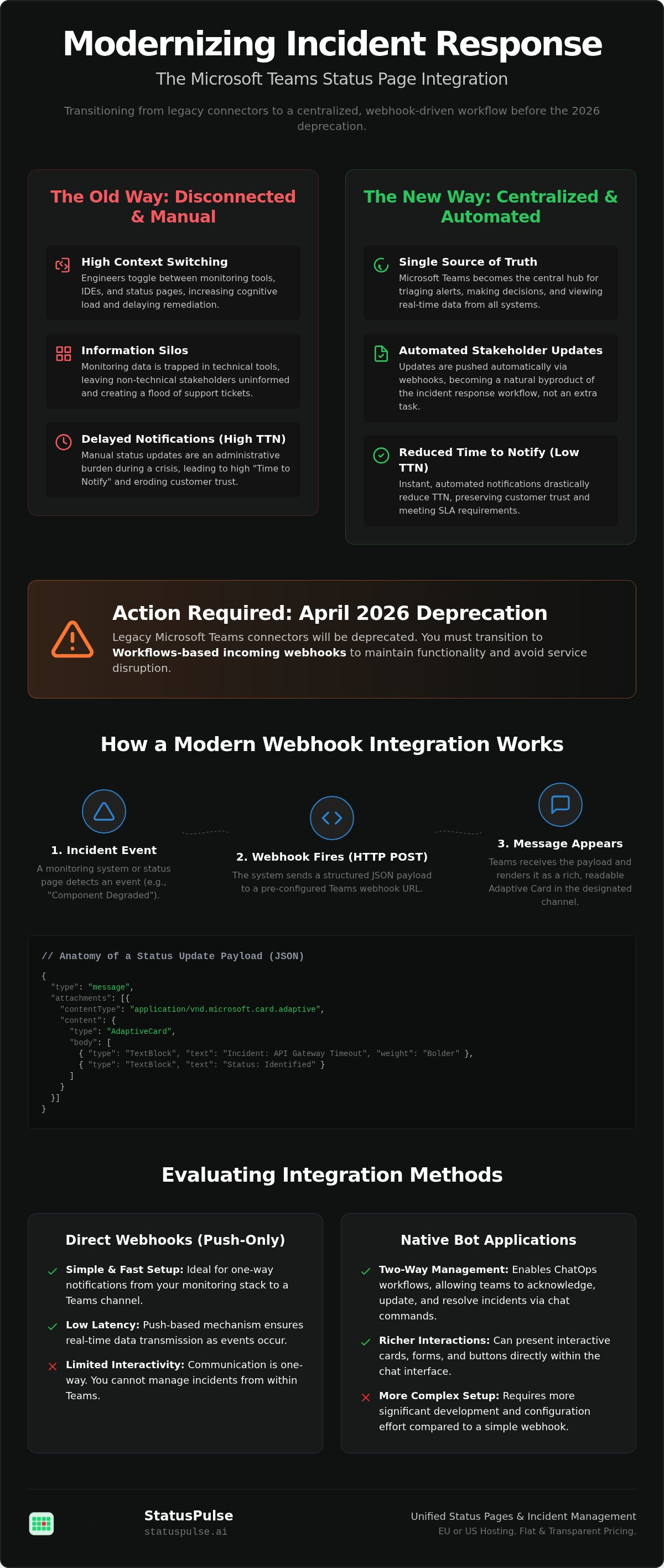
A status page webhook is a push-based mechanism for incident data transmission. Instead of Teams polling your status page for updates, the status page pushes data to Teams the moment an event occurs. This reduces latency. It ensures your Microsoft Teams status page integration reacts in real-time. The communication happens via an HTTP POST request containing a JSON payload. It's a lightweight way to move data across the stack.
The standard JSON structure includes specific components, status codes, and incident descriptions. Teams processes these POST requests and renders them as readable cards. Security is a primary concern here. You must manage secret tokens to ensure that only authorized services can post to your channel. Validating payloads prevents spoofed alerts from creating false alarms during an actual crisis.
Anatomy of a Status Update Payload
The JSON payload is the core of the message. It typically includes fields like incident_name, current_status, and affected_components. These fields allow Teams to display structured information rather than a wall of text. You can customize these payloads to suit different audiences. Engineering channels might need raw status codes. Customer success teams prefer plain-language descriptions. A standard incident update payload often looks like this:
{
  "type": "message",
  "attachments": [{
"contentType": "application/vnd.microsoft.card.adaptive",
"content": {
"type": "AdaptiveCard",
"body": [{
"type": "TextBlock",
"text": "Incident: API Gateway Timeout",
"weight": "Bolder"
}, {
"type": "TextBlock",
"text": "Status: Identified"
}]
}
  }]
}
Configuring the Teams Webhook Endpoint
To receive this data, you must first Create an Incoming Webhook within your Teams channel. This generates a unique URL. Your status page provider uses this URL as the destination for its POST requests. It's a straightforward setup. However, you must manage rate limits. Microsoft throttles incoming webhooks at four requests per second. If your monitoring tools are too noisy, critical alerts might be delayed. Use exponential backoff in your retry logic to mitigate this.
While webhooks are simpler than native apps, they occasionally offer less granular control. For teams prioritizing data sovereignty, StatusPulse provides a private status page option. This keeps sensitive incident data within your chosen region, whether that's the EU or the US, while still pushing essential updates to Teams. This balance allows for high transparency without compromising your internal security standards.
Evaluating Integration Methods: Webhooks vs. Native Bot Applications
Selecting the right architecture for your Microsoft Teams status page integration depends on your incident volume and the level of interactivity your SRE team requires. There are three primary paths: direct webhooks, native bot applications, and third-party middleware. Each method presents distinct trade-offs in latency, security, and maintenance overhead. Fewer hops between your monitoring stack and your chat environment always result in a lower Time to Notify (TTN).
Direct Webhooks: Simplicity and Speed
Direct webhooks are the lightweight, vendor-agnostic standard for most status page providers. They allow for a fast setup and offer the lowest possible latency because data travels directly from the source to Microsoft's endpoint. As noted in the official Microsoft documentation, modern integrations now use the Workflows app to handle these incoming POST requests. This ensures compliance with the 2026 security standards for Office 365 connectors.
Webhooks are ideal for standard uptime alerts and simple status updates. However, they are limited in interactivity. You can't easily trigger a response or acknowledge an incident directly from the webhook card. They also require manual payload formatting to ensure the JSON matches Teams' expectations. If your goal is straightforward transparency without complex logic, webhooks are the most reliable choice.
Native Bot Integrations: Interactive Incident Management
Native bot applications provide enhanced functionality, including two-way communication and interactive Adaptive Cards. These apps allow engineers to acknowledge incidents, update status levels, or even draft post-mortems without leaving the Teams interface. By 2026, native integrations have become the standard for high-maturity SRE teams who want to treat chat as a functional command center rather than a passive notification feed.
The trade-off for this power is higher complexity. Native apps often require vendor-specific configurations and deeper permissions within your Teams tenant. While they offer better security through OAuth-based authentication, they can be overkill for smaller teams. For organizations that value precision and simplicity, StatusPulse offers a balanced approach that provides the depth of a native integration without the bloat of traditional enterprise software.
Third-party middleware like Zoho Flow or Zapier is another option for complex, multi-step workflows. These tools can bridge gaps between legacy systems, but they introduce a "middleman" into your incident response. This adds latency and creates another point of failure during an outage. In a crisis, the most ethical choice is often the simplest one. Minimizing the number of hops between your monitoring data and your stakeholders ensures that your status page remains a reliable source of truth.
Best Practices for Teams-Based Incident Workflows
Effective incident management requires more than just technical connectivity. It demands a disciplined workflow that prioritizes clarity over volume. A Microsoft Teams status page integration works best when it follows the "Human-in-the-loop" rule. Raw monitoring data is often too granular or noisy for public consumption. A technical review step ensures that every update sent to stakeholders is accurate, calm, and helpful. Automation should assist the engineer, not replace their judgment.
Channel hygiene is equally critical. You should separate noisy monitoring alerts from critical status page updates. Mixing these streams leads to notification fatigue and missed signals. Create dedicated channels for different stages of the incident lifecycle. An "Incidents-Internal" channel handles technical triage, while a "Status-Updates" channel serves as the record for broader stakeholder communication.
Managing Notification Fatigue
High-pressure outages are stressful. You don't need a flood of irrelevant pings during a crisis. Implementing severity thresholds for Teams alerts ensures that only actionable events trigger a notification. Use @mentions sparingly. Only the primary on-call engineer should be directly alerted for critical failures. Organizing channels by service or component also helps. It allows teams to focus on their specific areas of responsibility without being distracted by unrelated infrastructure blips.
Compliance and Data Sovereignty in Chat-Ops
Data residency is a technical and ethical requirement. For European firms, GDPR implications make EU-based hosting for status data non-negotiable. You must ensure that incident logs and descriptions do not contain Personally Identifiable Information (PII). This is especially important when pulling Teams chat history into status page reports for post-mortems. Automating this process creates a reliable audit trail, but it must be handled with precision.
StatusPulse offers both EU and US hosting options to support your data sovereignty needs. This commitment to regional compliance is a core part of building a reliable system. You can learn more about these principles in our guide on Uptime Monitoring: A Developer’s Guide to Reliability. By choosing a platform that respects these boundaries, you protect your users and your organization.
Transparency is a technical virtue that builds long-term trust. If you are tired of complex pricing models and corporate bloat, start centralizing your incident communication with StatusPulse. We provide the technical depth SREs need with a straightforward, ethical approach to uptime.
Scaling Transparency with StatusPulse and AI-Assisted Updates
StatusPulse integrates directly with Microsoft Teams to provide instant transparency across your organization. This connection allows you to manage the entire incident lifecycle from a single command center. By automating the data flow between your monitoring stack and your status page, you reduce the risk of human error during high-pressure outages. It ensures that your stakeholders receive accurate information without adding to your team's administrative burden.
Our Microsoft Teams status page integration supports advanced technical features like SSL certificate monitoring, API checks, and 1-minute uptime intervals. These tools ensure that your data is precise before it ever reaches a stakeholder. You don't need multiple fragmented tools to maintain a high standard of reliability. StatusPulse provides an all-in-one solution that respects your time and your technical expertise.
AI as an Incident Assistant, Not a Replacement
AI should not act autonomously during a technical crisis. StatusPulse uses AI to summarize complex technical logs into human-readable status updates. This feature keeps the human engineer at the center of the process. The workflow is straightforward. AI drafts the update; you verify the content; Teams notifies the channel. This human-in-the-loop approach reduces the cognitive load on SREs during "Level 1" incidents. It allows your team to focus on the fix while the assistant handles the communication drafting.
StatusPulse vs. Industry Incumbents
Many enterprise providers use complex per-seat billing or per-subscriber fees that punish your growth. We avoid these models. StatusPulse opts for a flat, transparent pricing model that prioritizes integrity over flashiness. We believe that ethical business practices are as important as technical precision. You get a comprehensive platform for monitoring, status pages, and AI incident management without the corporate bloat associated with industry incumbents.
When choosing a Teams-integrated status page provider, use this final checklist to ensure they meet your standards:
- Support for the 2026 Workflows-based webhook standard.
- Choice between EU or US hosting for data sovereignty.
- Human approval workflow for all AI-assisted drafts.
- Flat pricing without hidden per-subscriber or per-seat costs.
- Integrated uptime, SSL, and API monitoring in one dashboard.
Honest communication is the foundation of customer trust. If you are ready to move beyond complex enterprise tools, explore how StatusPulse centralizes your incident response. We provide the technical depth you need with the straightforward ethics you deserve.
Building a Resilient Chat-Ops Ecosystem
Implementing a Microsoft Teams status page integration is about more than just pushing notifications. It's about centralizing your incident response into a single, transparent source of truth. Transitioning to the 2026 Workflows-based standard ensures your automation remains functional while meeting modern security requirements. Transparency works best when it's paired with human oversight and regional data compliance. Information silos only serve to increase stress during critical outages.
StatusPulse offers a straightforward alternative to bloated enterprise software. We provide flat, transparent pricing and the choice between EU or US hosting for full data sovereignty. Our AI-powered incident drafting helps reduce SRE burnout by handling the initial narrative while you focus on the technical fix. You don't have to navigate complex per-seat billing to get professional reliability.
Start building trust with a StatusPulse status page today. Maintaining uptime is a constant challenge. With a principled approach and the right tools, you can turn technical disruptions into a clear demonstration of your team's reliability.
Frequently Asked Questions
How do I set up a Microsoft Teams webhook for my status page?
Setting up a Microsoft Teams status page integration in 2026 requires using the Workflows app. You create a new flow triggered by an HTTP request, which generates a unique webhook URL. Copy this URL into your status page provider's integration settings. This replaces the legacy Office 365 connectors retired in April 2026. Ensure your payload matches the Adaptive Card format for proper rendering.
Can I send updates from Microsoft Teams back to my status page?
Sending updates back to a status page requires a native bot or a two-way API connection. Standard incoming webhooks are one-way only; they receive data but cannot send user responses back to the source. If you need to update an incident status directly from a chat thread, you must use a provider that offers a native Teams application. This allows for interactive buttons and bidirectional data flow.
Is there a limit to how many status updates I can send to a Teams channel?
Microsoft Teams throttles incoming webhooks at a rate of four requests per second. If your monitoring tools generate excessive alerts during a major outage, you may hit this limit and face message delays. To mitigate this, use exponential backoff in your retry logic. It's also best practice to aggregate multiple component failures into a single status update to stay well below the threshold.
What is the difference between a public status page and a private Teams alert?
A public status page is for external customers, while private Teams alerts are for internal engineering triage. Public pages focus on high-level availability and service health. Teams alerts provide granular technical details, such as stack traces or specific API error codes. Keeping these streams separate prevents overwhelming customers with technical noise while ensuring your SRE team has the data they need for remediation.
How does AI help in drafting Microsoft Teams status updates?
AI assists by summarizing raw technical logs into human-readable incident drafts. In StatusPulse, the AI analyzes the initial monitoring failure and prepares a concise update for your stakeholders. This draft appears in your Teams channel for review. You maintain final control by verifying the text before it's published. This reduces the cognitive load on engineers who are busy resolving the underlying technical issue.
Does StatusPulse support EU-based hosting for GDPR compliance?
Yes, StatusPulse provides dedicated EU-based hosting to help organizations meet GDPR data residency requirements. We offer a choice between EU and US data centers. This ensures that your incident logs, subscriber data, and status history remain within your preferred jurisdiction. Maintaining data sovereignty is a core part of our ethical approach to infrastructure, providing a principled alternative to US-only enterprise providers.
Can I customize the appearance of status alerts in Microsoft Teams?
You can customize alert appearance using the Adaptive Card framework. This allows you to define the layout, colors, and text styles of your status updates. Most modern providers allow you to map your incident data to specific card templates. By using structured JSON payloads, you can ensure that critical information like Service Name and Current Status is highlighted clearly for your team.
What happens if my status page provider goes down during an incident?
If your status page provider fails, you lose your primary communication channel with stakeholders. This is why StatusPulse maintains high availability and geographic redundancy. We recommend using a secondary monitoring tool to track the status page itself. In a worst-case scenario, you can still use your Microsoft Teams status page integration to communicate internally if the external public page is temporarily unreachable.


