

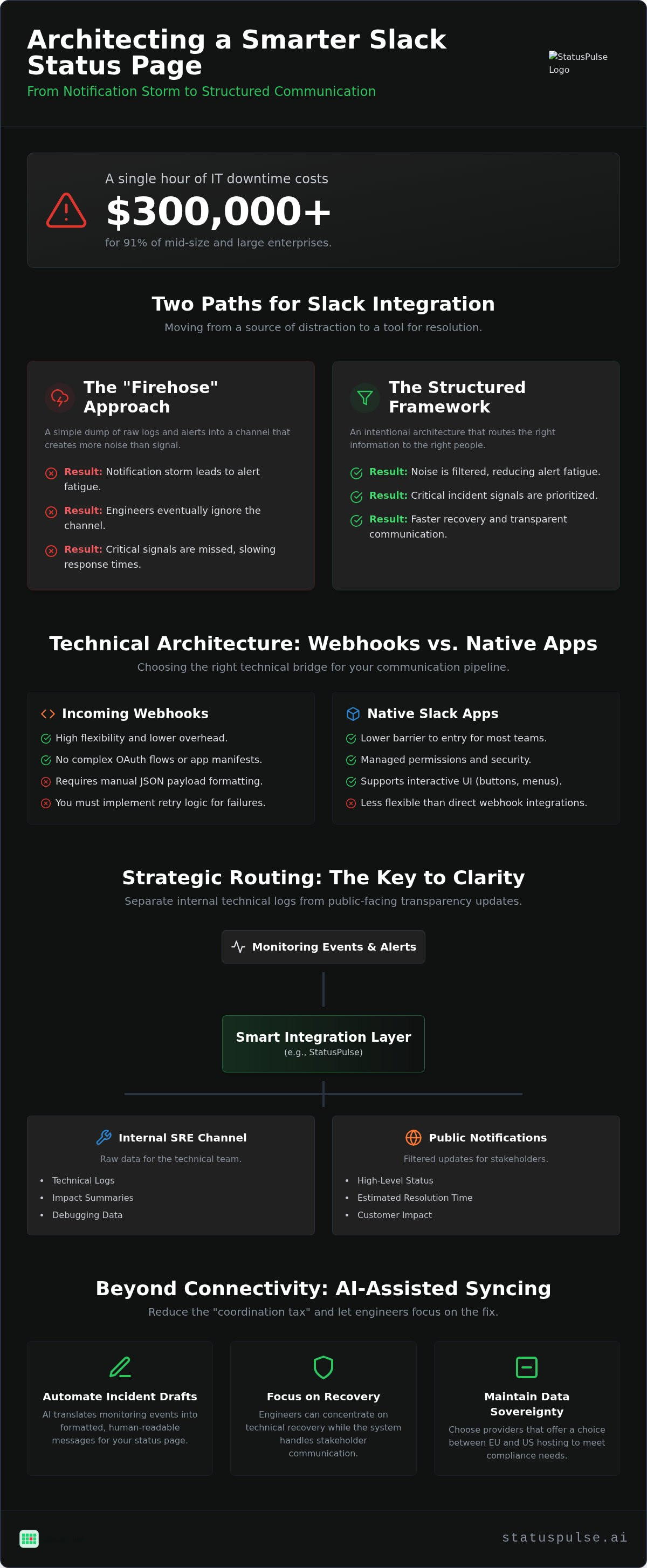
Did you know that 91% of mid-size and large enterprises report that a single hour of IT downtime costs over $300,000? When your services go dark, every second spent manually updating Slack channels is a second lost to recovery. Most teams treat their status page integration with Slack as a simple firehose. This approach usually results in a notification storm that engineers eventually ignore, leading to missed signals and slower response times.
We agree that Slack should be a tool for resolution, not a source of distraction. You shouldn't have to choose between keeping stakeholders informed and actually fixing the root cause. It's also important to remember that Slack itself can experience outages, so your communication plan must remain resilient. This guide shows you how to architect a status page integration with Slack that reduces alert fatigue and ensures transparent incident communication. We'll examine the technical trade-offs between webhook-based triggers and native apps using the latest Slack SDKs. You will also learn how to implement AI-assisted drafting to automate updates, allowing your team to focus on technical recovery while the system handles the messaging.
Key Takeaways
- Evaluate the technical trade-offs between webhooks and native apps to build a more resilient communication pipeline.
- Architect a status page integration with Slack that filters noise and prioritizes critical incident signals for your SRE team.
- Define distinct routing strategies to separate internal technical logs from public-facing transparency updates.
- Reduce the manual coordination tax by using AI-assisted tools to draft incident reports directly from monitoring data.
- Maintain data sovereignty and compliance by selecting providers that offer a choice between EU and US hosting.
The Role of Slack in Modern Incident Communication
Incident communication is a technical requirement, not a marketing luxury. For most DevOps teams, Slack acts as the central nervous system where observability data meets human decision-making. However, a basic status page integration with Slack that simply dumps raw logs into a channel often backfires. It creates notification noise that engineers eventually tune out. Effective incident management requires moving from reactive pings to a structured transparency framework that respects the user's time.
Many teams start by researching what are webhooks to build their own notification pipes. While this provides raw connectivity, it lacks the logic required to distinguish between a minor blip and a critical outage. The goal is to route the right information to the right people without overwhelming them. This shift from simple connectivity to intentional routing is what separates high-performing SRE teams from those drowning in alerts.
Why Native Slack Integrations Beat Manual Updates
Speed is the most critical metric when Mean Time to Recovery (MTTR) is on the line. Manual updates are inherently slow and prone to human error during the high-stress environment of a live outage. When an engineer is busy debugging a database lock, updating a status page is often the last thing on their mind. Automation ensures that stakeholders are notified even if the primary responder is occupied with technical recovery.
Native integrations automate this process by translating monitoring events into formatted messages. This reduces the "coordination tax" that typically slows down resolution. By utilizing tools like StatusPulse, teams can ensure that their status page remains the single source of truth without requiring constant manual intervention. It allows the team to focus on the fix while the system handles the messaging.
The Risk of Out-of-Band Communication
Slack can experience outages, which necessitates maintaining a standalone status page that remains independent of your primary chat tool. Relying solely on a third-party chat platform for emergency communication creates a single point of failure. If your primary coordination tool is down, you need an external source of truth that remains accessible to both your team and your customers.
Balancing internal coordination with public transparency is a delicate task. Internal channels need raw data and technical impact summaries to help engineers work. Public notifications, however, should focus on high-level status and estimated resolution times. A well-architected integration allows you to manage both streams from one central hub without leaking sensitive technical details to the public.
Technical Architecture: Webhooks vs. Native Slack Apps
A status page integration with Slack acts as a technical bridge that translates raw monitoring data into human-readable chat messages. When architecting this pipeline, you must choose between native Slack apps and incoming webhooks. Each method has distinct trade-offs regarding maintenance, security, and the level of interactivity they provide to your SRE team.
Native apps offer a lower barrier to entry for most organizations. They provide managed permissions and support interactive UI components like buttons or dropdown menus. These apps typically utilize Slack's modern Block Kit, allowing for more structured layouts than plain text. In contrast, incoming webhooks offer high flexibility and lower overhead. They don't require you to manage a full app manifest or complex OAuth flows. However, they force you to manually format every JSON payload and handle the retry logic yourself if the endpoint fails.
Security should be your primary concern when building these connections. You should implement payload signing to verify that incoming alerts actually originate from your status provider. If your provider supports it, IP whitelisting adds another layer of defense against spoofed notifications. For teams with strict compliance needs, using a platform like StatusPulse can simplify this by providing pre-configured, secure endpoints that respect regional data requirements.
Understanding the Slack Payload Structure
Modern Slack messages use a block-based structure rather than simple strings. This allows you to map status events to specific "Blocks" to improve readability during high-stress incidents. You can use JSON to define specific colors, such as green for operational status or red for critical outages, based on the incident's severity. A Webhook URL is a unique endpoint used to send data to Slack via an HTTP POST request. By structuring your payload with clear headers and metadata fields, you ensure that responders see the most critical data first without scrolling through unformatted logs.
Data Sovereignty and Integration Security
EU-based teams should prioritize integrations hosted in Europe to maintain data sovereignty and comply with local regulations. While Slack offers data residency in regions like Frankfurt and Paris, your integration layer must also follow suit to avoid unnecessary cross-border data transfers. Managing Slack API scopes is another critical task. You should always follow the principle of "least privilege" access, granting only the specific permissions needed to post to a channel. Finally, avoid storing sensitive incident data, such as internal server IPs or PII, in third-party integration logs. Keeping your communication logs clean is a core part of ethical incident management.
Strategic Routing: Internal Alerts vs. Public Notifications
One channel is never enough for a growing technical organization. When you send every alert to one place, your team stops reading them. A robust status page integration with Slack uses intentional routing to separate technical noise from actionable business signals. Internal responders need different information than your sales team or your customers. While managing multiple channels increases your configuration overhead, it significantly improves signal quality and prevents critical alerts from getting buried.
Internal channels should focus on raw data, technical impact summaries, and direct links to observability logs. Conversely, public or customer-facing channels require high-level status updates and an estimated time to fix (ETF). This distinction ensures that engineers have the depth they need to debug while stakeholders receive the clarity they need to manage expectations.
Designing Your Slack Channel Architecture
Your Slack environment should mirror your incident response hierarchy. We recommend starting with three distinct channel types. The #incident-war-room is for active technical coordination only. It's where engineers share code snippets and debug in real-time. The #status-updates channel should be read-only for the broader company, providing a filtered view that keeps non-technical staff informed without interrupting the fix.
For high-value clients, Slack Connect channels offer a way to automate transparency. By routing status updates directly into a shared channel with a customer, you reduce the volume of support tickets during an outage. This approach turns your status page into a proactive communication tool rather than a reactive dashboard, building trust through visibility.
Filtering Signal from Noise
Signal quality depends on strict filtering rules. Use component-based filtering to route alerts to the specific teams responsible for those services. There's no reason to ping the frontend team for a database replication lag. You should also set thresholds to limit notifications to "Major Outage" status changes, avoiding pings for routine maintenance or minor performance blips that don't impact the end-user experience.
Don't forget to close the incident loop. Every initial alert must have a corresponding "Resolved" notification. Without this, stakeholders are left wondering if the service is truly back online, leading to unnecessary manual follow-ups. Platforms like StatusPulse make this easy by allowing you to map specific incident severities and components to distinct Slack destinations from a single interface, ensuring the right people get the right message at the right time.
Implementation Checklist: Building Your Slack-Status Hub
Building a robust status page integration with Slack requires more than just clicking an install button. A successful setup ensures that your technical signals are routed with precision. Follow this five-step checklist to move from basic connectivity to a high-signal incident hub.
- Step 1: Audit your existing monitoring checks. Before connecting the pipe, verify the health of your Uptime, API, and SSL monitoring. Ensure that your checks are configured with appropriate timeout thresholds to avoid false positives.
- Step 2: Define your Slack scopes. Create dedicated channels as discussed in the strategic routing section. Use the principle of least privilege when granting API permissions to your status provider.
- Step 3: Map components to destinations. Assign specific status page components to their relevant Slack channels. Route database issues to your data engineering channel and frontend blips to the web team.
- Step 4: Configure the payload. Ensure your Slack message blocks include direct links to the incident on your status page. This reduces the time responders spend searching for context during a crisis.
- Step 5: Run a "Game Day" test. Trigger a simulated incident to verify the end-to-end flow. Confirm that the message appears in the correct channel and that all interactive elements function as expected.
Pre-Configuration Audit
Check for overlapping alerts from other error-tracking suites or on-call rotation software. Receiving three different pings for the same database timeout creates unnecessary friction. You should also verify that your status page provider supports hosting in the regions where your team operates, whether that is the EU or the US. Finally, identify a primary "Incident Commander" for Slack. This specialist will be responsible for managing the human side of the conversation while the automation handles the technical signaling.
If you need a platform that simplifies this mapping while providing a choice between EU or US hosting, start building your status hub with StatusPulse today.
Testing and Validation
Use "Test Incident" features to verify Slack delivery without alarming your entire organization. This allows you to check for mobile notification clarity. Alerts must be readable on a phone screen, as responders are often away from their desks when an outage begins. Confirm that the severity levels are visually distinct and that the "Resolved" notification successfully closes the loop. Learn more about uptime monitoring best practices to ensure your underlying checks are as reliable as your notification pipeline.
Beyond Connectivity: AI-Assisted Syncing with StatusPulse
Connectivity is just the baseline for modern incident response. A sophisticated status page integration with Slack should assist the responder, not just notify them. StatusPulse treats Slack as an active participant in the incident lifecycle rather than a passive recipient of logs. Instead of forcing you to context-switch between a browser and your chat client, the platform brings the drafting tools directly into your existing workflow.
Many industry incumbents charge per subscriber or per channel. This model often penalizes you for being transparent with your team or customers. We use a flat, transparent pricing model that avoids per-subscriber bloat. You can add as many Slack channels or subscribers as your organization requires without worrying about hidden fees or complex corporate pricing tiers.
Drafting clear status updates is difficult when you are busy debugging a production environment. AI provides a reliable starting point by summarizing technical logs into plain English. This is particularly useful for non-technical Slack channels where stakeholders need clarity over raw metrics. Understanding The Architecture of Incident Communication Transparency helps you build a more resilient, trust-based relationship with your users.
The system analyzes the monitoring signal and suggests a summary that describes the impact and current status. It removes the "blank page" problem that often delays communications during the first ten minutes of an outage. By automating the first draft, you ensure that your status page and Slack channels remain in sync without sacrificing your focus on the technical recovery.
The StatusPulse Advantage
Data sovereignty is a core virtue, not a marketing afterthought. We offer both EU and US hosting options to meet your specific regulatory and privacy requirements. This choice allows you to keep your incident data within your preferred jurisdiction, supporting compliance with local standards. By combining uptime monitoring, status pages, and AI-driven Slack automation into one unified platform, we eliminate the complexity of managing multiple disjointed tools.
For technical teams who value precision, ethical pricing, and straightforward software, StatusPulse provides a grounded alternative to the complex, bloated incumbents. We focus on solving the problem effectively rather than sounding like a traditional enterprise provider. You get a reliable system that respects your time and your budget while keeping your stakeholders informed through every incident.
Optimizing Your Incident Signal
Effective incident communication succeeds when it respects the responder's time. A well-architected status page integration with Slack moves your team away from manual updates and toward automated transparency. By prioritizing signal over noise and utilizing AI to assist with drafting, you ensure that stakeholders stay informed while your engineers remain focused on recovery. Remember that while Slack is a central hub, it isn't foolproof. Maintaining a standalone status page is the only way to preserve a source of truth during primary communication failures.
If you are tired of complex pricing models and corporate bloat, it's time for a more ethical approach. You can build a more transparent incident process with StatusPulse today. Our platform provides both EU and US hosting options to support your specific data sovereignty needs. You get AI-powered incident drafting and flat pricing with no per-subscriber fees. Start small by auditing your current monitoring checks and let automation handle the coordination tax. Your team and your customers will appreciate the clarity.
Frequently Asked Questions
How do I connect my status page to Slack?
You connect by using a native Slack app or an incoming webhook. In most platforms, you navigate to the integration settings, authorize the app with specific Slack scopes, and select your target channel. Native apps are generally preferred for their interactive components. This status page integration with Slack ensures that monitoring events trigger automated messages without manual input. It's a straightforward process that takes minutes once permissions are granted.
Can I send status updates to multiple Slack channels simultaneously?
Yes, you can route updates to multiple channels by configuring distinct integration rules for each destination. This allows you to send raw technical logs to a private #incident-war-room while simultaneously posting high-level summaries to a public #status-updates channel. Effective routing prevents non-technical staff from being overwhelmed by technical jargon. It also ensures that the right teams receive the specific information they need to resolve the outage quickly.
Is the Slack integration secure for sensitive incident data?
Security depends on your implementation and the provider's architecture. You should use payload signing and IP whitelisting to verify that alerts are legitimate. It's also critical to follow the principle of least privilege by limiting the API scopes granted to the integration. Avoid posting internal server names or customer PII in Slack channels. StatusPulse supports EU-based hosting, which helps teams maintain data sovereignty and comply with strict regional privacy standards.
What is the difference between a Slack webhook and a native app integration?
Webhooks are simple HTTP POST endpoints that require you to manually format JSON payloads using Slack's Block Kit. They offer high flexibility but require more maintenance. Native apps are managed integrations that provide a user-friendly setup and support interactive UI elements like buttons. While webhooks are lightweight, native apps are often more secure because they use OAuth and managed permissions. Choosing between them depends on your team's need for customization versus ease of use.
Can I automate Slack updates using AI?
You can automate the drafting of updates using AI-powered tools. In StatusPulse, the AI analyzes monitoring data to propose a summary in plain English. This removes the "blank page" problem during high-stress outages. However, we keep a human in the loop to review and hit "Post" before the message goes live. This ensures that your status page integration with Slack remains accurate while significantly reducing the time spent on manual coordination.
How do I prevent Slack alert fatigue during a major outage?
Prevent fatigue by implementing strict filtering rules and notification thresholds. You should only trigger Slack alerts for "Major Outage" status changes rather than every minor performance blips. Use component-based routing to ensure that only the relevant teams are pinged. Additionally, always send a "Resolved" notification to close the incident loop. This clarity helps responders ignore the noise and focus only on the signals that require immediate technical intervention.
Does StatusPulse support Slack Connect for customer notifications?
Yes, the integration can post to Slack Connect channels to keep high-value clients informed. By routing status updates directly into shared channels, you reduce the volume of support tickets during downtime. This proactive approach builds trust with customers by providing transparency where they already work. It turns your status page into a collaborative tool. You can manage these external notifications from the same central hub used for your internal technical alerts.
What happens to Slack notifications if the status page provider is down?
If your status page provider experiences an outage, notifications will cease to flow. This is why we emphasize that Slack should not be your only source of truth. It's also possible for Slack itself to go down, which is why a standalone status page is a technical requirement. You should always have a fallback communication plan. For some highly regulated industries, on-premise solutions might be required to ensure total control over the communication pipeline.


