

The database is timing out, the Slack alerts are relentless, and your support team is drowning in identical tickets. Instead of investigating the root cause, you are stuck manually drafting a status update to keep users informed. This manual toil is a distraction you cannot afford during a critical incident. By automating status page updates, you can eliminate this bottleneck and ensure your communication remains as fast as your monitoring alerts.
Most SREs agree that while transparency is vital, the process of communicating it should not compete with the work of restoration. We believe that a status page should serve as a reliable assistant, not another chore on your incident checklist. This guide explains how to use webhooks, APIs, and human-in-the-loop AI to lower your Mean Time to Communicate (MTTC) and reduce support volume. We will examine the technical architecture required to build a reliable monitoring pipeline that keeps your users in the loop while ensuring you maintain final editorial control.
Key Takeaways
- Manual incident communication often fails during major outages when engineering focus is split between restoration and reporting.
- Effective automation requires a logical Monitoring-Trigger-Action loop using either webhooks or REST APIs to synchronize data sources.
- Learn why automating status page updates requires a human-in-the-loop model to prevent generic robotic updates and false positives.
- Reduce implementation risk by piloting your first automated component on non-critical services before scaling across your infrastructure.
- Maintain data sovereignty by selecting a provider that offers a choice between EU and US hosting locations for your public status page.
The Engineering Cost of Manual Incident Communication
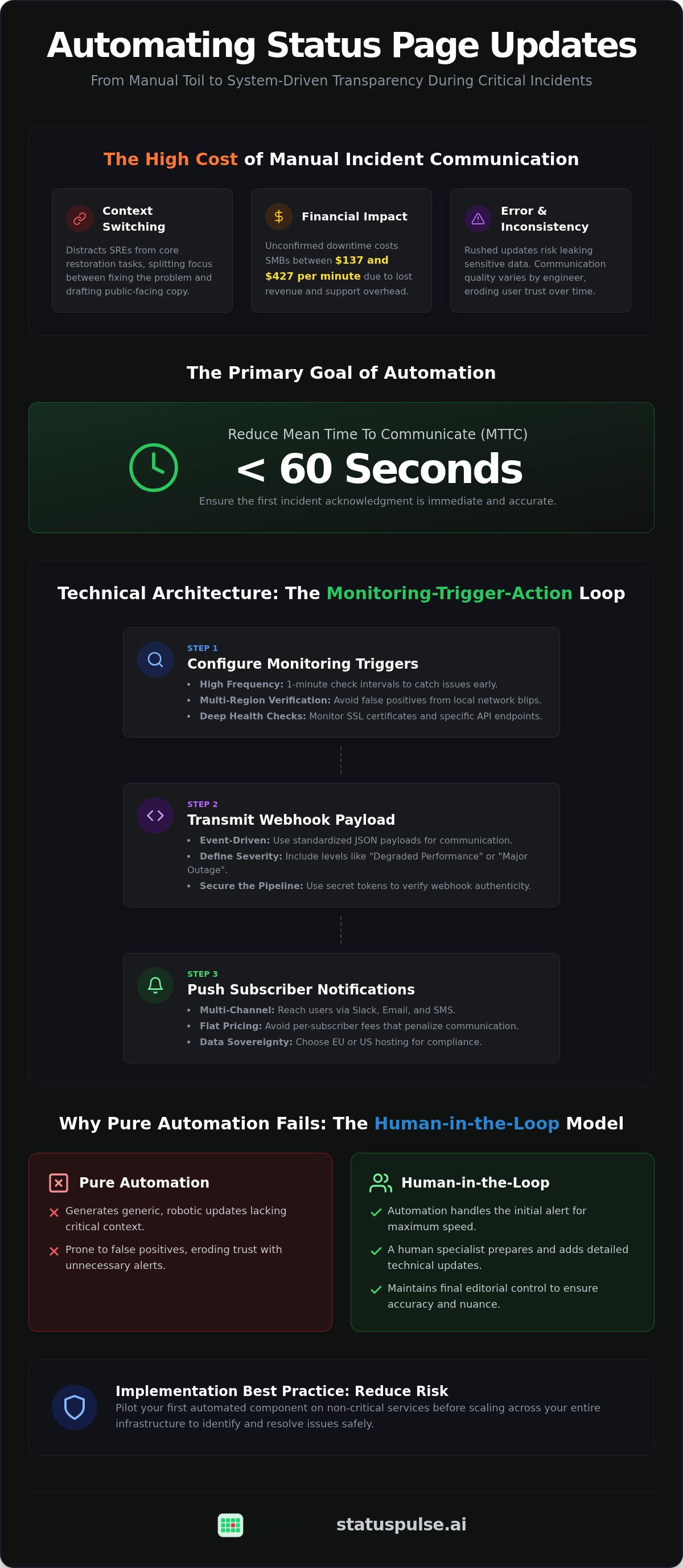
Status page automation is the programmatic synchronization of monitoring data with public-facing communication. It moves status reporting from a manual task to a system-driven output. In a standard incident management process, communication is often the weakest link. When a major outage occurs, engineers naturally prioritize system restoration over documentation. This creates a "Fire Drill" problem where the status page remains green while the service is actually down.
Users don't tolerate silence well. Every minute of unconfirmed downtime correlates with a spike in support tickets. Research indicates that unplanned downtime costs small to medium businesses between $137 and $427 per minute. If you don't acknowledge the issue quickly, your support team will be overwhelmed by repetitive inquiries. The challenge lies in balancing the speed of automating status page updates with the technical nuance only a human can provide.
Why Manual Updates Fail Under Pressure
Context switching is a primary cause of failure. An SRE should be analyzing logs or scaling resources, not drafting copy for a public audience. When engineers are forced to rush updates, human error becomes a significant risk. You might accidentally leak internal hostnames or sensitive data in a frantic Slack-to-status-page copy-paste. Consistency also suffers across different shifts. One engineer might provide deep technical context, while another only posts a vague "Investigating" message. This inconsistency erodes user trust over time.
Defining Successful Automation Goals
The primary goal of automating status page updates is reducing the Mean Time to Communicate (MTTC) to under 60 seconds. This doesn't mean removing the human from the loop entirely. Instead, it means using automation to handle the initial acknowledgment and component status changes while a specialist prepares more detailed technical updates. This approach ensures that the first alert is immediate and accurate.
Successful automation also addresses regional compliance. For teams operating in Europe, ensuring data sovereignty is a core technical requirement. Using a platform like StatusPulse allows you to choose EU-based hosting for your status page and monitoring data. This ensures your incident logs remain within your preferred jurisdiction while your automated pipeline continues to function. By setting clear goals for speed and consistency, you can transform your status page from a manual chore into a reliable technical asset.
Technical Architecture for Status Page Automation
The architecture of automating status page updates relies on a reliable Monitoring-Trigger-Action loop. This system ensures that data flows directly from your monitoring probes to your subscribers without manual intervention. A critical but often overlooked aspect of this architecture is data residency. While many providers default to US hosting, choosing a platform that offers EU-based hosting can simplify your compliance with regional data sovereignty standards. This choice ensures that your incident data remains within your preferred jurisdiction.
Step 1: Configuring Monitoring Triggers
Webhooks are the standard for automating status page updates because they are event-driven. Your monitoring tool should send a standardized JSON payload to your status page ingest endpoint. This payload must include specific incident severity levels, such as "Degraded Performance" or "Major Outage." To secure this pipeline, use secret tokens or headers to verify that the incoming webhook is genuinely from your monitoring provider and not a malicious third party.
Step 3: Subscriber Notification Pipelines
Once the status page receives an update, it must push notifications to your users via Slack, email, or SMS. When designing your incident response communications, focus on creating clear feedback loops for stakeholders. Many legacy providers charge per-subscriber fees, which can quickly make automation prohibitively expensive as your user base grows. We prefer a flat pricing model that encourages transparency rather than punishing you for communicating with your customers.
For a technical deep dive into these systems, read our article on The Architecture of Incident Communication Transparency. If you're looking to simplify this stack, StatusPulse integrates monitoring and status pages into a single, unified platform.
Human-in-the-Loop: Why Pure Automation Often Fails
Pure automation is often viewed as a binary choice: either you do everything manually or you let the machines take over entirely. This is a mistake. While automating status page updates eliminates manual toil, 100% automation frequently results in generic, unhelpful messages. Users tend to ignore robotic alerts that provide no context. Worse, a sensitive trigger might turn a minor network blip into a global "Major Outage" notification, causing unnecessary panic among your stakeholders.
According to research from Carnegie Mellon University on effective incident communications, reputation management depends on technical accuracy and clear messaging. A middle path is required. We advocate for a human-in-the-loop model where technology assists the specialist rather than replacing them. This approach ensures that your communication remains technically precise without the delays of manual drafting.
AI-Powered Incident Management
AI excels at summarizing high-velocity data. When an incident occurs, modern tools can ingest monitoring logs and draft a readable status update. Instead of a superlative-heavy "We are experiencing a massive failure," the AI drafts a factual statement: "Our API is currently returning 404 errors for 12% of requests in the EU-West region." This "show, don't claim" methodology provides immediate value to your users. It maintains a professional, calm tone that reduces the stress of technical disruptions.
The Approval Workflow
The most effective way to implement automating status page updates for high-priority services is through a "Draft-only" trigger. When a component fails, the system drafts the update and notifies your SRE team. An engineer reviews the copy, adds any necessary internal context, and publishes it. To ensure speed, many teams use a 5-minute rule: if a human doesn't intervene within five minutes, the AI-drafted update goes live automatically. This creates a safety net for your communication pipeline.
This balance is particularly important for complex systems. For a deeper look at maintaining these standards, see our guide on API Monitoring: The Developer’s Guide to High Availability in 2026. At StatusPulse, we build our AI incident management to function as an assistant that respects this human-centric workflow.
Implementation Guide: Automating Your First Component
Don't attempt to automate your entire infrastructure on day one. Start by selecting a non-critical component for your pilot, such as an internal tool or a specific microservice with low customer visibility. This allows you to calibrate your thresholds and automating status page updates without the risk of triggering a global false alarm. Successful implementation requires a disciplined approach to mapping dependencies and verifying the failure path before going live.
Checklist: Pre-Automation Requirements
Before you connect your monitoring probes to your public status page, ensure your underlying data is reliable. An automated system is only as good as the triggers that drive it. Use this checklist to verify your readiness:
- SSL Certificate Monitoring: Verify that your automation includes certificate expiry checks to prevent avoidable downtime.
- Dependency Mapping: Explicitly define how component failures relate; if your primary database is down, your API status should automatically reflect a "Major Outage."
- Notification Templates: Pre-draft technical responses for various scenarios to maintain a calm, professional tone during disruptions.
Sample Workflow: API Latency Trigger
Latency is often the first sign of a pending outage. You can automate the transition from "Operational" to "Degraded Performance" by setting a specific threshold in your monitoring configuration. For example, if your API response time exceeds 500ms over three consecutive checks, the system should trigger an update. Once the latency returns to a baseline of 100ms for five minutes, the status can revert to "Operational."
{
  "monitor_id": "api_v1_latency",
  "threshold_ms": 500,
  "consecutive_failures": 3,
  "action": {
"component_id": "core_api",
"status": "degraded_performance",
"message": "We are observing increased latency in the EU region."
  }
}
Testing this failure path is essential. Simulate a downtime event in your staging environment to verify that the webhook fires correctly and the status page updates as expected. After each incident, establish a post-mortem process for the automation itself. Did the update trigger too late? Was the message too vague? Use these insights to refine your logic. If you want to skip the complex plumbing of connecting separate tools, StatusPulse provides an all-in-one platform that unifies monitoring and automating status page updates in a single dashboard.
StatusPulse: Built for Automated Transparency
StatusPulse was built to solve the fragmentation problem in incident management. Most teams currently juggle separate uptime monitoring tools, status page providers, and manual notification scripts. This complexity increases the risk of communication failures during an outage. By unifying uptime monitoring and public status pages into a single platform, we eliminate the need for complex middleware when automating status page updates. This native integration ensures that when a probe fails, the communication pipeline is already primed to respond.
Our AI Incident Management follows the human-in-the-loop model. It functions as a technical assistant that ingests monitoring data to draft precise updates for your review. This approach prevents the generic "robotic" updates that users often ignore. For teams with strict regulatory requirements, we provide a choice between EU or US hosting. This ensures your incident logs and subscriber data remain compliant with regional data sovereignty standards without defaulting to a single geographic region.
Why We Built StatusPulse Differently
We chose a different path than industry incumbents. Traditional enterprise providers often use complex pricing models that penalize growth. StatusPulse uses a flat-fee model with no per-subscriber charges. We prioritize technical precision over corporate bloat. Our tool is built by specialists who understand that reliability is more important than flashy marketing. We believe transparency should be a standard feature, not a luxury add-on. [VERIFY: StatusPulse exact entry price for 2026].
Getting Started with Automated Updates
Setting up your first automated status page takes less than five minutes. You begin by configuring your public status page and selecting your preferred hosting region for data sovereignty. From there, you can connect your API probes or uptime monitors directly to specific components. The system handles the logic of automating status page updates based on the thresholds you define in your pilot phase. You maintain full control over the final output while the platform manages the technical heavy lifting.
Start your journey toward reliable, transparent communication today. Start your 14-day trial of StatusPulse and replace manual toil with a reliable monitoring pipeline.
Scaling Your Incident Communication Strategy
Transitioning from manual updates to a system-driven communication pipeline is a necessity for modern technical teams. By automating status page updates, you reduce the engineering cost of downtime and prevent support ticket spikes. You've learned how to build a reliable Monitoring-Trigger-Action loop while keeping a human in the loop for technical nuance. This balance ensures your users receive immediate, accurate information without overwhelming your SREs.
Choosing a platform that supports your technical requirements is the final step. Whether you need EU or US hosting for data sovereignty or AI-driven drafting to speed up your response times, the focus remains on technical precision. Our flat monthly pricing ensures that transparency remains accessible as your user base grows. It's time to replace manual copy-pasting with a reliable automation pipeline.
Automate your status page with StatusPulse to start building a more transparent infrastructure. Reliable communication is within reach.
Frequently Asked Questions
Is it safe to fully automate status page updates?
While full automation is technically possible, a human-in-the-loop model is safer for high-severity incidents. Full automation works well for scheduled maintenance or non-critical components. For major outages, pure automation risks sending generic or alarming messages without context. We recommend a draft-first approach where the system prepares the technical update but a specialist provides the final approval to ensure accuracy and technical nuance.
How does AI help in automating incident communication?
AI assists by summarizing high-velocity monitoring logs into human-readable updates. Instead of manual drafting during a crisis, the system identifies the specific failure, such as a localized API latency spike, and generates a factual status report. This reduces the cognitive load on SREs. It ensures that automating status page updates remains technically precise while maintaining a calm, professional tone that builds user trust.
What is the difference between webhooks and APIs for status pages?
Webhooks are event-driven, pushing data from your monitoring tool to your status page the moment a failure occurs. This is more efficient for real-time alerts. APIs require your status page or a middleman script to poll your monitoring data at set intervals. While APIs offer more granular control for complex integrations, webhooks are the standard for automating status page updates due to their low latency and reduced overhead.
Will automating updates reduce the number of support tickets?
Implement multi-region verification and debouncing thresholds. A single failed probe should not trigger a public alert. Instead, configure your system to require consecutive failures from at least two different geographic regions before updating the component status. This technical safeguard ensures that local network blips or transient issues don't cause unnecessary panic. Testing these paths in a staging environment is essential for refining your automation logic.
Does StatusPulse support EU-based data hosting for GDPR?
StatusPulse provides a choice between EU and US hosting locations. This allows technical teams to maintain data sovereignty by keeping incident logs and subscriber data within their preferred jurisdiction. While GDPR does not strictly mandate physical storage in the EU, hosting within the European Economic Area (EEA) is the simplest path to compliance. We prioritize these ethical standards to help you meet regulatory requirements without complex legal workarounds.
Can I use StatusPulse with my existing monitoring tools via API?
StatusPulse is designed to integrate with your existing stack via a robust REST API and incoming webhooks. You can connect third-party monitoring probes directly to our platform to synchronize component statuses automatically. This flexibility allows you to maintain your current technical workflow while gaining the benefits of AI-driven incident drafting and flat-fee pricing. It is a focused alternative for teams tired of the corporate bloat found in legacy platforms.


