

A single API timeout happens at 2:00 PM. By 2:05 PM, your support queue has fifty new tickets, all asking the same question. Your engineers are busy debugging, but the manual overhead of updating users and triaging duplicates is slowing them down. This is the "ticket storm" every DevOps team fears. Implementing a Jira Service Desk status page integration is the most direct way to stop these storms before they start.
You shouldn't have to choose between keeping users informed and actually fixing the problem. We agree that legacy status tools often feel like an expensive burden, especially when they charge per-subscriber fees that punish you for being transparent. This article shows you how to automate your incident communication and build a lean response workflow that respects your time and your budget.
We'll walk through the configuration steps to connect your status page to Jira, explore how to use AI for faster incident drafting, and compare hosting options in the EU and US. You will learn how to deflect tickets effectively while maintaining a professional, reliable presence for your customers without the corporate bloat of traditional enterprise software.
Key Takeaways
- Understand how a Jira Service Desk status page integration creates a direct link between system health and your help center to deflect redundant support tickets.
- Identify why manual incident updates fail during outages and how to automate the sync between internal Jira tickets and public-facing communication.
- Compare integration models to avoid the "subscriber tax" often found in legacy platforms that charge per-user for status updates.
- Learn the technical steps for a lean implementation, including mapping Jira components and managing API credentials using the principle of least privilege.
- Use AI-driven drafting to summarize complex technical Jira issues into clear, human-readable status updates for faster incident response.
The Architecture of Jira Service Desk Status Page Integration
A Jira Service Desk status page integration functions as a technical bridge between incident detection and customer support. It connects your monitoring data directly to your customer-facing help center. The primary goal is ticket deflection. By showing real-time service health on your portal, you provide immediate answers to users who would otherwise open a support request. This architecture relies on two-way REST API communication. It ensures that when an incident is acknowledged in Jira, the public status reflects that state accurately.
Within the discipline of IT Service Management (ITSM), this integration closes the loop between engineering teams and end users. It moves your support model from reactive to proactive. Instead of waiting for the first fifty tickets to arrive, you inform the user before they ever click the "Create Ticket" button. This reduces the cognitive load on your agents and keeps your queue manageable during outages.
How Webhooks Trigger Status Updates
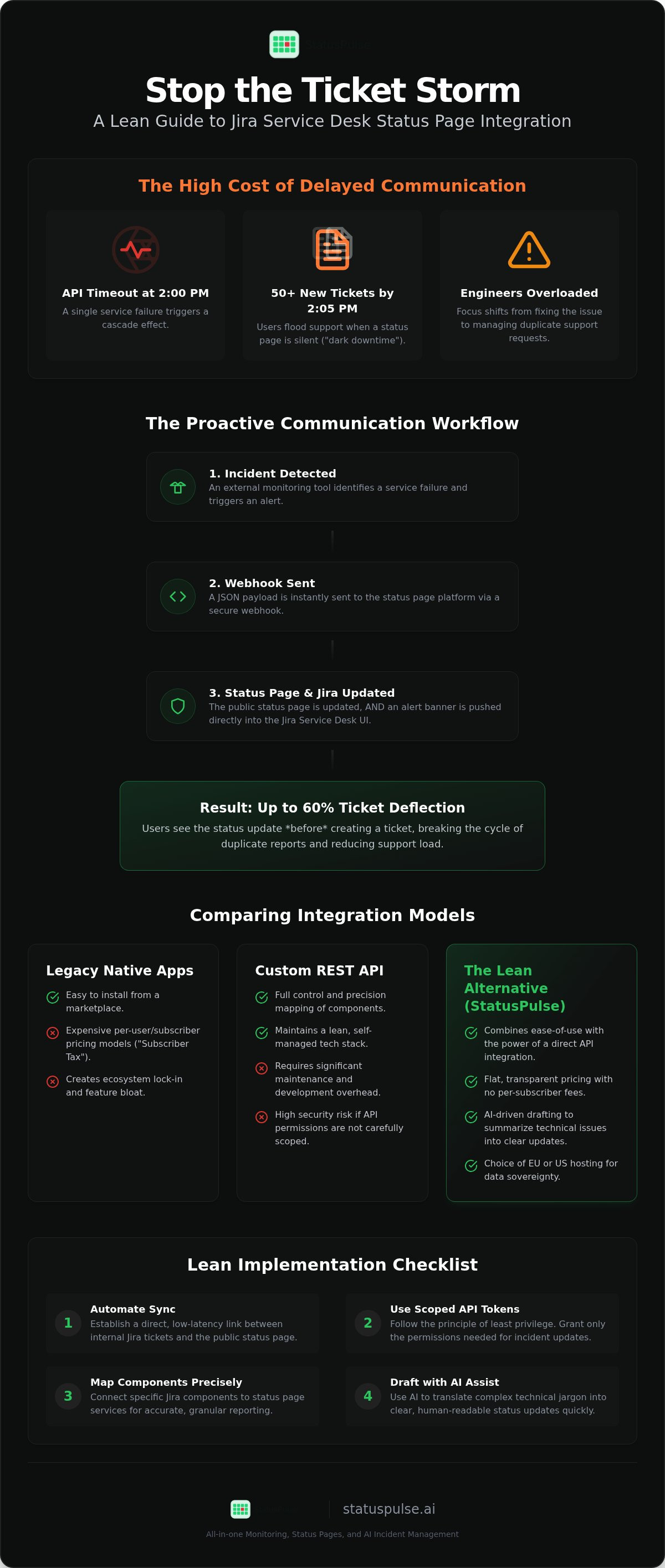
Webhooks are the backbone of a responsive push model. When a monitoring tool identifies a service failure, it sends a JSON payload to your status page. The status page then acts as a relay. It pushes a banner or alert directly into the Jira Service Desk UI. This process must be fast. High latency in this pipeline leads to ticket storms. If a user lands on your portal before the webhook completes its cycle, they will likely submit a duplicate report. A lean integration minimizes these delays by avoiding unnecessary middleware. It prioritizes a direct path from the monitoring source to the user's screen.
REST API vs. Native Apps
Deciding how to implement your Jira Service Desk status page integration often comes down to a choice between flexibility and convenience. Native marketplace apps are easy to install. However, they often come with ecosystem lock-in and per-user pricing. They can also introduce bloat by including features your team doesn't need. Legacy tools often force you into complex setups that serve their sales goals more than your technical needs.
Custom REST API integrations offer more control. They allow you to map specific Jira components to status page services with precision. This approach requires more maintenance but keeps your stack lean. Security is a critical factor here. Granting API permissions to Jira requires a careful approach. You should use scoped tokens to limit access to only what is necessary for incident updates. This follows the principle of least privilege and protects your internal data.
StatusPulse provides a middle ground for teams who value technical substance over corporate bloat. It offers a straightforward integration that respects your budget and your time. By focusing on reliability and transparency, it helps you maintain trust with your users without the overhead of traditional enterprise software.
Why Most Jira Teams Struggle with Ticket Storms
Manual updates are too slow. When an outage occurs, the clock is against you. Every second without a public update is a second where users flood your help desk. This is the root cause of ticket storms. Inconsistent messaging between internal Jira tickets and public status pages makes it worse. It confuses users and frustrates agents. If your internal team sees one thing while the public sees another, trust evaporates quickly.
"Dark" downtime is toxic for customer trust. If a service is down and your status page says "All Systems Operational", users feel ignored. They assume you don't know about the problem. This silence forces them to open a ticket just to get your attention. You can find more on the ethics of visibility in our guide on The Architecture of Incident Communication Transparency. Transparency isn't just about being honest. It's a technical strategy to manage load.
The Cost of Delayed Communication
Support engineers bear the brunt of outages. They face a wall of repetitive queries while technical teams are silent. A 5-minute delay in status updates can lead to hundreds of duplicate reports. This creates an artificial backlog that persists long after the incident is resolved. Real-time sync between your infrastructure and your portal is the only way to break this cycle. Industry benchmarks suggest that proactive communication can reduce initial ticket volume by up to 60%. This follows principles found in the National Cyber Incident Response Plan, which emphasizes coordinated communication to manage stakeholder expectations during a crisis. Without a Jira Service Desk status page integration, your team is essentially fighting the same fire on two different fronts.
Fragmented Tooling and Incident Fatigue
On-call engineers suffer from tool fatigue. They must update Jira, notify Slack, and then remember to update a status page. This "alt-tab" response model is prone to error. Automation removes this cognitive load. A proper Jira Service Desk status page integration ensures that a status change in Jira propagates everywhere. It creates a single source of truth. You don't need three different tools to say the same thing. More importantly, it addresses the human factor. Technical teams are often better at debugging than drafting public-facing copy under pressure. An integrated system can pull data from Jira to help draft these updates, ensuring the message is accurate and consistent across all channels. If you are tired of manual overhead, StatusPulse offers a way to automate these updates without the corporate bloat of legacy platforms.
Comparing Integration Models: Incumbents vs. Lean Alternatives
Choosing a Jira Service Desk status page integration often feels like a default decision to stay within the Atlassian ecosystem. Native tools offer deep integration but frequently carry corporate bloat. This bloat isn't just in the user interface; it's in the pricing model. Legacy incumbents often charge based on the number of subscribers you have. This creates a financial penalty for being transparent. If your user base grows, your communication costs spike even if your incident volume stays the same.
Effective incident response is about reducing customer effort. When a service fails, the user wants immediate clarity without obstacles. A lean alternative like StatusPulse focuses on this core utility. It avoids the complexity of enterprise feature sets that most DevOps teams never touch. Instead, it provides a stable, principled platform for incident updates that doesn't punish you for scaling your audience.
| Feature | Atlassian Statuspage | StatusPulse |
|---|---|---|
| Entry Price (2026) | [VERIFY: Atlassian Statuspage entry price for 2026] | Flat-rate pricing |
| Subscriber Fees | Tiered limits/Per-subscriber costs | No per-subscriber fees |
| Data Hosting | Regional pinning on select plans | Choice of EU or US hosting |
Pricing Transparency and Scalability
Hidden costs in status tools often hide behind per-subscriber notification fees. If you have 5,000 customers, a legacy tool might force you into a high-tier plan regardless of how often you use it. We believe this model is unethical for growing SaaS teams. Flat-rate models provide the predictability your CFO needs. You don't have to worry about a "subscriber tax" when your product goes viral. [VERIFY: Atlassian Statuspage entry price for 2026] remains the baseline for the incumbent model, but for teams prioritizing technical substance over ecosystem lock-in, the lean approach is more sustainable.
Data Sovereignty: EU vs. US Hosting
Regional hosting is no longer a luxury. It's a requirement for GDPR and strict regulatory compliance. While Atlassian provides data residency for its core products on higher-tier plans, this doesn't always extend to Marketplace apps. Centralizing all your data within a single global provider creates a single point of failure for your compliance strategy. StatusPulse allows you to choose between EU or US data centers at setup. This ensures your status data stays within your required jurisdiction. It provides a regional signature that defines your identity in a globalized market while maintaining high performance and privacy standards.
How to Implement a Lean Jira Status Integration in 2026
Setting up a Jira Service Desk status page integration doesn't require the complex multi-step guides often associated with enterprise Atlassian accounts. A lean implementation focuses on three core pillars: service mapping, secure authentication, and automated drafting. You want a system that works as an assistant, requiring only a final human action to go live. This approach avoids the hours of configuration typical of bloated legacy tools.
Mapping Components for Accuracy
Start by aligning your Jira Service Desk "Services" with your status page "Components." Not every internal microservice needs a public status. Over-reporting minor internal issues creates noise and erodes trust. Focus on high-level services that customers recognize. For example, map "Checkout API" in Jira to "Payment Processing" on your status page. Use clear, non-technical names so customers understand the impact immediately. This prevents the trap of technical jargon that confuses the very people you're trying to help.
Automating the Update Workflow
Once your services are mapped, generate API credentials using the principle of least privilege. Your status page only needs access to specific incident data, not your entire Jira instance. Configure your status page to listen for specific triggers, such as an incident moving to "In Progress." This is where AI incident management adds value. It can draft incident summaries directly from Jira ticket descriptions, stripping out internal notes and technical debt.
The goal is a lean incident response. Your on-call engineer shouldn't have to write public copy from scratch during a crisis. Instead, they review an AI-drafted summary and click one button to publish. This maintains human agency while moving at the speed of the outage. For more on maintaining system health before an incident occurs, see our API Monitoring: The Developer’s Guide.
Before a real outage hits, test your Jira Service Desk status page integration with a scheduled "Maintenance" event. This verifies the API handshake and ensures the UI banners appear correctly on your help center. If you want a straightforward setup that prioritizes precision over corporate bloat, you can get started with StatusPulse today. It’s built for specialists who value their time and their users' trust.
StatusPulse: A Principled Approach to Jira Communication
StatusPulse provides a Jira Service Desk status page integration that prioritizes technical credibility over sales flash. We designed the platform to be a fair alternative for teams tired of complex enterprise models and corporate bloat. It operates as a streamlined assistant to your incident response team. By removing the unnecessary layers of traditional ITSM software, we allow your engineers to focus on resolution rather than navigating a heavy UI. This grounded approach ensures that your communication remains reliable when your services are not.
AI-Assisted Incident Management
During an outage, writing public copy is the last thing on an engineer's mind. Our AI Incident Management drafts these updates in seconds based on your Jira activity. It summarizes technical logs and ticket descriptions into human-readable language. This ensures your messaging remains professional even when stress levels are high. It's about reducing the cognitive load on your on-call rotation. You maintain human agency because the AI provides a draft that requires your final approval before it goes live to your users. This workflow keeps your communication honest and consistent across every channel.
Reliability and Performance
Our platform combines public status pages with robust uptime monitoring. We perform checks at 1-minute intervals across a global network of nodes. This ensures that your status page accurately reflects real-world latency and availability for your users. You can also monitor SSL certificates and APIs within the same dashboard to catch potential failures before they trigger a ticket storm. This all-in-one approach is explored further in our Website Uptime Monitoring Tools: A Developer’s Guide. By catching issues early, you reduce the pressure on your help desk and maintain a stable environment for your customers.
Data sovereignty is a primary signature of our identity. We don't default every customer to a single US-based cloud. You choose between EU or US hosting to align with your specific privacy and regulatory requirements. This transparency extends to our pricing. We offer flat-rate plans without per-subscriber surprises or hidden fees. It's a straightforward model that values integrity and technical precision. If you are looking for a Jira Service Desk status page integration that respects your budget and your data, StatusPulse is built for your team.
Scaling Incident Communication Without Complexity
Managing a high-traffic support portal requires more than just a place to post updates. It requires a Jira Service Desk status page integration that removes friction for both your users and your engineers. By automating the sync between your internal tickets and public health reports, you stop the initial wave of duplicate tickets. This allows your technical team to focus on the root cause instead of administrative triage.
You don't need a bloated enterprise suite to achieve this. A lean, principled platform offers the same reliability with flat, transparent pricing. Whether you require EU or US hosting for data sovereignty, the focus remains on technical precision. AI-powered incident drafting ensures your public messaging is clear and accurate in seconds. This keeps your communication honest without the per-subscriber fees of legacy incumbents.
Build a more transparent status page with StatusPulse. It’s time to move away from complex pricing models and fragmented tools. Start building a more resilient support workflow today.
Frequently Asked Questions
How does Jira Service Desk status page integration reduce support tickets?
A Jira Service Desk status page integration reduces ticket volume by providing proactive visibility on your help center portal. When users land on your request page, they see a real-time banner or status indicator explaining the current outage. This immediate transparency stops the initial wave of duplicate reports. Instead of opening a new ticket to ask if a service is down, users see that your team is already investigating the issue.
Can I integrate a third-party status page with Jira Cloud?
You can integrate third-party status pages with Jira Cloud using REST APIs or dedicated connectors. This approach allows you to maintain a lean stack while keeping your public status in sync with internal Jira tickets. StatusPulse uses a secure API-driven model to listen for status changes in your Jira projects. This ensures that when an engineer moves a ticket to "In Progress," your public page reflects that update without requiring manual data entry.
What is the difference between native and third-party Jira integrations?
Native integrations like Atlassian Statuspage offer deep ecosystem lock-in but often come with complex pricing models and per-subscriber fees. Third-party integrations focus on technical substance and cost transparency. They provide more flexibility in how you map components and often allow for regional hosting choices that native tools may restrict to enterprise tiers. Choosing a third-party tool helps you avoid the corporate bloat while maintaining a reliable connection to your Jira Service Desk.
Is StatusPulse GDPR compliant for EU-based teams?
StatusPulse is designed for EU-based teams with a strong focus on data sovereignty and GDPR compliance. We offer a choice between EU and US hosting at the time of setup, ensuring your data residency requirements are met. Unlike global providers that centralize all data in one region, our model allows you to keep status information within your required jurisdiction. This regional signature is a core part of our commitment to privacy and ethical data management.
Do I need to pay for every subscriber on my status page?
Many legacy incumbents charge per-subscriber fees, which creates a financial penalty as your user base grows. StatusPulse uses a flat, transparent pricing model that does not charge for individual subscribers. This approach is more ethical for growing SaaS teams who want to be transparent without worrying about a "subscriber tax" during an outage. You can notify your entire audience without facing unexpected bill increases or complex tier upgrades.
Can AI really help draft incident updates from Jira tickets?
AI incident management helps by summarizing technical Jira ticket descriptions into human-readable status updates. It acts as a technical assistant that drafts copy in seconds, ensuring tone consistency across your communication channels. This reduces the cognitive load on on-call engineers during high-stress incidents. The system requires a final human action for approval, ensuring you maintain agency over what is published while benefiting from the speed of automated drafting.
What happens if the status page itself goes down?
A reliable status page must be architecturally decoupled from your primary infrastructure. StatusPulse utilizes global monitoring nodes to ensure that even if your main services fail, your status page remains available to communicate with users. We maintain high availability through a distributed network, preventing your communication channel from becoming a single point of failure. This redundancy is critical for maintaining trust when your internal systems are facing technical disruptions or architectural failures.
How long does it take to set up the Jira integration with StatusPulse?
Setting up a Jira Service Desk status page integration with StatusPulse typically takes less than fifteen minutes. The process involves generating a secure API token in Jira and mapping your internal services to your status page components. We prioritize a straightforward setup that avoids the complex configuration cycles found in traditional enterprise software. Once the initial handshake is complete, your automated ticket deflection workflow is live and ready to handle your next incident.


