

A PagerDuty alternative for status pages is a specialized communication platform that integrates with monitoring tools to provide uptime visibility without the per-subscriber fees common in enterprise software. These alternatives focus on architectural decoupling and AI-assisted drafting to simplify incident updates and support regional data sovereignty.
Why are you paying a "transparency tax" every time a new customer wants to know if your system is down? Many engineering teams are searching for a PagerDuty alternative for status pages because enterprise tools often penalize growth with unpredictable pricing. This model feels out of step with modern DevOps culture, where transparency is a core requirement, not an expensive add-on.
We know the pressure of manual incident updates during a P1 outage. You should focus on restoration, not wrestling with a separate UI to draft reports while your MTTR climbs. This article explains how to move toward monitoring-native workflows that use AI to handle the heavy lifting of communication. We examine the hidden costs of enterprise bloat, the technical requirements for decoupled architecture, and how AI summaries can reduce your coordination tax.
Key Takeaways
- Eliminate the "transparency tax" by switching to a flat pricing model that does not charge for every email or SMS subscriber.
- Evaluate why modern teams select a PagerDuty alternative for status pages to consolidate monitoring, status updates, and AI incident management.
- Reduce Mean Time to Resolution (MTTR) by using AI-assisted drafting to generate incident updates from real-time monitoring data.
- Ensure data sovereignty by choosing between EU or US hosting to meet specific regional regulatory and GDPR requirements.
- Simplify your stack by integrating status pages directly with existing monitoring stacks like Prometheus, Datadog, or specialized API monitors.
The Hidden Costs of Enterprise Status Pages: Why Teams Seek Alternatives
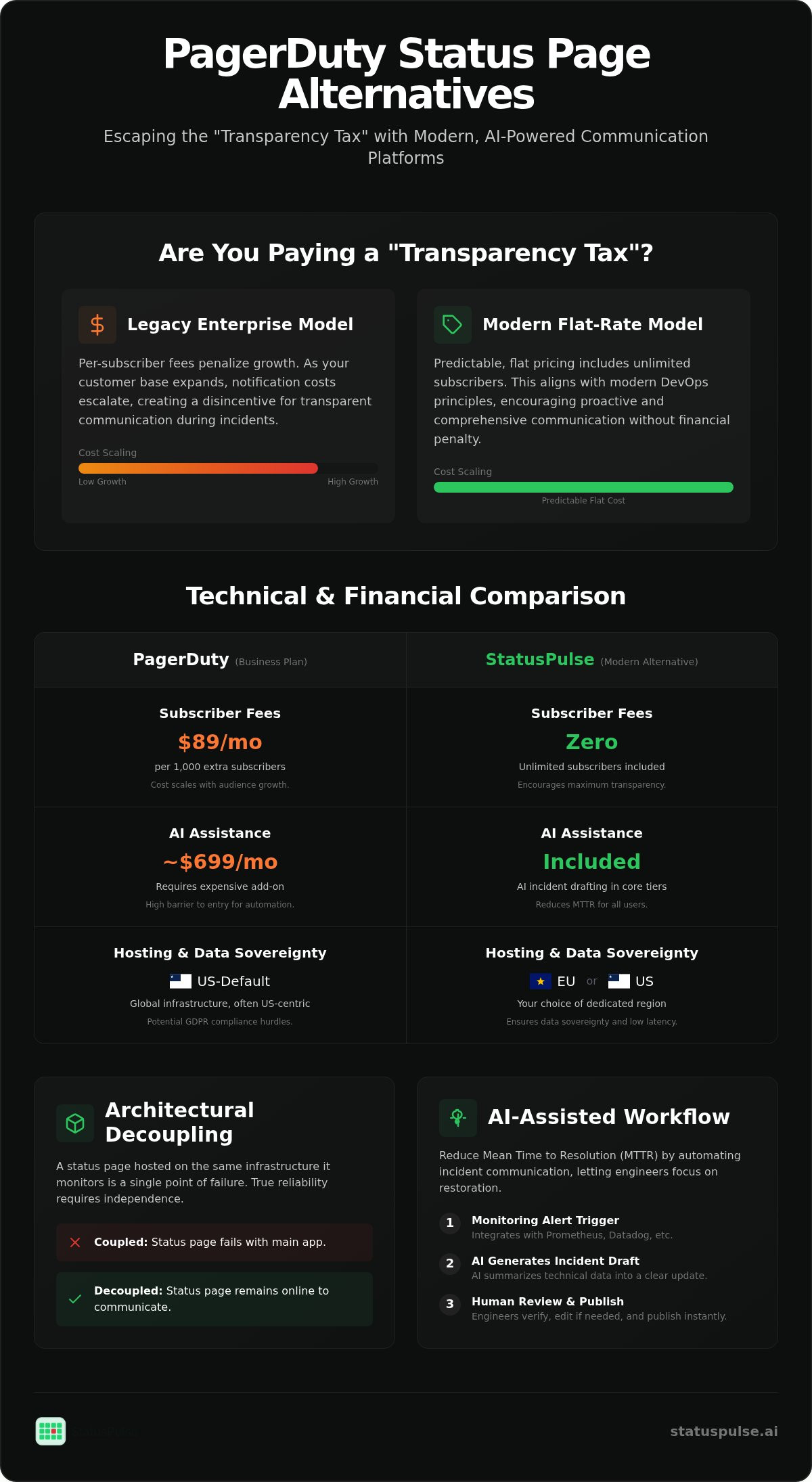
Engineering teams often outgrow enterprise status pages when the "subscriber tax" begins to exceed the cost of the base license. While PagerDuty provides a robust operations platform, its status page functionality is frequently treated as an expensive add-on with variable costs. The following table summarizes the technical and financial differences between legacy enterprise models and leaner, monitoring-native alternatives.
| Feature | PagerDuty (Business Plan) | Modern Alternatives (StatusPulse) |
|---|---|---|
| Core Pricing | $41 per user / month | Flat tiered subscriptions |
| Subscriber Fees | $89/mo per 1,000 extra subs | No per-subscriber fees |
| AI Assistance | Paid add-on (~$699/mo) | Included in core tiers |
| Hosting Location | Global (often US-default) | Choice of EU or US |
| Primary Focus | On-call / Alerting | Incident Communication |
The total cost of ownership (TCO) for enterprise status pages is rarely limited to the seat price. You must account for the subscriber limits that trigger additional monthly fees once you pass arbitrary thresholds. For a high-growth company, searching for a PagerDuty alternative for status pages is often a financial necessity to avoid being penalized for a growing customer base.
The Per-Subscriber Pricing Trap
The "subscriber tax" creates an ethical dilemma for technical leads. When you're charged for every email or SMS notification, you're essentially being billed for transparency. This model scales poorly. It forces teams to decide if an incident update is worth the spike in notification costs. Flat pricing models remove this friction, aligning your communication budget with modern DevOps principles rather than arbitrary user counts.
Fragmented Workflows vs. Native Monitoring
Operational friction is a hidden cost that slows down Incident management workflows. Managing a status page that's decoupled from your primary monitoring stack creates a dangerous lag. Engineers must manually sync data from tools like Prometheus or Datadog into a separate dashboard. This context switching increases the risk of human error during high-pressure outages.
A single source of truth for uptime and communication reduces this burden. When your status page is monitoring-native, it understands the state of your infrastructure without manual intervention. This approach is detailed in our guide on Uptime Monitoring, which highlights how automated checks can trigger updates. You don't need enterprise-grade on-call routing if your primary goal is reliable, automated status communication.
Evaluating Status Page Architecture: Reliability and Data Sovereignty
A status page hosted on the same infrastructure it monitors is a single point of failure. If your primary AWS region goes dark and your communication hub is inside that same region, you've lost your only way to talk to customers. Technical teams looking for a PagerDuty alternative for status pages must prioritize architectural decoupling. Your status page should live on a completely independent network to ensure it remains reachable when your main stack is not.
EU vs. US Hosting: More Than a Checkbox
Data sovereignty is a legal reality for European companies. The Schrems II ruling changed how we evaluate technical tools. It's no longer enough to have a "global" cloud. You need to know exactly where your data sits. While PagerDuty announced a European service region in June 2026, many teams still find themselves defaulted to US-based hosting. This can create compliance hurdles and unnecessary latency for your local users.
Reliability also means respecting regional choice without charging extra for it. Choosing a provider that offers native EU or US hosting allows you to align with GDPR requirements and Effective Incident Management Communications best practices. Reducing the physical distance between your status page and your users ensures that even during a massive traffic spike, your updates load quickly. If you need a provider that treats regional data sovereignty as a core feature, StatusPulse offers dedicated EU and US hosting options to simplify your compliance roadmap.
The Role of API and SSL Monitoring
Status pages are only as useful as the data feeding them. If you rely solely on manual updates, your page will always lag behind the actual incident. Automated status updates require a foundation of robust API and SSL monitoring. You can't rely on Real User Monitoring (RUM) for status triggers; if your site is down, there are no users to report the failure. Synthetic monitors are the standard here.
SSL certificate monitoring is equally critical. Nothing damages trust like a "connection not private" error on your own status page. Automated tracking prevents these certificate expirations before they reach the user. For a deeper look at building these triggers, see our guide on API Monitoring: High Availability in 2026. By integrating these monitors directly into your communication dashboard, you remove the human bottleneck from the initial alert phase.
Synthetics allow you to probe your endpoints from multiple global locations. This gives you a more accurate view of availability than internal logs alone. When a synthetic probe fails, your status page can update automatically. This ensures your customers see a "partial outage" status before they even have time to open a support ticket.
StatusPulse vs. PagerDuty: A Technical Comparison
Selecting a PagerDuty alternative for status pages requires a clear understanding of where enterprise power meets developer-first efficiency. PagerDuty is a broad operations platform. It excels in environments with legacy infrastructure and massive, interlocking team structures. StatusPulse is a specialized tool for teams that prioritize incident communication and monitoring-native workflows over complex administrative overhead.
Feature Parity and Trade-offs
Honesty about trade-offs is essential for technical credibility. PagerDuty wins on complex on-call rotations. If your organization manages fifty different teams with varying escalation policies, their platform offers the necessary granularity. However, this depth comes with a configuration tax. StatusPulse focuses on speed of deployment. It's built for teams that need to go from zero to a live, automated status page in minutes. We trade enterprise-scale on-call management for flat pricing and AI-assisted drafting that works out of the box.
Integrations also follow different philosophies. PagerDuty offers hundreds of connectors, many of which require extensive setup. StatusPulse uses monitoring-native hooks. You can connect Slack, Jira, and your existing monitoring stack using straightforward API integrations. This minimalist approach reduces the time spent in dashboards and keeps engineers in their primary workspaces.
AI Incident Management Comparison
The technical handling of an outage should follow established frameworks like the NIST Computer Security Incident Handling Guide. A critical part of this process is communication. PagerDuty addresses this through PagerDuty Advance, which is a paid add-on priced at [VERIFY: PagerDuty Advance AI add-on price]. StatusPulse includes AI Incident Management as a core feature of its tiered subscriptions. This tool doesn't just alert you. It summarizes technical logs and API failure codes into human-readable updates for your status page.
Instead of staring at a blank text box during a P1 incident, the AI drafts a summary of the impact. It identifies which services are affected based on your uptime monitors and suggests a remediation status. This human-in-the-loop approach ensures accuracy while saving valuable minutes. For a deeper look at this philosophy, read about The Architecture of Incident Communication Transparency. By removing the cost barrier to AI, we allow teams to adopt modern communication standards without justifying a separate, high-cost line item for AIOps.
Modernizing Incident Communication: The AI Drafting Workflow
The "blank page syndrome" is a real bottleneck during high-pressure outages. When an SRE is busy debugging a production failure, drafting a public status update often feels like a distraction. However, delaying communication increases support volume and damages user trust. A PagerDuty alternative for status pages should solve this by acting as a technical assistant that bridges the gap between raw logs and human-readable updates.
Modern AI tools shouldn't be black boxes that automate public communication without oversight. Instead, they should analyze the specific telemetry from your uptime monitors. If an API monitor returns a 504 Gateway Timeout, the AI can cross-reference this with your service map to suggest which features are likely degraded. This moves the cognitive burden from the engineer to the software assistant.
From Alert to Update in 60 Seconds
Efficiency in incident response requires a structured workflow that minimizes manual data entry. You can achieve a faster response time by following a three-step assisted process:
- Step 1: Automated Detection. Your system identifies a failure through API or server uptime monitoring. This triggers an internal alert immediately.
- Step 2: AI-Generated Summary. The platform analyzes the failure code and provides a draft summary of the technical issue and its estimated impact on users.
- Step 3: Human Review. A responder reviews the draft for accuracy and clicks publish to update the public status page.
This "human-in-the-loop" requirement is vital. AI is excellent at summarizing technical logs, but a human must provide the final ethical and context-aware check before a message goes live. This ensures consistency in tone, regardless of which engineer is on call. It prevents the erratic shifts in communication style that often happen when different team members handle different shifts of a long outage.
Best Practices for Honest Incident Updates
Effective communication avoids the "we are investigating" loop. Users want technical substance, not vague corporate platitudes. Use AI to translate complex server errors into customer-centric language that explains exactly what is broken. For example, instead of "Database issues," explain that "Search functionality is currently degraded due to high latency in our indexing service."
Honesty builds long-term credibility. Once a service is restored, include a post-mortem summary on the same public status page. This keeps the full lifecycle of the incident in one place for stakeholders. If you are ready to move away from manual drafting and unpredictable pricing, explore how StatusPulse automates incident communication with built-in AI assistants.
Transitioning to a Monitoring-Native Status Page
Moving your incident communication to a new platform shouldn't mean losing your history or your audience. When transitioning to a PagerDuty alternative for status pages, the first step is migrating your existing subscriber list. Most teams handle this via a CSV export or a direct API sync to ensure that customers who opted into updates aren't left in the dark during the switch.
Integrating with your existing monitoring stack is the technical core of the setup. Whether you use Prometheus, Datadog, or custom health checks, you can automate component updates using simple webhooks. Instead of manual toggling, your monitoring logic can push status changes directly to your page. A typical JSON payload for a component update might look like this:
{
  "component_id": "api-gateway-eu-01",
  "status": "partial_outage",
  "description": "Increased latency detected in eu-central-1 region."
}
White-labeling is essential for maintaining brand trust. You should configure a CNAME record in your DNS settings to host the status page on your own subdomain, such as status.yourcompany.com. This ensures that users stay within your ecosystem. A standard configuration involves pointing your subdomain to the provider's proxy, for example: status.yourcompany.com CNAME proxy.statuspulse.ai. This setup allows for automated SSL management and a consistent experience for your users.
Developer-First Setup Checklist
A successful deployment involves more than just a public dashboard. Use this checklist to ensure your communication hub is production-ready:
- Verify SSL Monitoring: Set up automated checks for the status page domain itself to prevent certificate expiration.
- Configure Channels: Map your notification routes for Email, SMS, and Webhooks.
- Internal Stakeholder Pages: Set up private status pages to keep non-technical staff informed without exposing internal debugging details to the public.
Final Considerations for Data Sovereignty
Subscriber lists are GDPR-sensitive assets. If your company is based in Europe, you must verify that your provider offers EU-based hosting for these databases. This ensures that your customer data never leaves the region. It's also a matter of ethics; your status page provider should never track or sell the data of the people who trust you with their contact information. Choosing a platform that respects these boundaries simplifies your compliance roadmap. If you're ready to build a more technical, ethical communication layer, Explore StatusPulse status pages to see how we handle monitoring-native incident management.
Modernizing Your Incident Communication Stack
Choosing a PagerDuty alternative for status pages isn't just about cutting costs. It's about aligning your technical tools with your engineering culture. You shouldn't have to manage a "subscriber tax" or worry about data sovereignty when you're already managing a production outage. Flat pricing and the choice between EU or US hosting are now baseline requirements for modern DevOps teams who value ethics and compliance.
AI-powered incident drafting changes the rhythm of your response. It moves you from manual data entry to a human-in-the-loop review. This saves time and ensures your customers get accurate, technical updates without the stress of a blank text box. By integrating monitoring directly with your communication hub, you reduce human error and focus on restoration. Your users value honesty above all else. Give your team the tools to provide that transparency without the enterprise bloat or hidden fees.
Build a more transparent status page with StatusPulse and take control of your incident workflow.
Frequently Asked Questions
Is there a free alternative to PagerDuty for status pages?
Yes, there are several open-source and free-tier options, but they often lack automated monitoring or AI assistance. While PagerDuty has a limited free tier, teams seeking a PagerDuty alternative for status pages often find that free tools require significant manual overhead. StatusPulse offers tiered subscriptions that include specialized monitoring and AI drafting tools. These features are typically absent from completely free or open-source solutions that require self-hosting and manual maintenance.
Does StatusPulse charge per subscriber for status page updates?
No, we use a flat, tiered pricing model that does not penalize you for growing your audience. Unlike enterprise incumbents that charge for every email or SMS subscriber, we believe transparency should be a fixed cost. This approach allows you to scale your communication without worrying about unpredictable monthly bills or hitting subscriber caps during a high-traffic incident. You can focus on keeping users informed instead of managing notification budgets or subscriber limits.
Can I host my status page in the EU for GDPR compliance?
Yes, you can choose to host your data in either the EU or the US. This regional choice is a core feature designed to support data sovereignty and GDPR compliance for European engineering teams. By keeping subscriber lists and incident logs within the EU, you simplify your regulatory roadmap and reduce latency for your local users during critical outages. It ensures your compliance requirements are met without extra configuration or additional enterprise fees.
How does the AI incident management tool help during an outage?
The AI assistant analyzes telemetry from your uptime and API monitors to draft human-readable incident summaries. Instead of starting with a blank page during a P1 event, you get a suggested update based on actual failure codes. This human-in-the-loop workflow ensures that your public communication remains consistent and technical while saving your responders several minutes of manual drafting time. It translates raw logs into customer-centric language that explains the actual user impact.
Can I keep PagerDuty for alerting and use StatusPulse for status pages?
Yes, many teams use a hybrid approach where they retain PagerDuty for complex on-call rotations while using StatusPulse for public communication. You can trigger status updates via webhooks or API calls from your existing alerting stack. This allows you to benefit from our flat pricing and AI drafting tools without migrating your entire incident response infrastructure at once. It's a practical way to modernize your external communication while keeping established internal workflows intact.
Does StatusPulse offer API monitoring alongside status pages?
Yes, API monitoring is a native part of the platform. We probe your endpoints from multiple global locations to detect latency spikes or functional failures. These monitors can be linked directly to status page components, allowing the system to automatically update the public status the moment a synthetic check fails. This integration reduces the time between a technical failure and user notification. It provides a single source of truth for both monitoring and communication.
What is the setup time for a new public status page?
You can deploy a basic public status page in approximately five to ten minutes. The process involves creating your components, linking your uptime monitors, and configuring your custom subdomain via a CNAME record. Once your SSL certificate is verified, your page is live. Most of the setup time is spent customizing the branding and notification channels to match your existing user experience. It's designed to be straightforward for developers and SREs who value efficiency.
How does StatusPulse handle high traffic during "thundering herd" status checks?
Our status page architecture is decoupled from the monitoring infrastructure to handle massive traffic spikes. We use global edge caching to serve static versions of your status page to thousands of concurrent visitors. This prevents the thundering herd effect from crashing your communication hub when users rush to check your status during a major service disruption. Your status page remains reachable even if your primary application servers are struggling under high load or total failure.


