

Most teams treat their Opsgenie incident status integration as a permanent fixture. It isn't. With the standalone product set for retirement on April 5, 2027, your current automation strategy has a hard expiration date. You're likely facing the familiar friction of manual updates during high-pressure outages. It's exhausting to manage alerts while simultaneously trying to keep users informed. We agree that technical disruptions are stressful enough without the added weight of corporate bloat and complex pricing models.
This guide provides a technical blueprint to architect a reliable bridge between your alerts and your status page. You'll learn how to automate communication without the manual overhead or the alert fatigue caused by un-filtered data. We'll explore how to maintain human agency in the loop while ensuring your status page stays accurate. By the end, you'll have a clear path to a decoupled, principled stack that respects your time and your data sovereignty.
Key Takeaways
- Prepare for the Opsgenie retirement on April 5, 2027, by decoupling your alerting from your communication stack today.
- Evaluate the technical trade-offs between using webhooks for real-time pushes and native apps for faster setup.
- Architect a reliable Opsgenie incident status integration by mapping technical alert payloads to specific status page components.
- Reduce manual overhead by using AI-assisted tools to summarize technical logs into human-readable updates.
- Maintain data sovereignty by choosing hosting locations in the EU or US to avoid regional compliance issues.
The State of Opsgenie Integration in 2026
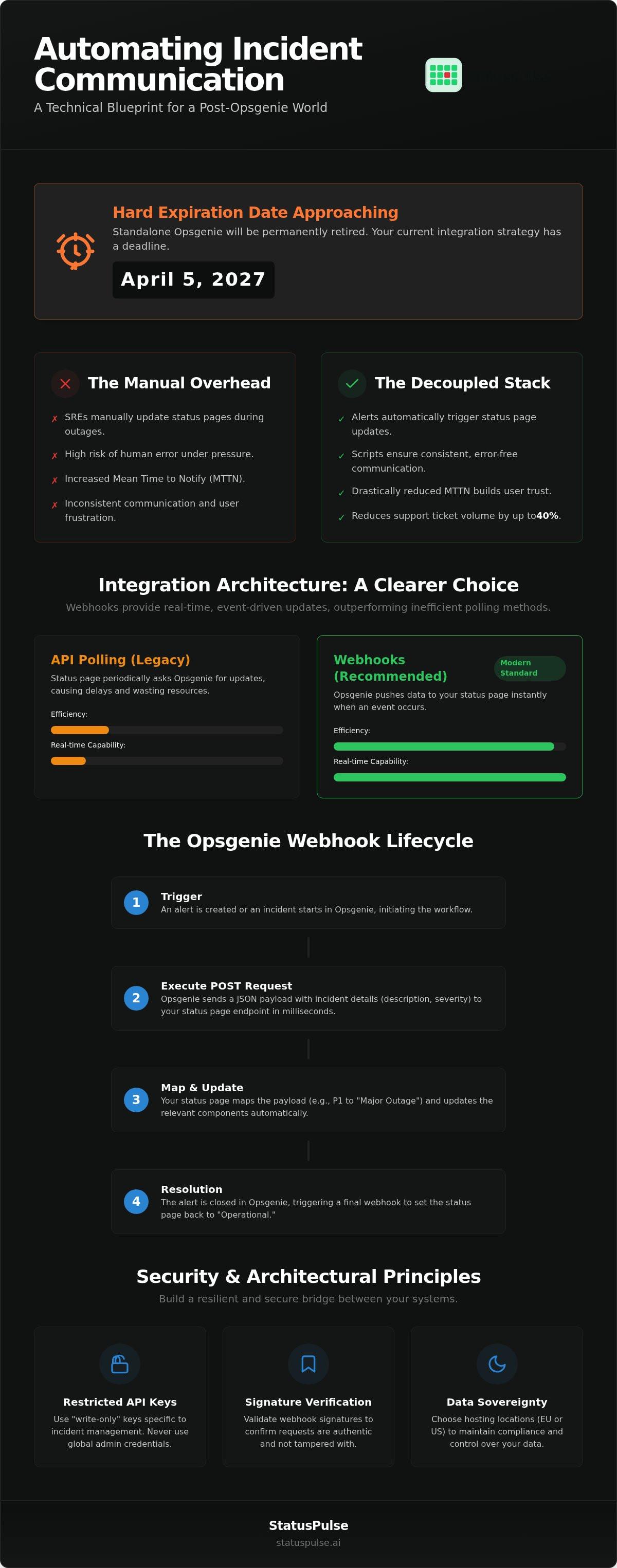
An Opsgenie incident status integration is the technical bridge between your monitoring stack and your customers. It ensures that when a service fails, the public is informed immediately. The primary objective is to drive down your Mean Time to Notify (MTTN). Speed matters. Every minute of silence from your team increases user frustration and support load. Automating this connection turns your internal alerts into external clarity without requiring manual intervention during a crisis.
Why Automation is Non-Negotiable for SREs
Manual status updates are a liability. During a SEV-1 outage, your SREs shouldn't be hunting for login credentials for a communication tool. Human error is inevitable under stress. Automated updates ensure consistency and adherence to core incident management principles. Industry professionals report that proactive, automated communication can reduce support ticket volume by up to 40% during active incidents. It's about building trust through transparency. You show what you know, as soon as you know it. Humans fail under pressure; scripts don't.
The 2027 Sunset: What it Means for Your Integrations
The landscape shifted on March 4, 2025, when Atlassian announced that standalone Opsgenie will be permanently retired on April 5, 2027. New sales already stopped on June 4, 2025. Users are being pushed toward Jira Service Management (JSM). This move forces a critical choice. You can follow the migration path into a more complex, expensive ecosystem, or you can choose to decouple your stack. Integrating with a neutral, third-party platform like StatusPulse ensures your communication remains independent of your incident response tool.
Direct API integrations offer more resilience than proprietary, one-click connectors. They give you control over your data and your workflow. By architecting your Opsgenie incident status integration as a standalone bridge today, you avoid the migration headaches of 2027. You gain a principled alternative to corporate bloat. It's about precision. It's about reliability. Decoupling your status page from the Atlassian ecosystem now provides the flexibility you'll need when the sunset finally occurs.
Technical Architecture: How Opsgenie Bridges to Status Pages
The mechanics of an Opsgenie incident status integration rely on two primary data exchange methods. API polling is the traditional approach. It involves your status page asking Opsgenie for updates at set intervals. This is inefficient. It wastes resources and introduces lag. Webhooks are the superior choice for 2026. They push data immediately. When an alert fires, Opsgenie sends the details to your status page. This happens in milliseconds. With the Opsgenie sunset approaching on April 5, 2027, building your architecture on open standards like webhooks makes future migrations much simpler.
Successful integration requires precise payload mapping. You must decide how internal priorities translate to public statuses. An Opsgenie "P1" priority typically becomes a "Major Outage." A "P2" might be a "Partial Outage." This logic is usually handled by a serverless function or a direct mapping tool within your status page provider. Standardizing these definitions is vital. It follows the structural clarity found in the National Incident Management System. Clear communication starts with consistent data translation.
Understanding the Opsgenie Webhook Lifecycle
The webhook lifecycle follows a clear sequence. It starts with a trigger. This is usually the creation of an alert or the start of an incident in Opsgenie. Opsgenie then executes a POST request to your status page endpoint. This request carries a JSON payload with the incident description and severity. The final step is the resolution. When your team closes the alert in Opsgenie, a second webhook is sent. This automated action clears the incident on your status page. It ensures your "Operational" status returns without human intervention.
Security and Authentication Best Practices
Security is paramount when connecting these platforms. Never use global admin keys for simple integrations. Instead, generate restricted API keys with "write-only" permissions for incident management. You should also implement webhook signature verification. This allows your status page to confirm that the POST request is authentic and hasn't been tampered with. Ensure all data moves over TLS 1.3. Protecting your communication channels is as important as protecting your infrastructure. For teams who value these standards, StatusPulse provides secure public status pages as a technical alternative to bloated legacy suites.
Evaluating Integration Methods: Webhooks vs. Native Apps
Choosing the right architecture for your Opsgenie incident status integration involves a trade-off between speed and control. You're deciding between the convenience of native connectors and the granular precision of custom webhooks. Native apps are built for rapid deployment. They provide a "one-click" experience that maps standard Opsgenie priorities to status page severities. Custom webhooks require more initial effort but offer a level of architectural flexibility that native apps cannot match. They allow you to transform payloads and filter data before it ever reaches your public audience.
The Case for Native Status Page Connectors
Small teams with standard workflows often benefit from native connectors. These tools reduce configuration time by providing pre-mapped severity levels. For example, an Opsgenie P1 alert automatically triggers a Major Outage status. Native apps also include built-in error handling and retry logic. If a delivery fails, the system attempts to resend the update without manual intervention. It's a reliable choice for teams that don't need to deviate from industry-standard incident responses. However, this convenience often comes with limited customization of incident descriptions and metadata.
The Case for Custom Webhook Mapping
Custom webhooks are the preferred choice for teams prioritizing technical depth and flexibility. They prevent vendor lock-in, which is a significant concern as the standalone Opsgenie product approaches its 2027 sunset. By using a serverless function as a middleware, you can perform sophisticated payload transformations. You can filter which internal alerts actually trigger public status changes, ensuring your users aren't bothered by low-impact backend issues. This method also supports multi-region status pages by routing updates based on specific Opsgenie tags.
Architecting your own bridge requires more management overhead but delivers superior control over public messaging. It allows you to maintain a "Best of Breed" stack, connecting specialized tools rather than relying on a single-vendor suite. For teams seeking this balance of technical depth and simplicity, StatusPulse offers a straightforward webhook endpoint designed for precision. We believe in providing the tools you need to build a resilient Opsgenie incident status integration without the corporate bloat found in larger ecosystems.
Configuration Guide: Mapping Opsgenie Payloads to Incidents
Setting up a reliable Opsgenie incident status integration requires a logical sequence of configuration steps. You must first generate an API key on your status page with "Incident Management" scopes to authorize incoming POST requests. Then, navigate to the "Integrations" menu in Opsgenie to add a new Webhook. You will need the specific endpoint URL provided by your status page provider. Define the JSON payload structure carefully to ensure the data aligns with your communication requirements. Finally, establish routing rules to prevent internal noise from reaching your customers.
- Step 1: Generate an API key on your status page with "Incident Management" scopes.
- Step 2: Configure the Opsgenie Webhook integration via the "Integrations" menu.
- Step 3: Define the JSON payload structure to match your status page requirements.
- Step 4: Set up routing rules to prevent "noisy" alerts from hitting the public page.
Example JSON Payload Mapping
The "incidentName" attribute in your payload serves as the bridge to the public title of the status page entry. This ensures that the technical alert message is translated into something your users can actually understand.
// Opsgenie Alert Payload
{
  "action": "Create",
  "alert": {
"message": "Service timeout on API node 4",
"priority": "P1",
"tags": ["Public"]
  }
}

// StatusPulse Incident Object
{
  "title": "API Connectivity Issues",
  "status": "major_outage",
  "description": "We are investigating service timeouts."
}
The "action" field acts as the state machine for the integration; "Create" opens the incident, "Acknowledge" updates it to an "Identified" state, and "Resolve" marks it as "Fixed". This automation keeps your communication in sync with your actual engineering progress without requiring a manual update for every status change.
Filtering and Routing Logic
Filtering is the difference between transparency and alert fatigue. You don't want every internal database blip to trigger a public notification. Only trigger public updates for alerts tagged with "Public" or "Customer-Facing" in Opsgenie. This ensures that your SREs maintain control over what the world sees. You should also map Opsgenie "Teams" to specific status page "Components". For example, an alert from the "Frontend" team should only impact the "Web App" component. Implementing a 90 second delay buffer is a practical way to prevent flickering status updates. This gives your team a moment to verify the incident before it becomes public record.
If you are looking for a platform that handles these mappings with precision, you can set up public status pages that integrate with Opsgenie webhooks in minutes. We provide a technical alternative for teams who value straightforward architecture over complex corporate suites.
Scaling Incident Transparency with StatusPulse
StatusPulse acts as a specialized receiver for your Opsgenie incident status integration. It provides a high-performance webhook endpoint that ingests the JSON payloads we mapped in the previous section. This architecture avoids the bloat of traditional enterprise suites. You get a direct line from your alerting backend to your public communication frontend. Our flat pricing model means your costs remain predictable. You aren't penalized with per-subscriber fees when your audience grows during a critical outage.
Bridging the Gap with AI Incident Summaries
The most difficult part of incident communication is translating technical logs into human language while services are down. StatusPulse uses AI incident management tools to draft updates based on the raw data in your Opsgenie alerts. This isn't a hands-off automation. We use a human-in-the-loop approach. The AI acts as a technical assistant that prepares a draft for your engineers to review and publish. This process ensures technical accuracy while maintaining a calm, professional tone for your users.
By using AI to summarize technical data, you reduce the cognitive load on your SREs. They don't have to switch contexts between debugging and copywriting. This speeds up your Mean Time to Notify (MTTN) and ensures your status page remains a source of truth. It's about precision. The AI identifies the core issue from the Opsgenie payload and suggests a clear, concise summary for your customers. Your team maintains agency, but the busywork is handled by the platform.
EU Hosting and Data Sovereignty
For European teams, hosting status data within the EU is often a non-negotiable compliance requirement. Many US-centric incumbents default to North American regions, which can complicate GDPR and data residency strategies. StatusPulse provides a clear choice. You can host your status data in either the EU or the US. This regional flexibility supports your data sovereignty and ensures your communication stack aligns with your legal obligations. It is a principled alternative for teams that value privacy as a core virtue.
Choosing a status page with regional hosting also adds a layer of infrastructure resilience. If a major US-based cloud provider faces a regional outage, a status page hosted in the EU remains accessible to your global users. This geographic separation is a key part of a robust incident management strategy. You need your status page to be the most reliable part of your stack. By combining EU hosting with a secure Opsgenie incident status integration, you build a transparent bridge that your customers can trust, regardless of where your primary servers are located.
Future-Proofing Your Incident Communication
The April 5, 2027, sunset of standalone Opsgenie marks a turning point for incident response teams. Decoupling your alerting from your communication stack today prevents the friction of forced migrations later. By mastering your Opsgenie incident status integration through webhooks and precise payload mapping, you ensure that your users stay informed without overwhelming your engineers. You've seen how a principled architecture prioritizes human agency while using automation to handle the busywork of status updates.
Choosing a partner that values transparency and data sovereignty makes this transition straightforward. StatusPulse provides native EU or US hosting options and AI-assisted incident drafting to help you maintain a calm tone during disruptions. Flat pricing. No subscriber limits. Total transparency. Our model ensures your costs remain predictable even during major outages. It's time to move away from bloated corporate suites and toward a focused, technical solution.
You can build a more transparent incident workflow with StatusPulse and regain control over your communication stack. Your team deserves tools that are as efficient as the software they build.
Frequently Asked Questions
Does Opsgenie integration work with the free version of StatusPulse?
Yes, the integration is available across all plans. StatusPulse prioritizes technical accessibility. You can connect your webhook endpoint regardless of your tier. This ensures small teams can automate their communication early. We don't gate essential automation features behind enterprise paywalls. Our goal is to reduce your mean time to notify without forcing a complex pricing model on your growing infrastructure. You get the same reliable bridge regardless of your budget.
How do I prevent internal Opsgenie alerts from showing up on my public status page?
You prevent noise by using Opsgenie's filtering and routing rules. As discussed in the configuration guide, you should only trigger webhooks for alerts tagged with "Public" or "Customer-Facing". This logic ensures your SREs maintain agency over which technical disruptions become public record. Without these filters, every minor backend blip would trigger a notification. This leads to alert fatigue for your subscribers and reduces the long term credibility of your status page.
What happens to my integration when Opsgenie is sunsetted in 2027?
Your current Opsgenie incident status integration will stop functioning when the product is retired on April 5, 2027. You must migrate your alerting to Jira Service Management or an alternative provider before this date. Because StatusPulse uses a standard webhook architecture, you only need to update the source of the payload. The transition is a technical update to your alerting backend rather than a complete rebuild of your public communication stack and user data.
Can I map different Opsgenie teams to specific components on my status page?
Yes, you can map specific teams to individual components using the webhook payload metadata. By filtering based on the "Team" or "Service" field in the Opsgenie JSON, you ensure that a database failure only impacts the database component on your page. This granular control prevents misleading "Major Outage" banners across your entire site when only one microservice is down. It provides the technical precision your users expect during complex service disruptions.
Is it possible to automate the "Resolved" status when an Opsgenie alert is closed?
Automation of the "Resolved" status is a core feature of the webhook lifecycle. When an alert is closed in Opsgenie, it triggers a final webhook action. StatusPulse receives this "resolve" signal and automatically clears the incident from your public page. This removes the manual overhead of updating two platforms simultaneously. It ensures your status returns to "Operational" as soon as your engineering team confirms the fix in their primary internal alerting tool.
How does StatusPulse handle webhook retries if the connection is interrupted?
StatusPulse implements an exponential backoff strategy for failed webhook deliveries. If our endpoint is unreachable or your alerting provider faces a network glitch, the system attempts to resend the payload at increasing intervals. This reliability ensures that your status page stays in sync even during transient network failures. We prioritize data integrity to ensure your public communication remains a trustworthy source of truth for your customers, regardless of regional connectivity issues or cloud outages.
Do I need to be an Opsgenie Admin to set up the status integration?
You need administrative permissions within Opsgenie to access the "Integrations" menu and configure new webhooks. However, once the webhook is established, your SREs and developers can trigger updates through their normal alert workflows. On the StatusPulse side, you only need an API key with "Incident Management" scopes. This restricted access follows security best practices by ensuring your integration doesn't require global administrative rights for day to day operations or status updates.


