

83% of engineers admit to ignoring or dismissing alerts occasionally because the noise outweighs the signal. It's a dangerous habit born from monitoring systems that cry wolf too often. Setting up effective website down alerts isn't just about pinging a URL. It's about ensuring every notification represents a genuine incident that demands immediate action.
Effective website down alerts use multi-location verification and specific status code thresholds to ensure a high signal-to-noise ratio. By filtering out transient network blips, you eliminate the alert fatigue that leads to missed SLAs and burnout.
You've likely felt the frustration of a 3 AM page for a minor hiccup that resolved itself within seconds. This guide shows you how to configure high-signal alerts that reduce noise and automate your incident response workflow. We will cover technical configurations for zero false positives, automated communication strategies, and how to maintain data sovereignty using EU or US hosting options. You'll learn to move away from disjointed tools and toward a streamlined, ethical approach to reliability.
Key Takeaways
- Learn to balance detection speed with multi-location verification to ensure every notification is accurate and actionable.
- Optimize check intervals and timeouts to distinguish between transient network latency and genuine service outages.
- Master the process of setting up effective website down alerts by mapping severity levels to the right communication channels.
- Reduce manual overhead and support tickets by bridging the gap between monitoring and automated public status pages.
- Evaluate how flat pricing and regional hosting options in the EU and US support your team's budget and data sovereignty.
The Anatomy of a Reliable Website Down Alert
A reliable alert is a precise balance between detection speed and verification accuracy. If you prioritize speed alone, you'll trigger notifications for every transient network spike. If you prioritize accuracy too heavily, your Mean Time to Detect (MTTD) suffers. Website monitoring should be treated as a precision tool, not a blunt instrument. You want to know the second your service fails, but you don't want to be woken up by a false positive.
Simple binary checks often fail modern technical stacks. A server might return a 200 OK status code while the application logic is failing or the database connection has timed out. Setting up effective website down alerts requires looking beyond the basic HTTP status. You need to monitor Service Level Indicators (SLIs) like response latency and error rates to understand the true health of your service. A "down" state isn't always a total crash; it's often a degraded state where the user experience is broken despite the port being open.
Signal vs. Noise: Why False Positives Kill Productivity
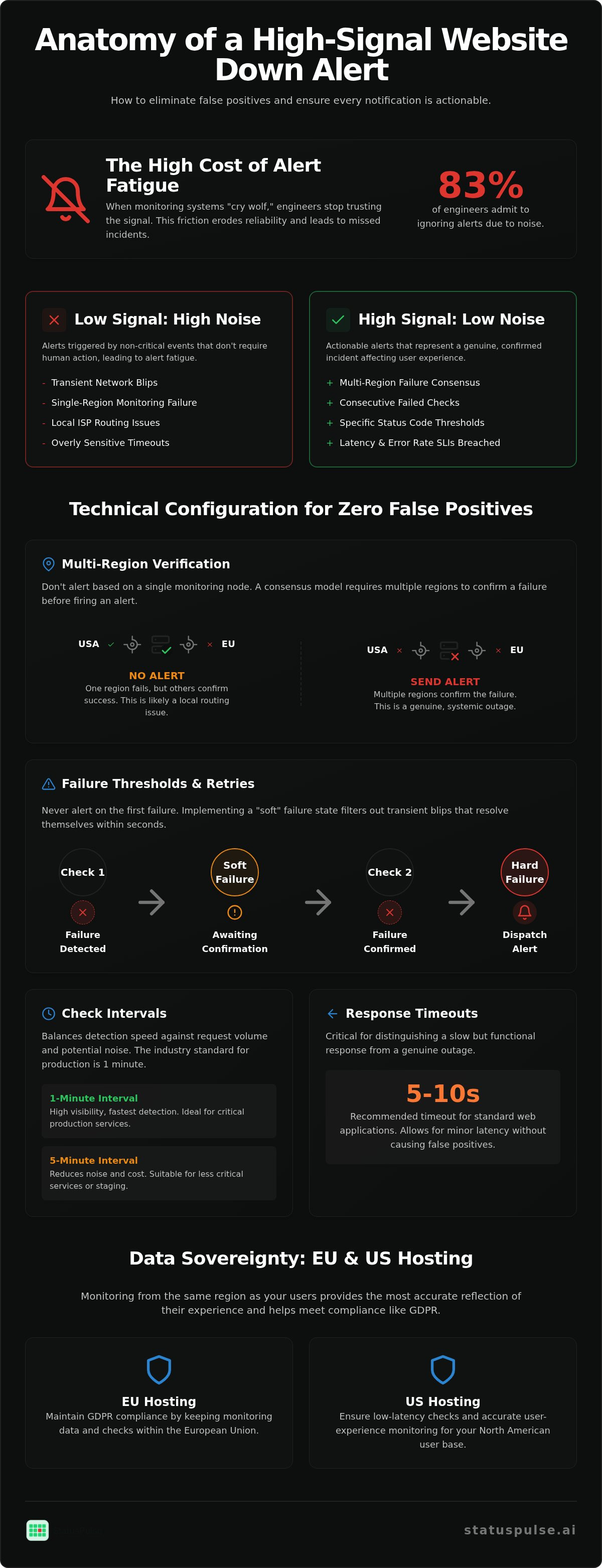
Alert fatigue is a genuine business risk. A 2026 study found that 44% of organizations experienced an outage because a critical alert was suppressed or ignored. When your monitoring system "cries wolf" with false positives from DNS propagation issues or local ISP hiccups, engineers stop trusting the signal. This friction erodes the reliability of your entire stack. High-signal monitoring requires aggressive noise reduction. If an alert doesn't require a human to take immediate action, it shouldn't be an alert; it should be a log entry.
The Role of Multi-Region Verification
You shouldn't alert based on a single monitoring node. A network blip in a single data center shouldn't wake up your on-call rotation. Reliable systems like StatusPulse use a consensus model. This requires at least two or three distinct regions to confirm a failure before an alert is fired. This prevents "flapping" notifications caused by localized routing issues that don't affect your global user base.
Regional monitoring nodes also account for global latency. A site might be reachable from Frankfurt but failing from New York. By requiring multi-region verification, you distinguish between a localized routing issue and a total systemic outage. This approach ensures your team only reacts to real problems. It also respects the data sovereignty of your users by allowing you to choose where these checks originate, whether in the EU or the US.
Technical Configuration: Intervals, Timeouts, and Monitoring Regions
Configuration is the stage where monitoring strategy meets execution. Setting up effective website down alerts requires a granular approach to check intervals and timeouts. A 1-minute interval is the industry standard for production environments; it offers high visibility but increases your request volume. Conversely, a 5-minute interval reduces noise and cost but can delay incident response by critical minutes. The choice depends on your SLA requirements and the volatility of your stack.
Timeouts are equally critical. If you set a timeout too low, you risk alerting on a slow but functional response. If it is too high, your monitoring node might hang while your users are already seeing 504 errors. Aim for a 5 to 10-second timeout for standard web applications. This window allows for minor network latency without triggering a false positive for an application that is simply under heavy load.
Defining Retries and Thresholds
Never alert on the first failure. Implementing a "soft" failure state, where the system requires two or three consecutive failed checks before escalating to a "hard" failure, is a core strategy in Combating Alert Fatigue. This buffer filters out transient network blips that resolve themselves within seconds. The check interval is the frequency at which the monitoring system pings your endpoint, directly determining your detection speed and monthly request volume.
Data Sovereignty and Geographic Hosting
Data residency is no longer a secondary concern for European developers. Under GDPR, non-compliance can result in fines of up to €20 million or 4% of global annual turnover. Monitoring from the same region as your users provides the most accurate reflection of their experience. If your user base is split between continents, you should balance your monitoring nodes across both US and EU regions.
Choosing a provider that offers transparent hosting options in the EU and US allows you to maintain data sovereignty while ensuring global visibility. This regional precision helps identify if an outage is global or isolated to a specific geographic CDN edge. By aligning your monitoring infrastructure with your regulatory requirements, you protect both your uptime and your legal standing.
Combating Alert Fatigue through Intelligent Escalation
Alert fatigue is not just a morale issue; it is a technical liability. When 57% of engineers report that fewer than 30% of their alerts are actionable, the system is broken. Setting up effective website down alerts requires a hierarchy of communication that respects human attention. You should not treat a minor performance dip with the same urgency as a total database failure. Mapping severity to specific channels turns a chaotic stream of data into a structured response plan that protects your team from burnout.
Escalation policies ensure that the right person is notified at the right time. Start with the primary on-call engineer via a push notification. If the incident is not acknowledged within 15 minutes, escalate to the secondary or lead developer. For catastrophic outages lasting over an hour, the CTO should be looped in via a dedicated channel. This structure prevents critical signals from being buried in a noisy Slack channel. It also provides a clear path for resolution when the initial responder is overwhelmed by the complexity of the incident.
Multi-Channel Notification Strategies
Your choice of channel should match the severity of the event. Use Slack or Discord for non-critical warnings, such as minor latency increases or SSL certificate expiration notices. These are tasks for the next business day. For critical "Service Down" events, use high-impact channels like SMS or phone calls. These demand immediate intervention. If you are part of a larger team, integrating StatusPulse with tools like PagerDuty or Opsgenie allows for enterprise-grade rotation management. This keeps your communication centralized and your team focused on the fix rather than the tool.
Threshold-Based Silencing
Maintenance windows are a fundamental requirement for ethical monitoring. Silencing alerts during planned downtime prevents unnecessary stress and ensures your uptime statistics remain accurate. When setting up effective website down alerts, you should also implement alert grouping to prevent "notification storms." During a major network outage, receiving 50 individual alerts for 50 different microservices is counterproductive. A single, grouped incident summary is more useful for root cause analysis. This approach respects the developer's time and cognitive load. For a deeper look at balancing technical precision with human factors, read our guide on Uptime Monitoring: A Developer’s Guide to Reliability and Honest Communication. Ethical alerting means setting boundaries that protect your team while maintaining high availability.
From Alert to Incident: Automating the Response Workflow
When a verified outage occurs, the clock starts on two fronts: the technical fix and the customer communication. Setting up effective website down alerts is only half the battle. The other half is ensuring that verified downtime triggers an automated response workflow. This reduces the manual burden on engineers who should be focusing on the root cause rather than answering support tickets.
A Public Status Page acts as a single source of truth. It prevents a flood of duplicate support inquiries by acknowledging the issue before the customer reports it. Automating the "Incident Created" state based on multi-region verification ensures that your communication is as fast as your detection. This level of automation bridges the gap between monitoring and transparency.
Automating Status Page Updates
Most modern monitoring tools allow you to trigger a status page update via a simple webhook. When your monitors detect a hard failure, they can automatically switch your status page to "Identified" or "Investigating." This immediate transparency builds trust with your users. Maintaining this trust requires The Architecture of Incident Communication Transparency, where honesty is prioritized over optics. Avoid vague language. Tell your users exactly what is happening as soon as you know it.
AI-Assisted Incident Management
High-stress outages are the worst time to draft professional updates. AI incident management can now summarize technical logs and error traces into readable customer updates. This reduces the cognitive load on your engineering team. Instead of starting from a blank page, your team can review and approve AI-generated drafts that follow your established templates. This ensures consistency across all incident post-mortems and status updates.
Consistency is key to a professional response. Using pre-configured templates for different incident types allows your team to move quickly without sacrificing quality. If you are tired of disjointed tools and manual workflows, you can automate your entire incident response with a unified platform. This approach keeps your engineers focused on the code and your customers informed of the progress.
Why StatusPulse is the Transparent Choice for Modern Teams
Industry incumbents often hide behind complex pricing and corporate bloat. Setting up effective website down alerts shouldn't require a degree in procurement or a massive engineering budget. StatusPulse is the honest alternative. We built this platform for specialists who value precision, privacy, and straightforward tools. It's a principled approach to reliability that prioritizes integrity over marketing hype.
Our platform is a unified solution. It combines uptime monitoring, SSL certificate monitoring, and API monitoring with integrated public status pages. We offer flat, transparent pricing. There are no hidden "per-subscriber" fees that penalize you for growing your audience. This rebellious streak against industry standards ensures you get a fair, ethical service that respects your budget and your time.
Monitoring Beyond the Homepage
Uptime is only one metric of success. SSL certificate monitoring is essential to prevent "Connection Not Private" errors that destroy user trust. We also provide deep API monitoring. This goes beyond checking for a basic 200 OK status code. You can verify specific payloads to ensure your application logic is actually functioning. For a technical deep dive into maintaining high availability, see our guide on API Monitoring: The Developer’s Guide to High Availability in 2026.
A Commitment to Data Sovereignty
We provide equal weight to EU and US hosting options. This choice allows you to maintain data sovereignty and meet regional regulatory requirements without compromise. Our infrastructure is designed for technical precision. We don't use hyperbolic language because the software speaks for itself. It's a calm, reassuring experience that reduces the stress of managing technical disruptions.
Getting Started in Minutes
Configuration is simple even for complex stacks. You can claim your public status page and connect your first monitor within minutes. The tool acts as an assistant that automates the noise while leaving the final human action to you. This mirrors our promise of simplicity and ease of use. If you are tired of disjointed tools and corporate bloat, it is time for a change.
You can Build your reliable monitoring stack with StatusPulse today. Join a community of developers who value ethical pricing, data privacy, and technical excellence. Our team is dedicated to precision, making our platform the most reliable way to monitor your digital assets.
Building a Resilient Monitoring Culture
Reliability is a deliberate choice. It starts with moving away from noisy, binary pings and toward a system built on multi-region verification and intelligent escalation. Setting up effective website down alerts ensures your team remains focused on solving problems rather than filtering through false positives. By automating your incident response and status page updates, you turn a technical failure into an opportunity for transparent communication. This approach builds long-term trust with your users and reduces the operational burden on your engineers.
StatusPulse provides the technical precision required for modern DevOps workflows without the corporate bloat of industry incumbents. You get access to AI-powered incident management and the choice between EU and US hosting for full data sovereignty. Our transparent, flat-rate pricing means you won't face surprise bills as your traffic grows. It's a straightforward, ethical approach to a complex problem.
Take control of your uptime today. You can Start monitoring with StatusPulse to build a more reliable infrastructure for your users. Precision is within reach.
Frequently Asked Questions
What is the difference between a ping check and a keyword check?
A ping check only verifies that the server responds at the network level. A keyword check is more advanced because it looks for specific strings in the HTML body. This ensures the application is actually rendering correctly rather than just returning a blank 200 OK page. Keyword checks are essential for setting up effective website down alerts that catch logic failures.
How many monitoring locations should I use for a global website?
For a global website, you should use at least three distinct monitoring locations. Using a single node is a common cause of false positives due to localized routing issues. A consensus model requiring multiple regions to confirm a failure ensures your alerts are actionable. StatusPulse allows you to distribute these checks across EU and US regions for balanced global visibility.
Can I receive website down alerts via Slack or Microsoft Teams?
You can receive alerts via Slack, Microsoft Teams, or any platform that supports webhooks. Integrating monitoring with your existing chat tools keeps your team informed without adding more disjointed software to your stack. For critical incidents, it's best to supplement chat notifications with high-impact channels like SMS to ensure the on-call engineer is reached immediately.
What is alert fatigue and how do I prevent it?
Alert fatigue occurs when engineers become desensitized to notifications due to a high volume of noise. You can prevent this by configuring soft failure thresholds and requiring consecutive failed checks before firing an alert. Setting up effective website down alerts requires high-signal monitoring that respects the developer's time. This ensures every notification represents a genuine problem that requires immediate action.
Is it possible to monitor internal applications behind a firewall?
Monitoring internal applications behind a firewall typically requires a heartbeat or push monitor. Instead of an external node pinging your server, your internal application sends a periodic request to the monitoring service. If the service doesn't receive the heartbeat within the expected window, it triggers an alert. This method allows you to track internal jobs without exposing your network to the public internet.
How does SSL certificate monitoring prevent downtime?
SSL certificate monitoring alerts you well before your certificate expires. If a certificate lapses, browsers will block access to your site with a security warning, which is functionally equivalent to downtime for your users. Automated checks prevent these avoidable outages by giving your team ample time to renew certificates and update your server configuration before the expiration date.
Should I use a public or private status page for my incident alerts?
Use a public status page to communicate with your customers and reduce support tickets during an outage. A private status page is better suited for internal stakeholders who need more technical detail or sensitive information about the incident. StatusPulse provides public status pages as a core offering to help teams maintain transparency and trust during service disruptions.
How do AI incident management tools help during an outage?
AI incident management tools assist technical teams by transforming complex system logs into readable status updates. During a high-pressure outage, these tools reduce the cognitive load on engineers by drafting initial customer notifications based on the detected error. This automation ensures your communication remains consistent and professional while your team focuses on restoring service as quickly as possible.


