

A deployment finishes and the dashboards stay green, but users still report a broken workflow. That gap is why synthetic API monitoring must test more than whether an endpoint responds.
A successful HTTP response isn't always proof that an API works correctly. A check can receive a 200 OK while a particular customer flow still fails, so the test needs to validate the result that matters, not just whether the endpoint responds.
This guide explains how synthetic monitoring works, what API checks can test, and how transaction, DNS, SSL, and network tests fit in. It compares synthetic monitoring with real user monitoring (RUM), including what each reveals and where each has blind spots. You’ll learn how to match checks to the risks your application needs to catch.
Key Takeaways
- Validate API behavior, not just reachability: a successful HTTP response can still hide a broken user flow.
- Match checks to the failure you need to catch, from DNS resolution and SSL validity to network access and multi-step transactions.
- Use scripted tests to catch anticipated failures before users encounter them, while recognizing they cannot cover every real-world scenario.
- Pair controlled checks with real user monitoring to see both whether a journey works and how it behaves for actual customers.
- Prioritize critical journeys such as login and checkout, then adjust check frequency to the impact of an outage.
What is synthetic monitoring?
Synthetic monitoring runs controlled requests to test API availability and behavior before a customer reports a problem. Teams can schedule checks around the clock, including at 3am, when real traffic may be quiet. The same test can run inside a firewall or from outside it, depending on whether the target is an internal service or a public endpoint.
API Health, Performance, and Usage
API health, performance, and usage monitoring uses repeatable requests to check whether an endpoint responds, how quickly it responds, and whether its output meets expectations. This matters because a reachable API can still return incorrect data or fail a key operation. For example, a check can request a test account and validate a required response field.
Availability, Performance, and SLA Metrics
Availability measures successful checks over time, while performance metrics track response time and failures. Teams may use 99.9% or 99.99% as availability targets, then compare observed results with their service-level agreement (SLA). A useful report separates outages from slow responses, so an internal update reflects the actual impact rather than a single uptime figure.
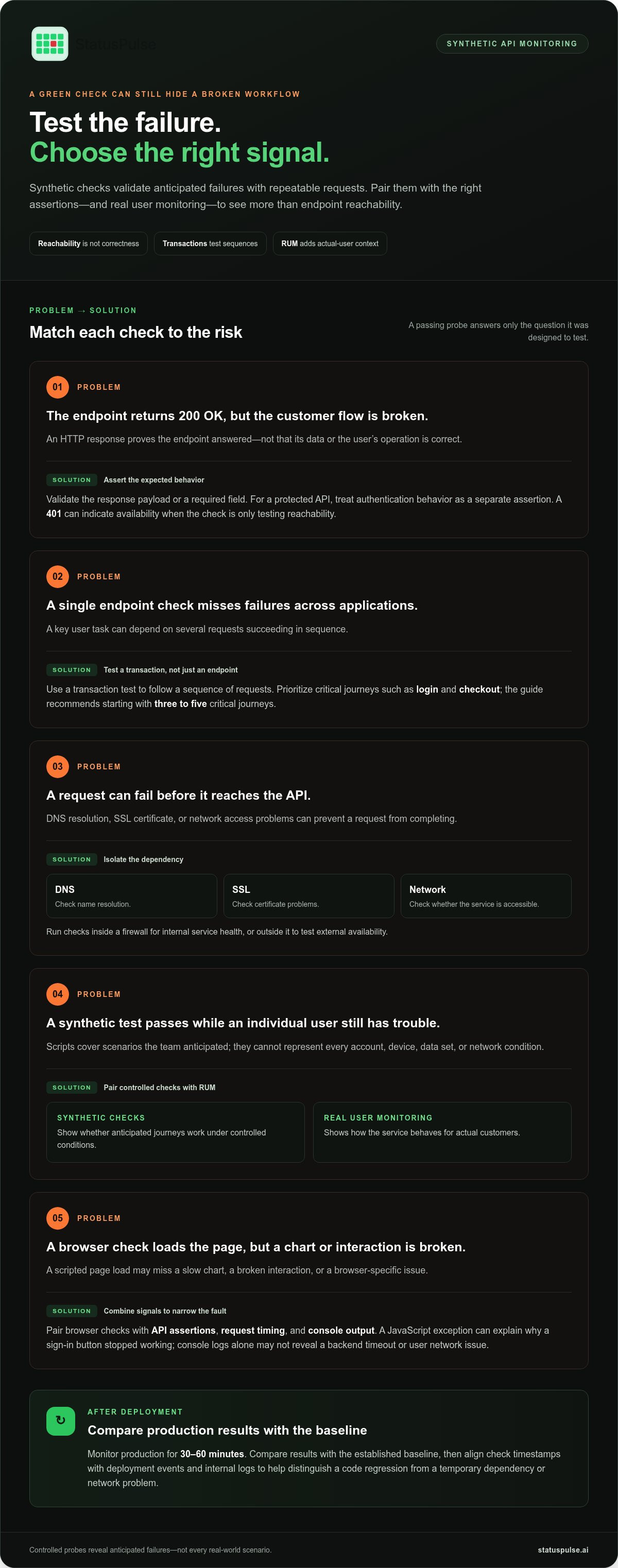
Set the expected response for each check. A 200 OK may indicate that an endpoint answered, but it does not prove that its payload is correct. A 401 response can count as evidence of availability when the check only tests whether the endpoint is reachable. For a protected API, authentication behavior is a separate assertion.
How do API monitoring tools compare on features and integrations? Compare support for request assertions, multi-step workflows, test locations, and integrations with alerting or incident tools. Choose based on whether you need endpoint checks, user-journey validation, or both.
How much does API monitoring cost in the United States? Costs depend on check volume, run frequency, test locations, and required integrations. Compare tools with the same monitoring scope, rather than judging headline prices without those details.
How do you set up automated API checks step by step? Choose a critical endpoint or journey, define a successful response, add assertions, then schedule checks and route failures to the responsible team. Start with three to five critical user journeys, such as login or checkout, and refine tests as application behavior changes.
Browser and page checks provide another view. They can test loading and interaction in a browser, but simulated activity may not reflect performance on dynamic, content-heavy pages. Pair a browser check with API assertions to distinguish a slow page from a failing backend request.
After deployment, monitor production for 30-60 minutes and compare results with the established baseline. DNS and SSL checks can also catch resolution or certificate problems before they block requests. Synthetic tests can run inside a firewall or outside it, depending on whether the goal is internal service health or availability from a global perspective.
Synthetic monitoring benefits and limitations
A synthetic check gives engineering teams a repeatable way to detect failures before users report them. It can run during quiet periods, compare application performance with a baseline, and collect consistent metrics after a code update. This makes it useful for regression checks, incident investigation, and confirming that a key action still works.
Repeatability is a practical advantage. A scripted request can use the same inputs each time, making changes in response time, status, or returned data easier to spot. For example, a test can verify that a search request returns the expected result after an API deployment. Teams can also run checks inside a firewall or from external locations to compare internal health with externally reachable service behavior.
But a green synthetic result doesn’t prove every user can complete every task. Tests cover scenarios engineers anticipated or recorded, not every combination of account, device, data, and network conditions. A test suite may cover only single-digit coverage of the full scenario state space. A request can pass while an individual customer encounters a problem tied to their permissions or data.
Browser simulations also have limits. A scripted page load may not fully represent how a dynamic application behaves. A test that opens a dashboard can miss a slow chart, a broken interaction, or a browser-specific issue. Synthetic monitoring works best when teams treat its actions as controlled probes, not as a complete substitute for production observability.
Console logs add useful evidence to browser checks. A JavaScript exception during a sign-in flow can explain why a button stopped working, even if the page loaded. Logs don’t reveal every cause: they may not show a backend timeout or a user’s network issue. Pair console output with request timing, response assertions, and application logs to narrow the fault domain.
Use each signal to answer a distinct question. A failed assertion points to changed expected behavior; rising latency points to slower service; a console error points to client-side execution. During incident review, compare the check’s timestamp with deployment events and internal logs. This helps distinguish a code regression from a temporary dependency or network problem.
To keep tests useful, review them when an API contract or user flow changes. Remove stale assertions, use test data that won’t alter real records, and keep credentials out of captured output. For teams that need scheduled checks on API endpoints, API monitoring can provide a focused way to track service availability.
Transaction, DNS, SSL, and network tests
A single endpoint check can miss failures across applications. Transaction tests follow a sequence of requests, while DNS, SSL, and network tests isolate dependencies that can prevent those requests from completing. Together, these tests make performance monitoring more proactive by checking the route a request actually takes.
A complex transaction models a user goal, not just one response. For example, an online checkout might create a test session, add an item, submit a shipping address, and confirm the order summary. Validate the output at every stage. If the address step returns an error, the test should identify that step rather than report only that checkout failed.
Multi-step scripts should use controlled test data and avoid creating real orders or changing real customer records. Each request can pass an identifier to the next step, then check expected fields, status codes, or state changes. A login flow, for instance, should verify that a session is created before requesting an account page. This catches broken handoffs between API calls.
Schedule checks according to business impact. Critical flows such as checkout, login, and payment APIs can run every 1-5 minutes. Secondary pages and informational endpoints can run every 10-15 minutes. Frequent checks can catch failures sooner, but teams should account for request volume and ensure tests don’t trigger unwanted actions.
DNS tests check whether a hostname resolves to the expected service. A DNS problem can make a healthy API unreachable by name, even if its server responds directly. SSL certificate checks examine certificate validity and the secure connection used by clients. Run DNS and SSL certificate checks every 30-60 minutes to identify resolution or certificate issues before they disrupt transactions.
Network tests help distinguish application faults from connectivity faults. A test can check whether a target is reachable from a chosen location and measure connection time. Comparing results from inside a data center and outside its firewall can reveal whether access is restricted to internal clients or affected along an external route.
Use failure details to guide the response. A DNS lookup failure points to name resolution; a certificate error points to the TLS connection; a timeout may indicate a network path or slow service. These results narrow the investigation but don’t automatically identify the cause. Correlate the failed step with application logs and deployment events.
Keep each scheduled transaction focused on one user outcome. A compact login script and a separate checkout script make failures easier to interpret than one long scenario covering the whole application. Review assertions when the flow changes, and confirm that test accounts and data remain safe to reuse.
Synthetic monitoring versus real user monitoring
Synthetic monitoring and real user monitoring (RUM) answer different questions. Synthetic checks ask whether a defined request or journey works; RUM shows what happened during actual customer sessions. Engineering teams often use both: a passing test cannot describe every user’s experience, while passive data depends on real traffic.
A synthetic agent sends planned requests continuously, including when no real users are active. For example, a scheduled request can test whether an API returns the expected account state overnight. This gives teams a controlled signal for availability and response behavior, and can reveal a failure before customer activity begins.
RUM collects observations from real user activity in production. It can expose a problem affecting one browser, region, or customer flow, even when a synthetic check passes. But RUM records customer experience only when traffic exists. A quiet service cannot provide fresh user-monitoring data, so an issue may go unnoticed until the next real session.
Think of synthetic monitoring as an active test and RUM as passive observation. A synthetic request follows a known path with chosen inputs. RUM reflects the varied requests, devices, and conditions customers encounter. For instance, a scripted product page may load successfully while a real user’s page fails because a particular response contains unexpected data.
RUM can also help teams investigate past behavior. Captured production traffic can provide a record of client actions for debugging, allowing engineers to inspect the sequence before a failure. That evidence adds context a fixed synthetic script may lack. Select useful request details for investigation, and avoid treating one replay as a complete account of every customer’s experience.
These approaches can inform each other. A team can identify a failed request in RUM, isolate the relevant sequence, then reuse recorded requests in a synthetic test. This turns an observed production problem into a repeatable check, which can verify that the same failure doesn’t return after a code update.
Integrations affect how quickly monitoring signals become actionable. Route synthetic failures and RUM findings into the same incident workflow, then correlate timestamps, affected requests, and deployment events. A synthetic alert without customer impact may be an early warning; a RUM spike without a failed synthetic check may point to a particular user segment or environment.
Use synthetic checks when you need predictable coverage, including during periods without traffic. Use RUM when you need evidence from actual customer sessions. For a production API, combine both: a scheduled check tests a known contract, while RUM can reveal unexpected behavior across real clients. Neither signal replaces application logs or other monitoring data your team uses.
API monitoring and synthetic checks
Synthetic API monitoring is useful when an endpoint’s contract matters as much as its availability. A check can validate whether consumers receive a response they can parse and use, then detect changes before dependent services fail. Define the contract from the API’s documented behavior, including required fields, data types, and error handling.
Build assertions around consumer expectations. A response may contain the right fields but return an unexpected value, such as marking a disabled account as active. Check both structure and meaning. For paginated endpoints, verify that continuation tokens or page links behave as expected, not just that the first result set appears.
Keep functional checks distinct from infrastructure checks. A port test can confirm that a service accepts connections, while an API assertion evaluates application behavior. Together, these signals help responders narrow the fault domain. If a port accepts traffic but a response fails schema validation, investigate request handling or a recent contract change.
Interpret status codes according to the endpoint’s purpose and client contract. A successful response must satisfy the operation’s expected outcome, not merely return a familiar code. For write operations, verify the resulting state through a safe read path. This catches cases where a request is accepted but the intended update doesn’t persist.
Use isolated test data and design write checks to be safe to repeat. A generated identifier can distinguish one run from another, while cleanup prevents test objects from accumulating. In a synthetic API monitoring workflow that creates a record, confirm its expected fields, then remove it in a separate cleanup action. Keep test credentials limited to the required actions.
Choose checks based on service criticality and ownership. A small set of endpoints tied to core customer actions gives teams clearer signals than many checks without owners. Include the responsible service and operation in alert details, so the receiving engineer knows which contract failed and where to start.
Set a schedule that reflects the cost of delayed detection and the load created by test traffic. Use consistent request inputs to compare response-time trends, and alert on a sustained change rather than one noisy sample. Route failures to the team that owns the endpoint, with enough context to reproduce the request safely.
Review each check after a contract change or incident. Keep assertions aligned with documented consumer behavior, remove obsolete expectations, and retain a clear reason for every test. This makes monitoring an operational way to validate API contracts, rather than a collection of green indicators with unclear meaning.
StatusPulse: Public Status Pages
StatusPulse brings monitoring and customer-facing incident communication into the same operational picture. Its API Monitoring and Uptime Monitoring help teams track service availability, while SSL Certificate Monitoring focuses on certificate status. Public Status Pages give teams a place to communicate service conditions when an incident affects users. This is a useful next step when synthetic checks identify failures but customers still need clear, timely information about service impact. Monitoring signals and status communication serve different purposes: one helps engineers spot a problem, the other helps users understand what is affected. If you’re evaluating how these pieces fit your incident workflow, visit StatusPulse.
Make your next check operational
Choose one API failure your team needs to catch, then define the expected response and alert owner. Treat the check as part of the service contract: update it when the API changes, and use failed runs to refine the test rather than adding checks without a clear purpose. Synthetic API monitoring works best when its signals lead to useful engineering action.
StatusPulse offers Uptime Monitoring, SSL Certificate Monitoring, and Public Status Pages. These services help teams monitor availability and certificates, then communicate service conditions through a public page. Monitoring and customer updates are separate parts of incident handling, so decide how your team will use each before an outage occurs.
If you’re planning how to connect monitoring with incident communication, contact StatusPulse to discuss monitoring. Start with a focused check and build from what your team learns.
Frequently Asked Questions
How does API monitoring improve performance and resilience?
API monitoring helps teams locate slow or failing dependencies before they cause wider disruption. Compare latency and error patterns across related endpoints to find whether delays begin in authentication, storage, or a downstream service. For example, if a profile request slows only when it calls a billing service, teams can focus their investigation there. Repeated measurements also show whether a fix improves behavior under the same conditions.
What are the best practices for API monitoring?
Write checks around documented API contracts, use safe test data, and assign each alert to an owning team. Keep credentials out of logs and rotate test tokens through your normal secrets process. Include negative cases, such as a malformed request, to verify error handling as well as success. Review checks when the contract changes, and remove assertions that no longer describe expected behavior.
What is API monitoring, and why is it important?
API monitoring tracks whether an API is reachable, responsive, and returning behavior that clients can use. This matters because an endpoint can remain online while a dependent feature fails. A team monitoring a shipping API, for example, can distinguish a slow quote response from a missing delivery estimate. That evidence helps engineers prioritize incidents by their effect on dependent services.
Which metrics should you monitor for APIs?
Track availability, response-time distribution, request volume, and errors by endpoint. Latency percentiles can expose slow responses that an average conceals, while separating client errors from server errors helps identify whether requests or services are failing. Include dependency-specific measurements where possible. For example, compare total request time with database-call time to see whether the application or storage layer contributes most to a delay.
What is synthetic API monitoring and how does it work?
Synthetic API monitoring runs controlled requests against an API and checks responses against defined expectations. A check can send a request with test credentials, validate selected response fields, and record timing. For example, it might confirm that a search response includes a required identifier, not just a success status. Scheduled runs provide comparable results even when customer traffic is quiet.
What API endpoints and user journeys should synthetic monitoring test?
Prioritize endpoints that support actions customers cannot complete without, such as authentication, search, and payment authorization. Test dependencies that can block those actions, but keep each script focused enough to identify the failing step. A journey might authenticate a test user, request an account summary, then verify a required field. Avoid checks that create real purchases or change customer records.
How often should synthetic API checks run, and from which locations?
Set check frequency according to business impact, request volume, and how quickly your team needs to detect a failure. Run tests from locations that represent the paths you need to observe: an internal location for private services and external locations for customer-facing access. Comparing locations can reveal regional reachability differences. Use a consistent test configuration so results remain useful for diagnosis.
What metrics and alerts should API synthetic tests track?
Record check success, response time, failed assertions, and the endpoint or journey step that failed. Alert on repeated failures or response time that exceeds 1.5-2 times the established baseline average. Include the location and timestamp in each alert, then route it to the service owner. Avoid paging on a single isolated result without context; correlate it with related checks and recent deployments.


