

An HTTP 200 response can still contain GraphQL field errors. Monitor the response body and operation outcomes, not status codes alone.
Deprecated fields can remain in use even when an endpoint appears healthy. Track which operations call them before changing the schema.
This guide covers error detection, slow-query investigations, operation health, and practical monitoring choices for GraphQL APIs.
Key Takeaways
- Track deprecated-field usage by operation so you can identify which clients still depend on fields before removing them.
- Inspect GraphQL response bodies for field-level errors; an HTTP 200 alone doesn’t prove the operation returned complete data.
- Use resolver latency, database-call counts, and query depth to narrow down slow or failing operations.
- Measure success and latency per operation, including each step in a multi-step transaction, rather than relying only on endpoint-wide health.
- Compare monitoring tools by the signals they capture and the way they fit your workflow; use status pages to communicate service health to users.
How do I monitor GraphQL errors that return HTTP 200?
Monitor the GraphQL response body, not only its HTTP status. A GraphQL server can return HTTP 200 while reporting field errors in the response.
GraphQL Errors Beyond HTTP Status Codes
GraphQL error tracking checks the response’s errors array alongside its HTTP status. A 200 response can contain partial data and an error when a field fails to resolve.
To set up monitoring and alerts, send a representative operation, parse its JSON response, and check that the errors array is empty. Alert on matching failures, then group them by operation name and error message to spot recurring problems.
Use JSONPath assertions to inspect the response body. For example, $.errors[*] selects each error object, while $.errors[*].message checks its message. Check that the errors array is absent or empty to catch failures a status-code check can miss. Keep separate assertions for expected data and errors, so partial responses don’t pass as complete success.
Per-Resolver Latency and Error Monitoring
Per-resolver monitoring measures the time and failures for each field resolver within an operation. It helps distinguish a slow dependency from a slow request overall.
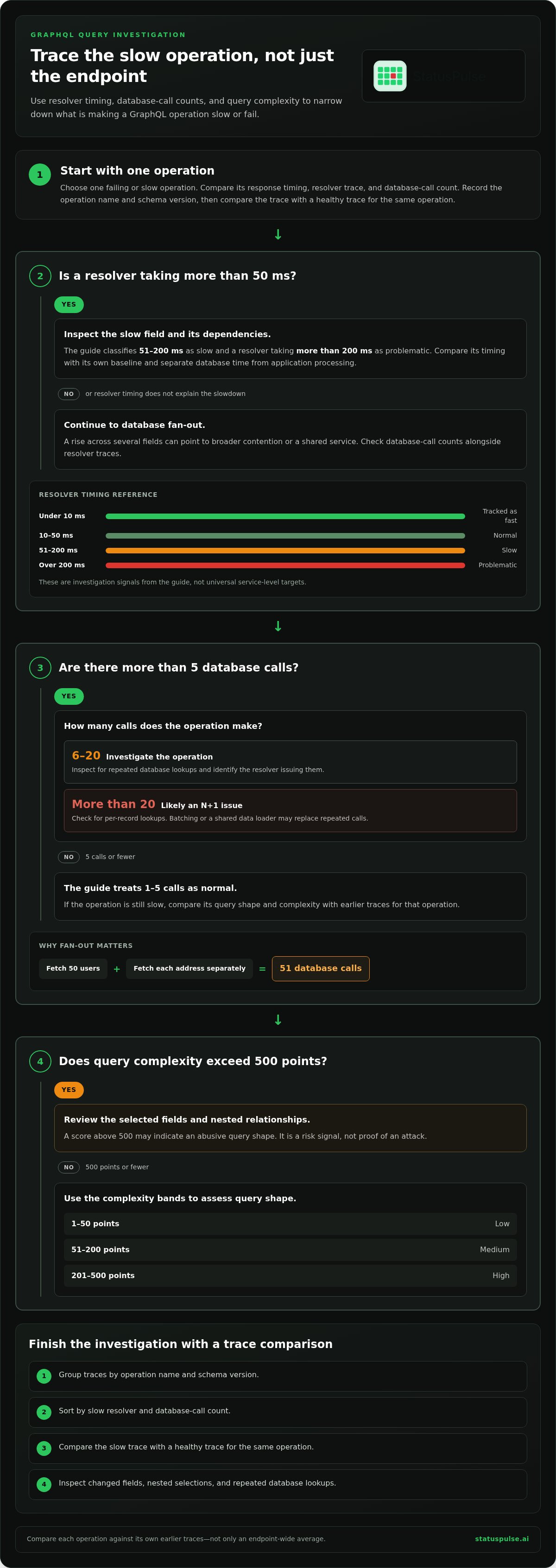
Record resolver name, operation name, duration, and error outcome. A resolver taking more than 200 milliseconds is classified as problematic in this guide; one under 10 milliseconds is tracked as fast. These are investigation signals, not universal service-level targets.
For example, if user.address fails while user.name resolves, field-level records show where partial data begins. Compare resolver timings for the same operation and inspect the slow field’s dependencies. Track error counts and latency separately: a resolver can be slow without failing, or fail quickly. Alert on recurring resolver errors and sustained latency changes, rather than treating every isolated slow call as an incident.
Request Details and Error Information
Request details are the metadata and response fields needed to connect an error to its operation and caller. The National Institute of Standards and Technology (NIST) says API monitoring telemetry should include a timestamp, client ID, request and response status, and endpoint identifier.
Capture those fields along with the operation name, resolver path, error message, and response data needed for diagnosis. Avoid recording credentials or unnecessary sensitive values. The error’s path can identify the failed field, while its message can distinguish a validation issue from a resolver failure.
To detect abuse and security risks, correlate request rates with client ID, endpoint, status, and repeated error patterns. NIST recommends monitoring request rates, error rates, and latency for each API and endpoint. Apply query-depth and complexity controls too: this guide recommends a depth limit of 10 levels and a complexity limit of 5000 points per rate-limit window.
For GraphQL APIs hosted on AWS, Azure, or Google Cloud, collect the same application-level fields from request and response telemetry. Group alerts by endpoint and operation so cloud-level availability doesn’t hide GraphQL field errors.
Investigating failing and slow queries
A slow GraphQL query is an operation whose response time increases because of resolver work, database calls, or query shape. Investigate the operation name and its backend activity together. A fast endpoint check can miss a costly operation, while a broad latency average can hide its impact.
Start with one failing or slow operation, then compare its response timing, resolver trace, and database-call count. Record the schema version and operation name with each trace. This helps distinguish a code change from a change in the client query. For example, if `GetUsers` slows after a schema deployment, compare its field selection and backend calls with its earlier baseline.
Database Fan-Out
Database fan-out is the number of database queries triggered by one GraphQL operation. The guide treats 1 to 5 queries per operation as normal and recommends investigating operations issuing 6 to 20. More than 20 queries per operation is likely an N+1 issue, where related records are fetched separately for each parent.
For example, fetching 50 users and each user’s address separately can produce 51 database calls. Aggregate query counts by operation, then inspect the resolver issuing repeated calls. Check whether batching or a shared data loader can replace per-record lookups. Compare the result against the same operation’s earlier traces, not just the endpoint-wide average.
Query Complexity
Query complexity estimates the work implied by a GraphQL query’s selected fields and nesting. A shallow query can score 5, while a deeply nested query can score 500. A single deeply nested query can consume more server resources than 100 simple queries.
Use complexity alongside depth and resolver traces. The guide categorizes scores from 1 to 50 points as low, 51 to 200 as medium, and 201 to 500 as high. Scores above 500 points may indicate abusive query shape. Review the selected fields and nested relationships before changing resolver code. Complexity is a risk signal, not proof of an attack.
For latency, the guide categorizes resolver times from 10 to 50 milliseconds as normal and 51 to 200 milliseconds as slow. Compare each resolver with its own baseline. A rise in one resolver points toward that field’s backend dependency; a rise across several fields suggests broader contention or a shared service. Trace database time separately from application processing.
Use this investigation sequence for a slow operation:
- Group traces by operation name and schema version.
- Sort by slow resolver and database-call count.
- Compare the slow trace with a healthy trace for that operation.
- Inspect changed fields, nested selections, and repeated database lookups.
If query degradation becomes a customer-visible incident, a public status page can communicate the known service impact while engineers investigate.
Operation-specific and multi-step transaction monitoring
Operation-specific monitoring measures reliability separately for each named GraphQL operation. It shows whether a particular operation fails or slows, even when endpoint-wide metrics look stable.
Give every operation a stable name, such as Checkout or OrderHistory. Track execution count, success rate, latency, and database calls for each name. Record the operation name alongside the client and schema version. This makes a change after a graphql schema deployment easier to distinguish from a change in client traffic.
A version identifies a deployed schema or client release. Compare each operation across versions rather than combining all requests into one average. For example, if Checkout slows only after a schema version changes, compare its selected fields and execution trace across releases. Keep the version label in dashboards and alerts, or a new client rollout can blend into the old baseline.
Set operation-specific alert conditions around the impact each operation carries. The guide recommends alerting when a critical operation’s error rate exceeds 1%, or its p95 response time rises by more than 20%. These triggers help separate a customer-facing regression in Checkout from a low-impact issue in an infrequently used operation.
Multi-step transaction monitoring follows related operations through a user workflow. A transaction is the sequence of requests needed to complete a task, such as loading a cart, validating inventory, and submitting an order. Record a shared trace or correlation identifier across those steps. Then identify whether the failure starts in GraphQL execution, a downstream service, or the final response.
For each transaction, record the step name, operation, outcome, latency, and dependency result. Alert when an operation issues more than 30 database queries, as the guide recommends. Review the complete trace before assigning cause: a slow final step may depend on earlier calls, even when that operation’s own execution appears normal.
GraphQL operations can combine several data needs in one request, while REST APIs often expose separate resource endpoints. Compare the user workflow, not just request counts. One GraphQL operation may load a whole screen, while a REST-based flow may require several endpoint checks. Keep separate baselines for each approach and report user-task completion alongside operation success.
Finally, compare schema performance baselines and flag a p95 regression above 15%, as the guide recommends. Pair that signal with operation-level errors and version labels. This lets teams distinguish a broad schema regression from one operation’s changing traffic or execution path.
API health indicators and success rates
Production health checks should reflect whether clients can complete their actual tasks. Define expected outcomes for each important operation before connecting checks to alerts.
API Health Indicators
API health indicators help distinguish a functioning service from one that merely responds. For GraphQL, include whether a representative operation returns the fields its consuming application needs.
Start with a production task, such as loading an account’s billing settings. Define which response fields make that task usable, then validate them in a synthetic check. A response containing an account name but missing its billing state may be valid JSON, yet still fail the application’s purpose.
Separate user-visible symptoms from diagnostic signals. A check can report whether the task works; traces and logs can help engineers find why it failed. Keep these roles clear in dashboards. Otherwise, a low-level resolver warning can look like a customer outage, or a broken customer workflow can disappear in a healthy infrastructure view.
Document an owner and response action for every production alert. For example, route a failed billing-settings check to the team responsible for that application capability. Review the check after schema or client changes to ensure its expected fields still match the task it represents.
API Success Rates
An API success rate measures how often requests meet a defined outcome. For GraphQL, define that outcome by the operation’s purpose and required response, not merely by whether a response arrives.
Define outcomes separately for operations with different jobs. An account lookup may succeed when it returns a valid account state, while a mutation may require a confirmation identifier. Applying one generic success rule to both can conceal failures that matter to users.
Keep expected business outcomes distinct from technical failures. For example, a profile update can succeed even if an optional display field is empty. A failed authorization check, by contrast, should not count as success merely because the response contains readable data.
Review how the success calculation handles retries and duplicate requests. If one user action triggers a retry, counting both attempts equally can distort the operational picture. Keep the user task and its individual attempts distinguishable, then investigate cases where a retry masks an initial failure.
Test each outcome rule with both valid and invalid responses. Use a representative client request, then deliberately remove a required field or return an invalid state. This confirms that the check detects a broken task before it becomes part of production alerting.
How do GraphQL monitoring tools compare on features, integrations, and pricing?
Compare tools by the signals they collect, the systems they connect to, and their billing units. A feature checklist and sample workload reveal practical differences beyond marketing labels.
GraphQL-aware tracing records execution details for an operation and its fields. Check whether a tool exposes resolver-level latency, errors, and database activity, or only endpoint response time. For example, a trace showing a slow products.reviews resolver is more actionable than one showing only a slow /graphql request.
Synthetic monitoring sends scheduled requests to validate expected behavior from outside the application. Check whether it can submit a named operation, inspect the JSON response, and assert required fields. A basic availability check can detect an unreachable endpoint, but may not reveal that a response lacks data required by a checkout flow.
Integrations determine how metrics and alerts fit into existing work. List your current telemetry destination, incident workflow, and deployment system before evaluating tools. Then test one route: send an alert for a failed operation to the on-call channel, include its operation name, and confirm responders can access the relevant trace. Avoid paying for duplicate dashboards if your existing observability platform provides the resolver detail you need.
Pricing models define which usage or capabilities affect a bill. Compare the billing basis, included retention, monitored endpoint limits, and whether extra users or data volume change the charge. Don’t compare headline tiers alone. Estimate your operation volume and retention needs, then match each requirement to the model’s actual billing unit.
Feature breadth involves tradeoffs. A dedicated application performance monitoring system may provide deeper traces across services, while a focused API checker may make endpoint tests easier to configure. A combined platform can reduce tool switching, but only if its GraphQL-level detail meets your team’s debugging needs.
Use this evaluation sequence with one representative operation, such as GetAccount:
- Confirm it records operation names, response errors, and latency.
- Verify its alert includes enough context to find the failing field.
- Test the integration with your incident workflow.
- Model billing against expected volume, retention, and user access.
Keep the test consistent across tools. For GetAccount, record whether each system catches an invalid response, surfaces the failing field, and routes an alert where the team works. Use those results to review your monitoring setup against operational needs, not feature counts alone.
StatusPulse: Public Status Pages
StatusPulse provides Public Status Pages for communicating service updates during incidents. Its AI Incident Management tools help technical teams draft status updates and summarize outage impact while engineers investigate and resolve the issue.
StatusPulse also offers Uptime Monitoring, SSL Certificate Monitoring, and API Monitoring. Its pricing is flat and transparent, without per-subscriber fees, and teams can choose EU or US hosting. These features can help teams bring monitoring and incident communication into one workflow.
Visit statuspulse.ai to explore Public Status Pages and monitoring.
Make monitoring part of your release process
Give monitoring a clear place in your engineering workflow. Assign an owner to review alerts, document who responds, and decide how findings inform schema and client changes. This turns GraphQL API monitoring from a dashboard task into an operational practice that supports releases and incident communication.
Keep the process proportionate to your architecture. A team with distributed services may need trace context across several systems; a smaller service may benefit more from focused operation checks and clear ownership. Revisit the setup when application boundaries or team responsibilities change, so alerts still reach people who can act on them.
StatusPulse can help teams connect service monitoring with clear communication during disruptions. Contact StatusPulse to discuss monitoring and how it could fit your operational workflow. A practical monitoring process starts with a clear next action, and your team can build from there.
Frequently Asked Questions
How do I handle deprecated field monitoring in GraphQL?
Track deprecated-field use by recording which operations request each deprecated field. Include the client or application version when available, so you can distinguish active consumers from older deployments. For example, if customer.phoneNumber is deprecated, identify the operations still selecting it and contact their owners through your normal development workflow. Remove the field only after those consumers have migrated and usage has stopped.
What is query complexity monitoring in GraphQL?
Query complexity monitoring estimates how much work a submitted operation may require before execution. Assign costs to fields and nested relationships, then review scores by operation and caller. A sudden rise for one client may point to a changed query shape or abusive usage. Pair complexity signals with execution outcomes, so a high score prompts investigation rather than being treated as proof of malicious activity.
What is the difference between REST and GraphQL API monitoring?
REST monitoring often evaluates separate resource endpoints, while GraphQL monitoring must also evaluate operations and selected fields. A reachable GraphQL endpoint may return partial data if one resolver fails; a REST check may focus more directly on an individual resource response. Validate both GraphQL transport and the fields a client screen requires, rather than relying on endpoint availability alone.
What is the right check interval for a GraphQL API monitor?
A practical starting interval is 60 seconds for a GraphQL endpoint check. The interval affects detection delay and the volume of synthetic requests, so align it with the service’s criticality and monitoring capacity. Keep the check lightweight, use a representative operation, and assert a meaningful response condition. A basic reachability probe can complement, but not replace, an operation-level check.
What is GraphQL API monitoring and what metrics should be tracked?
GraphQL API monitoring tracks whether operations execute correctly and meet performance expectations. Monitor request volume, operation-level success and errors, response latency, and resolver behavior. Add query shape or complexity signals when operation cost matters. Group metrics by operation and client version, then compare changes after deployments. This helps distinguish a broad endpoint issue from a regression affecting one consumer.
How to monitor GraphQL API performance, errors, and availability?
Use separate checks for endpoint reachability, operation performance, and response correctness. For example, a scheduled check can submit a read-only product query, verify required fields, and record latency. Application telemetry can capture errors during real traffic. Compare synthetic and production results: a passing check alongside rising live errors may point to client-specific inputs or authentication paths the synthetic request doesn’t exercise.
How to monitor GraphQL resolver performance and identify slow queries?
Record resolver-level timings alongside the operation and field path, then compare slow traces with healthy executions of the same operation. Check whether the delay follows one resolver, a shared dependency, or a particular input shape. For example, compare requests with different filter values and selected fields. This narrows the investigation before you inspect backend logs or change resolver code.


