

A successful API response can still conceal a broken workflow. Synthetic API monitoring uses scripted requests to check whether endpoints respond and important sequences of actions work as expected, helping teams detect failures before customers encounter them.
That makes it useful, but it does not show the whole picture. A scripted test follows only the paths it was designed to cover. Real user monitoring records what people experience, including journeys and conditions the scripts may miss.
This guide explains what synthetic monitoring measures, how it can test API collections and business processes such as login or checkout, and where its limits matter. It also compares synthetic monitoring with real user monitoring, so you can see what each method reveals and when combining them gives a fuller view of application health.
Key Takeaways
- Check more than whether an endpoint responds: validate the response content and the outcome of each critical step.
- Set test frequency and alert thresholds around the impact of a failure, not a one-size-fits-all schedule.
- Use scripted tests to spot known issues proactively, and real user data to understand what people actually experience.
- Build checks around important workflows such as login, search, and checkout to catch failures between services.
- Pair monitoring with clear public status updates so users can understand service disruptions.
What is synthetic monitoring?
Synthetic monitoring runs scripted requests to check whether applications and APIs respond as expected. It gives engineering teams a repeatable view of availability and performance, including during quiet periods with little or no user traffic.
Tools range from basic endpoint checks to platforms that run scripted, multi-step journeys. Compare options by supported protocols, test locations, workflow depth, and how clearly they report failures.
Application and API Availability
Application and API availability describes whether a service responds successfully when checked. A script can request a public endpoint and inspect the response for expected content or a valid result. This helps distinguish a reachable server from an application that cannot complete a useful task. Checks can also run on a specific computer or inside a firewall to monitor internal systems.
Performance and Availability Metrics
Performance and availability metrics describe whether a service responds and how quickly it completes a request. Track response time alongside successful and failed checks, then compare results with a baseline to spot slowdowns. For context, API uptime examples include 99.9% and 99.99%; these figures describe different availability targets, not proof that every transaction works. Pairing timing data with response validation gives teams a clearer view of service health.
How much do tools cost in the United States? Synthetic monitoring tools range from free options to many thousands of dollars. Cost depends on factors such as monitoring scope, test frequency, locations, and workflow complexity.
API Uptime Checks
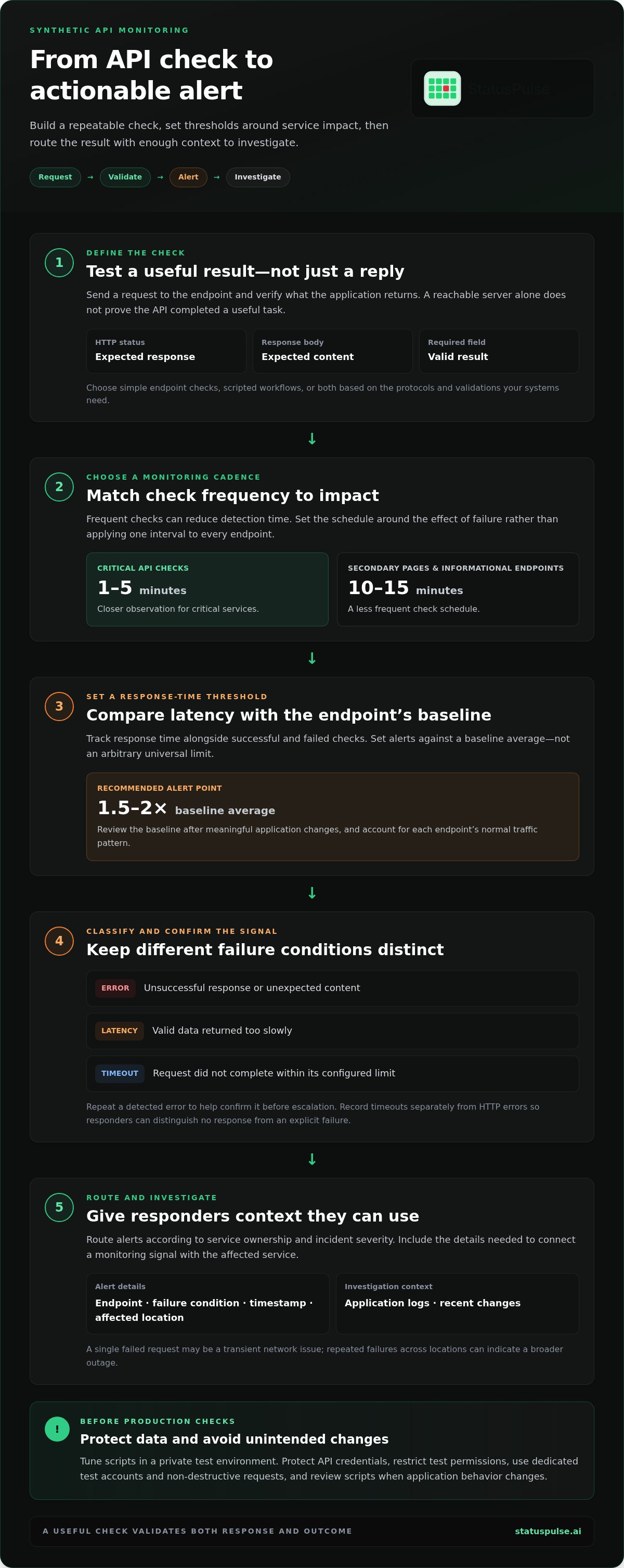
An API uptime check sends a request to an endpoint at a set interval and records whether it succeeds. It can validate the HTTP status, response body, or a required field, rather than treating any reply as proof of a healthy API. This distinction matters when an endpoint responds but returns incomplete or unusable data. For example, a health check can confirm that a service returns the expected account state.
Choose a tool based on whether you need simple endpoint checks, scripted workflows, or both. The right fit depends on the protocols and validations your systems require.
Limitations and Risks
Synthetic checks cover only the requests and paths included in their scripts. They may miss failures tied to an untested browser, network, location, device, or user action. A test can also create risk if it changes production data or uses real customer records. Use dedicated test accounts and non-destructive requests, and review scripts whenever application behavior changes.
What security and compliance considerations apply? Protect API credentials, restrict test permissions, and avoid sending sensitive production data through scripts. Assess where test data travels and how access to monitoring is controlled.
What are the limitations and risks? Script coverage cannot capture the full user experience, and poorly designed checks can trigger false alarms or unintended state changes. Validate each check against real application behavior.
How does API monitoring improve performance and resilience?
Monitoring can improve resilience by detecting degraded requests before they disrupt critical workflows. Scripts provide repeatable performance checks across locations and help teams relate uptime signals to user experience.
Monitoring Frequency and Alert Thresholds
Monitoring frequency determines how often scripts test an endpoint; alert thresholds define which results need attention. Both choices matter. Frequent checks can reduce detection time, but tests and thresholds should reflect service impact without generating unnecessary noise.
Critical API checks commonly run every 1-5 minutes. Secondary pages and informational endpoints can run every 10-15 minutes. A fifteen-minute interval is also typical for synthetic monitoring, but revenue-critical flows usually need closer observation.
Set response-time alerts against a baseline, not an arbitrary universal limit. An alert is recommended when response time exceeds 1.5-2 times the baseline average. Review the baseline after meaningful application changes, and keep each endpoint’s normal traffic pattern in view.
API Incident Alerting Rules
API incident alerting rules turn check results into signals engineers can act on. A single failed request may be a transient network issue, while repeated failures across locations can indicate a broader outage.
Set separate conditions for unsuccessful responses, unexpected content, and excessive latency. An endpoint returning an error, for example, should trigger a different event from one returning valid data slowly. Repeat a detected error to help confirm the result before escalating.
Route alerts according to service ownership and incident severity. A failing payment API may need immediate attention, while a slow informational endpoint may only require investigation. Include useful details in each alert: the endpoint, failure condition, timestamp, and affected location.
Timeouts and Alert Events
A timeout means a request has not completed within its configured limit. This matters because a stalled API can block dependent scripts even if the server has not returned an error code.
Set the timeout to match the endpoint’s expected behavior and the workflow it supports. A short limit can flag slow responses, but an overly aggressive setting may trigger false alarms during normal variation. Record timeouts separately from HTTP errors so responders can distinguish no response from an explicit failure.
Use a private test environment to tune scripts before production checks. Then review alert events against application logs and recent changes. This connects monitoring signals to likely causes instead of treating every alert as an isolated incident. For teams building these checks into an availability workflow, API monitoring can provide a focused starting point.
Synthetic monitoring versus real user monitoring
Synthetic monitoring and real user monitoring answer different questions. One tests planned journeys under defined conditions; the other records what visitors experience in actual sessions.
| Method | What it observes | Where it is useful |
|---|---|---|
| Synthetic monitoring | Scripted requests and journeys, run on a schedule | Checking known paths proactively, including when user activity is low |
| Real user monitoring | Performance data from actual user sessions | Understanding variation across visitors’ browsers, devices, networks, and actions |
A synthetic test provides a consistent baseline around the clock. A team can test a defined checkout journey before traffic arrives, for example, and compare results after an application change. Real user monitoring captures sessions as they happen, including paths engineers may not have anticipated.
The methods can also reveal different performance details. Synthetic tests can measure browser metrics such as first paint time, above-the-fold load time, and the load time of a specific object. Real user data shows how those measures vary across live sessions, locations, and traffic conditions. A scripted checkout failure identifies a broken test journey; session data can show which visitors encountered friction.
Neither view is complete on its own. A script covers only the actions and conditions engineers built into it, so its results indicate user experience without fully representing it. A simulated browser may not reproduce a visitor’s network, location, device, or browser. Real user monitoring captures actual activity, but cannot reveal a path nobody takes during the observation period.
Integrating monitoring systems can help connect a synthetic failure with evidence from real sessions. If a scripted search slows down, engineers can compare its timing with live search sessions and application changes. Keep the evidence distinct: one comes from a controlled test, the other from observed traffic.
Use synthetic tests to proactively check known journeys, and real user monitoring to understand variation across actual sessions. If a failure affects an untested path, update the script. If it affects only some visitors, investigate patterns in the real-session data.
What types of API checks and test scenarios can synthetic monitoring run?
A useful check validates API behavior, not just whether the server responds. Synthetic tests can inspect status codes, response fields, authentication, and complete business workflows.
Start with a single endpoint when you need a narrow signal. Send a request to a health or search endpoint, then assert the expected status and response structure. A 200 OK confirms the server replied, but it doesn’t prove the result is correct. Check a required field or value, such as whether a search response contains the expected product identifier.
HTTP status codes also help classify failures. A 4xx response points to a client-side request problem, while a 5xx response indicates a server-side error. Test expected error handling as well as success: a request with invalid credentials should fail clearly, rather than returning misleading account data.
For broader coverage, script sequences that represent customer or staff tasks. A synthetic test can verify that each action succeeds and that later steps receive the data they need:
- Log in, then confirm the account endpoint returns the expected user state.
- Search for an item, then check that the results contain a matching record.
- Submit a form, then verify that the response confirms successful processing.
- Add an item to a cart and proceed through checkout using test data.
These workflows expose failures between services. For example, checkout may receive a successful cart response but fail when the payment service processes the next request. Validate each response and pass only the necessary identifiers between steps. This makes it easier to pinpoint where the sequence breaks.
Test from different locations when geography can affect access or response behavior. A login flow might work in one region but fail in another because of routing, configuration, or a regional dependency. Comparing the same scripted journey across locations helps distinguish a broad outage from a location-specific failure.
Design scripts to avoid changing production data. Use dedicated test accounts, reversible actions, and data that can be reused safely. For checkout checks, stop before a real transaction unless the environment safely supports test transactions. Keep credentials out of visible test output, and give each test account only the permissions its workflow requires.
Make assertions reflect actual service contracts. A response can be syntactically valid yet contain stale or incomplete data. Validate the fields downstream applications require, and update assertions when an API changes. This ties each synthetic check to a defined user or system outcome instead of a shallow connection test.
How do you set up synthetic API monitoring step by step
Build checks around important user journeys, then define what success means at each stage. Start synthetic API monitoring with 3-5 critical user journeys, such as authentication, search, or a core account task.
- Choose journeys by impact. Identify the workflows whose failure would block users or dependent systems. For example, map the requests required to sign in and retrieve account data. Keep the initial scope to 3-5 journeys so each test has a clear purpose and an owner.
- Write down expected outcomes. For every request, define the acceptable response status, required fields, and meaningful result. A successful HTTP response alone may not prove the task worked. For a search request, assert that the response includes usable results, not merely a valid response structure.
- Prepare safe test data. Use a dedicated account and records created for monitoring. Prefer read-only operations where possible. If a journey must submit a form or alter state, define how the test data will be reset. Keep credentials out of scripts and logs, and grant the account only the permissions it needs.
- Set execution conditions. Choose a monitoring location that reflects the system boundary you need to test. A public endpoint tests the external path; a check inside a firewall can observe internal functions. Set the interval according to the journey’s importance, then define timeouts that distinguish a slow response from a completed request.
- Connect failures to action. Specify which conditions trigger an alert, who owns the affected service, and what context the event should include. Record the failed request, expected result, observed result, and location. This gives responders evidence to compare with application logs and recent changes.
Run each script in a private test environment before enabling production checks. Confirm that authentication works, assertions catch an intentionally incorrect response, and repeated runs do not leave unwanted data behind. Then compare synthetic results with application behavior and revise brittle steps when endpoints or response contracts change.
Review test outcomes after application deployments and whenever a workflow changes. A script that still runs but no longer represents the real journey can create false confidence. Keep journey ownership, expected results, and alert routing together so teams can maintain checks as dependencies evolve.
To put these checks into practice, explore API monitoring for tracking endpoint availability.
StatusPulse: Public Status Pages
StatusPulse helps teams pair service monitoring with clear communication through Public Status Pages. During an API or application incident, a status page gives users a place to see service updates. Uptime Monitoring, SSL Certificate Monitoring, and API Monitoring help teams track key availability signals.
This is a practical next step when your checks detect issues but customers still lack a clear view of service status. Use monitoring to identify disruptions and a public status page to communicate what’s affected. Visit statuspulse.ai to learn more.
Make monitoring part of the release process
Make your most important synthetic API monitoring checks maintained operational assets. Assign an owner to each journey, review expected results when an API changes, and use failures to improve both the test and the response process. This keeps monitoring connected to the system it measures instead of allowing scripts to drift after deployment.
StatusPulse supports the communication and monitoring that follow a detected issue. Uptime Monitoring and SSL Certificate Monitoring help track service availability and certificate status, while Public Status Pages give users a place to follow service updates during an incident. Align these signals with how your team communicates and responds.
Contact StatusPulse to discuss monitoring for your services and workflows. Build checks your team can maintain, then make each result useful to both responders and users.
Frequently Asked Questions
What are the best practices for API monitoring?
Give every check a clear owner, expected result, and response path. Separate production checks from test traffic, and use dedicated credentials with only the permissions each script needs. Review checks when an API contract or dependency changes. For example, if a response adds a required field, update the assertion so a valid status code does not mask an unusable payload.
What is API monitoring, and why is it important?
API monitoring checks whether an interface responds correctly and consistently for dependent systems. This matters because an API can fail even when its host application remains online. A product page might load while its inventory request fails, leaving customers with stale information. Monitoring helps teams identify the affected interface and connect the issue to dependent services.
Which metrics should you monitor for APIs?
Track successful and failed requests, response time, timeouts, and whether responses contain usable data. Break results down by endpoint so a slow search request is not hidden in an application-wide average. For example, a rising failure rate on an authentication endpoint has a different operational impact from occasional errors on an optional recommendation API. Tie metrics to service behavior your team can act on.
What is synthetic API monitoring and how does it work?
Synthetic API monitoring uses scheduled scripts to send planned requests and evaluate the results. A script can authenticate with a test account, request an account record, and check that required fields appear. The results reflect the scripted conditions, not every user’s experience. This approach is useful for repeatedly testing a known endpoint or workflow, including when live traffic is low.
What metrics and alerting thresholds should you use for API monitoring?
Choose metrics that show both availability and degradation, such as failed checks, timeouts, and response-time changes. Set latency alerts against the endpoint’s baseline; an alert threshold of 1.5-2 times the baseline average is a recommended starting point. For an alert rule, define the affected endpoint, the condition that triggers escalation, and the team responsible for investigating it.
How often should API synthetic tests run and from which locations?
Match the schedule to user and business impact: critical checks commonly run every 1-5 minutes, while secondary endpoints can run every 10-15 minutes. Choose locations that represent where users access the service or where important dependencies run. Comparing results across locations can help distinguish a regional routing problem from a failure affecting the service broadly.
How does synthetic API monitoring differ from real user monitoring and API observability?
Synthetic checks run planned scripts; real user monitoring records performance from actual sessions. API observability uses telemetry such as logs, metrics, and traces to investigate behavior within services and across dependencies. A failed scripted request can show that a problem exists, while a trace can help locate the failing service. These approaches answer different questions and can complement one another.
Which synthetic API monitoring tools are available and how do they compare?
Tools range from endpoint-checking services to platforms that run scripted, multi-step journeys. Compare them by supported protocols, test locations, workflow depth, and failure reporting. Choose based on whether you need endpoint checks, scripted workflows, or both.


