

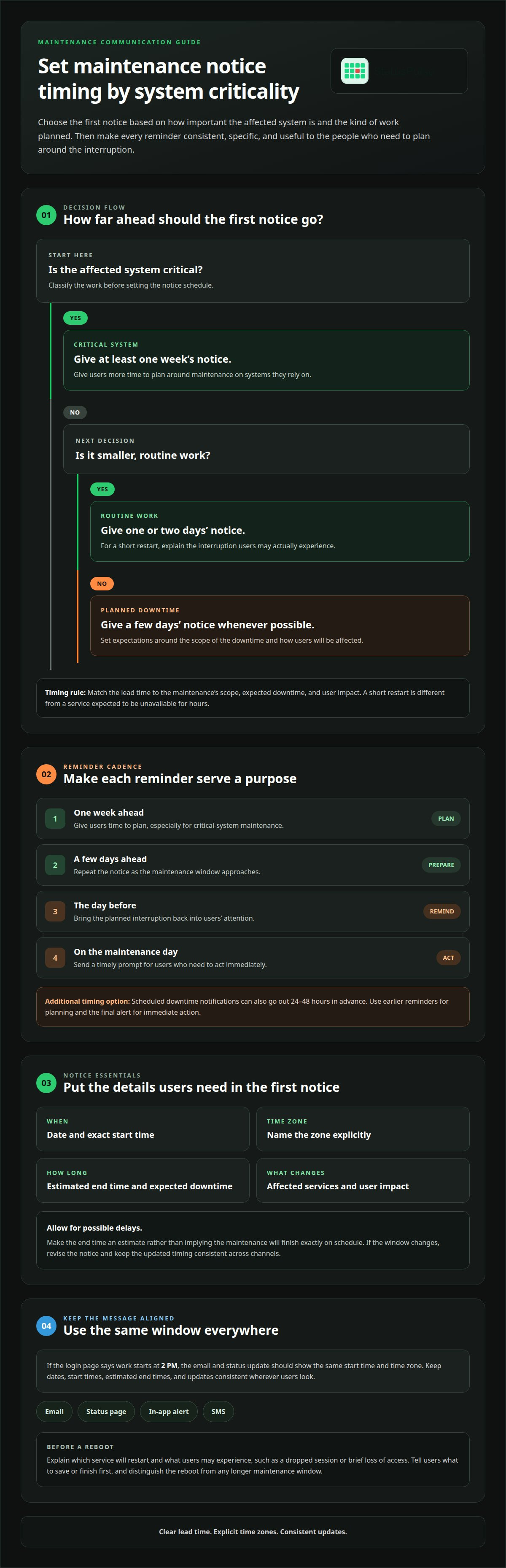
A maintenance notice needs a clear lead time and time zone, not just a date. For planned downtime, notify users a few days ahead. Announce maintenance on critical systems at least one week in advance, and smaller routine work one or two days ahead. When notifying users about upcoming maintenance across time zones, state the exact start and estimated end times, name the time zone, and allow for possible delays.
Email alone may not reach every user when they need the information. A status page, in-app alert, or SMS can make the notice easier to find, while a well-written message explains what will be affected and what users can do in the meantime.
This guide explains how to choose a maintenance window, tailor updates for technical and non-technical audiences, describe impacts and alternatives, and coordinate communication across channels. You’ll also learn how to schedule reminders so users in different regions can plan around the disruption.
Key Takeaways
- Set notice timing according to the maintenance’s scope and how much users rely on the affected system.
- Write updates that help both technical and non-technical readers understand what’s changing and what happens next.
- Name affected features, likely user impacts, and any practical alternatives before the work begins.
- Make maintenance windows clear across regions by stating the time zone and accounting for possible delays.
- Choose communication channels based on where users need to see the notice, then keep updates consistent as the work progresses.
Advance notice for scheduled maintenance
Build the notice schedule around system criticality, expected downtime, and user impact. Make each reminder useful rather than merely repetitive.
- Classify the work before scheduling. Announce critical-system maintenance at least one week ahead, and smaller routine work one or two days ahead. For planned downtime, give users a few days’ notice whenever possible. A user-facing application that needs a short restart differs from a service expected to be unavailable for hours.
- Set a reminder cadence that matches the maintenance window. A practical sequence is one week ahead, a few days ahead, the day before, and the maintenance day. Scheduled downtime notifications can also go out 24-48 hours in advance. Use the earlier reminders for planning and the final alert for immediate action.
- Keep the schedule consistent across channels. If the login page says work starts at 2 PM, the email and status update should show the same start time and time zone. Make the estimated end time explicit, and leave room for delays rather than implying the window is guaranteed to close on schedule.
Set Advance Notice and Reminder Timing
Set the first notice according to criticality: give users at least one week for critical systems and one or two days for routine work. For planned downtime, provide a few days’ notice whenever possible. Align reminders with the maintenance window, then send updates one week ahead, a few days ahead, the day before, and on the day.
Prepare Scheduled Maintenance Notices
State the date, exact start time, time zone, estimated end time, and expected downtime in the first notice. For example, a National Weather Service notice gave August 7 as the start date and estimated the radar would be down for approximately five days. Check every channel for consistent timing, and revise the notice if the window changes.
Warn Users Before Reboots
Before an advanced reboot, explain which service will restart and what users may experience, such as a dropped session or brief loss of access. Tell users what to save or finish first, and distinguish the reboot from any longer maintenance window. Check dependencies and active user workflows so the warning describes the actual interruption, not just the infrastructure action.
Coordinate reminders so users can plan ahead and still receive a timely prompt as the work approaches. For planned downtime, send multiple notices: one week ahead, a few days ahead, the day before, and on the maintenance day. Add a notice to the application’s login or start page a few days before downtime, where users can see it as they prepare to access the service.
Writing messages for technical and non-technical audiences
Write each update for the person reading it, not just the team doing the work. Give users a clear next step, then keep progress reports consistent throughout the maintenance window.
-
Tailor Messages to Each Audience
Separate operational details from user impact. Technical readers may need the affected service, deployment stage, and dependencies; other users need to know which task or feature will be unavailable. Start in plain language, adding technical terms only where they help. For example, explain that “API requests may fail” rather than relying only on an internal component name.
Make sure both versions give the same start time, expected duration, and next update time. Don’t let a simplified message promise more than the technical update can support.
-
Send Clear, Empathetic User Updates
Give logged-on users a concise warning before they begin work if maintenance may interrupt them. Say what to save, pause, or finish, and explain how the interruption affects their current task. Acknowledge the disruption directly; don’t bury practical instructions under apologies or technical jargon.
Give users a way to ask questions and say when the next update will arrive. Keep the notice visible long enough to read, but avoid blocking a task unless users must act before work begins.
-
Share Maintenance Status and Completion
Publish a progress update if the work changes, runs late, or affects users differently than expected. Say what has changed, what remains unavailable, and when the next update will arrive. A public status page gives users one place to find updates without searching through separate messages.
After maintenance, confirm completion, explain relevant changes and issue-resolution steps, share improvements or new features, and thank users for their patience. Remove downtime notifications within 1-2 hours after maintenance is complete. A public status page can provide a place to publish maintenance updates.
-
Address Notification Requirements and Reach
In the United States, applicable notification requirements depend on the service, sector, and customer contract. Identify the rules and commitments that govern your service before setting notice timing or wording; don’t assume one schedule applies to every organization.
Review delivery records, helpdesk ticket volume, user feedback, adherence to scheduled windows, and whether users took recommended actions. Compare these signals after each maintenance window. Delivery records alone don’t show whether users understood the message, so consider feedback and user actions alongside channel data.
Communicating affected features and alternative resources
Before sending a maintenance notice, list the affected functions, expected impact, and available alternatives. Users should be able to tell whether their task will stop, change, or continue through another route.
A useful notice names the maintenance purpose, affected services, expected duration, user impact, and available alternatives. If work may cause an outage or data loss, explain what users should save or avoid, and how the team will share updates.
Address possible outages or data loss directly: state which service or data may be affected, what users should do, and where to find recovery instructions. Don’t present a possible risk as certain.
-
Identify Affected Features
Connect the maintenance task to features users recognize, not just internal components. For example, if a database upgrade interrupts report exports but leaves sign-in available, name both functions and their expected availability. Check dependent workflows, such as scheduled reports that rely on the affected database.
Distinguish unavailable features from slower or degraded ones. If users can still read existing reports but can’t create new exports, say so. Avoid broad labels such as “the platform” when only one workflow is affected.
-
Include Key Notification Information
Give the notice a clear purpose, start time, estimated duration, affected services, expected user impact, and available alternatives. Include any required user action, such as saving a draft before a restart. Put practical details near the beginning so readers can act without scanning a long technical explanation.
Check that the message answers three questions: what is changing, what will users experience, and what should they do? For example, explain that report exports will pause, existing reports will remain accessible, and users can download needed files before work begins.
- Offer an alternative only if it will work during the maintenance window. If report exports pause, users might still view existing reports or retrieve a previously generated file. Make sure the fallback doesn’t depend on the service being changed. State its limits clearly, including missing data or delayed updates.
- For a possible outage, explain whether users should retry later, save local work, or avoid submitting a transaction. If data could be lost, identify the workflow at risk and point to the applicable recovery steps. Keep technical details available for operators, but make the user instruction direct. For example: “Save your draft before leaving this page.”
Coordinating maintenance across time zones
Choose a maintenance window that avoids peak usage for the largest share of users. Then publish one clear schedule that works across regions.
- Use regional activity patterns to choose the window. Compare usage across affected regions, then select a period that minimizes inconvenience for the largest number of users. Avoid peak hours where possible. If users are spread across North America and Europe, review each region’s demand rather than assuming one office’s quiet period suits everyone.
- Write the start and estimated end time with an explicit time zone. For example, “2-4 PM EST” is clearer than “this afternoon,” but a global notice should also identify which regions the abbreviation refers to. Include the date beside each time. A time without a date can be misread when users work across different local calendars.
- Choose a reference time zone for the operational schedule, then show users the local time they need. Keep the reference time visible so engineers and users can compare the same window. Before publishing, check every displayed conversion against the maintenance date. Time-zone offsets can change with seasonal clock rules, so verify each conversion rather than reusing one from an earlier window.
- Allow for uncertainty in the end time. State when work is scheduled to start and when it is estimated to finish, and explain that delays may extend the window. Keep the estimate consistent across email, the application, and the status update. If work runs late, publish a revised estimate instead of leaving users to infer progress from an expired schedule.
- Schedule reminders for the audiences who need them. A user in California and a user in Berlin may receive the same announcement at different local times, even when the maintenance window is fixed. Check when each group is likely to see its notice. Avoid sending reminders during local sleeping hours when another practical delivery time is available.
- Test the schedule from the user’s perspective before publishing. Read the notice with the time zone, date, and estimated duration visible together. Confirm that the displayed time matches the operational calendar the maintenance team uses. Ask a colleague in another region to interpret the notice without extra context, then revise any wording that makes the start or end ambiguous.
- Keep one source of truth throughout the window. When the start time changes, update every channel and preserve the original time zone in the revision. State that the window now begins later, name the revised date and time, and give a new estimated end. This prevents users from acting on an outdated regional conversion.
Using email, SMS, status pages, and in-app alerts
Choose channels based on where users need the notice and how quickly they must act. Keep maintenance details consistent across every message.
For emergency maintenance, publish an update as soon as you identify the disruption. Use the status page and in-app alerts for visible updates, then send email or SMS when users need direct notice.
- Use email for planned notices users may need to retain or forward. Put the affected service, maintenance window, and user action in the opening lines. For example, tell users that account exports will pause and where they can view previously generated files. Keep the subject specific, such as “Scheduled maintenance: account exports.”
Before sending, make sure the recipient group matches the affected feature. A notice about one application component shouldn’t imply that every product function will be unavailable.
- Use SMS for concise, time-sensitive messages, not for the full technical explanation. State the affected service, the start time with its time zone, and where users can read current details. For example: “Reporting maintenance starts at 2 PM EST. See the status page for updates.” Avoid sending SMS when the user doesn’t need an immediate action.
- Use a status page as the reference point when conditions change. Publish planned work before it starts, then update the same incident or maintenance entry if timing or impact changes. This gives email and SMS a stable destination. Keep the page aligned with the operational team’s current understanding.
A public status page can give users one place to find maintenance notices and progress updates.
- Use an in-app alert when users are already working in the affected application. Place it near the relevant feature, such as a report-export screen, so the warning has context. In-app downtime banners are typically text-only and don’t require user action or include call-to-action buttons. Keep the notice readable without blocking unrelated tasks.
- Match each channel to the urgency and audience. Email can carry the full explanation; an in-app banner can warn active users; SMS can deliver a short, urgent alert; and a status page can hold the evolving record. Organizations can also use social media, web pages, pop-ups, internal communication tools, or an application’s start page.
For emergency work, don’t wait for a complete postmortem before alerting users. First share the known impact and immediate instruction, then add updates as facts change. Mark uncertain timing as an estimate and revise it when the team has a reliable new window.
StatusPulse: Public Status Pages
StatusPulse provides Public Status Pages for publishing maintenance notices, service impacts, and progress updates in one place. Use a status page when users need a consistent reference across email, SMS, and in-app alerts, especially if the maintenance window or its impact changes.
StatusPulse also offers Uptime Monitoring, SSL Certificate Monitoring, and API Monitoring. These tools help teams track service availability and communicate operational changes with clearer context. A status page supports communication; it doesn’t replace channel-specific alerts when users need direct notification.
To give users a central place to follow planned work and service updates, visit StatusPulse public status pages.
Make your next maintenance window easier to coordinate
Make your communication plan a repeatable operational practice. After each maintenance window, review where users missed an update, which questions support teams received, and whether the published schedule matched the work. Use these findings to refine the next notice process, assign ownership for updates, and maintain a clear source of truth across regions.
Effective maintenance communication also depends on understanding what is happening across the services users rely on. StatusPulse offers Public Status Pages, Uptime Monitoring, and SSL Certificate Monitoring. These support teams that need service visibility alongside a consistent place to publish operational updates.
Clear expectations matter more than sending more messages. Keep the next step simple, make the schedule understandable wherever users work, and treat each update as part of the service itself. For help aligning status communication with your maintenance process, contact StatusPulse about maintenance notices.
With a repeatable plan, notifying users about upcoming maintenance becomes part of reliable operations rather than a last-minute scramble.
Frequently Asked Questions
How do I get notified about planned maintenance?
Enable maintenance notifications in the service’s account or organization settings, then confirm that the right team owns the subscription. If you use a shared inbox, check that messages reach active members rather than an unattended folder. Corporate mail filters can quarantine automated notices, so add the sender to your approved list when your organization’s email rules allow it.
How far in advance should users be notified about planned maintenance?
Choose the lead time by working backward from the last point when users can prepare safely. A workflow involving exports, approvals, or a scheduled customer handoff needs more preparation than one users can pause without losing work. Identify the last safe action with the service owner, then publish the notice early enough for affected users to complete it.
Which channels are best for notifying users about upcoming maintenance?
When notifying users about upcoming maintenance, use channels they have chosen or are expected to monitor, and keep broad messages free of sensitive operational details. Make sure the notice remains readable without images and its key instruction appears in plain text. This helps users who rely on assistive technology or use email clients that suppress formatted content.
How should maintenance announcements be timed across time zones?
Use a canonical timestamp in the operations schedule, then present the announcement in a format users can interpret. For example, include the time-zone abbreviation and an offset such as UTC alongside the local time. Avoid ambiguous numeric dates, which can be read in different month-day orders. Keep the canonical timestamp in the change record so later updates use the same reference.
How often should users receive reminders before scheduled maintenance?
Send another reminder when users’ decisions or preparation needs to change, not simply because time has passed. For example, notify affected users again if the maintenance scope expands or a previously available workflow will now be interrupted. Tie the audience list to affected components so unrelated users don’t receive reminders that don’t apply to them.
What are best practices for writing clear maintenance notices?
Use the same feature names users see in the product interface, and ask someone outside the implementation team to read the notice before publication. Replace internal abbreviations with terms customers recognize, then check that the instructions make sense without engineering context. Store approved message templates with an owner and revision history so outdated language doesn’t carry into a later announcement.


