

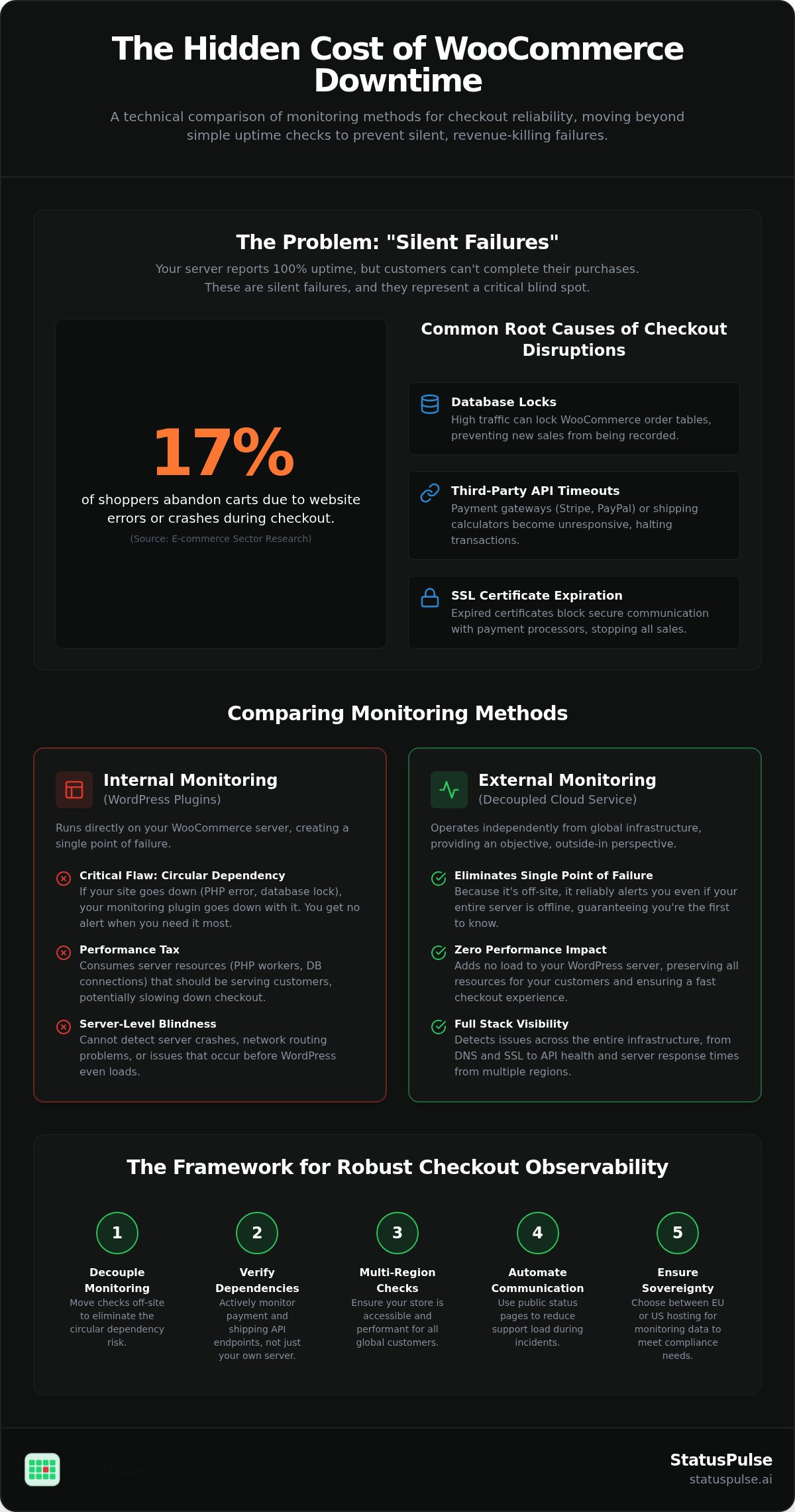
Approximately 17% of shoppers abandon their carts because of website errors or crashes during the checkout process. In a WooCommerce environment, these failures are often silent. They hide behind plugin conflicts after automated updates or subtle API timeouts. By the time you notice the dip in your analytics, you've already lost hours of sales and gained a backlog of support tickets.
You likely agree that internal WordPress plugins are a fragile solution for monitoring WooCommerce checkout process health. If your site's database locks up or PHP 8.3 hits a fatal error, an internal tool cannot alert you. It's a single point of failure that leaves you blind when you're most vulnerable. Relying on the system you're testing is a technical debt you can no longer afford. Precision requires a decoupled perspective.
This guide provides a technical framework for detecting and preventing checkout failures using infrastructure-level monitoring. You'll learn how to gain visibility into your checkout flow from the outside-in and how to use transparent incident communication to reduce support volume. We'll move beyond basic uptime checks to ensure your store remains reliable through the latest WooCommerce 11.1.0 updates and beyond.
Key Takeaways
- Identify "silent failures" where the store remains online but payment or shipping APIs prevent successful transactions.
- Avoid the risks of circular dependency by moving away from internal WordPress plugins toward decoupled, off-site monitoring.
- Establish a 5-step observability workflow for monitoring WooCommerce checkout process health using multi-region uptime checks.
- Lower support overhead during outages by automating incident communication through transparent public status pages.
- Ensure regulatory compliance and data sovereignty with a choice between EU or US hosting for your monitoring data.
The Problem with "Silent Failures" in WooCommerce Checkouts
Monitoring WooCommerce checkout process health is the practice of verifying that the entire transactional path, from the initial "Add to Cart" click to the final "Thank You" page, remains functional for every user. It's a distinct discipline from basic server monitoring. While your host might report 100% uptime, your customers could be staring at a spinning loading icon on the payment screen. This lack of visibility turns technical debt into direct revenue loss.
Silent failures represent a critical blind spot in e-commerce operations. These occur when your website appears online to a standard "ping" check, but the underlying payment gateway or shipping API has failed. Research indicates that approximately 17% of shoppers abandon carts because the website had errors or crashed during the process. This technical friction contributes to an estimated $260 billion in lost revenue annually across the global e-commerce sector. For a WooCommerce store, a silent failure often means your PHP execution is fine, but your business logic is broken. For store owners looking to eliminate technical debt and build a robust, error-free storefront, discover Codepispor to access expert web development and e-commerce solutions.
Common Root Causes of Checkout Disruptions
Checkout flows are complex because they rely on multiple external dependencies and internal resources. A single failure in any of these components can halt your revenue stream:
- Database locks: High-traffic sales events can cause table locking in the WooCommerce database, preventing new orders from being committed to the
wp_postsorwp_wc_orderstables. - Third-party API timeouts: Services like Stripe, PayPal, or FedEx may respond slowly or fail entirely, causing the checkout page to hang or return an "Internal Server Error" after the user clicks "Place Order." Selecting dependable providers using comparison platforms like PaySelect can help minimize gateway-level instability, but continuous external monitoring remains essential.
- SSL certificate expiration: Expired certificates prevent secure handshakes with payment processors. This blocks all transactions instantly because modern gateways require encrypted communication.
Why Traditional Uptime Checks Are Insufficient
A standard HTTP 200 response only confirms that your web server is reachable and serving a page. It doesn't guarantee that your checkout logic is executing correctly. Relying on simple Website monitoring pings is insufficient for monitoring WooCommerce checkout process stability. These basic checks fail to detect broken JavaScript on the checkout form, failed database writes, or a timed-out connection to your shipping calculator.
Silent failures are the gap between server availability and transactional functionality.
Effective monitoring requires observing the underlying infrastructure from the outside-in. This approach moves beyond UI-only testing to ensure that every layer of the stack, including external API health and database performance, is performing as expected. Utilizing a dedicated platform like StatusPulse allows you to monitor these infrastructure-level dependencies without adding load to your WordPress server.
Comparing Monitoring Methods: Off-Site Cloud vs. WordPress Plugins
Choosing the right architecture for monitoring WooCommerce checkout process health is a decision between internal convenience and external reliability. Most store owners start with WordPress plugins because they are familiar. However, technical teams often move to decoupled cloud services to avoid systemic blind spots. Precision requires a monitor that exists outside the failure domain of the website itself.
The Plugin-Based Approach (Internal)
Internal monitors run directly on your WordPress server. They have access to internal logs and can trigger actions within the dashboard. This setup is convenient for small blogs or low-volume hobbyist stores. However, it introduces a critical circular dependency. If your site crashes due to a PHP fatal error or a database lock, the plugin monitoring the site crashes too. You won't receive an alert because the notification engine is offline. This creates a false sense of security where the store is down but the dashboard reports no issues.
Relying on internal resources also adds a performance tax. Every check consumes PHP workers and database connections that should be reserved for customers. In the context of Analyzing the Checkout Experience, any latency during the transaction phase directly erodes buyer trust. If your monitor makes the site slower, it's contributing to the problem it's meant to solve. Plugins are often blind to server-level crashes and network routing issues that happen before WordPress even loads.
The Cloud-Based Approach (External)
External cloud monitoring operates entirely independently of your hosting environment. It observes your site from the outside, just like a customer would. This method provides visibility into DNS failures, SSL certificate expirations, and CDN outages that an internal plugin cannot see. It's the professional standard for SREs who require a source of truth that isn't tied to the infrastructure being monitored. It allows for multi-region verification to ensure the checkout isn't just working for you, but for your entire global audience.
While cloud monitors don't see your internal PHP error logs directly, they provide the most reliable uptime data. They ensure you are the first to know when a payment gateway API stops responding. This decoupled approach is the most effective way of monitoring WooCommerce checkout process stability without impacting server performance. For stores that prioritize data sovereignty, selecting a provider that offers EU or US hosting ensures your monitoring stack aligns with your regional compliance needs and provides a neutral perspective on site health.
5 Steps to Implement Robust Checkout Observability
Building a reliable system for monitoring WooCommerce checkout process health requires a structured approach. You can't just watch the homepage. You must observe the entire supply chain of the transaction. Observability is about understanding the internal state of your store by looking at its external outputs across the full stack.
- Map your dependencies: Identify every service involved in a purchase. This includes your payment processor, shipping calculators, and tax calculation APIs.
- Configure 1-minute checks: High-volume stores can't wait for 5-minute polling. A failure during a peak hour results in immediate revenue loss.
- Monitor from multiple regions: A routing issue in the EU might block customers there while US traffic remains unaffected. Multi-region verification provides a global perspective.
- Track SSL and domain health: These are fundamental to the PCI Security Standards Council requirements for secure transactions.
- Establish alert thresholds: Set your system to notify you after two consecutive failures. This filters out transient network blips and prevents notification fatigue.
Monitoring the Payment Gateway API
Your payment API health is the most critical metric for any e-commerce site. If Stripe or PayPal is down, your store is effectively closed. Synthetic checks allow you to simulate API calls to ensure the handshake is successful before a customer ever attempts to pay. For a deeper look at technical implementation, refer to this API Monitoring Guide. It explains how to track response times and status codes for third-party endpoints used during checkout.
Preventing SSL and Domain Expiry Outages
Expired certificates trigger "Connection Not Private" warnings that instantly kill conversion rates. These failures also violate security mandates and erode trust. Automating lookups for your domain and SSL health ensures you receive alerts weeks before an expiration date. You can use Website Uptime Monitoring Tools to track these technical vitals alongside your standard uptime checks. This prevents the embarrassment of a manual renewal failure and keeps your secure connection functional for every shopper.
Effective monitoring isn't just about knowing when the server is down. It's about ensuring every component of the checkout flow is ready to process a sale. By following these steps, you move from reactive troubleshooting to proactive reliability management.
Incident Communication: Reducing Support Load During Outages
Monitoring WooCommerce checkout process success is meaningless if you ignore the customer experience during a technical failure. When a checkout fails, a shopper faces a choice. They can try again, leave for a competitor, or open a support ticket. Without clear communication, most will choose the latter two. Transparency is a psychological tool that converts a technical failure into a trust-building event. It reassures the user that the problem is known and being actively addressed.
Manual drafting takes time that developers don't have during a critical outage. AI can assist by drafting technical summaries that translate complex server errors into plain language for non-technical customers. This clarity is essential for reducing support ticket volume. Some technical teams report reducing their ticket load by 40% or more simply by providing a visible, real-time status indicator on the checkout page. It moves the conversation from "Why is this broken?" to "I see you're fixing it."
The Role of the Public Status Page
A public status page serves as your single source of truth. It prevents your support team from answering the same question hundreds of times. By linking your monitoring alerts directly to your status page, you can automate the transition from a "Down" detection to a public incident update. This ensures that the moment a checkout disruption occurs, your customers are informed. For a deeper look at this strategy, see these best practices for incident communication transparency.
Drafting Updates with Technical Precision
Effective incident reports avoid hype and excuses. They focus on two metrics: impact and estimated resolution time. State clearly which payment methods are affected and what the current status is. Avoid vague language like "we are investigating." Instead, provide concrete details about the service being restored. Precision builds more authority than empty reassurance.
If you are serving European customers, data sovereignty is a core requirement. Providing a status page with a choice between EU or US hosting ensures you meet regional privacy expectations while maintaining high availability. It's about respecting the legal and ethical standards of your audience. Build a more reliable store by integrating AI-powered incident management into your WooCommerce stack to handle these communications automatically.
Implementing StatusPulse for WooCommerce Reliability
StatusPulse provides a unified stack for monitoring WooCommerce checkout process health, combining uptime, API, and SSL monitoring with AI-driven incident management. This integrated approach replaces the need for fragmented third-party tools or fragile WordPress plugins. You can configure your first checkout monitor in under 5 minutes by targeting critical transaction endpoints. Because our pricing is flat and transparent, you can scale these checks across multiple stores without the stress of per-subscriber fees or complex corporate pricing models.
The next step in your reliability workflow is integrating AI-powered incident management. When a failure is detected, the system drafts technical summaries automatically. This saves developer time and ensures that your status page is updated with precision. It moves your team from a reactive posture to a controlled, automated response that protects your store's reputation.
The Advantage of Decoupled Monitoring
StatusPulse's decoupled architecture is a core virtue for high-volume stores. Our monitoring nodes remain active even when your WordPress database locks up or your PHP execution fails. We provide a choice between EU or US hosting, allowing you to maintain data sovereignty while checking for global latency. This off-site perspective is essential for identifying network routing issues that internal tools simply cannot see.
We intentionally avoid per-subscriber fees as an ethical signature of our platform. We believe you shouldn't be penalized for growing your audience or communicating transparently during an outage. This flat-rate model allows agencies and technical teams to maintain precise observability across a diverse portfolio of stores without hidden costs. It is a straightforward alternative to the bloated pricing structures of industry incumbents.
Setting Up Your Status Page
A status page is only effective if it's accessible and trustworthy. You can customize the branding of your StatusPulse page to match your WooCommerce storefront, maintaining a familiar environment for your customers. You have full control over visibility, with options to enable private pages for internal stakeholders or public pages for your entire user base.
By centralizing your uptime and API data, you create a single source of truth for your organization. This reduces the friction between your technical team and your support staff. It ensures that everyone is looking at the same data in real-time. Build your first public status page on StatusPulse to automate your incident communication and protect your monitoring WooCommerce checkout process revenue today.
Securing Your Store's Transactional Integrity
Reliability in e-commerce is not a static achievement. It requires active observation of the technical dependencies that power every sale. You now have a framework to move beyond the limitations of internal plugins by adopting an off-site, infrastructure-level strategy. By mapping your dependencies and implementing automated incident communication, you protect both your revenue and your team's time.
Adopting a professional approach to monitoring WooCommerce checkout process health ensures you are never the last to know about a technical failure. Precision matters when your reputation is on the line. StatusPulse offers a decoupled monitoring stack with transparent, flat-rate pricing and integrated AI incident management. You can choose between EU or US hosting to maintain data sovereignty while ensuring your store remains functional for every customer.
Start Monitoring Your WooCommerce Checkout with StatusPulse
Building a resilient store is a deliberate choice. When you move from reactive fixes to proactive observability, you gain the quiet confidence needed to scale. Your customers deserve a checkout that works every time, and you deserve a monitoring tool that stays online when it's needed most.
Frequently Asked Questions
How often should I monitor my WooCommerce checkout process?
High-volume stores should use 1-minute monitoring intervals to minimize revenue loss. A 5-minute gap during a peak sales event can result in dozens of failed transactions before you are alerted. Frequent checks allow you to detect transient API timeouts or database locks before they escalate into a full-scale outage. This proactive approach is the standard for monitoring WooCommerce checkout process health in professional environments.
Can I monitor the checkout without using a WordPress plugin?
Yes, and it is often the more reliable choice for technical teams. External cloud-based platforms observe your site from the outside, simulating customer behavior without touching your WordPress core. This decoupled architecture ensures that if your database or PHP engine fails, the monitor remains active to send alerts. It avoids the circular dependency risk where a site crash also takes down your monitoring plugin.
What is the difference between uptime monitoring and checkout monitoring?
Uptime monitoring confirms your web server is reachable and serving an HTTP 200 response. Checkout monitoring specifically verifies the functional path of a transaction, including payment gateway handshakes and shipping calculator responses. A site can be online while the checkout is broken due to a silent API failure. True observability requires tracking these underlying infrastructure dependencies to ensure customers can actually complete their purchases.
Will monitoring tools slow down my WooCommerce store performance?
External monitoring tools do not impact your store's performance because they run on separate infrastructure. They send lightweight requests from global nodes rather than consuming your server's PHP workers. In contrast, internal WordPress plugins consume local resources and database connections for every check. Using a decoupled service ensures your server's capacity is reserved entirely for processing customer orders and maintaining site speed.
How does SSL certificate health affect the checkout process?
SSL certificate health is a critical dependency because payment gateways require an encrypted connection to process transactions. If your certificate expires or has a configuration error, modern browsers will block the checkout page with a "Connection Not Private" warning. This instantly kills conversion rates and violates PCI security standards. Automated SSL monitoring provides early warnings weeks before an expiration date to prevent these preventable outages.
Can I automate customer notifications when the checkout is broken?
You can automate these communications by integrating your monitoring alerts with a public status page. When a failure is detected, the system can trigger an incident update to inform customers immediately. Using AI-powered incident management assists by drafting technical summaries that explain the situation clearly. This transparency reduces support ticket volume by acknowledging the issue before frustrated customers feel the need to contact you.
What are the most common reasons a WooCommerce checkout fails?
Checkout failures typically stem from three main areas: third-party API timeouts, database locks, and SSL issues. Payment gateways like Stripe or PayPal may experience latency that causes the transaction to hang. High traffic can also lead to database contention, preventing the store from creating new order records. Finally, expired security certificates or failed plugin updates often break the JavaScript required for the checkout form to function.
Is off-site monitoring more reliable than plugin-based solutions?
Off-site monitoring is a more reliable choice because it operates independently of your hosting environment. If your server experiences a catastrophic failure, an off-site tool will still be online to alert you. Plugin-based solutions rely on the same resources as your store; if the site goes down, the plugin goes down too. A decoupled perspective provides a neutral source of truth for monitoring WooCommerce checkout process stability.


