

A WebSocket endpoint can return 101 Switching Protocols while users still can’t complete the actions they rely on. A handshake check confirms that a connection opened, not that the session can exchange useful messages. Effective WebSocket API monitoring needs to test what the service is expected to do after the connection starts.
That distinction matters when a persistent session drops, stops receiving updates, or accepts a connection but mishandles application messages. You need signals that show both whether the endpoint is reachable and whether a representative session behaves correctly. You also need alert conditions that avoid paging the team for every transient network blip.
Start by defining the session behaviour users depend on. Then choose checks for connection setup, message exchange, and heartbeat behaviour, and decide how to distinguish endpoint availability from session or application failures. This guide explains how to make those choices, use probes from multiple regions to assess reachability, and route useful alerts into incident response.
Key Takeaways
- Define the user-critical action your WebSocket session must support, then build checks around that expected behaviour.
- Separate handshake failures from session, message, and backend failures so alerts point responders toward the right layer.
- Use endpoint probes, synthetic sessions, and application telemetry for different kinds of evidence. No single method sees everything.
- Set check frequency to match your detection needs and tolerance for alert noise, then route actionable signals into incident response.
- StatusPulse supports WebSocket checks, intervals as low as 30 seconds, and multi-region probes with quorum to help assess availability across locations.
What WebSocket API monitoring measures, and what a successful connection misses
A chat client connects successfully, but new messages never appear. The handshake completed, so a basic availability check reports success, even though users can’t do what they came to do.
WebSocket API monitoring checks whether an endpoint accepts connections and whether a session behaves as expected. Reachability is only one part of that picture. A socket can remain open while messages fail to reach the application, a backend dependency becomes unhealthy, or the service stops processing events.
What does a WebSocket connection prove?
A WebSocket connection usually begins with an HTTP request asking to switch protocols. If the server accepts, it responds with 101 Switching Protocols, and the connection becomes a persistent channel that can carry messages in both directions. The WebSocket protocol supports ongoing communication without requiring a new HTTP request for every exchange.
The response proves that the client reached a server that accepted the upgrade. It doesn’t prove that the server authenticated the right user, processed a message, or returned the expected result. Those require separate checks.
For example, a chat endpoint may accept a connection while its message broker is unavailable. The socket stays open, but a sent message never reaches the recipient. A dashboard may connect but show stale values because its data source has stopped updating. In both cases, transport is available, but application behaviour is not.
Which WebSocket services need session-aware checks?
Session-aware checks matter wherever users depend on a sequence of events over a long-lived, bidirectional connection. Examples include chat, collaborative editing, live dashboards, online games, and connected devices. A short request-and-response check may miss a failure that appears only after a session has been active or after a particular message is exchanged.
Long-lived connections also create failure points beyond initial setup. A session may start normally, then lose its route through a load balancer, stop receiving events, or remain connected while a dependent service fails. The endpoint can still accept new connections even as existing users experience interruptions.
Build checks around the action the session supports. For a chat service, that might mean connecting, sending a test message, and verifying the expected response. For a dashboard, it could mean confirming that a known event arrives. Keep the check narrow and safe for production, and don’t treat an open socket alone as proof of service health.
This distinction fits into a broader availability plan: API monitoring for high availability should reflect what users need an API to do, not just whether a host responds.
How WebSocket failures develop across handshakes, sessions, and messages
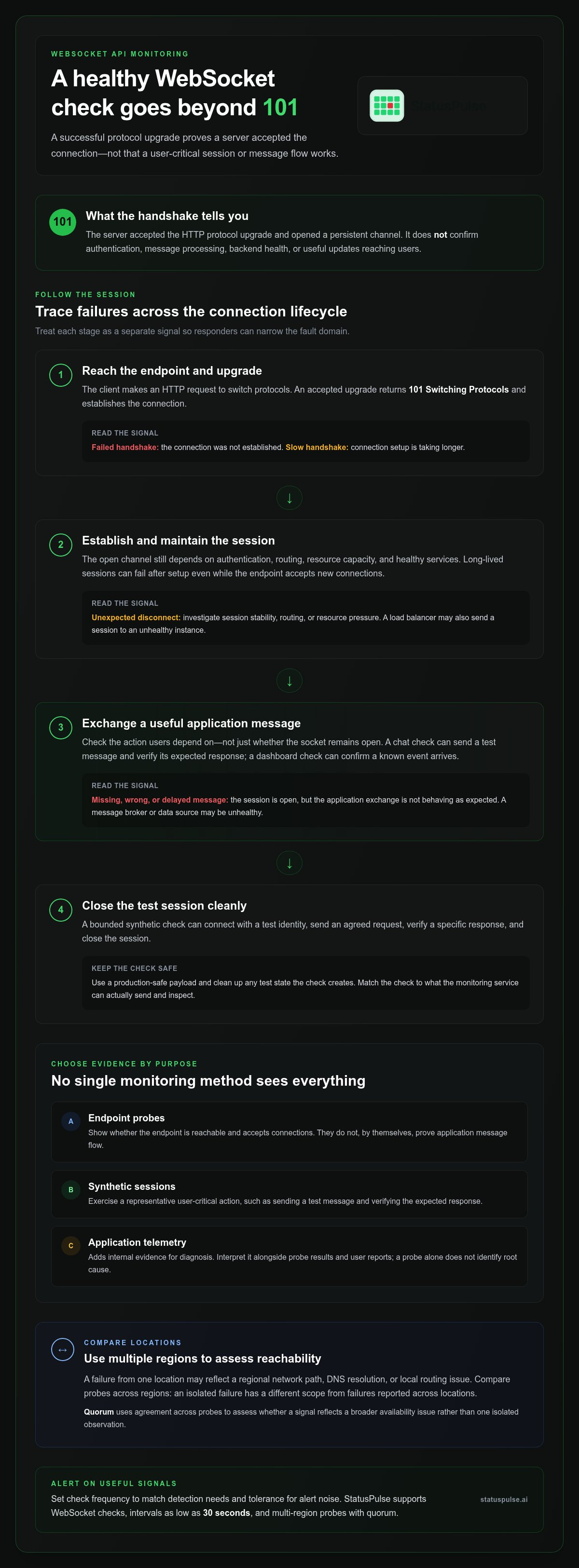
Trace a WebSocket connection as a sequence, not a single pass-or-fail event. A request first reaches the endpoint and attempts the HTTP Upgrade handshake. If accepted, the client establishes a session, exchanges messages, and eventually closes the connection. Each stage can fail for a different reason, so recording only the handshake result leaves gaps in diagnosis.
A successful handshake proves that a server accepted the protocol upgrade. It doesn’t prove that authentication, routing, backend dependencies, resource capacity, or application message handling will remain healthy throughout the session. Credentials may be rejected when the client attempts a protected action. A load balancer may direct a session to an unhealthy instance, or a dependency may stop producing events. Resource pressure can delay processing or force unexpected disconnects.
Keep the signals distinct. A slow handshake points to connection setup latency; a failed handshake means the connection wasn’t established. An unexpected disconnect concerns session stability, while a message error means the session is open but the application exchange is wrong, missing, or delayed. Distinguishing these outcomes helps responders narrow the fault domain instead of treating every symptom as “the WebSocket is down.”
What should a synthetic WebSocket check exercise?
Design a bounded check around one observable, user-critical action. It might connect with a test identity, send an agreed request, verify a specific response, then close the session. Keep the payload safe for production and ensure the check cleans up any test state it creates.
The expected response is the contract. A connection-only probe can report endpoint reachability, but it can’t validate the message flow. Don’t assume every monitoring service can send arbitrary frames or inspect application state. Match the check to the capabilities available, and use application telemetry for deeper internal diagnosis.
How do multi-region checks help diagnose connection problems?
A probe from one location can fail because of a regional network path, DNS resolution, or local routing issue, even while clients elsewhere connect normally. Probes from multiple regions let teams compare outcomes. A failure isolated to one location suggests a different scope from failures reported across locations. These results don’t identify the root cause by themselves, but they help focus the investigation.
Quorum uses agreement across probes to assess whether a signal represents a broader availability issue rather than one isolated observation. Interpret probe results alongside application telemetry and user reports; quorum isn’t proof that every session works. Record which locations failed and whether the results agree, so responders can assess the scope before deciding what to investigate next.
WebSocket probes vs. synthetic sessions vs. application telemetry
Each monitoring layer answers a different operational question. An endpoint probe checks whether a connection can be established from outside your system. A synthetic session checks a selected user path, while application telemetry records what happens inside the service as it handles connections and messages. Choose the layer based on the evidence your team needs.
| Method | Can detect | Can miss | Useful when |
|---|---|---|---|
| Endpoint probe | Connection or handshake failures | Authenticated flows, message handling, downstream faults | You need an external availability signal |
| Synthetic session | Failure in a defined connect-and-exchange path | Uncovered paths and internal root causes | You need to check a repeatable user action |
| Application telemetry | Internal processing, dependency behaviour, and errors | Reachability from a user’s network or probe location | You need evidence to diagnose service-side faults |
External checks show what a client can reach from a probe location. Internal telemetry shows how service components handled the work. Neither answers the other’s question: an internal metric can look healthy while the public endpoint is unreachable, and an external failure may not reveal which dependency caused it. This distinction also informs broader uptime monitoring fundamentals.
When is an endpoint probe enough?
If the requirement is simply that new clients can establish a WebSocket connection, an endpoint probe offers a direct, low-complexity signal. It can help identify DNS, network, TLS, or handshake problems from outside the service.
It won’t establish that an authenticated flow works, a message is processed, or a downstream dependency responds. Treat the probe as evidence about endpoint availability, not as a complete measure of real-time user experience.
When should teams add synthetic checks or telemetry?
Add a synthetic check for a specific session path that matters to users and can be tested safely and repeatably. Keep its assertions narrow: verify the expected result for that path rather than trying to reproduce every application state. Use telemetry to inspect server-side processing, dependency calls, queue behaviour, and errors the external check can’t observe.
Correlate signals by time and, where available, request or trace identifiers. If a synthetic exchange fails alongside authentication errors in service logs, investigate that path first. If the probe fails but the service records no corresponding processing, inspect the network edge or routing layer. This gives responders a practical starting point without treating any single signal as a complete diagnosis.
A practical workflow for configuring useful WebSocket monitoring
A useful check starts with a service requirement, not an arbitrary interval or alert threshold. Define what users need to do, choose a signal that can verify it, and decide who should respond when that signal fails. This keeps WebSocket API monitoring tied to operational decisions rather than generating alerts without a clear next step.
- Define the user-critical action. Specify the behaviour that matters, such as establishing a session or receiving a particular response. Keep the expected result observable and safe to test.
- Select the check. Use an endpoint probe for connection availability, a synthetic session for a repeatable user path, and application telemetry to investigate internal processing. Add checks only when they answer a distinct operational question.
- Set an interval and failure condition. Choose how often to check based on how quickly you need to detect an issue and how much alert noise the team can handle. Define what counts as a failure, including whether it must repeat or be corroborated by another signal.
- Route the alert and document the first response. Send actionable failures to the responsible on-call path. State what responders should inspect first, such as probe location, connection results, and relevant service telemetry.
For broader availability planning, transparent incident communication helps teams distinguish operational diagnosis from updates intended for customers.
How should teams choose a probe interval and alert condition?
Shorter intervals can surface changes sooner, but they also create more observations and may increase noise from transient failures. Match the interval to the service’s detection needs and the impact of a missed check, then review alert behaviour against actual incidents. StatusPulse supports configurable intervals down to 30 seconds, so teams can set a cadence that fits their monitoring approach.
Set alert conditions around meaningful evidence, not a single unexplained result by default. For example, a team might require repeated failures or agreement across probes before escalating. Choose the condition deliberately and document why it represents an actionable issue for the service.
How should WebSocket checks fit incident response?
Route a failure to the team responsible for the affected service, with enough context to begin investigation: the check type, time, observed result, and probe location. The first responder can compare external results with logs, metrics, and traces, then decide whether the issue is local, regional, or service-wide.
Keep internal investigation details separate from customer-facing status updates. Share the confirmed impact and current understanding publicly while responders continue examining technical evidence. For background on connecting monitoring to incident communication, see StatusPulse’s WebSocket monitoring options.
Using StatusPulse WebSocket checks to connect detection and communication
A protocol-level WebSocket check answers a basic but important question: can a probe reach the endpoint and establish a connection? It gives teams an external availability signal, but it doesn’t replace synthetic tests of a user flow or application telemetry that explains what happens inside the service.
StatusPulse supports WebSocket checks, custom intervals down to 30 seconds, and multi-region probes with quorum. Teams can observe endpoint availability from more than one location and assess probe results together. As with any external check, interpret the signal within its scope: a reachable endpoint doesn’t prove every authenticated session or message path works.
The operational value comes from connecting detection to response. Monitoring can surface a service issue, incident management can give the team a place to track its investigation, and a status page can communicate confirmed service impact to customers. These are related steps, but they serve different audiences and shouldn’t be collapsed into one alert.
What does a WebSocket check add to an all-in-one monitoring workflow?
Use the probe result as an input to incident tracking, not as an automatic diagnosis. A team can assign severity based on the affected user action, the scope of failures, and corroborating signals. Escalation should follow the incident’s impact and the team’s response process, rather than treating every failed observation as equally urgent.
During an incident, a status page gives customers a clear place to find service-impact updates while responders investigate internally. AI-drafted incident summaries can help prepare an update, but a person should review it for accuracy and context before it’s shared. That keeps communication useful without presenting a draft as a confirmed account.
When might separate observability tooling still be needed?
Protocol probes show what an external observer can reach. They don’t provide detailed application tracing or explain every internal failure. Teams with deeper telemetry needs may use dedicated observability tools alongside probes, then correlate timestamps and relevant identifiers across alerts, logs, metrics, and traces to narrow down where a session failed.
Data location can also be part of the operational decision. StatusPulse offers a choice of EU or US hosting, so teams can select the region that fits their data-residency requirements without assuming one location is right for every organisation.
Start with the real-time session users depend on most. Define one observable success condition, decide what should trigger an incident, and determine what responders and customers need to know.
Keep monitoring aligned with how the service evolves
A WebSocket session contract can drift as teams change authentication, routing, message formats, or dependent services. Treat the check as part of the service’s change process. When a user-facing behaviour changes, review whether the monitoring expectation still reflects what clients should experience.
This keeps WebSocket API monitoring more than a connectivity signal. It keeps the check relevant as the product evolves and helps prevent stale tests from reporting success against behaviour users no longer rely on. After an incident, use what responders learned to refine the expected outcome or clarify who owns the next action.
Choose one session that matters to users and make its expected behaviour clear enough to test and respond to. Then build from that contract at a pace your team can maintain. Explore WebSocket monitoring with StatusPulse to connect protocol checks with incident tracking and status communication.
Frequently Asked Questions
What is WebSocket API monitoring?
WebSocket API monitoring is the practice of checking whether a WebSocket service meets its operational contract, not just whether its endpoint responds. Define that contract alongside the service’s expected behaviour, and update it when authentication rules, message schemas, or client workflows change. Versioning the check with application changes helps prevent a test from passing while validating behaviour the current service no longer promises.
Can uptime monitoring detect a WebSocket session failure?
It can, if the configured check observes the condition that marks the session as failed. A connection probe alone won’t detect every interruption that affects an already connected client. Review what the monitor considers success and failure, including whether a session that closes unexpectedly changes the result. The definition should reflect the service’s intended lifecycle, not simply the fact that a connection once opened.
How do you test whether a WebSocket API is working?
Make the test safe to run repeatedly. Use dedicated test credentials and messages that won’t trigger real notifications, modify customer records, or create persistent data. Check that test activity is identifiable in service logs, and confirm the test can clean up after itself. These safeguards make failures easier to investigate without confusing synthetic traffic with real user activity.
What is the difference between WebSocket monitoring and HTTP monitoring?
HTTP checks generally evaluate separate requests, while a WebSocket check may need to account for a connection that remains open and carries traffic over time. That affects test design: a single response can be enough for a request-based route, but a WebSocket service may also need checks for session lifetime, message direction, or orderly closure. Select the protocol check that matches the behaviour your clients depend on.
How often should a WebSocket endpoint be checked?
Set the cadence to match the service’s operational objective, then review whether the resulting alerts help responders act. A check that runs more often may report short-lived disturbances that have little user impact, while a slower cadence can delay detection. Consider how quickly the team needs to know, how stable the signal is, and whether the check itself adds meaningful load or test activity.
Can WebSocket monitoring identify regional connection problems?
It can help reveal whether outcomes differ by probe location, which may point toward a region-specific network or routing issue. Compare those results with the service’s traffic patterns and deployment changes before drawing conclusions. Probe coverage may not mirror every customer’s network path, so regional signals are useful evidence for narrowing the investigation, not a complete map of each user’s experience.
What should a WebSocket monitoring alert include?
Make the alert easy to act on without exposing sensitive data. Identify the affected service and check, state the failed assertion in plain terms, and link the notification to the team’s relevant runbook or incident record if available. Avoid including credentials, session tokens, or full message payloads. A short, accurate signal helps responders start work while protecting information that doesn’t belong in an alert.


