

A lower MTTR can make incident response look healthier while slow detection or premature ticket closure stays hidden. Tracking metrics for incident response starts with more than choosing dashboard fields. Teams need consistent timestamps for when an incident begins, when someone acknowledges it, and when service is genuinely recovered.
Start with familiar measures such as mean time to detect, mean time to acknowledge, and mean time to resolve. But “MTTR” can mean response, repair, resolution, or recovery, so comparisons can mislead when teams use different definitions. A useful metric connects each timestamp to customer impact, an owner, and a decision the team can act on.
This guide explains which metrics to track, how to set measurement boundaries that hold across incidents, and how to read results without turning them into individual scorecards. A small, balanced set can reveal bottlenecks in detection, response, recovery, and communication, then help prioritize improvements.
Key Takeaways
- Separate operational measures from targets, SLAs, and customer-facing availability commitments so each metric serves a clear purpose.
- Set incident scope and timestamp rules before calculating response measures, including when detection time begins.
- Build a balanced set of measures around detection, acknowledgement, containment, restoration, recurrence, and customer impact.
- Use tracking metrics for incident response to spot patterns across comparable incident groups, then assign improvement work and review its effect.
- Combine monitoring events, incident records, escalation history, and post-mortems to understand the full response timeline.
What incident response metrics reveal beyond the outage duration
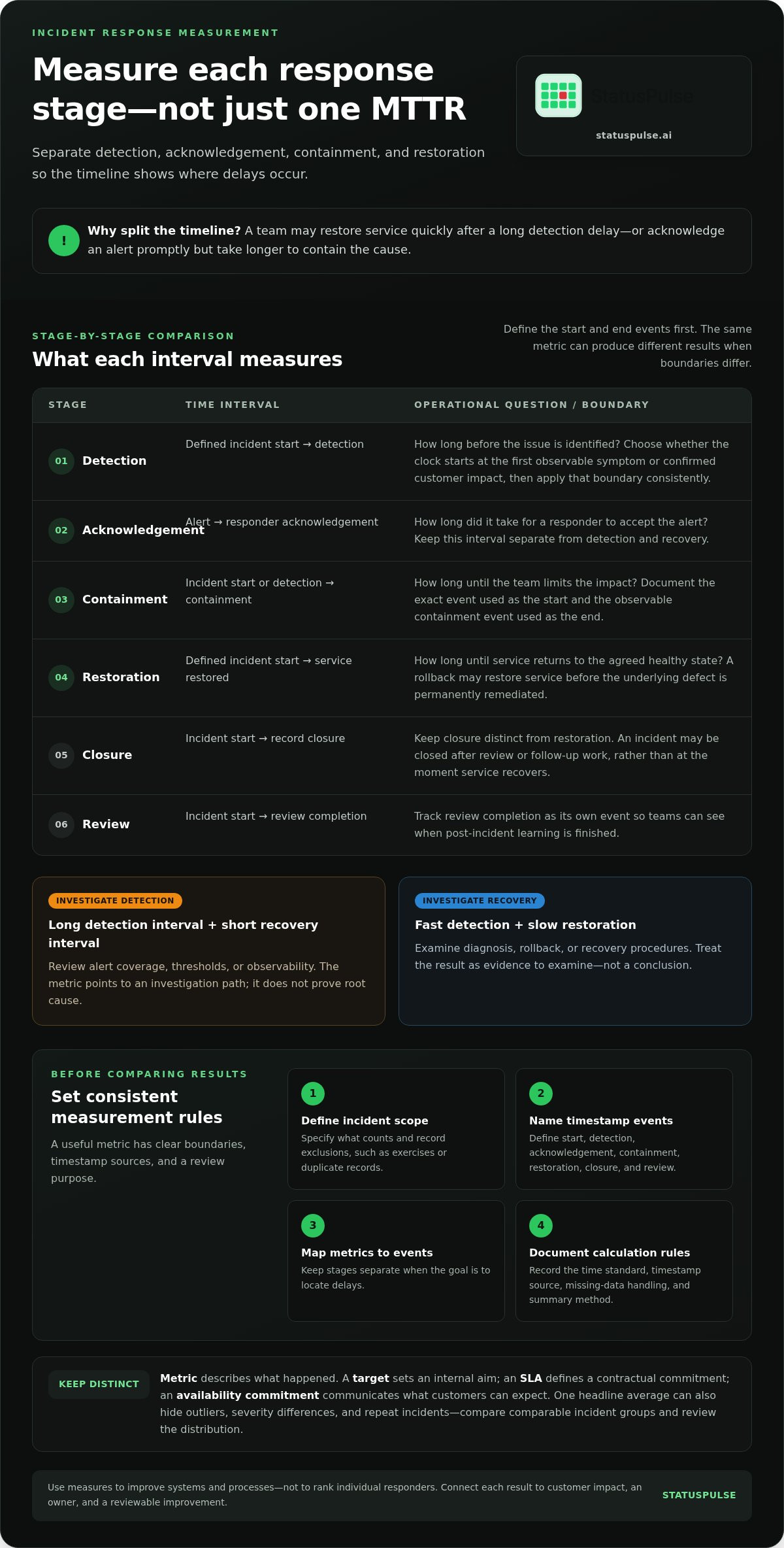
Incident response metrics measure how a team detects, acknowledges, contains, and recovers from incidents. They show where time and effort go across the response, not just how long customers experience an outage. A service may recover quickly after a long detection delay, for example, or responders may acknowledge an alert promptly but take longer to contain the cause.
Keep operational metrics separate from targets, contractual service-level agreements (SLAs), and customer-facing availability commitments. A metric describes what happened. A target sets an internal aim; an SLA defines a contractual commitment; an availability commitment communicates what customers can expect. These measures can inform one another, but they answer different questions. Incident management is crucial for minimizing disruption and ensuring business continuity.
What makes an incident response metric useful?
A useful measure answers a concrete operational question or connects to customer impact. For example: How long passed between the first confirmed service symptom and an alert? How long did affected customers wait for a status update? If the result changes what the team investigates or improves, the metric has practical value.
Define its boundaries before using it. Record the start and end events, the source of each timestamp, the role responsible for reviewing the result, and how often that review happens. For detection time, state whether the clock starts at the first observable symptom or at confirmed customer impact. Either boundary can work, but inconsistent boundaries cannot support a fair comparison.
Monitoring events and incident records provide complementary timestamps. A shared timeline helps teams reconcile when a probe first observed a failure with when responders declared an incident. Uptime monitoring and incident tracking can bring monitoring and response records into the same operational workflow, while teams define and calculate their measures consistently.
Why one headline number can mislead
A single average can hide outliers, severity differences, and repeat incidents. A group of short, low-impact interruptions alongside one prolonged outage may produce an average that looks stable, even though the severe incident exposed a weakness in detection or recovery. Compare incidents by severity, affected service, and customer impact. Review the distribution as well as the average.
Separate the stages. Detection time measures the interval before an issue is identified; acknowledgement time covers the wait until a responder accepts the alert; containment time measures progress toward limiting impact; restoration time ends when service returns to the agreed healthy state. Combining these intervals can obscure the stage that needs attention.
A long detection interval followed by a short recovery interval points to areas worth investigating, such as alert coverage, thresholds, or observability. If detection is fast but restoration is slow, examine diagnosis, rollback, or recovery procedures. These are investigation paths, not conclusions: a metric is evidence to examine, not proof of root cause.
Use the data to improve systems and processes, not to rank individual worth or effort. Incident outcomes depend on factors beyond one responder’s control, including service complexity and the quality of available signals. Tracking metrics for incident response is most useful when it leads to a specific, reviewable change.
Define incident response metrics with consistent timestamps
Before comparing incident metrics, make sure every team and tool refers to the same events. A clock that starts at the first customer symptom will produce a different detection time from one that starts when the team confirms impact. Neither boundary is automatically correct. Choose one, document it, and apply it consistently.
Use this setup sequence:
- Define incident scope. Specify what counts as an incident and which incidents belong in the measurement set. Record exclusions, such as exercises or duplicate records, so the cohort stays consistent.
- Choose timestamp events. Name observable events for incident start, detection, acknowledgement, containment, service restoration, closure, and review completion.
- Select metrics. Map each metric to the events it uses. Don’t combine stages if the goal is to find where delays occur.
- Document calculation rules. Record the time standard, source of each event, handling of missing timestamps, and whether you report a mean, median, or another summary.
Which incident timestamps should teams record?
Capture the first known impact, detection, acknowledgement, mitigation or containment, service restoration, and review completion. Keep closure separate from restoration: teams may close an incident after review or follow-up work, not when service recovers. Record timestamps in a consistent standard, such as UTC, and retain the original value and source system for audits and reconciliation.
Restoration also differs from permanent remediation. A rollback may return service to a healthy state while the underlying defect remains. Store both events when they occur at different times, and use restoration for recovery duration only if that is the boundary your team has documented.
How to calculate time-based incident metrics
Mean time to detect (MTTD) is the arithmetic mean of the time from the defined incident start to detection across a specified incident set. Mean time to acknowledge (MTTA) is the arithmetic mean from alert or incident creation to the first recorded acknowledgement. Keep the start event stable: switching from alert creation to confirmed incident declaration changes the result.
MTTR (mean time to resolve or recover) is the average elapsed time from a defined incident start to a defined resolution or recovery event. The “R” can mean response, repair, resolution, or recovery, so name the chosen meaning and its exact start and stop events instead of treating MTTR as universal. For recovery duration, for example, calculate from containment or mitigation to verified service restoration only if those are your documented boundaries.
Monitoring events and incident records can supply different points on this timeline. Uptime monitoring and incident tracking can help teams review those records together, while documented definitions keep calculations consistent across tools.
Choose a balanced metric set for your incident response
Start with a small set tied to the problem your team most needs to understand. A detection gap calls for different measures than slow restoration or repeat failures. Use the comparison below to connect each metric to a practical question, a likely data source, and a limitation to keep in view.
MTTD
Question: How long before the incident was detected?
Source: Monitoring events and incident records.
Limitation: Results depend on the agreed incident-start boundary and detection signal.
MTTA
Question: How long until a responder acknowledged the alert?
Source: Alert and escalation history.
Limitation: Acknowledgement doesn’t show whether investigation or mitigation began.
Containment time
Question: How long until the impact was limited?
Source: Incident timeline and change records.
Limitation: Teams need a clear, observable containment event.
Restoration time
Question: How long until service returned to the defined healthy state?
Source: Monitoring probes and incident records.
Limitation: Restoration may precede permanent remediation.
Incident frequency
Question: How often do incidents occur?
Source: Incident register, grouped by service or period.
Limitation: Counts depend on consistent incident classification.
Recurrence
Question: Are similar incidents happening again?
Source: Post-mortems and incident categories.
Limitation: Inconsistent tagging can hide related failures.
Customer impact
Question: Which customers or functions were affected, and how?
Source: Service records, support reports, and status updates.
Limitation: Impact may be difficult to quantify precisely.
Use only measures that can inform a decision. A team concerned about late discovery might begin with MTTD, customer impact, and recurrence. Probe coverage and failure signals add context when interpreting detection measures.
When to track detection, response, or recovery
Choose detection measures when incidents surface late or monitoring coverage is uncertain. Track acknowledgement and escalation when ownership handoffs appear to delay action. If service returns slowly, examine containment and restoration; if similar failures repeat, add recurrence. Select measures based on an observed concern, not because they are common on other teams’ dashboards.
Balance operational speed with customer impact
Break trends down by severity, service, incident type, and affected customer scope. Pair elapsed time with affected components, recurrence, and communication timing. Faster closure alone doesn’t prove a better customer outcome: a ticket can close while impact persists or customers still lack a clear update. Incident tracking and public status pages connect response records with customer-facing communication.
For tracking metrics for incident response, review whether each measure can change a decision. If it can’t guide investigation, engineering work, or communication, leave it out for now.
Turn incident response metrics into an improvement loop
A metric improves reliability when it leads to a decision, an owner, and a follow-up. Use a repeatable review process so incident data becomes engineering or operational work, not just another dashboard.
- Validate the data. Check incident scope, timestamp completeness, and definition changes before comparing results.
- Inspect trends. Compare distributions and incident cohorts, not only organization-wide averages. Group by service, severity, or incident type to see where a pattern occurs.
- Investigate causes. Use timelines and post-incident reviews to test explanations. A rise in detection time may point to a monitoring gap, but the metric alone doesn’t establish the cause.
- Assign work. Record a specific change, an accountable owner, and a review date. This might mean adjusting alert coverage, changing a runbook, or addressing a recurring fault.
- Revisit outcomes. After the change, compare relevant incidents using the same definitions. Keep, adjust, or close the work based on what the evidence shows.
Post-incident reviews should capture measurement gaps as well as technical findings. If the team couldn’t establish when impact began, record that as a data-quality issue to fix. Keep the discussion focused on systems, decisions, and learning rather than blame.
Build a dashboard that supports decisions
Make the dashboard interpretable before adding more charts. Show each metric’s definition, date range, incident count, severity filters, and data completeness. Separate operational timelines from business impact and customer communication measures so a change in one doesn’t obscure another.
Flag missing timestamps explicitly. Don’t silently convert incomplete records to zero or exclude them without showing the effect. Make uncertainty visible so reviewers can decide whether a trend is reliable enough to guide action.
Customer update timing belongs alongside response data, but it measures a different part of the experience. The incident communication architecture guide offers context for connecting update decisions to the incident timeline.
Prevent metric gaming and false comparisons
Avoid individual responder rankings and targets that reward quick ticket closure. Those incentives can distort the record without improving service. Compare like with like by using similar incident classes and severity levels, and note changes to tooling, processes, or services that affect historical results.
For tracking metrics for incident response, make the follow-up visible. Use incident tracking and post-mortems to support review, then assign an owner to each improvement and return to the relevant trend after the change. The measurement loop is complete only when the team checks whether its action helped.
Use monitoring and incident records to measure response in practice
A reliable incident timeline draws on more than one system. Monitoring events show when probes observed symptoms; incident records capture declared impact and response decisions; escalation history shows alert handoffs and acknowledgement; post-mortems add context about causes, gaps, and follow-up. Compare these sources using documented timestamps and service identifiers. Differences between them can reveal data gaps, not just slow response.
A probe may detect an endpoint failure before a responder declares an incident. That gap is useful only if the team knows what each timestamp represents and whether both refer to the same service and event. Keep raw event records available so reviewers can trace a metric back to its evidence.
Connect detection signals to incident timelines
Choose probes that reflect the service conditions customers depend on. HTTP, API, SSL, and DNS checks each provide different evidence; a passing HTTP check, for example, doesn’t establish that a certificate or DNS record is healthy. Correlate relevant events with incident records using consistent service identifiers and timestamps.
StatusPulse supports these probe types, with configurable intervals as low as 30 seconds and multi-region probes with quorum. These are monitoring configuration options, not guarantees that every incident will be detected or measured. Its incident tracking, severity-based escalation, on-call rotation, and post-mortems provide response records alongside monitoring data. Teams still define KPI boundaries and calculations; the platform doesn’t automatically calculate response metrics.
Include communication and follow-up in the measurement system
Technical recovery and customer communication answer different questions. Track time-to-first-update from the agreed communication start event to the first customer-facing update. Don’t treat it as detection time or recovery time: a team can detect an incident quickly while taking longer to communicate, or restore service before publishing a final update.
StatusPulse public status pages include a trust score panel with measures such as average resolution time and time-to-first-update. These measures add a customer-facing view to operational records. Post-mortems and AI-drafted incident summaries can support review, but the summaries are drafting assistance. Responders should check them against the timeline and make incident decisions themselves.
For teams tracking metrics for incident response, a combined view of probes, incident events, escalation history, and communication records makes it easier to trace a reported trend to its source. Explore StatusPulse incident monitoring and status pages to bring monitoring and incident records into a shared operational view.
Make the next incident easier to learn from
Choose one operational question to investigate after your next incident, then decide what evidence would help answer it. Tracking metrics for incident response works best when the result informs a practical change and gives the team a way to check whether that change helped.
Start with the records your team already maintains. Identify one gap that makes incidents harder to compare or learn from, then improve that part of the process before adding more measures. Explore StatusPulse monitoring and incident communication to support a measurement process your team can use and trust.
Frequently Asked Questions
What are the most important metrics for incident response?
The most useful measures have dependable source data and a clear operational decision attached. Before adding a metric, check whether changes in service scope could distort it. Incident counts may rise, for example, because a team added services to its inventory. Note scope changes alongside the trend so reviewers can interpret the numbers in context.
How do you calculate mean time to detect (MTTD)?
For each incident, subtract its agreed start timestamp from its detection timestamp, then average those durations across the selected incidents. Preserve the underlying timestamps and calculate from unrounded intervals; rounding each incident first can skew the result. Check for impossible values, such as detection recorded before incident start, and resolve those data errors before reporting the mean.
What is the difference between MTTA and MTTR?
MTTA describes acknowledgement, while MTTR describes a later response outcome, but the “R” can refer to different events. In an incident record, keep acknowledgement separate from the timestamp that ends your chosen MTTR measure. This lets you compare the initial handoff with the eventual outcome without assuming one interval explains the other.
Is MTTR enough to measure incident response performance?
No. MTTR records elapsed time, but it doesn’t show whether users experienced failed transactions, degraded functionality, or a brief interruption. For a fuller evaluation, retain service-level evidence such as affected components or error events with the incident record. This helps distinguish a short, broad disruption from a longer issue with limited scope.
How often should incident response metrics be reviewed?
Set a regular review cadence that matches how often your team can act on the findings, and revisit the data after changes to monitoring, incident tooling, or timestamp rules. These changes can break historical comparability. Mark the change date in reports so reviewers can separate an operational shift from a measurement change.
How can teams avoid using incident metrics to blame responders?
Keep dashboard views focused on incidents, services, and process stages rather than named responders. Limit person-level attribution to information needed to coordinate work, and explain the purpose of metrics before sharing reports. In reviews, ask what conditions shaped the response, such as missing context or unclear runbooks, then record an improvement that addresses the system.
What is time to first update in incident response?
Time to first update measures the delay before the first customer-facing incident communication, based on the start event your team has defined. Make the measure useful by deciding what qualifies as an update. A substantive notice can state the known impact and what happens next; an empty status marker may not give customers actionable information.


