

Most on-call engineers have been woken up by a critical alert that resolved itself before they could even open their laptop. It's a frustrating reality where transient network blips and minor packet loss trigger public false alarms, eroding both your sleep and your customers' trust. To solve this, you must learn to Auto-Create Incidents on Consecutive Failures Tuned to Avoid False Alarms rather than reacting to every single failed ping.
We agree that manually verifying every 503 error is a waste of your technical talent. This article promises to help you configure persistent failure logic and multi-region verification to automate your incident response without the noise. We'll examine how to set failure thresholds that distinguish between a temporary hiccup and a genuine outage, ensuring your public status page remains a source of truth. You'll learn to build a reliable pipeline that protects your team's nights and maintains high standards for precision and reliability.
Key Takeaways
- Identify how service flapping and overly sensitive alerts cause on-call burnout and learn to configure thresholds that prioritize persistence over speed.
- Master logic patterns like "N of M" checks to ensure your automation ignores transient spikes while catching sustained downtime.
- Learn how to Auto-Create Incidents on Consecutive Failures Tuned to Avoid False Alarms by connecting monitoring probes to automated incident templates.
- Differentiate between latency issues and hard 5xx errors to prevent slow-loading assets from triggering unnecessary public outages.
- Implement multi-region verification to confirm that a service failure is widespread rather than a localized network issue in a single data center.
The Cost of Flapping: Why Sensitivity Often Fails
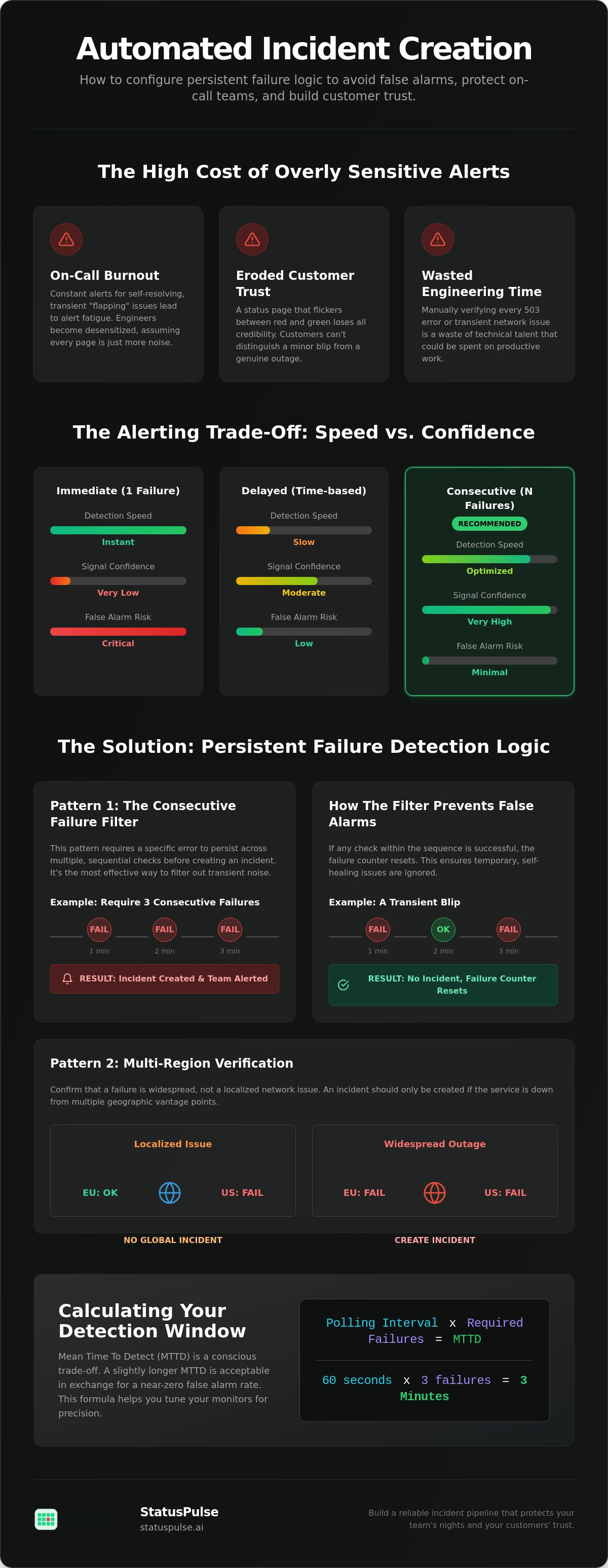
Flapping occurs when a service rapidly oscillates between "up" and "down" states. This behavior is often the primary driver of The Cost of Flapping, where engineers become desensitized to alerts because they assume the system is just being noisy again. When your monitoring is too sensitive, it treats every packet drop as a catastrophe. This creates a "Boy Who Cried Wolf" environment that drains SRE morale and ruins your team's sleep. Beyond the internal friction, flapping creates public-facing chaos. A status page that flickers between red and green every five minutes loses all credibility with your customers.
| Strategy | Detection Speed | Signal Confidence | False Alarm Risk |
|---|---|---|---|
| Immediate (1 failure) | Instant | Very Low | Critical |
| Delayed (Time-based) | Slow | Moderate | Low |
| Consecutive (N failures) | Optimized | Very High | Minimal |
The False Positive vs. Missed Outage Trade-off
There is an inverse relationship between how fast you detect a problem and how sure you are that it actually exists. If you want to know about a failure within one second, you must accept a high rate of false positives. Achieving 100% accuracy is technically impossible in distributed systems, but you can aim for "operational silence." This means your alerts only fire when a human actually needs to intervene. Effective website availability monitoring requires you to lean toward signal confidence over raw speed. It's better to detect a real outage in 60 seconds than to wake up an engineer for a five-second blip that resolved itself.
Defining Incident Thresholds for SaaS
A single failed ping should never trigger a public incident or an on-call page. Modern cloud environments are full of transient network jitter, routine load balancer reloads, and brief ISP hiccups. These are not outages; they are the baseline noise of the internet. You need to establish what a "normal" failure rate looks like for your specific stack before you automate anything. To maintain a trustworthy status page, you should Auto-Create Incidents on Consecutive Failures Tuned to Avoid False Alarms. This approach ensures that your system waits for a pattern of failure rather than reacting to a single data point. By requiring three or five consecutive failures, you filter out the noise while still catching genuine downtime within a reasonable window.
Logic Patterns for Persistent Failure Detection
Legacy monitoring tools often rely on single-check alerting. This model is binary and brittle; if a single probe receives a 503 error, the alarm sounds. This approach is the primary cause of noise in technical environments. Modern reliability engineering favors logic patterns that require proof of persistence before any action is taken. By implementing a verification window, you create a buffer that allows transient issues to resolve without human intervention. This window represents the elapsed time during retries where the system gathers evidence to confirm a genuine service disruption.
When you configure your monitoring stack to Auto-Create Incidents on Consecutive Failures Tuned to Avoid False Alarms, you shift from reactive guessing to data-driven declaration. This strategy ensures that an incident is only created when a failure state persists across multiple polling intervals. It is a fundamental step in Tuning Your Monitoring Stack for Accuracy, as it prevents the desensitization that occurs when engineers are constantly paged for self-healing blips.
Consecutive Failures: The Persistence Filter
Requiring three consecutive failures is the standard for high-availability SaaS applications. Consecutive failure logic is the requirement for a specific error state to persist across multiple sequential polling intervals without a single successful check. This pattern is highly effective at filtering out "micro-outages" caused by temporary routing changes or brief container restarts.
You must consider the impact on your Mean Time to Detect (MTTD). If your monitors poll every 60 seconds and you require 3 failures, your MTTD becomes 3 minutes. For most businesses, a 3-minute delay is a fair trade for a near-zero false alarm rate. Systems like StatusPulse allow you to define these thresholds per monitor, ensuring your core checkout API has a tighter window than a background analytics endpoint.
Sliding Window Logic: Handling Intermittent Errors
Some services don't fail neatly in a row. They might "flap," succeeding once and then failing twice. Sliding window logic, or the "N of M" pattern, catches these unstable services by looking at a broader history. For example, you might trigger an incident if 3 out of the last 5 checks fail. This represents a 60% failure rate over a 5-minute window.
- Use Consecutive Logic: For hard dependencies where any sustained downtime is a critical failure.
- Use Sliding Window: For services experiencing intermittent packet loss or resource exhaustion where performance is degraded but not entirely dead.
- The Goal: To ensure that by the time an incident is created, the evidence of failure is undeniable.
Choosing the right pattern depends on service criticality. A sliding window is better for catching "gray failure" where a service is technically up but practically unusable for a large portion of your users.
Tuning Your Monitoring Stack for Accuracy
Precision in monitoring requires more than just a binary "up" or "down" signal. A common mistake is treating latency spikes as hard failures. If your checkout API takes five seconds to respond instead of 200ms, your users are frustrated, but your server is still processing requests. Triggering an automated incident for a slow response can lead to unnecessary panic. You should reserve automation for verified 5xx status codes, while 4xx errors usually indicate client-side issues that don't warrant a public outage declaration. Setting realistic timeouts is critical; a timeout that is too aggressive will flag healthy but busy systems as down.
Technical teams must recognize that api monitoring requires significantly stricter tuning than static sites. APIs often involve complex database queries or third-party integrations that can intermittently lag. To maintain a reliable system, you must Auto-Create Incidents on Consecutive Failures Tuned to Avoid False Alarms. This ensures that a single slow request doesn't wake up your team, but a sustained failure across several checks triggers the necessary response. Proper Implementation: Automating Incident Creation depends on this distinction between a transient performance dip and a total service collapse.
Regional Network Jitter and False Alarms
Localized ISP issues often masquerade as global outages. If your monitoring node is in London and a major transatlantic cable has a brief hiccup, your service might appear down even if it's perfectly accessible from Frankfurt or New York. This is the danger of "single-source" monitoring. For EU-based teams, it's vital to prioritize uptime monitoring that utilizes multiple geographic regions. By requiring verification from at least two distinct locations before declaring an incident, you effectively eliminate false alarms caused by regional network jitter.
Threshold Math: Speed vs. Sanity
Finding the right balance between detection speed and alert sanity is a mathematical exercise. Your Mean Time to Detect (MTTD) is a product of your check frequency and your retry count. If you check every 30 seconds and require three consecutive failures, your maximum delay is 90 seconds. This is often the "sweet spot" for critical services.
- Critical Thresholds: Set to 3 consecutive failures for core APIs to ensure immediate but verified action.
- Warning Thresholds: Set to a sliding window (e.g., 2 failures in 5 checks) for non-critical background jobs.
- Timeout Strategy: Use a 10-second timeout for most web services to avoid "hanging" checks that block your monitoring queue.
By identifying these thresholds early, you prevent over-automation. You don't want your status page to update for every minor blip, but you also can't afford to wait ten minutes to catch a genuine database failure. Logic-driven thresholds provide the middle ground required for a professional on-call experience.
Implementation: Automating Incident Creation
To build a resilient pipeline, you must connect your monitoring signals directly to standardized incident workflows. This removes the "human in the loop" for the initial declaration, which is often the slowest part of the response chain. By using Incident Templates, you can pre-fill technical details like the affected component, severity level, and initial messaging. This ensures that when you Auto-Create Incidents on Consecutive Failures Tuned to Avoid False Alarms, the resulting notification is structured and useful for both your team and your users. Webhooks serve as the bridge here, pushing the confirmed failure signal from your monitoring stack to your status page or incident management tool.
Configuring this logic often happens at the monitor definition level. Below is a sample YAML configuration for a high-priority endpoint that requires both persistence and geographic consensus before acting:
monitor:
  name: "Core Checkout API"
  url: "https://api.example.com/v1/health"
  check_interval: 60s
  retry_count: 3
  confirmation_regions: 2
  actions:
- trigger: "incident_template_critical"
webhook_url: "https://statuspulse.ai/api/v1/webhooks"
Multi-Region Verification: The Ultimate Filter
Geographic consensus is the most effective way to eliminate false positives. Requiring at least two distinct regions to agree on a failure prevents a single data center issue or a regional ISP routing problem from triggering a global alarm. The logic follows a simple conditional: "If Region A = Down AND Region B = Down, then Create Incident." This multi-region agreement eliminates 99% of false alarms caused by localized network jitter. For teams prioritizing data sovereignty, you can configure these checks to run specifically from EU-based or US-based nodes to match your hosting architecture.
Automating the Public Status Page
Automating the public status page is the final step in reducing manual overhead. You should map your monitoring states (Down or Degraded) to specific status page components. Always set "Investigating" as the default automated state. This communicates to customers that you are aware of the issue while buying your team time to perform a root cause analysis. Providing automated status alerts can reduce support tickets by 40% during an active outage, as users find the information they need without contacting your support desk. This approach transforms your status page from a manual chore into a reliable source of truth.
If you are looking for a straightforward way to implement these thresholds without the complexity of traditional enterprise software, you can start building your pipeline with StatusPulse today.
Automated, Verified Incidents with StatusPulse
StatusPulse integrates the logic patterns discussed throughout this guide into a single, cohesive platform. By default, the system requires multi-region verification before any incident is declared. If a probe in London detects a failure, StatusPulse automatically cross-references this with a secondary region, such as Frankfurt or New York. This verification happens behind the scenes, ensuring that localized network congestion never triggers a public status update. You can Auto-Create Incidents on Consecutive Failures Tuned to Avoid False Alarms without managing complex scripts or brittle third-party integrations.
The platform also utilizes AI-powered incident management to assist with technical communication. Instead of staring at a blank text box during an outage, the AI analyzes your failure logs and drafts a technical summary. This provides a clear starting point for your team, allowing a human to review and publish accurate updates in seconds. StatusPulse prioritizes data sovereignty by allowing you to choose between EU or US hosting for your monitoring data, ensuring compliance with regional privacy standards without sacrificing performance.
Native Monitoring Meets Incident Management
Many teams struggle with "bolted-on" solutions where the monitoring tool and status page are separate products with conflicting billing models. StatusPulse offers an all-in-one approach that includes uptime, API, and SSL monitoring alongside public status pages. This integration ensures that website uptime monitoring tools provide the most value by automatically updating your status page the moment a failure is verified. Pricing is flat and transparent. You won't face per-subscriber fees or surprise costs as your audience grows, which is a direct rejection of the complex pricing models used by industry incumbents.
Getting Started with Zero Fluff
Setting up your first monitor with persistent failure logic takes under two minutes. You simply define your endpoint, select your retry count, and choose your verification regions. The AI assistant can then be configured to translate technical failure codes into plain language for non-technical stakeholders. This removes the stress of manual communication during high-pressure incidents. It's a focused tool built by specialists who value precision over corporate bloat.
If you are tired of alert fatigue and want a more principled approach to reliability, you can create your free StatusPulse account to silence the noise and regain control of your on-call rotation.
Building a Resilient Incident Pipeline
Reliability isn't about raw speed; it's about accurate verification. You've seen how single-check alerts cause desensitization and why consecutive failure logic is the professional standard for high-availability systems. By requiring proof of persistence and geographic consensus, you protect your team's focus and your brand's reputation. You can now Auto-Create Incidents on Consecutive Failures Tuned to Avoid False Alarms by implementing the thresholds and verification windows we've discussed.
Moving from manual verification to an automated pipeline reduces human error and lowers support ticket volume. StatusPulse provides this integration with a focus on data sovereignty through your choice of EU or US hosting. There are no per-subscriber fees, ensuring your costs remain flat even as your user base grows. With integrated AI incident drafting, your team can move from detection to resolution without the friction of traditional enterprise tools. Start monitoring with StatusPulse for free and build a quieter, more trustworthy on-call rotation today.
Frequently Asked Questions
How many consecutive failures are needed to confirm an outage?
Most SRE teams use three consecutive failures at 60-second intervals as a baseline. This creates a three-minute window that effectively filters out transient network blips while maintaining a low Mean Time to Detect (MTTD). For high-priority endpoints, you might shorten the interval to 30 seconds, but keeping the retry count at three remains the industry standard. It ensures that you only wake up for real problems rather than temporary routing hiccups.
Can I automate status page updates without risking false alarms?
You can automate these updates reliably by requiring multi-region verification. If two or more distinct geographic locations report the service as down simultaneously, the probability of a false alarm is near zero. This geographic consensus ensures that a localized routing issue in one data center doesn't trigger a global incident on your public page. It's a critical step to Auto-Create Incidents on Consecutive Failures Tuned to Avoid False Alarms.
What is the difference between retry count and polling interval?
Polling interval refers to how often your monitoring system checks the service, such as every 60 seconds. Retry count is the specific number of failures that must occur in a row before the system triggers an incident. If your interval is 60 seconds and your retry count is three, the system waits for three failed checks over three minutes before taking action. This distinction is vital for calculating your detection window and managing alert volume.
How do I handle flapping services in my automation?
Use a cooldown period or sliding window logic to manage services that oscillate between up and down states. A common pattern is requiring three failures within a five-minute window, even if they aren't consecutive. This prevents your automation from constantly opening and closing incidents when a service is unstable but hasn't fully collapsed. It keeps your notification channels quiet during periods of intermittent jitter and protects your team's focus.
Does StatusPulse support EU-based hosting for GDPR?
StatusPulse provides a choice between EU and US hosting regions for all monitoring data and incident logs. This allows teams to meet local data sovereignty requirements and comply with GDPR standards. By selecting an EU region, your data remains within the jurisdiction, providing the legal and technical safeguards required for European operations. It's an essential feature for principled teams who value privacy as much as uptime.
Will adding retries increase my Mean Time to Detect (MTTD)?
Adding retries technically increases your MTTD by the length of the verification window. However, a two-minute delay is almost always preferable to the chaos and lost customer trust caused by a public false alarm. Reliability requires a balance between speed and accuracy. Most teams find that the operational silence gained by filtering out noise is worth the slight delay in initial detection. It's a trade-off that prioritizes integrity over raw speed.


