

Your status page shouldn't be the first thing to fail when your production environment goes down. It's a common irony: a major incident spikes traffic to your communication tools, causing the very dashboard meant to reassure customers to time out. Using A Public Read API for Your Status Data That Is Rate-Limited and Ready to Embed ensures your incident data remains available even when your primary services aren't. With API abuse and bot attacks costing businesses up to $186 billion annually, robust rate limiting is a requirement for any public endpoint.
We know the stress of managing high support volumes while your engineering team is heads-down on a critical fix. You need a way to push real-time updates directly into your customer portals without exposing your infrastructure to DDoS risks or performance degradation. This article explains how to implement a secure, rate-limited read API that provides transparent communication while maintaining predictable performance. We'll look at architectural trade-offs, the necessity of 429 status codes, and how to reduce the manual overhead of incident reporting through smart embedding.
Key Takeaways
- Establish read-only access as a fundamental security requirement to isolate public data exposure from sensitive internal system controls.
- Use A Public Read API for Your Status Data That Is Rate-Limited and Ready to Embed to prevent resource exhaustion and ensure availability during major service disruptions.
- Configure Cross-Origin Resource Sharing (CORS) correctly to allow secure browser-based status updates without compromising your security posture.
- Handle high traffic volumes gracefully by using HTTP 429 status codes and Retry-After headers to guide automated client behavior.
- Reduce engineering overhead and support volume by embedding real-time incident data directly into your existing customer applications.
Understanding the Architecture of a Public Status Read API
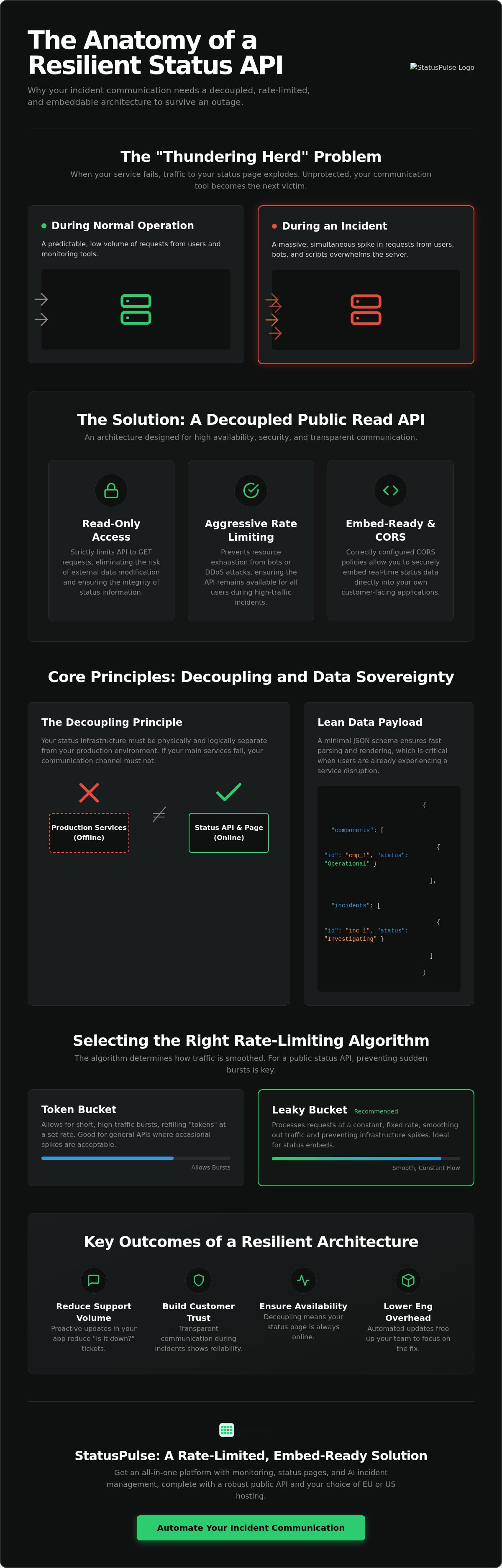
A public status read API is a specialized endpoint designed for the high-availability retrieval of system health data. It serves one purpose: giving your users the truth about your system's uptime. Unlike internal monitoring APIs that expose granular metrics like CPU load or database connection pools, a public API provides an abstracted view. It translates complex telemetry into human-readable statuses like "Operational" or "Degraded Performance." This abstraction protects your internal architecture while providing the transparency your customers expect.
Security starts with strict read-only access. By limiting the interface to GET requests, you eliminate the risk of an external actor modifying your status data. This isolation is critical for maintaining public trust. To ensure this data remains accessible under heavy load, we rely on rate limiting. This prevents a single client or a bot from monopolizing server resources during a traffic spike. A Public Read API for Your Status Data That Is Rate-Limited and Ready to Embed provides the necessary balance between transparency and system stability, ensuring your communication channel doesn't become a bottleneck.
The Decoupling Principle in Incident Communication
Your status API must live outside your primary infrastructure. If your main production environment fails, your status data should remain live. We call this decoupling. It ensures that communication doesn't fail when it's needed most. At StatusPulse, we prioritize data sovereignty by offering hosting in both EU and US regions. This choice allows teams to meet regulatory requirements while maintaining a resilient, secondary communication path that functions independently of their core services. It's about building a source of truth that is physically and logically separate from the systems it monitors.
Core Data Schema for Status Payloads
JSON is the standard format for these payloads because it's lightweight and easily parsed by modern frontend frameworks. A lean schema focuses on component states, current incidents, and upcoming maintenance windows. We use ISO 8601 for timestamps to avoid confusion across global time zones. Keep the payload small. Fast client-side rendering is essential when users are already frustrated by a service disruption. Providing just enough detail helps manage expectations without overwhelming the browser or the network. A typical payload should include component IDs, status strings, and a history of recent updates to provide full context.
Why Rate Limiting is Critical for Status Data Availability
When your service goes down, your status page traffic doesn't just grow. It explodes. This is the "Thundering Herd" problem. Thousands of clients, automated scripts, and frustrated users refresh their browsers simultaneously. Without protection, your status provider becomes another casualty of the outage. This is the exact moment when your communication must be most resilient.
Implementing A Public Read API for Your Status Data That Is Rate-Limited and Ready to Embed ensures your communication remains a stable island during a system storm. Beyond simple availability, rate limiting protects against malicious resource exhaustion and aggressive scraping. It's an ethical choice for any public-facing tool. It ensures one noisy neighbor or a poorly written script doesn't degrade the experience for every other user. Industry leaders emphasize the importance of rate limiting policies for maintaining service integrity. For a status API, this isn't about restriction. It's about preserving a public utility.
Selecting the Right Rate-Limiting Algorithm
Fixed window counters are simple but suffer from "bursting" at the edge of time windows. Token Bucket algorithms allow for short bursts while maintaining a steady average. However, Leaky Bucket algorithms are often superior for status embeds. They smooth out traffic by processing requests at a constant rate, preventing infrastructure spikes. For public status data, IP-based limiting is the standard. It removes the friction of API keys for end-users while still identifying high-volume offenders.
Calibrating Limits for Incident Spikes
Setting a baseline requires balancing transparency with performance. While some legacy management APIs use restrictive limits like 60 requests per minute, a public read API needs to be more permissive for end-users. A common industry standard for read-only status endpoints is between 1 and 5 requests per second per IP address. This allows a human user to refresh comfortably but blocks a script from hammering the endpoint.
Your API should allow for a "burst" capacity. This accommodates the initial surge when an incident notification goes out. If you need a solution that handles these complex traffic patterns without manual configuration, StatusPulse provides pre-configured, rate-limited endpoints designed for high-pressure scenarios. Striking this balance ensures your status data is always there when your customers need it most. It transforms your incident response from reactive chaos into a controlled, professional process.
Embedding Status Data: Implementation Strategies
Choosing how to integrate status data depends on your specific use case and security requirements. A Public Read API for Your Status Data That Is Rate-Limited and Ready to Embed simplifies this decision by providing a secure endpoint that works across different environments. Best practices for REST API design suggest that public endpoints should be optimized for consumption with minimal friction. For status data, this means ensuring the API is "embed-ready" by supporting Cross-Origin Resource Sharing (CORS) out of the box. This configuration allows your frontend to fetch data directly without a backend proxy.
Performance is just as important as security. To keep latency low for global users, embed-ready APIs require high-performance CDN edge caching. This ensures that the JSON payload is delivered from a server physically close to the end user. Multi-region API hosting further improves resilience. If one region faces a localized outage, your status data remains accessible from another. This setup is particularly important for teams prioritizing data sovereignty, as it allows them to choose between EU or US hosting for their status information.
Client-Side Embedding with JavaScript
Client-side integration is the fastest way to add a status indicator to your web app. Using the native fetch() API, you can retrieve JSON data and update your UI dynamically. It's an efficient way to keep users informed without page refreshes. Manage your state carefully to avoid unnecessary calls. Re-polling the API every 60 to 300 seconds is usually sufficient for most incident communication needs. Security is paramount here. You should never expose write-access keys in client-side code. A true public read API should either be open or use a strictly scoped, read-only token that carries no risk if intercepted.
Server-Side Integration for Enhanced Security
Proxying status data through your own backend provides an extra layer of control. This allows you to sanitize data or combine it with other internal metrics before it reaches the browser. By caching the status response on your server for 30 seconds, you can serve thousands of concurrent users while only making two requests per minute to the provider. This strategy is highly effective when integrating status data into your broader API monitoring workflows. It ensures your internal dashboards stay updated without hitting rate limits during high-traffic incidents. This approach also allows you to implement fallback logic if the status provider's endpoint is unreachable.
Handling Rate Limit Errors and Production Logic
Your production code must anticipate the moment a rate limit is reached. When using A Public Read API for Your Status Data That Is Rate-Limited and Ready to Embed, your application will eventually receive an HTTP 429 "Too Many Requests" response. This isn't a failure of the system. It is a protective measure. The response typically includes a "Retry-After" header. This header specifies the exact number of seconds your client should wait before making another request. Ignoring this value and retrying immediately often leads to longer cooling-off periods or temporary IP blocks.
Logging and monitoring these 429 events is essential for maintaining a healthy integration. If your logs show a high frequency of throttled requests, it's time to review your polling intervals or caching strategy. Silent failures in a status widget can lead to users seeing stale data during a real incident. This defeats the purpose of transparent communication. Monitoring your API consumption helps you identify if a specific part of your app is behaving aggressively before it impacts your users.
Exponential Backoff Strategies
Linear retries worsen API congestion. If 500 clients all retry every five seconds, the traffic spike never dissipates. Exponential backoff increases the wait time after each failed attempt. Adding "jitter" (random delay) prevents multiple clients from synchronizing their retries. This approach allows the API server to recover while ensuring your widget eventually updates. Here is a simple retry loop for your status data fetching:
async function fetchStatus(url, retries = 3, delay = 1000) {
  const response = await fetch(url);
  if (response.status === 429 && retries > 0) {
const retryAfter = response.headers.get('Retry-After') || (delay / 1000);
const jitter = Math.random() * 100;
await new Promise(res => setTimeout(res, (retryAfter * 1000) + jitter));
return fetchStatus(url, retries - 1, delay * 2);
  }
  return response.json();
}
User Feedback During Throttling
Design your UI to handle throttled states gracefully. Avoid showing generic error messages that imply your service is broken. A "Refreshing status..." or "Update in progress" indicator is much more reassuring. Security also plays a role in user trust. Proactive SSL monitoring ensures your status data is delivered over a valid connection, preventing browser warnings during a traffic surge. If a user is manually refreshing too often, an honest message explaining the rate limit policy helps manage expectations without causing alarm.
For a resilient communication layer that handles these technical complexities for you, set up your status page with StatusPulse today.
StatusPulse: A Rate-Limited, Embed-Ready Solution
StatusPulse provides A Public Read API for Your Status Data That Is Rate-Limited and Ready to Embed without the bloat of traditional enterprise software. We built this platform to solve the decoupling problem natively. You don't need to configure your own rate-limiting middleware or manage complex gateways. Every status page includes a secure, read-only endpoint protected by our global infrastructure. It handles the traffic spikes for you.
Our pricing reflects our commitment to ethics. We don't charge per-subscriber fees or penalize you for high API call volumes during an incident. You get a flat, predictable rate regardless of how many users refresh your status widget. We also respect data sovereignty. You can choose to host your data in the EU or the US to meet local regulatory standards. It's a principled approach to a critical piece of infrastructure.
Configuring Your Public Status API
Enabling the API takes seconds. Within the StatusPulse dashboard, you can toggle public access and immediately receive a unique endpoint URL. You can customize the JSON output to include only the components relevant to your specific frontend. This reduces payload size and speeds up client-side rendering. Using incident communication transparency helps build long-term trust with your users. It shows you value their time and technical needs.
Ready to Embed: The StatusPulse Widget
Deployment is straightforward. We provide a pre-built status widget that you can drop into your application in under five minutes. It uses the same rate-limited API to ensure it never slows down your primary app. You can apply custom CSS to ensure the widget matches your brand's native look and feel. This allows for a visual integration that feels native without the engineering overhead of building from scratch.
We also leverage AI to assist your team during high-stress outages. Our system can generate incident summaries based on your internal updates. However, we prioritize human agency. You always perform a final review of these summaries before they hit the public API. This ensures accuracy and maintains the professional tone your customers expect. It's a tool that assists you rather than replacing your judgment.
Building a Resilient Communication Strategy
Effective incident response requires more than just a status page. It demands a technical architecture that survives the very outages it reports. By decoupling your status data and implementing strict rate limits, you ensure that your truth remains accessible when your production environment fails. Proper implementation of A Public Read API for Your Status Data That Is Rate-Limited and Ready to Embed allows you to maintain transparency without adding performance risks to your core application.
Your users deserve clarity during disruptions. Using a dedicated endpoint with smart retry logic and edge caching transforms your status data into a reliable public utility. It reduces support tickets and builds long-term trust through consistent availability. Ready to simplify your incident stack? Build your transparent status page with StatusPulse to access AI-powered incident management and flexible EU or US hosting options. We provide a straightforward platform with no per-subscriber fees. Start providing the transparency your customers expect today.
Frequently Asked Questions
What is an API rate limit and why does it matter for status pages?
An API rate limit is a constraint on the number of requests a client can make within a specific timeframe. It's critical for status pages because they experience massive traffic surges during service disruptions. If thousands of users refresh their dashboards simultaneously, the resulting "thundering herd" can overwhelm the server. Rate limiting preserves the availability of your communication channel when your primary systems are failing.
How do I handle a 429 error when fetching status data?
You should check for the "Retry-After" header in the response and delay your next request accordingly. It's best to implement exponential backoff with jitter to prevent synchronized retries from multiple clients. This ensures your application doesn't contribute to server congestion and eventually retrieves the data successfully. Handling these errors gracefully prevents your UI from showing broken or stale data to frustrated users.
What is the best rate-limiting algorithm for a public status API?
The Leaky Bucket algorithm is often the best choice for public status data because it processes requests at a constant, steady rate. This smooths out traffic bursts and provides a predictable load for the backend. While Token Bucket allows for short bursts, Leaky Bucket is superior for maintaining stability during the high-pressure surges typical of incident communication. It ensures that no single user can monopolize the API's resources.
Can I embed status data directly into my React or Vue application?
Yes, you can consume A Public Read API for Your Status Data That Is Rate-Limited and Ready to Embed using standard tools like the fetch() API or axios. Since these endpoints are read-only and CORS-enabled, you can integrate them directly into your component logic. This allows you to build custom status bars or indicators in React, Vue, or Svelte without needing a backend proxy or complex server-side code.
Is it better to use a public API or a pre-built status widget?
It depends on your engineering resources and customization needs. A public API offers maximum flexibility for custom UI/UX but requires more development time to build and maintain. A pre-built widget, like the one offered by StatusPulse, can be deployed in minutes and handles branding and rate limiting automatically. Widgets are often the pragmatic choice for teams wanting to reduce overhead while maintaining professional incident communication.
How does StatusPulse handle API rate limiting for its users?
StatusPulse implements IP-based rate limiting on all public read endpoints to protect availability during traffic spikes. This is handled at our edge infrastructure, ensuring that malicious bots or aggressive scrapers don't impact legitimate users. We provide these limits out of the box so you don't have to configure complex middleware or gateways yourself. Our goal is to keep your status data live even when your traffic hits peak levels.
Why is CORS configuration important for embedded status data?
CORS configuration is essential because it allows browser-based applications to securely request data from a different domain. If your app is on your own domain and your status API is on our domain, the browser will block the request unless the server sends the correct headers. A Public Read API for Your Status Data That Is Rate-Limited and Ready to Embed includes these headers by default to simplify your frontend integration.
What data should be included in a public status API response?
A public response should include component statuses, current incident descriptions, and scheduled maintenance windows. Use the JSON format for its lightweight nature and ISO 8601 for timestamps to ensure global compatibility. Avoid including sensitive internal metadata or granular metrics that could expose your infrastructure to security risks. Focus on providing human-readable truth that helps your customers understand the current state of your services.


