
Why are your users still flooding your support desk with "Is it down?" tickets when you already have a dedicated status page? It's a common friction point for SREs and DevOps teams. You've built the monitoring, but the data remains trapped in a silo that nobody visits until they're already frustrated. To fix this, you must Let Your Uptime Travel with Status Badges oEmbed Widgets and RSS Feeds so that critical information meets your users where they actually work.
Distributing uptime via badges and feeds allows you to embed live system status into third-party platforms and your own UI. This automation reduces support volume by informing users of incidents before they report them. We agree that status data should be ambient rather than a hidden destination. This guide covers the technical implementation of embeddable components and automated feeds. We'll focus on methods that respect your site's performance while removing the need for manual updates across Slack, Discord, and your documentation. By the end, you'll have a strategy to keep your ecosystem updated without the corporate bloat of traditional enterprise tools.
Key Takeaways
- Move beyond siloed status pages to reduce support volume by surfacing uptime data directly within your user's current workflow.
- Learn why SVG is the superior technical choice for status badges to ensure high-DPI clarity and optimal site performance across all devices.
- Discover how to Let Your Uptime Travel with Status Badges oEmbed Widgets and RSS Feeds to integrate live status into documentation platforms like GitBook or Notion.
- Automate incident communication by using RSS and Atom feeds to bridge the gap between monitoring systems and chat platforms like Slack or Discord.
- Streamline your transparency layer with a single dashboard that combines monitoring, AI-assisted incident summaries, and portable distribution tools.
The Architecture of Portable Uptime: Beyond the Status Page
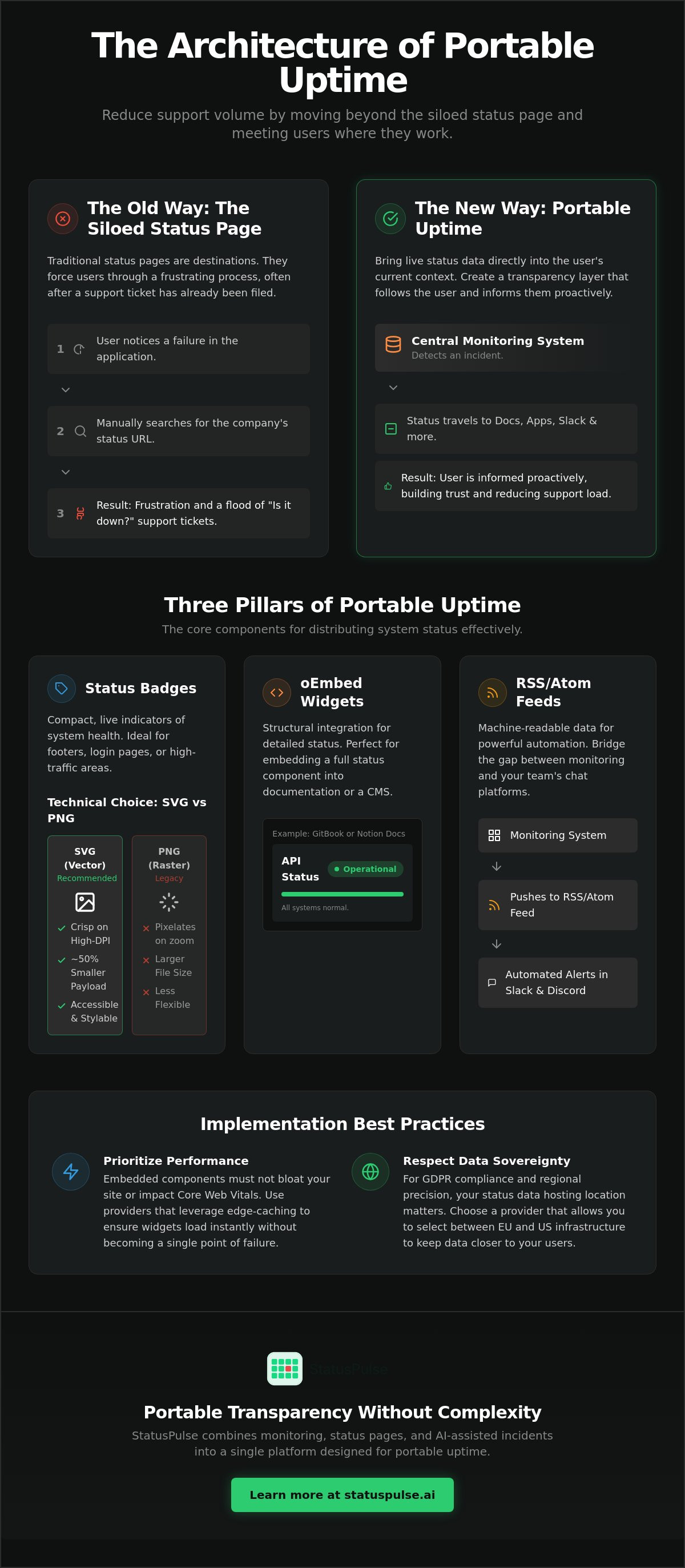
Traditional status pages are destinations. They require a user to notice a failure, search for your status URL, and wait for the page to load. This friction creates a delay between the incident and the communication. By the time a user reaches your status page, they've likely already opened a support ticket or vented on social media. Portable status is the solution. It brings live data about system reliability into the user's current context. Instead of a silo, you create a transparency layer that follows the user. To achieve this, you must Let Your Uptime Travel with Status Badges oEmbed Widgets and RSS Feeds.
This architecture relies on three distinct pillars. First, visual badges provide immediate status indicators on login or pricing pages. Second, oEmbed widgets allow structural integration into documentation platforms. Third, RSS feeds offer machine-readable data for automation. However, this level of transparency requires balance. Real-time widgets can sometimes trigger "false positive" noise if your monitoring thresholds are too aggressive. Flapping monitors might cause a badge to flicker between green and red, which can increase anxiety rather than reducing it. We recommend using sensible alert delays to ensure only verified incidents reach your public-facing widgets.
The Psychology of Ambient Transparency
Seeing a "System Operational" badge on a login screen provides a sense of quiet confidence. It reassures the user before they even start their task. When an incident occurs, proactive broadcasting prevents the "black box" effect where users feel ignored. This visibility can lower churn rates during long-tail incidents because users trust you're on top of the problem. You move from reactive firefighting to a controlled, proactive communication model. It's about building integrity through constant, low-stakes proof of performance.
Data Sovereignty and Performance
Technical implementation must not sacrifice speed. Embedding external widgets can bloat your site if not handled correctly. StatusPulse uses edge-caching to ensure that widgets don't impact your Core Web Vitals or become a single point of failure. We also prioritize data sovereignty. Unlike many competitors that default to US-only infrastructure, StatusPulse allows you to choose between EU and US hosting. This choice is critical for teams navigating strict GDPR requirements or those who simply value regional precision in their monitoring stack. By placing your status data closer to your users, you ensure the reporting remains as fast as the systems you monitor.
Implementing Status Badges: Technical Specs and Customization
Badges are the most compact way to Let Your Uptime Travel with Status Badges oEmbed Widgets and RSS Feeds. While many legacy providers still offer PNG images, modern system architecture demands more precision. A status badge should be a live reflection of your system's health, not a static asset that pixelates on high-DPI displays. Using SVG (Scalable Vector Graphics) is the technical standard here. SVGs are XML-based, meaning they scale infinitely without losing quality and typically carry a payload 50% smaller than a comparable PNG. This performance difference is critical when you're loading a badge on every page of your documentation or inside a high-traffic footer.
Security is another factor often overlooked in badge implementation. Your internal monitoring dashboard might use specific server names like "AWS-USEAST-DB-01," but your public badge should never expose these identifiers. Information leakage can provide a roadmap for malicious actors during an outage. Always use public aliases for your monitors. This keeps your internal infrastructure private while providing the transparency your customers need. For those looking to streamline this process, StatusPulse allows you to map internal monitors to public-facing aliases with a single toggle.
SVG vs. PNG: A Performance Review
SVGs allow you to manipulate the DOM directly. You can use CSS to change the "Up" or "Down" color states based on real-time data without reloading a new image file. This approach also improves accessibility. Instead of relying solely on red and green colors, which 1 in 12 men and 1 in 200 women with color-blindness may struggle to distinguish, you can include text labels or distinct shapes within the vector. The ideal cache-control header for a 1-minute status badge update is Cache-Control: public, max-age=60, s-maxage=60.
Advanced CSS and Styling
To prevent "layout shift" (CLS) when a badge loads asynchronously, always define fixed dimensions or an aspect-ratio in your CSS container. You can also use data attributes within the badge embed code to trigger specific animations. For example, a "pulse" effect can be applied only when the status is "Investigating." To ensure the badge remains legible across user preferences, utilize media queries like @media (prefers-color-scheme: dark) to swap badge themes automatically. While badges handle the visual layer, utilizing RSS for incident communication ensures your technical updates remain machine-readable for more complex integrations.
Placement best practices suggest the footer for general trust-building, but the login page or documentation sidebar is more effective during active incidents. By placing the badge near the "Submit Ticket" button, you provide immediate answers before the user starts typing. This proactive approach respects the user's time and reduces the load on your support team.
OEmbed Widgets: Integrating Status into Docs and CMS
Visual badges are effective for quick indicators, but complex environments require structural integration. If you want to Let Your Uptime Travel with Status Badges oEmbed Widgets and RSS Feeds, you must understand the oEmbed protocol. oEmbed is an open format designed to allow a website to display embedded content from another site using only a source URL. Instead of forcing users to manage messy iframe snippets, oEmbed handles the handshake between your status data and platforms like Notion, WordPress, or GitBook. It transforms a simple link into a rich, functional widget that updates in real time.
The process begins with a discovery link in your status page header. When a consumer platform encounters your status URL, it looks for a <link> tag pointing to an oEmbed provider. This provider returns a JSON or XML response containing the widget's dimensions and the necessary HTML to render the live status. This standardized approach ensures that your uptime data looks consistent across different CMS environments without requiring custom code for every platform. For developers, this means one implementation works everywhere.
The oEmbed Protocol for SREs
The technical lifecycle of an oEmbed request is straightforward. A consumer site sends an HTTP GET request to the provider's URL with the status page link as a parameter. The provider validates the request and returns a structured response as defined by the oEmbed specification. This method is significantly safer than raw <iframe> embeds. It prevents cross-domain security risks by allowing the consumer platform to inspect the metadata before rendering the content. It also allows the provider to specify exact width and height parameters, which prevents the layout from breaking on mobile devices.
Use Cases: From Notion to Internal Wikis
Documentation is where oEmbed truly shines. Developer docs often become stale because status information is siloed. By embedding a live widget into your GitBook or ReadMe pages, you ensure that developers see the current health of your API alongside the endpoint documentation. This reduces the friction of context-switching when a request fails. Internal teams also benefit. You can drop a status link into a Notion workspace or a Jira ticket, and it will automatically unfurl into a live monitoring dashboard.
Setting up these integrations shouldn't require a dedicated engineering sprint. StatusPulse provides native oEmbed support, meaning your status page is already configured to work with major documentation and CMS platforms out of the box. You simply provide the URL, and the protocol handles the rest. This automation ensures that your internal wikis and public docs remain accurate without manual edits, keeping your transparency layer synchronized across your entire technical stack.
RSS Feeds: Automating Incident Communication
While badges and oEmbed handle the visual and structural layers, RSS and Atom feeds provide the machine-readable backbone for your transparency strategy. This is the most effective way to Let Your Uptime Travel with Status Badges oEmbed Widgets and RSS Feeds into external automated workflows. Unlike a status page that requires a browser session, an RSS feed allows your incident history to be consumed programmatically by other servers or scripts. It transforms your status updates from a human-readable log into a versatile data stream.
The structure of a status RSS item is intentionally simple to ensure compatibility. Each entry typically contains a <title> for the incident name, a <link> to the full report, a <description> for the latest update, and a <pubDate>. By offering filtered feeds, you allow users to subscribe only to specific components or geographic regions. This granularity is essential for complex architectures where a database lag in one region shouldn't trigger alerts for your entire global user base. It prevents notification fatigue and ensures that your data remains relevant to the recipient.
Proactive Broadcasting with RSS
You can use automation platforms like Zapier or Make to bridge the gap between your monitoring and your communication tools. These platforms can poll your RSS feed and instantly pipe new updates into Slack, Discord, or Microsoft Teams. This removes the manual overhead of updating internal chat channels during the "golden hour" of an incident. You can also use these feeds to trigger "maintenance mode" banners on your own application. A simple script can check the feed for active incidents and toggle a UI component without any manual deployment. Below is a sample of what a standard incident update looks like in XML:
<item>
  <title>API Latency - Investigating</title>
  <link>https://status.example.com/incidents/123</link>
  <description>We are investigating increased latency in the EU-West region.</description>
  <pubDate>Mon, 15 Jun 2026 10:00:00 GMT</pubDate>
</item>
Reducing Email Fatigue
Technical users often prefer RSS over email subscriptions because it keeps incident logs out of their crowded inboxes. Email notifications are subject to delivery delays and spam filters, which are unacceptable during critical outages. RSS provides a pull-based alternative that resides in a dedicated reader or dashboard. Providing component-specific feeds is a cornerstone of API Monitoring: The Developer’s Guide to High Availability in 2026, as it allows developers to track only the microservices their application depends on.
If you're tired of managing complex notification lists and want a system that supports these machine-readable standards out of the box, you can configure automated RSS feeds with StatusPulse. This ensures your technical updates are always accessible to both humans and the tools they use to stay informed.
The StatusPulse Approach: Portable Transparency Without Complexity
Managing a distributed transparency layer shouldn't add to your team's cognitive load. We've built StatusPulse to consolidate monitoring, incident management, and status pages into a single dashboard. This integration allows you to Let Your Uptime Travel with Status Badges oEmbed Widgets and RSS Feeds without jumping between multiple tools or managing fragmented API keys. We prioritize integrity over flashy marketing. Our platform focuses on delivering technical precision to SREs and DevOps teams who value their time and their users' trust.
Our pricing model reflects this grounded approach. Many industry incumbents utilize complex, per-subscriber pricing models that effectively penalize you for growing your audience. We believe transparency should be accessible. StatusPulse offers flat, transparent pricing without per-subscriber fees for RSS or badge views. We also respect data sovereignty. You have the choice between EU or US hosting for your status data, ensuring compliance with regional regulations and reducing latency for your specific user base.
AI-Assisted Incident Summaries
During an active outage, your primary focus is on remediation, not copywriting. Our AI incident management tool acts as a technical assistant to help you draft clear summaries for your widgets and feeds. It analyzes your incident data to suggest concise updates that maintain a professional tone across all your embedded components. This ensures consistency between your public status page and your documentation sidebars. To see this in practice, you can read more about How to Draft Honest Incident Updates with AI. We emphasize human agency; the AI provides a draft, but you make the final call before the update goes live.
Getting Started with Portable Status
Activating your portable status layer is a logical three-step process. First, enable the badges and RSS feeds within your StatusPulse dashboard. You can customize the SVG output to match your design system's CSS variables. Second, test your oEmbed integration by pasting your status URL into a platform like Notion or GitBook to verify the handshake. Finally, audit your placement. Ensure your badges are visible on high-friction pages like login or support portals. By choosing to Let Your Uptime Travel with Status Badges oEmbed Widgets and RSS Feeds, you transform status from a hidden URL into an ambient proof of reliability. It's a technical implementation that respects site performance while building long-term customer trust.
Building a Distributed Transparency Layer
System status is most valuable when it meets users where they already work. By moving beyond siloed status pages, you reduce support anxiety and prevent unnecessary ticket volume during minor disruptions. Implementing high-performance SVG badges and structural oEmbed widgets ensures your documentation stays accurate without manual updates. Machine-readable RSS feeds further bridge the gap between monitoring and your team's chat platforms. To effectively Let Your Uptime Travel with Status Badges oEmbed Widgets and RSS Feeds, you need a system that supports these open standards without adding technical debt.
StatusPulse provides a streamlined alternative to bloated monitoring tools. We offer flat pricing with no per-subscriber fees and give you the choice between EU and US hosting to support your data sovereignty requirements. Our AI-assisted incident drafting helps you communicate clearly during high-pressure outages while maintaining human control. You can start building trust with StatusPulse portable widgets today. Proactive communication is the most reliable way to maintain system integrity and user loyalty.
Frequently Asked Questions
What is the difference between a status badge and a status page?
A status badge is a compact, embedded visual indicator used to show real-time health on existing pages, while a status page is a standalone destination containing comprehensive incident history. Badges provide ambient transparency on login or support screens to reduce support volume. Status pages serve as the authoritative source for deep-dive investigation and detailed post-mortem reports during major outages.
Will embedding a status badge slow down my website performance?
No, status badges won't slow down your site if you use optimized SVG formats and edge-caching. StatusPulse delivers badges through global CDNs to ensure they don't impact Core Web Vitals or become a single point of failure. We utilize a 1-minute cache-control header to balance data accuracy with high-speed delivery, ensuring your main application remains fast.
Can I customize the CSS of my status badge to match my brand?
Yes, you can use custom CSS and data attributes to align badges with your brand's specific design system. Since SVGs are part of the DOM, you can control colors, typography, and even pulse animations directly through your existing stylesheets. This flexibility ensures the badge feels like a native part of your interface rather than a bolted-on third-party asset.
How do I use an RSS feed to automate Slack notifications for incidents?
You can automate Slack notifications by connecting your status RSS feed to an automation platform like Zapier or Make. These tools poll the feed for new items and post the content to a designated channel instantly. It's a reliable way to Let Your Uptime Travel with Status Badges oEmbed Widgets and RSS Feeds into your team's existing internal communication flow.
What platforms support oEmbed for status widgets?
Major platforms like Notion, WordPress, GitBook, and Jira support oEmbed for status widgets out of the box. You simply paste your status page URL into the editor, and the platform uses the oEmbed protocol to unfurl it into a rich widget. This standardized approach removes the need for managing raw iframe code across different documentation or CMS environments.
Does StatusPulse offer a choice between EU and US hosting for data privacy?
StatusPulse provides a clear choice between EU and US hosting to help technical teams maintain data sovereignty. You can select your preferred region during the initial setup to comply with regional privacy standards like GDPR. This ensures your monitoring data and status feeds remain within your required jurisdiction without defaulting to a single global region.
Is there a limit to how many users can subscribe to my status RSS feed?
There is no limit to the number of users who can subscribe to your RSS feed, and StatusPulse doesn't charge per-subscriber fees. We prioritize transparent, flat pricing that doesn't penalize you for growing your audience or being more open with your customers. You can scale your transparency efforts across your entire ecosystem without worrying about fluctuating costs.
Can I hide specific monitors from my public status badges?
Yes, you can hide specific monitors or use public aliases to protect internal infrastructure details from public view. You have granular control over which monitors are included in your public badges and widgets. This allows you to maintain internal security and privacy while still providing the necessary system transparency to your end users.


