

During an outage, responders must restore service while keeping affected users informed. Automated incident communication can reduce the time spent repeating updates across channels, but automating every message can spread unverified details.
This guide shows how to build a workflow that reduces repetitive work while keeping accuracy and human judgment in view. It covers workflow design, review boundaries, safe rollout, and when connected monitoring and status pages may help.
Key Takeaways
- Use automated incident communication to prepare repeatable updates, while responders confirm incident scope and customer impact.
- Build a clear path from detection to publication: establish incident context, draft the message, review it, then update as facts change.
- Choose the right control level for each message, from fixed templates to AI-assisted drafts, and reserve automated publication for updates with clear boundaries.
- Start with one service and one channel. Assign owners, audiences, update cadence, approval rules, and a fallback before expanding.
- Connect monitoring, public status pages, and AI-assisted drafting where they fit your workflow. StatusPulse brings uptime, API, and SSL monitoring together with these capabilities.
What automated incident communication does and what it should not automate
A service starts returning errors after a deployment. Responders need to investigate and restore service, while affected users need to know what’s happening. Copying updates between internal channels and a public status page takes attention away from both tasks.
Automated incident communication uses workflows to prepare or distribute updates based on incident signals. It does not determine the cause, measure customer impact, or resolve the incident. It belongs within the broader incident management process, supporting communication while responders remain accountable for incident decisions.
Which communication tasks are suitable for automation?
Automation is most useful for repeatable steps with clear inputs and boundaries. Depending on the platform and its configuration, workflows may collect alerts, populate an update draft from known incident details, remind an owner to post a progress update, or prepare a status-page publication.
Keep routine progress separate from claims that require stronger evidence. “We’re investigating elevated errors in the API” may be appropriate when monitoring detects a symptom. A definitive cause, security statement, or estimate of affected customers needs confirmation from responders. Publication permissions and available actions vary by platform, so verify whether a workflow drafts, queues, or actually publishes a message.
Where human judgment must remain in control
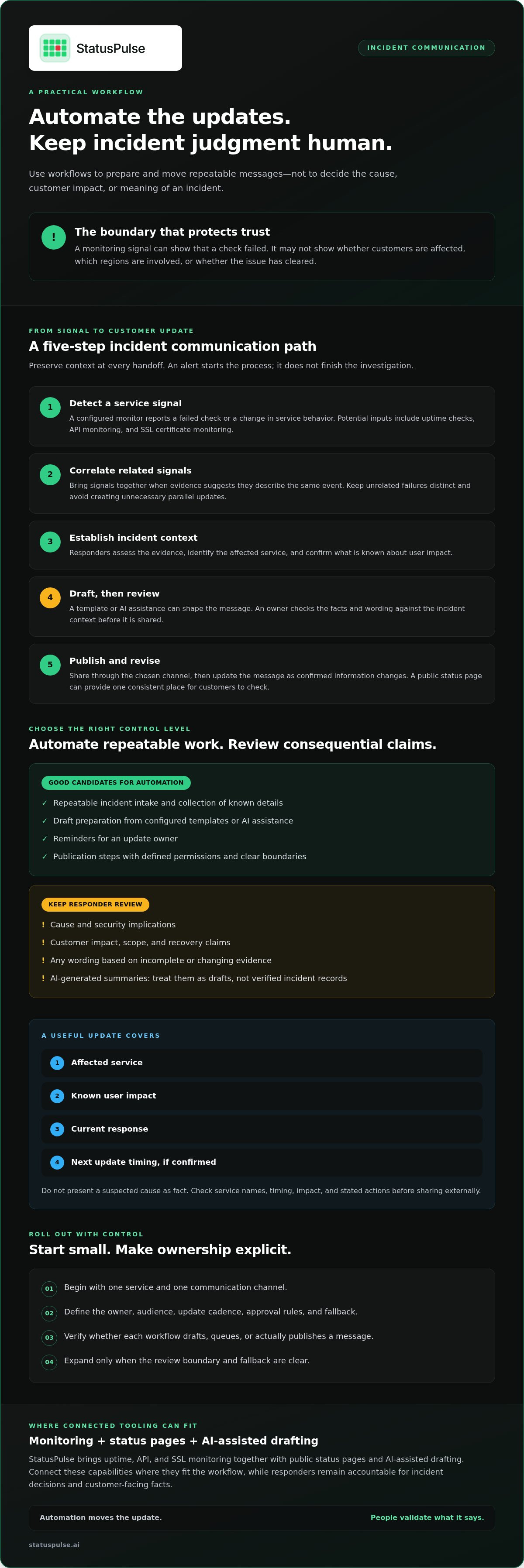
Require responder review when evidence is incomplete, the scope is uncertain, or wording could mislead. A monitoring signal can show that a check failed. It may not show whether customers are affected, which regions are involved, or whether the issue has cleared.
Treat AI-generated summaries as drafts, not verified incident records. Check service names, timing, impact, and stated actions against the incident context before sharing externally. If the facts change, revise the update rather than letting an earlier assumption carry forward.
- Automate: repeatable intake, draft preparation, reminders, and publication steps with defined permissions.
- Review: cause, security implications, customer impact, recovery claims, and any message based on incomplete evidence.
The boundary is practical: automate the work of preparing and moving updates, but keep people responsible for deciding what the incident means and what customers should be told.
How an automated incident communication workflow moves from signal to update
The workflow should preserve context at each handoff: a monitor reports a symptom, responders establish what it means, and a reviewed message reaches the right audience. This connects communication to incident response without treating an alert as a customer-facing conclusion.
A reliable workflow moves signals into incident context, turns confirmed details into a reviewed update, then publishes and revises that update as the situation changes. Automation can support each step, but responders remain responsible for confirming scope and impact.
Connect monitoring signals to a shared incident record
Potential signal sources include uptime checks, API monitoring, and SSL certificate monitoring, depending on what the team has configured. For monitoring fundamentals, see this uptime monitoring guide.
Bring related signals together when they point to the same service event. For example, a failed API check and an availability alert might describe two symptoms of one disruption. Grouping them in a shared incident record gives responders a place to assess timing and evidence together. The grouping logic still needs care: unrelated failures should remain distinct, while duplicate symptoms shouldn’t create unnecessary parallel updates.
Turn confirmed context into a reviewed update
Use this sequence to move from a signal to a public message:
- Detect: A configured monitor reports a failed check or change in service behavior.
- Correlate: Related signals are associated with the same event where evidence supports it.
- Establish context: Responders identify the affected service and confirm known user impact.
- Draft and review: A template or AI assistance can shape the message; an owner checks facts and wording.
- Publish and update: Share through the chosen channel, then revise as confirmed information changes.
A useful customer update states the affected service, known impact, current response, and next update timing if confirmed. Avoid presenting a suspected cause as fact. A public status page can serve as the consistent destination for these updates, giving customers one place to check while responders continue investigating. The broader goal of incident response is to manage disruption; communication should support that work without outrunning verified information.
Automated updates versus manual messages: choose the right level of control
More automation isn’t always safer. It can speed up routine messages, but it can also repeat an incorrect or outdated detail across channels. Choose the level of control based on how predictable the update is and how much harm a mistaken claim could cause.
Manual messages
Speed: slower. Consistency: depends on the writer. Review burden: higher. Error risk: varies with context and workload. Best for ambiguous, high-impact incidents where responders need to shape each message.
Fixed templates
Speed: quicker after confirmation. Consistency: high for standard wording. Review burden: moderate. Error risk: details can be omitted or left stale. Best for predictable progress updates with fields responders can verify.
AI-assisted drafts
Speed: can reduce drafting effort. Consistency: depends on the source context and review. Review burden: remains necessary. Error risk: a draft may include unsupported or outdated claims. Best when a responder checks every fact before sharing.
Automated publication
Speed: fastest after setup. Consistency: high when the source is accurate. Review burden: lower only for tightly bounded messages. Error risk: an incorrect signal or rule can publish misleading updates. Best for low-ambiguity messages with explicit safeguards.
These are qualitative trade-offs, not guarantees. An incident management communications guide can help teams define audiences, responsibilities, and message practices before choosing which steps to automate.
Match automation level to incident risk
For a confirmed, routine event, a fixed template can help an owner quickly report that a service is degraded and responders are investigating. High-impact, security-sensitive, or unclear incidents need explicit human review before external updates. Don’t assume a platform supports approval gates or role-based publication controls; verify those capabilities and test the configured workflow.
Manual communication, or an existing incident-management workflow, may be the better fit when updates require sensitive coordination, the incident has no reliable source of truth, or the team can’t validate automated triggers. Extra tooling isn’t useful if it adds another place to reconcile conflicting information.
Prevent stale, duplicated, or conflicting messages
Assign one incident record as the source of truth and name an owner for each audience or publication channel. Define how responders correct an update when scope or impact changes. If multiple channels carry messages, designate one canonical status page or record and make other updates point back to it.
Automation should accelerate verified information, not manufacture certainty. That principle keeps automated incident communication useful without letting a fast workflow turn an uncertain signal into a confident public claim.
How to implement automated incident communication safely
Start small: apply automated incident communication to one service and one channel before expanding. A limited rollout makes it easier to spot gaps in ownership, missing information, and failures without introducing the same problem across every service at once.
Write down who owns the event, who the update is for, how often the team expects to communicate, which messages need approval, and who takes over if the owner is unavailable. Keep these decisions accessible to responders during an incident, not buried in a design document.
Create rules responders can use under pressure
Document what triggers a draft, who reviews it, and who publishes it. Keep templates concise, with separate versions for confirmed impact, investigation, mitigation, and resolution. Make it clear which details must be verified before use, and avoid wording that suggests a cause or recovery state the team hasn’t confirmed.
Test failure cases before widening the rollout. Simulate duplicate alerts, missing context, a failed publication attempt, an update that becomes stale, and a resolution signal that needs responder confirmation. Define a manual fallback for when monitoring or communication tooling is unavailable, including who can post through the team’s existing process.
Review the workflow after incidents
Set a baseline before enabling the workflow. Track time to first update and correction frequency, then compare those measures after incidents. Review them alongside responder feedback: automation may shorten drafting time but still add review work or create confusion about who owns publication.
After each relevant incident, compare event timestamps, incident records, and published messages. Look for delays, duplicate updates, and mismatches between what responders knew and what users were told. Use actual corrections and team feedback to adjust templates, ownership, or safeguards. Don’t treat faster publication alone as evidence that the process improved.
- Expand only when the initial service and channel work reliably under tested conditions.
- Revise rules when responders repeatedly have to correct drafts or reconcile conflicting updates.
- Retain a clear manual fallback and named owners as automation grows.
Connect monitoring, status pages, and AI assistance with StatusPulse
Incident updates are easier to manage when monitoring, customer-facing communication, and drafting support sit within the same operational picture. Responders can use monitoring to investigate symptoms, then review incident context and decide what customers should be told. A shared platform can reduce the need to reconcile information across separate tools, but it doesn’t remove the need for clear ownership or human review.
StatusPulse combines uptime, API, and SSL certificate monitoring with public status pages and AI-powered incident management. Its AI tools help draft status updates and summarize outage impact. Treat those outputs as assistance: responders still need to verify the details and decide whether an update is ready to publish.
When an all-in-one platform may fit
A combined platform may suit teams that want monitoring, public updates, and incident drafting support in one place. This can make it easier to keep incident context and customer communication aligned, rather than copying details between tools. It’s a practical option to evaluate, not a reason to replace a working process without checking what the platform actually supports.
Teams with established incident-management tooling may be better served by extending their current workflow, especially if it already meets their needs for routing, approvals, and communication. Compare the effort of maintaining that toolchain with the value of consolidating monitoring and status-page work. Avoid assuming that shared product packaging guarantees a particular automation path.
Evaluate the fit without overlooking trade-offs
Assess the operational requirements first. Check which signals you need to monitor, whether the public status page supports your communication needs, and how responders will review AI-assisted drafts. Also confirm who controls publication and what manual process the team will use if a tool or workflow is unavailable.
Map the workflow you want to support, from the monitoring signal through incident review to the customer update. Then check whether the platform’s monitoring, status-page, and AI incident management features fit those steps. A tool should address a specific communication or coordination gap, not add another source of conflicting information.
Review your incident workflow, identify where repeated communication creates friction, and explore StatusPulse incident communication tools as one option for supporting automated incident communication with human review intact.
Build an update workflow your responders can trust
Good automated incident communication takes repetitive work off responders without handing over incident judgment. Start with a narrow workflow, connect signals to confirmed context, and keep people responsible for reviewing claims about cause, impact, and recovery.
Measure whether the process improves time to first update without increasing corrections or review overhead. Expand only when the workflow handles missing context, stale information, and publication failures safely. If your current incident tooling already supports that process, extending it may be the simpler choice.
StatusPulse brings uptime, API, and SSL monitoring together with public status pages. Its AI can assist with update drafts and impact summaries, while responders should verify details before sharing them.
Review your current workflow, identify the communication work worth automating, and explore StatusPulse monitoring and incident communication. Clear ownership and verified updates are a strong foundation for your next incident.
Frequently Asked Questions
What is automated incident communication?
Automated incident communication uses workflows to prepare or distribute updates based on incident signals. It can reduce repetitive work by collecting alert details, creating drafts, or reminding an owner to post. It doesn’t independently confirm an incident’s cause, customer impact, or resolution. Responders remain responsible for checking facts and deciding what to communicate, especially when the available evidence is incomplete.
Can incident updates be published automatically?
Yes, if the chosen platform supports automated publication and the team has configured it for that purpose. Automatic publishing can suit routine, low-ambiguity messages based on verified information. For uncertain, high-impact, or security-sensitive incidents, require a responder to review the update first. Check the platform’s actual publication and approval capabilities rather than assuming they’re available.
How does AI help with incident communication?
AI can help responders turn incident details into a status update draft or summarize reported outage impact. This can reduce time spent writing and reformatting messages, but it doesn’t make the details correct. Verify service names, timing, impact, and actions against the incident record before sharing. StatusPulse’s AI tools assist with drafting updates and summarizing impact; responders should review the content before sharing.
What should an incident status update include?
Include the affected service, confirmed user impact, what responders are doing, and when users can expect another update if that timing is known. Use plain language and distinguish confirmed facts from active investigation. For example, say that elevated API errors are under investigation if the cause isn’t confirmed. Update or correct the message as the incident scope and recovery status change.
How do you prevent automated incident updates from being inaccurate?
Use a defined source of truth for incident status, and assign an owner to review or publish each update. Limit drafts to confirmed context, check them before external publication, and test cases such as duplicate alerts, missing details, and failed publication. Establish a correction process so responders can replace stale or incorrect messages. Automation should move verified information faster, not turn uncertainty into certainty.
Should every incident trigger a public status page update?
No. Decide based on whether the incident affects a service or audience that customers need updates about, not solely on whether monitoring raised an alert. An internal check failure may not indicate customer impact. Set criteria for when an event warrants public communication, who confirms that threshold, and what details are safe to share. This helps avoid unnecessary or misleading status-page messages.
How can a team measure incident communication automation?
Establish a baseline, then track time to first update and how often published messages need correction. Review these measures alongside responder feedback: did automation reduce repeated writing, or add review work? Compare monitoring events, incident records, and public messages for timing and consistency. Use the findings to revise templates and safeguards. Faster publication alone doesn’t prove that updates are accurate or useful.


