

What if a certificate outage isn’t caused by a missed expiry date, but by a certificate no one knew your team owned? Preventing SSL certificate outages starts with visibility across every domain, service, and environment, not another spreadsheet reminder. Expiration is a common failure, but an incomplete intermediate certificate chain or a renewal that never reaches production can also break trust.
Manual tracking may feel manageable when the inventory is small. As certificates spread across teams and environments, ownership gets fragmented and reminders become easy to miss. Automated renewal helps, but you still need to verify that the right certificate and full chain are deployed where clients connect.
This guide explains common technical causes of SSL failures and how to build a prevention strategy around a unified certificate inventory, proactive expiry alerts, renewal checks, and chain validation. You’ll learn how to catch problems before browsers show “Connection Not Private,” reduce reliance on individual memory, and limit the risk of customer-facing downtime. If an issue still occurs, clear incident communication can help customers understand what’s happening while your team works on a fix.
Key Takeaways
- Understand how certificate expiry, failed renewals, and trust-chain problems can interrupt the TLS handshake and trigger browser warnings.
- Map the certificate lifecycle from CSR creation through CA validation, deployment, and renewal so teams know where failures can occur.
- See why automated issuance with Let’s Encrypt or ACME still needs monitoring to catch renewal and deployment failures.
- Use a five-step approach to preventing SSL certificate outages, starting with a complete inventory of domains and subdomains.
- Learn how SSL monitoring and a public status page can help detect certificate issues and keep customers informed.
Why SSL Certificate Outages Happen and Why They Persist
An SSL outage occurs when a client can’t establish a trusted TLS connection to a service. During the handshake, the server presents a certificate and the client checks its identity, validity, and trust chain. A failure can stop the connection before the page loads, leaving users with a browser-level block or a “Connection Not Private” warning. A public key certificate binds a public key to an identity; TLS relies on that binding to authenticate the server.
Expiration is a common cause, but auto-renewal alone doesn’t prevent every outage. A scheduled job can fail because of a permissions change, DNS validation problem, rate limit, or deployment error. Renewal may never happen, or a new certificate may be issued but not installed on the endpoint serving traffic. Without a check of the live service, the problem can go unnoticed until a client reports it.
The immediate cost is user friction and lost trust. Visitors may leave rather than bypass a browser warning, and interrupted access can affect conversions and search visibility. Don’t assume a certificate error automatically causes a specific search-ranking penalty. The more direct risk is that users and crawlers can’t reliably reach the service.
Common Root Causes Beyond Expiration
Several configuration faults can break trust even while a certificate is within its validity period:
- Hostname mismatch: The certificate’s Subject Alternative Name (SAN) doesn’t include the requested hostname. With Server Name Indication (SNI), a misconfigured virtual host can also present the wrong site’s certificate.
- Incomplete chain: The server omits an intermediate certificate, so some clients can’t build a path to a trusted root. Browsers may behave differently if they have cached intermediates, which can make the fault inconsistent across clients.
- Revocation and OCSP issues: A revoked certificate shouldn’t be trusted. A missing or stale OCSP staple can also affect certificate-status checks, though client behavior varies. Test what the endpoint actually serves and how relevant clients respond.
The Silent Failure of Manual Tracking
Spreadsheets depend on someone discovering every certificate, recording the correct hostname and expiry date, and updating the record after each change. That process gets fragile across departments, cloud accounts, load balancers, and non-production environments. A date entered incorrectly can make a reminder look reliable while pointing to the wrong certificate.
Manual expiry checks also miss problems that aren’t dates. An expiry alert won’t identify a broken chain or a wrong SNI response. Treat monitoring as a check of the live endpoint, and alert on certificate status and TLS configuration. That visibility is central to preventing SSL certificate outages, including failures that a renewal job completes without reporting.
Mapping the SSL Lifecycle: From CSR to Expiration
A certificate’s lifecycle starts before a Certificate Authority (CA) issues it. The server or certificate-management system generates a private key and a Certificate Signing Request (CSR). The CSR contains the public key and requested identity details, such as the domain name. The private key stays under your control; it should never be sent with the CSR.
The CA validates the request, then signs and returns an end-entity certificate. That certificate identifies a specific hostname or set of hostnames. A root certificate sits at the top of the trust hierarchy, while one or more intermediate CA certificates link the end-entity certificate to that root. Browsers and operating systems trust selected roots in their trust stores, then attempt to build and validate the chain presented by the server. Grants.gov describes certificates as a way to prove the identity of your organization's system during secure communication.
Validation methods and ACME challenges
Domain Validation (DV) confirms control of a domain. It’s usually the simplest option to automate, but it doesn’t verify the legal identity of the organization behind the site. Organization Validation (OV) adds checks of organizational identity. Extended Validation (EV) involves more extensive identity checks. These levels describe validation, not different encryption strength.
Automated issuance commonly uses ACME challenges. HTTP-01 requires the CA to retrieve a token from a specified path on the domain, so the service must be reachable over HTTP for validation. DNS-01 requires a TXT record in DNS. It supports wildcard certificates and can work when the web service isn’t publicly reachable, but automation needs controlled access to DNS updates.
Why intermediate certificates matter
The server must present the end-entity certificate and required intermediate certificates. It normally should not send the root, which clients already trust independently. A common Nginx mistake is configuring only the leaf certificate instead of a full-chain file. Apache setups can also fail if the certificate and intermediate chain are configured incorrectly. Follow the directives and file format for your server version.
Check what a client receives, not just what’s on disk:
openssl s_client -connect example.com:443 -servername example.com -showcerts
Review the returned certificates and verification result. SNI matters: the -servername option sends the hostname so the server selects the correct virtual host. As a further check, use an independent TLS monitor to track the live chain and expiry together. SSL certificate monitoring can add a separate view of certificate validity as certificates move from issuance to renewal.
Manual Tracking Compared with Automated SSL Monitoring
The right monitoring approach depends on how many endpoints you manage, which systems your team already uses, and who will maintain the checks. Compare the operational trade-offs before choosing.
| Approach | Useful when | Trade-off |
|---|---|---|
| Manual checks | The inventory is small and changes rarely | Checks depend on people remembering to run them |
| Custom scripts | You need control or integration with existing alerting | Your team owns development, testing, and maintenance |
| Cloud-native monitoring | You want certificate signals within an existing cloud stack | Coverage may be limited to that provider or environment |
| Dedicated monitoring | You need a separate view across multiple environments | Check the tool’s endpoint coverage, integrations, and cost |
Let’s Encrypt and other ACME-based systems automate certificate issuance and renewal, but they don’t confirm that every endpoint serves the renewed certificate. A completed renewal is one signal. A check of the live service verifies what a client can actually connect to.
Evaluating management strategies
OpenSSL scripts can provide a lightweight starting point. They’re useful when your team wants to control the check or send results to an established alerting system. The script still needs testing as infrastructure changes, and someone must own it when its output stops matching the environment.
Cloud-native checks can fit teams that already route alerts through provider tools. Dedicated monitoring can be useful across providers or separate network environments. Weigh subscription costs against the engineering time required to build and maintain equivalent coverage. For TLS configuration guidance, consult SSL Labs’ SSL and TLS Deployment Best Practices.
Key metrics for SSL observability
Expiry is an important signal, but it doesn’t describe the full TLS posture. Monitor days to expiry, whether the served chain validates, and whether the certificate’s signature algorithm meets your organization’s policy. Treat deprecated algorithms such as SHA-1 as findings to investigate against that policy, rather than assuming every endpoint has the same requirements.
Use an external check when you need an independent view of public endpoints, and internal telemetry when you need deployment context. The two perspectives answer different questions. SSL certificate monitoring is one option for tracking certificate health alongside your other operational checks.
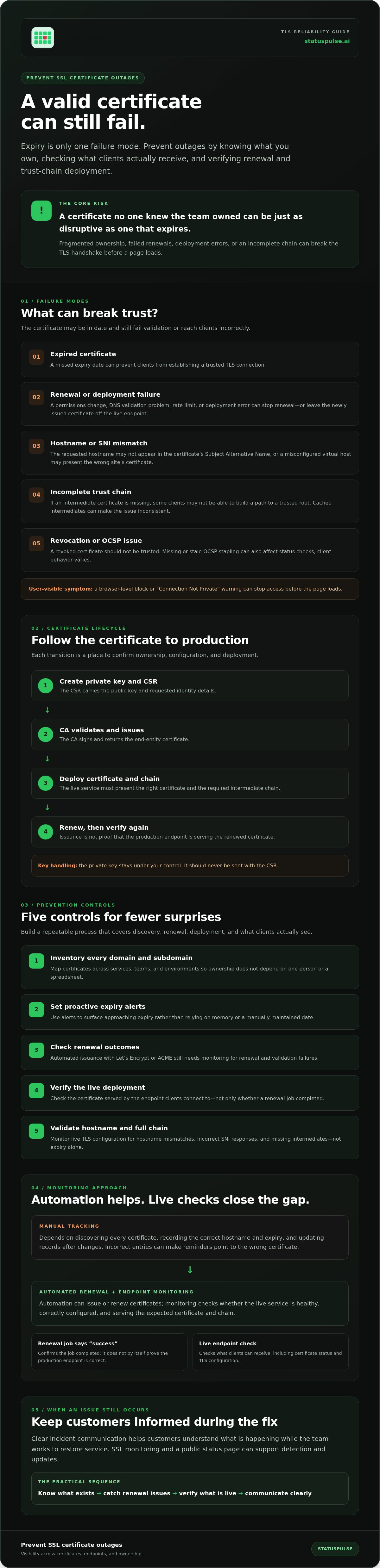
A Five-Step Strategy for Preventing SSL Certificate Outages
Preventing SSL certificate outages takes more than setting expiry reminders. Build a process that finds every public endpoint, automates routine renewals, checks what clients receive, and assigns a clear owner when an alert fires.
Step 1: Inventory every domain and certificate
Start with DNS records, cloud load balancers, ingress controllers, CDNs, and service catalogs. Include subdomains, staging environments, and certificates managed by individual teams. Search Certificate Transparency logs with a tool such as crt.sh to find publicly logged certificates associated with your domains. Treat the results as leads, not a complete inventory: logs can expose forgotten hostnames, but they won’t reveal every certificate or confirm which endpoints are still active.
For each certificate, record the hostname, owner, issuer, expiry, deployment point, and renewal method. Flag “Shadow IT” certificates for review. Standardizing issuance where practical can reduce operational variation, but preserve exceptions where a service has a valid technical or organizational reason to use another CA.
Step 2: Automate routine issuance and renewal
Use ACME automation, such as Let’s Encrypt, for eligible certificates. Test the full path: validation, issuance, deployment, and reload of the service. A renewal command succeeding doesn’t prove that the public endpoint is serving the new certificate. Keep manual procedures for high-value or non-automated certificates, with a named owner and documented renewal steps.
Step 3: Check public endpoints from outside
Monitor the live hostname, not only the origin server or renewal job. External checks can catch a stale certificate on a CDN or load balancer that internal systems report as healthy. Where users connect through different regions or network paths, use checks from more than one location to spot regional DNS, routing, or deployment differences.
Step 4: Make alerts actionable and escalate them
A 30-14-7-1 day expiry cadence is a practical starting point, not a universal rule. Tune it to your renewal lead time and incident process. Send early warnings by email or chat; reserve SMS or paging for critical production endpoints nearing expiry or failing validation. Include the hostname, days remaining, owner, and runbook. If the first alert goes unacknowledged, define who receives the next escalation. Filter out low-priority test systems to limit alert fatigue.
Step 5: Review and rehearse the process
Assign an owner to every certificate and periodically compare the inventory with deployed endpoints. Rehearse manual renewal for certificates that can’t use automation, including how to install the full chain and verify the result. SSL certificate monitoring can provide another view of public certificate health as part of your operational checks.
Automating SSL Health with StatusPulse
Expiry alerts are useful, but they’re only one part of certificate monitoring. To catch problems that users can encounter, checks should cover the certificate’s validity and the endpoint’s hostname and chain. Confirm which checks your chosen monitor performs. Don’t assume that an expiry alert also detects a failed handshake or missing intermediate certificate.
StatusPulse provides SSL certificate monitoring alongside uptime and API monitoring. This gives your team another signal to consider alongside renewal logs: issuance can succeed while a proxy or load balancer continues serving an old certificate. Check that the monitored hostname matches the endpoint customers use, including relevant subdomains.
Connect detection to customer communication
Monitoring tells the operations team something is wrong. A public status page gives customers a place to see what’s affected and whether the issue is being investigated. During an SSL incident, state the impacted service, user-visible symptoms, and what you know so far. Update the message as facts change. Avoid promising a resolution time unless the team can support it.
AI incident management can help draft a concise update from technical incident details, such as a certificate validation failure or affected endpoint. Treat the draft as a starting point. A person should verify the scope, remove internal jargon, and approve the wording before publication. Clear, timely updates can reduce confusion, though they can’t guarantee that customers won’t leave.
Include monitoring and communication in the same workflow
Certificate monitoring and incident communication address different parts of an outage. Monitoring helps teams track certificate health; a public status page gives customers a place to find relevant updates if a disruption affects them. Decide who reviews alerts, who investigates, and who publishes customer-facing updates. That way, the response doesn’t depend on one person noticing a message and working out what to do next.
For preventing SSL certificate outages, pair automated renewal with certificate-health checks and a clear communication path if an issue arises. StatusPulse SSL monitoring and status pages bring together monitoring and incident communication tools for teams reviewing their operational workflow.
Make Certificate Health Part of Your Routine
Preventing SSL certificate outages is an ongoing operational practice, not a one-time renewal task. Keep certificate ownership visible, automate routine renewals, and check public endpoints independently. Give each alert a clear owner and escalation path.
Renewal automation can’t confirm that every proxy or load balancer serves the new certificate. Monitoring adds another way to track certificate health. If a fault reaches customers, a public status page helps explain what’s affected while your team investigates.
StatusPulse provides uptime, API, and SSL certificate monitoring, as well as public status pages and AI incident management tools. These features can help teams track service health and prepare customer updates when an incident occurs.
Explore StatusPulse monitoring and status pages to see how they could fit your team’s workflow.
Frequently Asked Questions
Why did my SSL certificate expire even though I have auto-renew enabled?
Auto-renew can fail if domain validation breaks, a scheduled job stops running, credentials expire, or the renewal service hits a rate limit. It can also succeed without updating the public endpoint: a load balancer, reverse proxy, or CDN may keep serving the old certificate. Check renewal logs, confirm the certificate was deployed to every TLS termination point, then test the live hostname externally.
How far in advance should I set my SSL expiration alerts?
Set the first alert early enough to investigate ownership, validation, and deployment issues before expiry. A 30-14-7-1 day cadence can be a practical starting point, but tune it to your renewal process and certificate lifetime. Send reminders to the certificate owner, then escalate unacknowledged alerts for production services. Also alert on failed renewals and invalid chains, not only the expiry date.
What is the difference between a root certificate and an intermediate certificate?
A root certificate is a trust anchor included in a client’s trusted certificate store. An intermediate certificate is signed by a root or another intermediate and helps link a website’s end-entity certificate back to that trusted root. The server typically sends its end-entity certificate and required intermediates. If an intermediate is missing or incorrect, some clients may fail to build a trusted chain.
Can I monitor SSL certificates on internal or private networks?
Yes, but the monitoring system must be able to reach the private endpoint. A public monitoring service usually can’t connect directly to a host behind a firewall or on a private network unless it supports a suitable private connectivity method, such as an agent or approved network path. Check the tool’s capabilities and security model. For internal checks, run probes from inside the network and monitor public endpoints externally.
Will an expired SSL certificate affect my SEO rankings?
An expired certificate can prevent browsers and search crawlers from accessing a site normally, which can disrupt user visits and crawling. Don’t assume that expiry causes an automatic, fixed ranking penalty; search visibility depends on whether crawlers can reach and process affected pages over time. Restore valid HTTPS promptly, verify the full chain, and check crawl and indexing reports for access problems.
What should I do immediately if my SSL certificate expires?
Renew or reissue the certificate, then deploy it to every endpoint that terminates TLS, including relevant load balancers and proxies. Confirm the hostname and validity dates, install the required intermediate certificates, and reload the service if needed. Test the public endpoint with the correct SNI hostname and an external TLS check. If users are affected, publish a concise status update with the impact and confirmed next steps.
How do I verify if my full certificate chain is installed correctly?
Connect to the live endpoint and inspect the certificates it presents. For example, run openssl s_client -connect example.com:443 -servername example.com -showcerts. Check that the server returns the end-entity certificate and required intermediates, and review the verification result. The SNI option matters when a server hosts multiple domains. An external check can help catch differences between the live endpoint and local certificate files.
Is a dedicated SSL monitoring tool better than a custom script?
It depends on your inventory and maintenance capacity. A custom script gives you control and can fit an existing alerting stack, but your team must maintain discovery, SNI handling, chain validation, retries, and alert routing. A dedicated tool can reduce that code burden and provide ongoing endpoint checks, but verify its coverage and integrations. For a small, stable inventory, a tested script may be sufficient.


