

An uptime percentage can be accurate and still fail an SLA review. Without a defined measurement window, downtime rules, and documented exclusions, the number leaves too much room for dispute. A practical uptime SLA report template puts those rules beside the result.
If you’ve had to reconcile monitoring alerts with contract language or rebuild a report by hand, the problem isn’t just the calculation. It’s the gap between operational evidence and the commitment customers see. Monitoring records can support an SLA report, but they don’t determine contractual compliance on their own.
This guide covers the fields to include: service and reporting period, availability formula, incident evidence, exclusions, and notes on data gaps or measurement limits. It also distinguishes an SLI, the measured result, from an SLO, an internal target, and an SLA, the customer commitment. The goal is a repeatable report that makes performance clear without hiding caveats.
Key Takeaways
- Separate the SLA commitment, internal SLO target, and measured SLI so readers can see what was promised and what the evidence shows.
- Apply the agreement’s exact time window, downtime definition, and exclusions before calculating availability.
- Use an uptime SLA report template with fields for incidents, evidence references, limitations, and review ownership to make reports easier to repeat and audit.
- Choose spreadsheets, monitoring exports, or status-page records based on the context they preserve and the review effort they require. Incident updates and SLA calculations serve different purposes.
- Connect uptime, API, and SSL monitoring records to a reviewed reporting workflow, while keeping customer-facing incident communication clear and separate from the final SLA result.
What an Uptime SLA Report Shows, and What It Cannot Prove
An uptime SLA report summarizes service performance against specified SLA measurement rules. It records the result for a defined service and period, then shows how the team calculated that result and which evidence supports it.
The report is not the agreement itself, and a monitoring alert alone does not determine whether a contractual commitment was met. The governing agreement defines which services are covered, the measurement period, how downtime and exclusions are treated, and what remedies may apply. A report makes those terms easier to assess, but it cannot replace them or settle ambiguity in their wording.
An uptime percentage is meaningful only alongside its measurement scope: the service measured, the period covered, and the rules used to count availability. For example, a probe that checks one endpoint provides evidence about that endpoint from that probe’s perspective. It doesn’t automatically show that every customer-facing function was available.
A useful uptime SLA report template keeps the commitment, measurement, and evidence distinct. The foundational Service-level agreement reference describes the role of SLAs and common service metrics. For an actual report, the signed agreement’s language remains the governing source.
SLA, SLO, and SLI: Which one belongs in the report?
These terms describe different things. An SLA is the external agreement with a customer. An SLO is an operational target the organisation sets for its service. An SLI is the observed indicator used to assess performance, such as measured availability or latency.
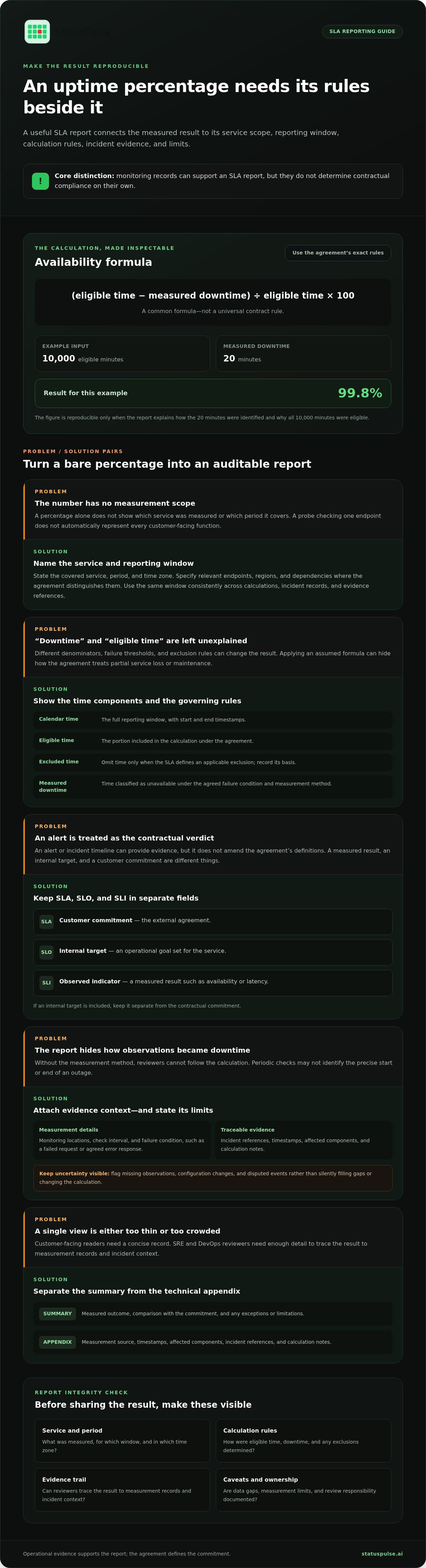
Label each item clearly. If the report includes an internal target as well as a contractual commitment, put them in separate fields. This prevents an SLO from being mistaken for a customer promise, or an SLI result from being presented as the promise itself.
Who uses an uptime SLA report?
Customer success and procurement teams need a concise record they can understand and share: which service was assessed, for what period, and how the result compares with the commitment. SRE and DevOps teams need enough detail to trace that result back to measurement records and incident context.
One report can serve both audiences if it separates the summary from the technical evidence. The summary can state the measured outcome and flag exceptions or limitations. A technical appendix can list the measurement source, timestamps, affected components, incident references, and calculation notes, allowing reviewers to follow the reasoning without crowding the summary.
This distinction also sets a boundary on what the report proves. It can show how recorded observations were evaluated under stated rules. It cannot, by itself, prove that monitoring captured every user experience, resolve unclear contract wording, or establish a remedy beyond what the agreement specifies.
How to Calculate SLA Availability Without Hiding the Measurement Rules
A common availability formula is (eligible time − measured downtime) ÷ eligible time × 100. Treat it as a starting point, not a universal contract rule. The SLA may define a different calculation, denominator, failure threshold, or treatment of partial service loss.
For example, if a service has 10,000 eligible minutes in the reporting window and 20 minutes of measured downtime, the result is 99.8%. That figure is reproducible only if the report explains how it identified those 20 minutes and why all 10,000 minutes were eligible.
Calendar time: The full reporting window, such as a named month, with its start and end timestamps.
Eligible time: The portion of that window included in the availability calculation under the agreement.
Excluded time: Time omitted only where the SLA defines an applicable exclusion, such as an approved maintenance window.
Measured downtime: The time classified as unavailable under the agreed failure condition and measurement method.
Different measurement scopes can produce different availability figures for the same reporting period. State the chosen scope rather than presenting one percentage as if it described every component and user experience.
Define the measurement window and service scope
Name the reporting period and time zone, then use them consistently in calculations, incident records, and evidence references. Specify the covered service and, where the agreement distinguishes them, the relevant endpoints, regions, and dependencies. A homepage check, for example, may not represent a separately contracted API. Include scheduled maintenance or other exclusions only when the SLA allows them, and record the basis for each exclusion.
Document the source and limits of each measurement
Record which monitoring locations observed the service, the check interval, and the failure condition, such as a failed request or an agreed error response. These details help reviewers understand how observations became a downtime duration. Alert records and incident timelines can corroborate the sequence of events, but they don’t amend the contract’s definitions.
Keep uncertainty visible. Flag missing observations, monitoring configuration changes, and disputed events rather than silently filling gaps or changing the calculation. If a check runs periodically, it may not identify the precise start or end of an outage. State how the report handled that limit. An uptime SLA report template should provide space for these notes alongside the result.
Uptime monitoring records can support this evidence trail, but teams still need to map each observation to the agreement’s rules. Uptime monitoring records from StatusPulse provide operational data for that review; the contract-specific calculation remains a documented reporting decision.
Spreadsheet, Monitoring Data, or Status Page: Compare Reporting Approaches
Each format serves a different reporting need. Compare them by how consistently teams can reuse the records, what context they preserve, and how much review they require.
| Approach | Repeatability | Context | Review effort |
|---|---|---|---|
| Spreadsheet | Depends on stable formulas and controlled inputs. | Can combine results and notes, but context may rely on manual entries. | Higher if reviewers must trace edits and values to source records. |
| Monitoring export | Supports consistent review of recorded observations. | Shows monitor events, but may lack customer-facing incident context. | Requires interpretation and reconciliation with relevant events. |
| Status-page history | Provides a record of published updates. | Shows what stakeholders were told and when. | Needs comparison with monitoring evidence for reporting use. |
For background on monitoring observations and their limits, see Uptime Monitoring: A Developer’s Guide to Reliability and Honest Communication. An incident communication timeline shows what the team told customers and when; an SLA calculation applies the agreement’s measurement rules to evidence.
When a spreadsheet is enough, and when it becomes fragile
A spreadsheet can work for a small, stable service scope with clear inputs. It becomes fragile when people edit formulas, paste data manually, or change reporting logic without recording why. Keep dated versions, document formula changes, and retain source records so another reviewer can reproduce the result.
Use monitoring and status updates for different evidence
Monitoring records supply observations for the reporting period. A public status page gives customers a readable incident timeline. The Architecture of Incident Communication Transparency offers context on incident communication, but status-page updates don’t replace documented SLA calculations.
Manual review still matters. Check whether maintenance qualifies as an exclusion, whether a partial outage meets the defined failure condition, and how to handle disputed incidents. An uptime SLA report template can identify which sources support each figure and where reviewer judgment is needed.
Copy-Ready Uptime SLA Report Template: Fields and Completion Steps
Use this structure to keep the contractual commitment, measured result, supporting evidence, and reviewer notes together. Replace each bracketed field with the applicable contract detail or recorded data. Don’t fill gaps with assumed thresholds or sample performance claims.
Template fields to include in every report
Copy and adapt this block for each covered service. Keep the field labels intact where possible so reports remain comparable across periods. If a field doesn’t apply, state why rather than leaving its meaning unclear.
Service name: [Covered service]
Covered components: [Endpoints, regions, or dependencies included by the agreement]
Reporting window and time zone: [Start timestamp] to [end timestamp], [time zone]
Agreement reference: [Contract name, section, or version]
SLA commitment: [Contractual availability target and applicable terms]
SLI and measurement method: [Observed indicator, source, failure condition, and calculation method]
Result: [Measured outcome for the reporting window]
Excluded time: [Duration and reason for each exclusion, with the relevant agreement basis]
Incidents: [Incident reference, affected component, relevant timestamps, and report treatment]
Evidence references: [Monitoring export, incident record, or other source location]
Limitations or disputed events: [Data gaps, configuration changes, uncertainties, or unresolved interpretation]
Review owner and date: [Reviewer role or name, review date]
Remedy, if applicable: [Agreement-defined remedy or “not assessed in this report”]
A repeatable review workflow
Use the same sequence each cycle. A consistent process makes the report easier to reproduce and helps reviewers catch mismatches before sharing results.
- Confirm the scope. Identify the agreement version, covered components, reporting window, time zone, applicable SLI, and contractual target. Resolve scope changes before calculating.
- Collect source records. Gather monitoring observations and incident timelines for the full period. Keep the source records with the report or reference a stable location where authorised reviewers can access them.
- Reconcile events. Compare observed failures with incident records. Apply exclusions only when the agreement supports them, and document the reason and evidence for each exclusion. Flag disputed events instead of silently deciding how they affect the result.
- Check the calculation. Have a reviewer verify the inputs, formula, result, and any manual adjustments against the agreement’s measurement rules. Record who reviewed the report and when.
- Prepare and share the summary. State the result plainly, then include material limitations and link to the supporting evidence. Keep customer-facing wording consistent with the reviewed calculation. Don’t present an internal target as a contractual promise.
This uptime SLA report template works best when its evidence is collected consistently. Use StatusPulse uptime monitoring for report evidence and retain human review for contract-specific decisions.
Turn SLA Reporting into a Repeatable Monitoring and Communication Workflow
Make reporting part of the service’s operating cycle: collect relevant signals, review them against the reporting scope, then prepare customer communication. Connect operational observations, the reviewed report, and incident updates through shared references, but don’t treat them as interchangeable records.
Connect operational signals to a customer-facing record
Homepage checks may not cover the service components customers rely on. API monitoring can add endpoint-level observations, while SSL certificate monitoring can surface certificate issues. Choose checks that reflect the scope being reported. For API monitoring considerations, see API Monitoring: The Developer’s Guide to High Availability in 2026.
Public status pages give stakeholders a place to follow incident updates. AI-assisted tools can help draft or summarize those updates, with a person reviewing accuracy and wording before publication. Neither status updates nor AI-generated text should determine contractual outcomes.
Choose a platform around the workflow, not a headline percentage
Assess whether your process needs monitoring, customer updates, incident context, and report review in one place. A narrow service scope with established tools may not need an all-in-one platform; specialised systems may also suit teams with specific evidence requirements.
StatusPulse combines uptime, API, and SSL certificate monitoring with customizable public status pages and AI-driven incident management to help teams draft updates and summarize outage impact. Explore StatusPulse uptime monitoring and status-page tools to assess how these capabilities fit your reporting workflow.
Make the Next Reporting Cycle Easier to Defend
Before the next reporting period closes, assign an owner to maintain the measurement rules and preserve the evidence behind each result. Treat changes to monitored services, checks, and exclusions as report inputs that need review, not invisible adjustments. This helps keep future reports consistent when teams or systems change.
Use the uptime SLA report template as a starting point, then adapt its fields to your agreement and review process. The goal isn’t just a polished percentage. It’s a result another person can trace, question, and reproduce.
To connect service monitoring with customer incident communication, explore StatusPulse monitoring and incident communication. Build a reporting process your team can explain with confidence.
Frequently Asked Questions
Is an uptime SLA report the same as an uptime report?
No. An uptime report can be an operational snapshot for engineers, while an SLA report is prepared to assess a defined customer commitment. The same monitoring data may feed both, but their purpose differs. An operations dashboard might group incidents by component to help find recurring faults; a customer report should make clear which contractual service and reporting period its result addresses.
Can uptime monitoring prove that a service met its SLA?
Not by itself. For a stronger audit trail, preserve the monitor configuration that produced the observations, including the tested URL or API operation and any changes made during the period. Retain original exports rather than only a chart or summary. This lets a reviewer understand how the evidence was generated and whether a configuration change affects the interpretation of the result.
How often should a company send an uptime SLA report?
Use the schedule stated in the customer agreement. If it leaves the cadence open, choose a regular interval that fits the customer’s review process and operational reporting cycle, then apply it consistently. Make the delivery date and reporting period explicit. A separate incident notification process can handle time-sensitive events, so a periodic report doesn’t become the only channel for communicating service issues.
What happens if an SLA report shows availability below the commitment?
Verify the result, then follow the agreement’s process for any notification, review, or remedy. Assign an owner to track the follow-up, record the decision, and preserve relevant correspondence with the report. The service team can also investigate contributing causes and corrective work. Keep that operational follow-up distinct from any contractual remedy, which depends on the agreement’s terms.
Should planned maintenance count as downtime in an SLA report?
Check the agreement’s treatment of planned maintenance before deciding how to classify a window. Keep the maintenance request, approval or notice record, and actual start and end times together. A scheduled label alone doesn’t determine how the interval should be treated. If work runs beyond its approved window, record the overrun separately so the reviewer can apply the relevant contract language.
Can a public status page replace an uptime SLA report?
No. A status page is designed to communicate service events to stakeholders, while a report supports a period-specific contractual review. For customers who need both, reference the relevant status-page incident from the report, but keep the report’s calculation and decision trail in its own record. This makes it easier to answer later questions about a reporting period without relying on a general incident feed.
What evidence should an uptime SLA report retain?
Retain enough detail to reconstruct the result, not just the final percentage. Useful records include timestamped source exports, the calculation file or script version, the agreement version applied, and reviewer approval. Apply your organisation’s access and retention policies, and use stable references so authorised reviewers can locate the supporting material later. A report generated with an uptime SLA report template should also identify where those records are stored.


