
Maintenance isn't a technical failure. It's a trust-building opportunity that only fails when your communication is opaque or delayed. When you hit the "off" switch, your users shouldn't feel abandoned. They should feel informed. We know the pressure is real. Gartner reports that the average cost of IT downtime is $5,600 per minute. Over 90% of mid-size enterprises say a single hour of downtime costs them more than $300,000. That's a lot of revenue to lose while your support inbox explodes with repetitive questions.
You're likely tired of the manual effort required to draft updates and the customer churn that follows a poorly explained outage. We believe transparency shouldn't be a chore. This guide, Scheduled Maintenance Windows: The 5-Step Playbook for Zero Customer Complaints, gives you the exact communication framework to run maintenance without losing trust. Following the ITIL v5 standards announced in January 2026, you'll learn how to automate incident communication and build long-term brand equity through honesty. We'll walk through everything from proactive planning to using AI for drafting updates that keep your users calm and your inbox empty.
Key Takeaways
- Understand the psychological gap between a surprise outage and a planned event. Learn how to maintain user trust through proactive transparency.
- Implement the Scheduled Maintenance Windows: The 5-Step Playbook for Zero Customer Complaints to handle multi-region latency with data-driven precision.
- Master the "First 5 Minutes" rule. Let Claude draft your incident updates while you focus on the technical fix. You press send.
- Turn downtime into brand equity with honest post-mortems. Close the loop by explaining what you learned and why it matters to your users.
- Automate your communication workflow with native status pages. They stay online even when your primary infrastructure goes down.
Why Most Scheduled Maintenance Windows Fail (And the Cost of Silence)
A zero-complaint maintenance window is proactive, transparent, and predictable. It's not just a technical requirement; it's a promise of reliability. Most windows fail because they treat users like an afterthought. When a system goes down without warning, users feel a loss of control. This triggers frustration and churn. However, when downtime is scheduled and communicated, that psychological weight shifts. Users can plan around it. They feel respected. This shift in perception is the foundation of Scheduled Maintenance Windows: The 5-Step Playbook for Zero Customer Complaints.
Industry incumbents often fail here because of corporate bloat. They have layers of approval for a single status update. By the time their "official" message goes out, your support inbox is already drowning. These legacy providers prioritize their own image over your users' time. We believe in a different approach. Maintenance shouldn't be a secret. It should be a clear, honest conversation between developers and the people who use their software.
The Support Ticket Avalanche
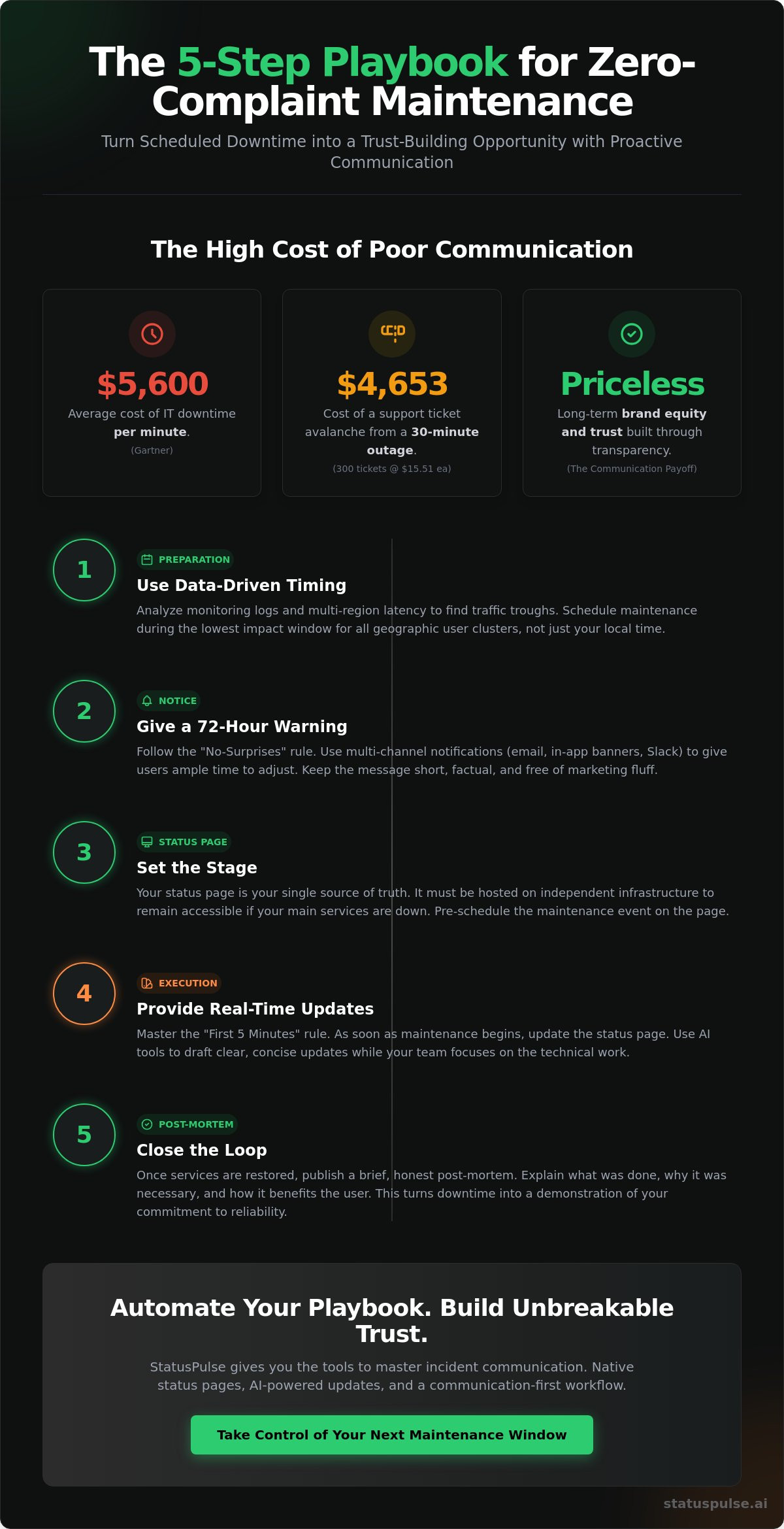
The cost of silence is measurable. Gartner research shows that the average cost of IT downtime is $5,600 per minute. But the hidden labor cost is equally damaging. According to HDI, the average cost of managing a single support ticket is $15.51. If a 30-minute outage generates 300 tickets from confused users, you've just spent $4,653 on avoidable labor. Proactive status updates act as your frontline defense. They answer the "is it just me?" question before it ever reaches your team. The Maintenance Paradox is simple: the more you communicate, the less they care about the downtime.
Transparency as a Competitive Edge
Honest communication beats marketing fluff every time. Users don't want a "performance optimization" euphemism when the database is offline. They want the truth. Moving from reactive firefighting to principled transparency changes how your brand is perceived. It moves you from being a faceless service to a trusted partner. Using native public status pages ensures your communication remains accessible even if your primary infrastructure is struggling. This builds long-term brand equity that survives the occasional outage. When you're honest about the "why" and the "when," you stop being a source of stress and start being a model of reliability.
The 5-Step Playbook for Zero-Complaint Maintenance
Incumbent frameworks like ITIL v4 often feel too slow for modern teams. While ITIL v5, announced in January 2026, tries to bridge the gap with AI-driven models, we prefer a leaner, communication-first approach. This is the Scheduled Maintenance Windows: The 5-Step Playbook for Zero Customer Complaints. It's built for developers who value integrity and want to avoid the bloated processes of SaaS giants. Five steps. Zero complaints. It's about moving from a reactive "hope they don't notice" mindset to a principled stance of transparency.
Steps 1 & 2: Preparation and Notice
Step 1 is about data-driven timing. Use your monitoring logs to identify traffic troughs across different time zones. Don't guess; analyze your multi-region latency to ensure you aren't disrupting a specific geographic cluster during their peak hours. If your EU users are peak-active while your US users sleep, you need a window that respects both. This meticulous attention to detail is what separates a professional operation from a sloppy one. It's a grounded approach that prioritizes the user experience over internal convenience.
Step 2 is the 72-hour warning. Follow the "No-Surprises" rule by giving your users enough runway to adjust their own workflows. Your notification email should be short and punchy. "We're performing scheduled maintenance on May 14th at 03:00 UTC." That's it. Avoid marketing fluff and subordinate clauses. Just provide the facts clearly. Multi-channel notification is key. Post to Slack, send the email, and update your in-app banner. When you're consistent, you build a foundation of trust that survives any technical hiccup.
Step 3: Setting the Stage with Status Pages
Step 3 involves setting the stage with your centralized truth. Your status page must be hosted on separate, independent infrastructure. If your primary servers are struggling, your status page shouldn't be. StatusPulse provides an EU-hosted, GDPR-native solution that stays online even when your primary infrastructure goes down. You can learn more about Public Status Pages: Building Trust Without Surprises. Configure your maintenance mode toggles in advance to ensure a smooth transition once the clock hits zero.
Step 4 and Step 5 focus on the window itself and the aftermath. During the maintenance, communication speed is everything. Claude drafts the incident updates; you press send. This keeps the technical team focused on the deployment while the AI handles the heavy lifting of drafting status messages. Finally, close the trust loop with an honest post-mortem. It's a principled way to turn downtime into a demonstration of competence. Following Scheduled Maintenance Windows: The 5-Step Playbook for Zero Customer Complaints ensures your brand remains a fair and ethical alternative to the corporate giants. You can start building this foundation of trust today with StatusPulse monitoring.
Executing the Window: Real-Time Updates and AI Assistance
The clock hits zero. Most developers dive straight into the terminal and forget the users entirely. This is where trust begins to erode. In our Scheduled Maintenance Windows: The 5-Step Playbook for Zero Customer Complaints, the "First 5 Minutes" rule is non-negotiable. You must update your status page the moment you start. Even a simple "Maintenance has begun as scheduled" message prevents the "is the site down?" anxiety. It signals that you're in control. Silence, on the other hand, signals chaos.
Speed matters, but technical precision matters more. You need to communicate what's happening without drowning users in jargon. Incumbents often rely on faceless, automated messages that feel cold and corporate. We prefer a grounded approach. Use your status page to provide a logical flow of updates. If you're migrating a database, say that. If you're deploying a security patch, be honest about it. This level of transparency is a rebellious act against the "black box" culture of SaaS giants.
AI-Powered Incident Management
Technical logs are messy. During a high-pressure maintenance window, the last thing you want to do is stare at a blank text box. This is where AI changes the game. Our platform uses AI to summarize complex system logs into human-readable updates. It removes the writer's block that often leads to communication delays. You don't have to worry about phrasing or tone while you're busy fixing a latency spike.
We follow a principled model: Claude drafts, you press send. We don't believe in pure automation for incident management. Human agency is vital for maintaining integrity. You review the draft, ensure it's accurate, and hit the button. It keeps your team efficient while ensuring every message feels human and honest. This balance of speed and oversight is essential for following the Scheduled Maintenance Windows: The 5-Step Playbook for Zero Customer Complaints.
Handling the Unexpected
Even the best plans can hit a snag. Maybe a "15-minute" patch turns into a 2-hour ordeal because of a multi-region sync issue. When this happens, follow the "Honesty First" rule. Don't wait until the window expires to announce a delay. Update your users as soon as you know the timeline has shifted. Provide facts, not excuses. If you're seeing unexpected API Monitoring: The Developer’s Guide to High Availability can help you identify these bottlenecks before users do. By being the first to report a delay, you maintain your position as a reliable, transparent partner rather than a failing service.
The migration is done. The database is stable. Your team is ready for a coffee break. But for your users, the experience is still ongoing. Many companies make the mistake of vanishing the moment the technical work ends. They hope the downtime is forgotten. In reality, this silence creates a vacuum of uncertainty. Closing the loop is the final, essential stage of Scheduled Maintenance Windows: The 5-Step Playbook for Zero Customer Complaints. It's how you turn a period of unavailability into a demonstration of professional integrity. Incumbents often hide behind vague "system improvements" messages. We believe your users deserve better.
Your "We are back" notification should be more than a status change. It's a summary of success. Be declarative. If the maintenance window closed early, highlight that efficiency. If it took exactly as long as promised, reinforce that predictability. This isn't just about being polite. It's about proving that your team is in total control of the infrastructure. When you provide a clear conclusion, you allow your users to return to their work with full confidence in your platform. It moves your brand from being a "service provider" to a "reliable partner."
The Art of the Post-Mortem
A post-mortem is not an apology; it is a technical commitment to future reliability. Use a template that prioritizes facts over fluff. Start with what was achieved. Move to any unexpected hurdles. End with what was learned. If a multi-region sync took longer than expected, explain the technical reason. Admitting a minor mistake builds more trust than claiming perfection. Users know that software is complex. They value the honesty of a team that cares about the details. This principled approach to reporting is why EU-hosted and GDPR-native status pages are vital. You aren't just checking a compliance box. You're building ethical authority by protecting user privacy while being radically transparent.
Measuring Success Beyond Uptime
Success isn't just about the absence of red dots on a dashboard. It's about "Zero-Complaint" metrics. Track your support tickets per 100 users during the maintenance window. If you communicated effectively, this number should be negligible. Compare this to the industry average ticket cost of $15.51. Proactive communication is a high-ROI activity. It's also worth asking for direct feedback. A simple "Was this notice helpful?" on your status page provides invaluable data for your next window. Over a 12-month period, this consistent transparency reduces churn. Users don't leave because of scheduled downtime; they leave because of surprises. You can eliminate those surprises and build a more resilient brand with StatusPulse public status pages.
Automating Your Playbook with StatusPulse
A strategy is only as strong as the infrastructure supporting it. Scheduled Maintenance Windows: The 5-Step Playbook for Zero Customer Complaints works best when your status page lives on a separate, resilient infrastructure. StatusPulse provides exactly that. We're EU-hosted and GDPR-native. This means your data stays in the region. Your communication stays online even during multi-region latency spikes. It's a principled choice for teams that value privacy and reliability over corporate bloat. We don't believe in the complex pricing models of SaaS giants. Our monitoring is honestly priced at €5, not $29. You get technical precision without the enterprise markup.
Our AI incident management understands what developers need. It doesn't replace your judgment; it assists your workflow. Claude drafts your updates. You press send. This keeps you in control while removing the stress of manual writing during a high-pressure window. It's a grounded approach to automation that respects human agency. By removing the manual effort of drafting and sending updates, you can focus on the technical execution of your maintenance window. No surprises. No fluff.
Why StatusPulse for Maintenance Windows?
One-click maintenance scheduling takes the friction out of the preparation phase. You set your window. We handle the automated subscriber alerts across Slack, Microsoft Teams, and Zendesk. Our platform integrates seamlessly with your uptime and API monitoring. If traffic drops or latency increases in a specific region, you'll know before your users do. The UI is minimalist by design. We've stripped away the unnecessary filler found in incumbent tools. You get a fast-paced, logical interface that respects your time. It's a tool built by developers who care about getting the details right.
Get Started in Under 5 Minutes
Setting up your first public status page shouldn't take an afternoon. With StatusPulse, you can be live in under 5 minutes. Start by connecting your API monitoring to your maintenance workflow. This ensures that when you toggle maintenance mode, your status page reflects the reality of your infrastructure immediately. It's about building a centralized truth for your users. By following the standards set by ITIL v5 in January 2026, you're choosing a future-proof way to manage digital products. You can start building trust honestly at StatusPulse.ai today. Four plans. No surprises. Just the tools you need to maintain integrity and reduce support volume.
Take Control of Your Next Maintenance Window
Maintenance shouldn't be a source of stress for your team or your users. It's a chance to prove your reliability through action. By following the Scheduled Maintenance Windows: The 5-Step Playbook for Zero Customer Complaints, you move beyond reactive firefighting. You've learned how to time your updates using multi-region latency data and how to use AI to draft human-readable status updates. Transparency is your most powerful competitive advantage against corporate incumbents who hide behind opaque processes.
Don't let your next update get buried in a support ticket avalanche. StatusPulse offers an honest, EU-hosted, and GDPR-native infrastructure that keeps your communication clear. Claude drafts your messages. You press send. It's that simple. We believe in fair pricing that respects your budget and your principles. Our honestly priced monitoring starts at €5, not $29.
Stop surprising your customers. Start your honest status page for €5. It's time to build a brand that users can trust, even when the servers are down. You have the playbook. Now, you have the tools to execute it with confidence.
Frequently Asked Questions
How much notice should I give customers for scheduled maintenance?
Give your customers at least 72 hours of notice for routine updates. For major infrastructure migrations, provide 7 to 10 days of lead time. This follows the "No-Surprises" rule. It gives developers and users enough runway to adjust their own workflows. Proper notice is a core part of Scheduled Maintenance Windows: The 5-Step Playbook for Zero Customer Complaints.
Can I automate maintenance notifications through my status page?
Yes, you can automate alerts across Slack, Microsoft Teams, and email. You schedule the maintenance window once. The platform handles the multi-channel notifications at pre-set intervals. We use AI to simplify the process. Claude drafts the updates; you press send. This keeps you in control while removing the manual effort of drafting repetitive status messages.
What is the best time of day to schedule a maintenance window?
The best time is during your lowest traffic trough, which you can identify using multi-region latency data. For many global SaaS platforms, this window typically falls between 02:00 and 05:00 UTC. Use your historical monitoring logs to find the exact 3-hour period where user impact is lowest. Don't guess; let the data guide your timing.
How do I handle maintenance updates if my main site is completely down?
Host your status page on a separate, independent infrastructure. StatusPulse is EU-hosted and GDPR-native. It stays online even if your primary servers fail. This ensures your users always have access to a centralized truth. You can provide real-time updates without worrying about your own site's availability. It prevents the silence that causes support ticket spikes.
Is it better to use a private or public status page for maintenance?
Public status pages are superior for building brand trust and ethical authority. They show your users that you value transparency. Use private pages only for internal infrastructure that has zero impact on the end-user experience. For customer-facing services, a public page is essential for Scheduled Maintenance Windows: The 5-Step Playbook for Zero Customer Complaints.
What should I include in a maintenance window post-mortem?
Include the actual duration of the downtime, the technical tasks completed, and any lessons learned from the process. If a 15-minute patch took 40 minutes, explain the technical reason honestly. Avoid marketing fluff. Use plain-spoken ethics to describe what happened. A post-mortem is a technical commitment to future reliability that proves you care about the details.


