

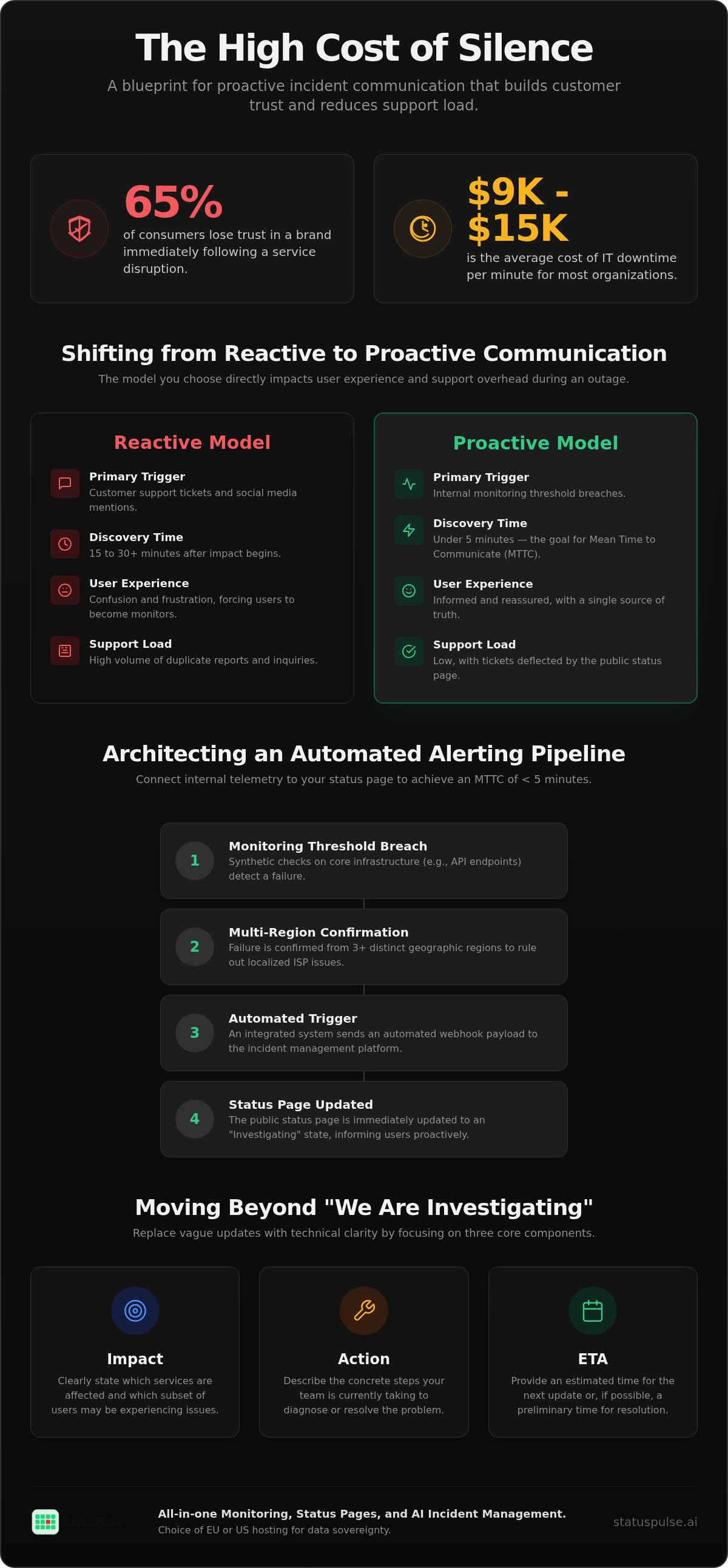
65% of consumers report losing trust in a brand immediately following a service disruption. For most organizations, the average cost of IT downtime sits between $9,000 and $15,000 per minute. When systems fail, silence is the most expensive response you can choose. It forces your users to become your monitoring system, flooding your support queue with tickets you don't have time to answer.
You likely agree that manual status updates are a burden during a crisis. Drafting copy under pressure often leads to vague, unhelpful communication that frustrates technical users. This guide explains how to architect proactive incident communication into your stack. You'll learn to build automated workflows that alert users to disruptions before they report them, effectively reducing support load and churn.
We will examine the technical requirements for lowering your Mean Time to Communicate (MTTC). We also look at how integrated monitoring can trigger status updates automatically. By the end, you'll have a blueprint for a communication strategy that prioritizes transparency and preserves customer retention through even the most difficult outages.
Key Takeaways
- Learn to measure and optimize Mean Time to Communicate (MTTC) to minimize the window of silence during a technical outage.
- Architect a direct pipeline between your uptime monitoring and public status page to automate service disruption alerts.
- Implement proactive incident communication to notify users of infrastructure issues before they report them to your support team.
- Replace vague status updates with technical clarity by focusing on three core components: impact, action, and estimated resolution time.
- Maintain data sovereignty by selecting between EU and US hosting options for your incident management and monitoring stack.
What is Proactive Incident Communication?
Proactive incident communication is the practice of alerting users to service disruptions based on internal monitoring triggers before they experience the failure or report it to support. It prioritizes Mean Time to Communicate (MTTC) to minimize the impact on customer trust. By the time a user encounters a "504 Gateway Timeout," an official acknowledgement should already be visible on your status page.
Silence during a technical failure is a form of technical debt. It forces customers to act as your monitoring system, which leads to immediate frustration and potential churn. While internal teams focus on the database failover or deployment rollback, external transparency ensures the user understands the scope of the issue. This technical honesty is a requirement for maintaining credibility in a competitive SaaS market.
| Feature | Reactive Model | Proactive Model |
|---|---|---|
| Primary Trigger | Customer support tickets | Monitoring threshold breaches |
| Discovery Time | 15 to 30+ minutes | Under 5 minutes |
| User Experience | Confusion and frustration | Informed and reassured |
| Support Load | High (Duplicate reports) | Low (Deflected tickets) |
The MTTC Metric: Why Minutes Matter
MTTC, or Mean Time to Communicate, measures the delta between system detection and the first public update. You calculate it by subtracting the detection timestamp from the first update timestamp. High MTTC values correlate directly with higher support ticket volumes. When users are left in the dark, they reach for the support button to verify if the issue is on their end. This creates a secondary crisis for your support team while engineers are already under pressure.
Setting a target MTTC of under five minutes is a realistic goal for modern teams. Achieving this requires moving away from manual drafting. By using a platform that integrates uptime monitoring directly with your status page, you can automate the initial alert. This doesn't just help the user; it also improves your Mean Time to Recovery (MTTR). When the noise of incoming tickets is silenced by an early update, your engineers can focus entirely on the technical resolution.
Reactive vs. Proactive Communication Models
The reactive model relies on external signals. It waits for the first few support tickets or a spike in social media mentions to confirm an issue. By the time you confirm the outage this way, hundreds of users have already had a negative experience. You're playing catch-up from the start. This approach fails to account for crisis communication strategies that prioritize rapid, factual narrative control.
The proactive incident communication model relies on internal telemetry. It triggers a status update the moment a monitoring threshold is breached. This approach eliminates "Dark Debt," which refers to the minor incidents that teams often ignore because they haven't hit a specific public threshold. Disclosing these minor flickers builds long-term trust. While proactive alerts reduce churn, they do carry the risk of over-notifying users about transient issues. You must tune your monitoring thresholds to distinguish between a temporary network flicker and a genuine service degradation.
Architecting a Proactive Alerting Pipeline
To achieve proactive incident communication, you must bridge the gap between monitoring telemetry and your public-facing status page. Manual updates are too slow for modern SaaS expectations. You need a pipeline that triggers an "Investigating" state based on immediate check failures. This reduces the window of silence between a service drop and user notification. By the time a customer thinks to check your status, the information should already be there.
Configure synthetic checks for your core infrastructure, including API endpoints and SSL certificate validity. Multi-region monitoring is essential here. A typical configuration requires failures from at least three distinct regions before escalating an alert. This ensures that a localized ISP issue doesn't trigger a global outage notification. A standard webhook payload for an automated status update might look like this:
{
  "incident": {
"component_id": "api_gateway",
"status": "partial_outage",
"message": "Automated: Latency threshold exceeded in EU-West-1",
"automation_source": "synthetic_monitor_node_04",
"region_confirmation": ["London", "Frankfurt", "Dublin"]
  }
}
Research from the Software Engineering Institute highlights the importance of effective incident management communications by stressing that data must be accurate and timely. Without a direct link between your monitoring nodes and your communication hub, your data will always be delayed.
Integrating Monitoring and Status Pages
Webhooks are a standard way to connect tools, but they often introduce "glue code" that requires its own maintenance. Native integration is more resilient because it eliminates these external failure points. For instance, you can set a rule where if API latency exceeds 500ms for three consecutive checks, the status page automatically flips to "Partial Outage." This informs users of performance degradation before they notice the lag themselves. This level of automation is a core part of uptime monitoring that actually serves the end user.
Avoiding Alert Fatigue in Public Updates
Not every minor blip deserves a public alert. You must define "Significant Impact" versus "Minor Fluctuation" to avoid overwhelming your audience. Use debouncing and thresholding to prevent a "flickering" status page. Thresholding allows you to ignore transient 503 errors that resolve within seconds. You might set a policy where an "Investigating" status is only published after 120 seconds of sustained downtime. This balance protects your brand from unnecessary noise while maintaining transparency for real issues.
StatusPulse automates these state changes without requiring manual intervention. By using integrated monitoring, you can ensure your status page remains a source of truth. It allows your engineers to focus on the fix while the system handles the initial wave of proactive incident communication. This setup preserves your team's focus during the critical first minutes of a disruption.
Drafting Updates: Moving Beyond "We Are Investigating"
Speed is only half of the equation in proactive incident communication. If your automated alert triggers but provides no context, you haven't actually reduced the support load. You've just confirmed the user's frustration. High-quality communication requires a shift from corporate vague-speak to technical precision. SaaS users, especially developers, value granular details that help them understand if they need to change their own configurations or simply wait for a fix.
Standardizing your update frequency is just as important as the content itself. During a critical outage, a 15-minute pulse is appropriate. For minor issues, 60 minutes might suffice. The goal is to prove that the incident is still being actively managed. When a status page goes silent for hours, users assume the team has lost control. Regularity builds a foundation of trust that survives even the longest downtime.
The Anatomy of a High-Trust Incident Update
An honest update consists of three core elements: Impact, Action, and ETA. You should avoid language that minimizes the problem. Instead, use technical terminology that establishes professional authority. If a database connection pool is exhausted, say so. This transparency allows your technical peers to trust your expertise.
- Impact: Be specific about the scope. Instead of "some users," state "EU-West-1 API users experiencing 500 errors." This helps users quickly determine if they're affected.
- Action: Describe the technical path to resolution. Mentioning that you're "Rolling back deployment v1.2" is more reassuring than saying you're "working on a fix." It shows a concrete plan is in motion.
- ETA: Establish a communication pulse. Even if there's no new technical progress, provide a timestamp for the next update. This prevents users from constantly refreshing the page in a state of uncertainty.
Reducing Cognitive Load with AI Incident Assistants
Drafting these updates under the pressure of a major outage is difficult for even the most experienced SREs. This is where AI incident management tools become useful. They can ingest raw log data or internal chat conversations to generate a concise summary for the public status page. This reduces the cognitive load on the engineer who is currently trying to solve the actual problem.
StatusPulse includes AI incident management features designed to turn technical telemetry into readable updates. AI-driven communication is a tool for speed, not a replacement for judgment. You should always maintain a human-in-the-loop to verify the update before it goes live. This ensures that the transparency you provide remains accurate and ethical. By using AI as an assistant, you can maintain a high MTTC without sacrificing the quality of your messaging.
Measuring the ROI of Transparency
Transparency isn't a soft metric; it's a hard operational efficiency. The primary quantitative benefit of proactive incident communication is support ticket deflection. Research indicates that 74% of consumers believe transparent communication during a disruption influences their loyalty to a brand (SQ Magazine, 2026). When you provide updates before a user reports a problem, you eliminate the "Is it down for everyone?" flood, allowing your support team to focus on complex queries rather than triaging identical reports.
SLA compliance is another critical factor for enterprise-grade SaaS. A public status page provides a verifiable record of uptime and response times, which is vital for contracts where uptime guarantees are tied to financial credits. Proactive alerts ensure your Mean Time to Communicate (MTTC) stays low, proving to stakeholders that your monitoring stack is both precise and honest.
Support Ticket Deflection Strategies
A status page is only useful if it's visible at the point of failure. Integrating status banners directly into your application UI via an API is a powerful deflection strategy. This ensures that users see an "Investigating" message before they search for your support link. Moving communication closer to the failure point reduces cognitive load for the user and preserves your team's reputation during a crisis. By exposing the "Investigating" state through your frontend, you preemptively answer the user's first question.
The Ethics of Pricing in Incident Management
The market for incident management is often bloated with complex pricing models that penalize transparency. Many legacy providers charge per-subscriber fees, which means you pay more as your user base grows. If you have 20,000 users, you shouldn't pay a premium just to notify them of a service blip. This model creates "notification hesitation," where teams might delay updates to avoid hitting billing thresholds or incurring unexpected costs.
StatusPulse provides a principled alternative with flat-rate pricing and no per-subscriber fees. This is a direct contrast to corporate incumbents that scale costs based on your audience size. We believe that public status pages should be accessible and predictable for every team. You get unlimited subscribers and all-in-one monitoring without the corporate bloat or hidden fees of established players. Ready to automate your transparency? Create your status page with flat-rate pricing today.
Implementation: Setting Up StatusPulse for Proactive Communication
Implementing proactive incident communication requires a toolchain that respects both technical requirements and regional regulations. Setting up a resilient system shouldn't take weeks of professional services. With StatusPulse, you can move from a reactive posture to a proactive one in under five minutes by focusing on core monitoring and clear data residency. This ensures that your communication stack is as reliable as the infrastructure it monitors.
Data Sovereignty and GDPR Compliance
European teams often face stricter requirements regarding where their monitoring data and incident logs are stored. The GDPR's 72-hour breach notification deadline (Legiscope, 2026) makes it essential to have a reliable communication platform that is always available, even when your primary infrastructure is failing. StatusPulse offers a choice between EU and US hosting options to support global data sovereignty and regional compliance.
Selecting a regional hosting location ensures your status page remains compliant with local privacy standards. This isn't just about checking a box for legal reasons. It's about providing a principled alternative for users who value privacy as much as uptime. By keeping data within the EU or US, you maintain control over your technical metadata and avoid the corporate bloat of providers who default to a single, opaque hosting region.
Final Steps to Proactive Readiness
Once you've selected your hosting region, you can begin configuring your monitors. This process is straightforward and avoids the complexity of enterprise-scale incumbents. Focus on these core areas to ensure total coverage:
- Uptime Monitoring: Connect your first 1-minute uptime check. This provides the high-resolution data needed to trigger alerts before users notice a lag in performance.
- SSL and API Monitoring: Configure checks for certificate expiration and endpoint health. These are the most common points of failure for modern SaaS applications and are often overlooked until a public outage occurs.
- Public Customization: Customize your public status page to match your technical brand. A professional, integrated look reinforces the quiet confidence your team needs to project during a crisis.
- Team Collaboration: Invite your entire engineering team to the dashboard. StatusPulse uses a flat pricing model without per-user fees, allowing you to scale your response team without increasing your monthly costs.
Before going live, draft a "Scheduled Maintenance" update to test your notification pipeline. This ensures that every team member knows the workflow and every subscriber is ready to receive alerts. You can start a trial today to build your own high-trust communication stack. Proactive incident communication is a technical choice; make it before the next incident occurs.
Building a Culture of Technical Transparency
Proactive incident communication isn't just about software; it's a fundamental commitment to user trust. By automating the link between uptime monitoring and status pages, you remove the stress of manual reporting during a crisis. You've learned how to measure MTTC, architect a resilient alerting pipeline, and use AI to draft technical updates that provide genuine value. These steps transform downtime from a reputation risk into an opportunity for radical transparency.
Silence is a form of technical debt that compounds with every minute of an outage. Establishing a reliable communication pulse ensures that your users are never left guessing. StatusPulse provides the infrastructure to make this possible without the bloat of legacy enterprise tools. With EU and US hosting options, you maintain data sovereignty while benefiting from flat, transparent pricing that doesn't penalize your growth. AI-powered incident drafting ensures your updates are fast and accurate; letting your engineers focus on resolution rather than copy editing.
The transition from reactive to proactive communication starts with the right stack. You can build a more resilient brand by prioritizing honesty over flashiness. Build a more transparent incident process with StatusPulse today and start alerting your users before they have to ask.
Frequently Asked Questions
What is the ideal MTTC for a SaaS company?
The ideal Mean Time to Communicate (MTTC) for a SaaS company is under five minutes. Achieving this target ensures that you reach users before they have time to open a support ticket. High-performing SRE teams treat MTTC as a core operational metric alongside MTTR. If your communication lag exceeds ten minutes, you're likely already losing customer trust. Automated triggers from your monitoring stack are the only way to consistently hit these low thresholds.
Should I automate status updates or keep them manual?
You should automate the initial alert but keep a human-in-the-loop for technical resolution details. Automation is essential for proactive incident communication because it eliminates the delay of manual drafting during the first critical minutes. Once the incident is acknowledged, an engineer should provide a manual update with specific context about the fix. This hybrid model balances speed with the technical accuracy that your users expect during a service disruption.
Does proactive communication increase the visibility of minor bugs?
Proactive communication does increase the visibility of minor issues, but this transparency builds long-term technical credibility. Users often notice small blips in API latency or transient errors in their own logs. When your status page acknowledges these minor flickers, it proves your monitoring is precise and honest. Hiding small failures creates a dark debt of trust. Being open about minor disruptions prevents users from wondering if your platform is secretly unstable.
How do I handle incident communication for third-party API failures?
You should communicate third-party API failures by clearly identifying them as external dependencies on your status page. If a major provider like AWS or Stripe is down, your users need to know that the issue is outside your direct control. Provide links to the third-party status pages so your customers can track the source of the problem. This approach protects your reputation while helping your users understand the technical architecture of the disruption.
What is the difference between a public and private status page?
The difference between a public and private status page lies in access control and the intended audience. Public pages are accessible to anyone and are designed to build market trust and deflect general support tickets. Private status pages are gated behind authentication and are used for internal stakeholders or enterprise clients with specific SLAs. Most SaaS companies benefit from a public page to maintain transparency with their broader user base and potential leads.
How does EU-based hosting affect monitoring latency?
EU-based hosting has a negligible impact on monitoring latency if your nodes are strategically placed near your target infrastructure. For European companies, using EU-hosted monitoring is often a requirement for data sovereignty and GDPR compliance. StatusPulse allows you to choose between EU and US hosting regions to ensure your data stays where you need it. This regional focus minimizes the distance between your monitoring agents and your servers, providing more accurate performance data.
Can AI accurately draft incident updates for technical users?
AI can accurately draft incident updates by summarizing technical log data and internal team chats into readable summaries. It's particularly effective at removing the cognitive load from engineers during high-stress outages. However, technical users value precision, so an SRE should always review the AI's output before it's published. AI incident management tools function best as assistants that handle the formatting and initial copy; leaving the final technical verification to a human.


