
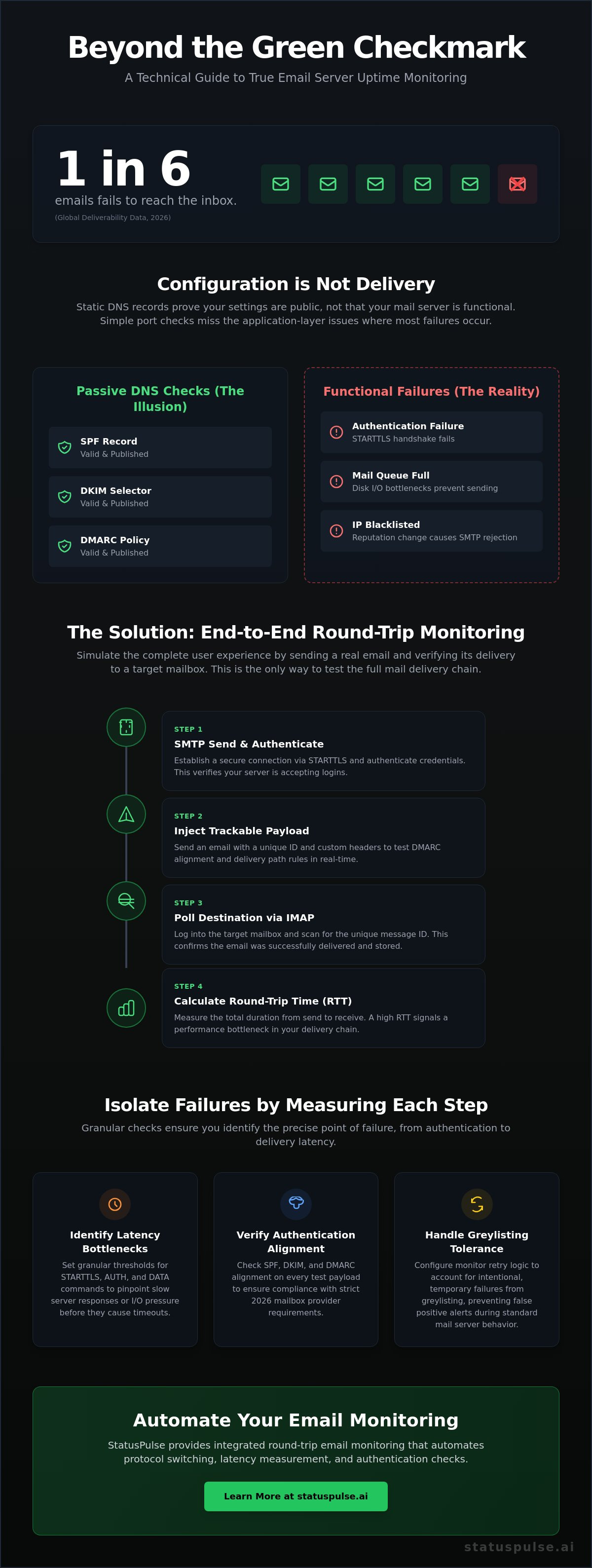
One in six emails fails to reach the inbox, according to 2026 global deliverability data. You've likely seen it happen. Your SPF and DKIM records are valid, yet critical system alerts still land in spam or vanish into an SMTP black hole. Standard email server uptime monitoring often fails because it only checks if a port is open, not if the message actually arrives.
We agree that a green status light on a DNS check doesn't mean your mail server is functional. This guide explains how to monitor the full round-trip loop, from SMTP injection to IMAP polling, while ensuring your DMARC alignment stays within strict 2026 regulatory requirements. We will cover automated authentication verification, latency bottleneck identification, and the technical steps needed to reduce false positives caused by greylisting.
Key Takeaways
- Static DNS records prove your configuration but not your server's actual functional availability.
- Robust email server uptime monitoring requires a full round-trip loop that tests SMTP sending and IMAP polling in a single cycle.
- Isolate latency bottlenecks by setting granular thresholds for each specific step of the mail delivery chain.
- Configure monitor retry logic to account for greylisting and prevent false positive alerts during intentional temporary failures.
- Verify SPF, DKIM, and DMARC alignment on every test payload to ensure compliance with 2026 mailbox provider requirements.
Why SPF, DKIM, and DMARC Records Aren’t Enough for Uptime
You have green checkmarks on your DNS records. Your SPF is valid. Your DKIM selector is published. Despite this, your transactional emails are bouncing or hitting the spam folder. This happens because DNS records only prove configuration, not functional availability. They are static pointers. They don't account for a crashed signing service, a misconfigured mail transfer agent, or a blacklisted IP address.
Effective email server uptime monitoring goes beyond checking if port 25 is open. A simple TCP ping to the Simple Mail Transfer Protocol (SMTP) port only confirms the service is listening. It doesn't confirm that the server can authenticate a user, accept a payload, or route it to an external MX. Simple pings miss approximately 90% of real-world delivery issues because they ignore the application layer logic where most failures occur.
- Authentication failures during the STARTTLS handshake.
- Local mail queues filling up due to disk I/O bottlenecks.
- IP reputation changes that trigger immediate SMTP rejections.
- Misconfigured relay permissions that prevent mail from leaving the local network.
The Gap Between Configuration and Delivery
Configuration is not delivery. Take DKIM as an example. If your server's private key is corrupted or the signing daemon hangs, your DNS record remains "valid" to external scanners. However, every outgoing mail will fail verification at the destination. Monitoring tools that only scrape DNS records will report 100% uptime while your actual delivery rate drops to zero. You're left with a false sense of security while your users miss critical notifications.
DMARC records at p=none create a similar blind spot. While this policy is useful for initial setup, it hides delivery issues from your immediate view. You might only discover failures days later when reviewing aggregate reports. Email round-trip monitoring is the only way to verify the full delivery path by mimicking a real user's experience from end to end.
Active vs. Passive Email Monitoring
Passive monitoring relies on historical data. You watch DNS records or parse logs after the fact. It's useful for auditing but lacks the immediacy required for incident response. Active monitoring takes a different approach. It sends a test probe, waits for it to arrive in a controlled mailbox, and measures the latency of each specific step in the chain.
In 2026, major providers enforce strict authentication and spam rate thresholds below 0.3%. Passive checks can't tell you if a specific provider has temporarily throttled your IP or if a greylisting policy is causing 15-minute delays. Active functional testing is now the baseline for any reliable email server uptime monitoring strategy. It identifies the "last mile" of delivery that protocol pings simply cannot reach.
Implementing SMTP and IMAP Round-Trip Monitoring
A round-trip check simulates the actual user experience. It's the gold standard for email server uptime monitoring. The process follows a four-phase logic: establishing a secure connection, injecting a trackable payload, polling the destination mailbox via IMAP, and calculating the Total Round-Trip Time (RTT). This approach verifies that your mail transfer agent (MTA) and mailbox provider are communicating correctly.
In accordance with RFC 5321, the send phase must validate the entire SMTP conversation. Don't just check if the server responds. You need to verify that the STARTTLS handshake completes and the AUTH command is accepted. Once the message is injected, the monitor switches protocols to IMAP. It logs into the recipient mailbox to find the specific message ID. This confirms that the mail wasn't just accepted by the relay; it was actually delivered to the storage backend and is ready for the user to read.
Calculating the total RTT provides a baseline for performance. If your SMTP injection takes 200ms but the IMAP poll takes 10 seconds, you've identified a delivery bottleneck. For teams needing a simpler way to manage these complex checks, StatusPulse offers integrated round-trip monitoring that handles the protocol switching and timing automatically.
Step 1: The SMTP Send Phase
Performance during the send phase is often overlooked. You should measure STARTTLS and AUTH performance separately. A slow handshake often points to certificate chain issues or resource exhaustion on the server. Injecting specific headers during this phase is also critical for DMARC alignment testing. By including the correct "From" and "Return-Path" headers in your test probe, you can verify that your signing service is applying DKIM signatures correctly in real-time.
Set initial timeout thresholds for the handshake. If the SMTP DATA command takes longer than five seconds, it's a sign of disk I/O pressure or database latency on the mail server. These granular metrics help you fix issues before they cause a total service outage.
Step 2: The IMAP Poll Phase
The polling phase requires a balance between speed and server load. Polling every few seconds can trigger rate limits or tax the server's CPU. Most reliable monitors use a 60-second window for the first check. Use unique subject line tokens, such as a UUID, for precise correlation. This ensures the monitor isn't accidentally validating a previous test or a different message entirely.
Mailbox maintenance is the final piece of the puzzle. Automated cleanup is necessary to prevent storage bloat. Your monitoring script or service should delete the test message immediately after a successful poll. This keeps the test mailbox lean and ensures that IMAP SEARCH commands remain fast and efficient.
Optimizing Per-Step Thresholds and Alignment Checks
Effective email server uptime monitoring requires more than a binary "up/down" result. You need to measure the duration of each protocol command to detect degradation before it becomes a total failure. Generic timeouts often mask underlying issues like database lock contention or overloaded signing daemons. By breaking down the round-trip into granular steps, you can isolate exactly where the delivery chain is stretching.
Correlating these latency spikes with specific server components allows for faster incident resolution. If you see a spike in DKIM signing time alongside a rise in CPU usage, the issue is likely cryptographic overhead. Monitoring these details ensures your email server uptime monitoring strategy provides actionable data rather than just noise.
Granular Latency Thresholds
A five-second response for SMTP AUTH should be treated as a warning. While the connection technically succeeds, such high latency often signals resource exhaustion on the authentication backend. If the SMTP DATA command spikes while other commands remain fast, the bottleneck is likely in the mail queue processing or disk I/O. These metrics tell you when your infrastructure is struggling under load.
IMAP search latency is equally telling. As mailboxes grow, search operations can become slow if indexing is misconfigured. Monitoring this specific step helps you identify when storage maintenance is required. Aim for sub-second responses for IMAP SEARCH on a clean test mailbox to ensure your storage layer is performing as expected.
Real-Time Alignment Verification
In 2026, mailbox providers like Google and Microsoft enforce strict DMARC alignment for bulk senders. Simply receiving a test email isn't enough. Your monitor must parse the Authentication-Results header of the polled message. This confirms that the SPF and DKIM signatures actually match your sending domain rather than just being "present."
Automated checks should also verify the depth of your SPF record. Exceeding the 10-lookup limit is a common cause for dynamic alignment failure. A shift from "strict" to "relaxed" alignment in your headers often signals a misconfiguration in your signing service or a potential security breach where an unauthorized relay is being used. For teams managing multiple domains, StatusPulse provides automated alignment tracking that alerts you the moment a header check fails.
Handling Greylisting and External Latency Tolerance
Greylisting remains a common source of noise in email server uptime monitoring. It is an intentional, temporary failure designed to thwart spam bots that don't retry. When your monitor sends a test probe, the receiving server may return a 451 "Try again later" response. If your monitoring logic is too aggressive, this temporary delay triggers a false positive alert.
Differentiating between a 451 error and a hard 550 "User unknown" error is critical. A 550 error indicates a permanent configuration or delivery failure. A 4xx response is a request for patience. You shouldn't alert your team for a protocol-level request to wait. Understanding these nuances prevents unnecessary stress during routine mail delivery cycles.
Greylist Tolerance Strategies
Most greylist windows last between 5 and 15 minutes. To monitor real-world delivery impact, your IMAP poll phase must account for this delay. You can distinguish between a greylist delay and a genuine queue backup by inspecting the specific SMTP response code; a 451 code explicitly identifies a policy-based retry request rather than a resource bottleneck.
Whitelisting your monitoring IPs is a common shortcut used by many teams. However, this bypasses the greylisting check entirely. While it reduces noise, it prevents you from seeing how your actual users experience delivery delays. Testing the real-world impact provides a more honest view of your service reliability and IP reputation.
Reducing False Positives
Single timeouts are often transient network blips. Reliable email server uptime monitoring uses thresholding based on successive failures across multiple regions. If a probe fails from a London node but succeeds from Frankfurt, your server is likely fine. The issue is regional network congestion, not a service crash.
For systems relying on mail-related microservices, you should also implement API monitoring to track the health of your internal delivery endpoints. This ensures that a failure in your submission API isn't misidentified as a mail server outage. Multi-region checks act as a second opinion, confirming that a problem is global before paged alerts go out.
Managing these retry windows and regional checks manually is complex and error-prone. StatusPulse simplifies email server uptime monitoring by automating greylist-aware retries and multi-region verification. This reduces alert fatigue while maintaining a precise, technical view of your global delivery health.
Unified Mail Monitoring with StatusPulse
Managing manual scripts for round-trip tests is a maintenance burden that most DevOps teams can't afford. Fragmented tools often lead to fragmented data. StatusPulse replaces complex custom logic with a unified interface for email server uptime monitoring. Every check performs the full SMTP-to-IMAP loop discussed in this guide, verifying both protocol availability and delivery success in a single cycle.
Instead of relying on static timeouts that trigger false positives, StatusPulse utilizes AI-powered thresholding. The system learns your server’s specific latency baseline over time. If your MTA typically takes 400ms for a STARTTLS handshake, you won't get paged for a minor 50ms fluctuation. You only receive alerts when the deviation signals a genuine performance bottleneck or a configuration shift.
Transparency is a core requirement for modern mail infrastructure. StatusPulse automates the parsing of Authentication-Results headers, tracking SPF, DKIM, and DMARC alignment on every test probe. This ensures that your delivery reliability isn't just about speed, but also about maintaining the strict security standards required by major providers in 2026.
Built for DevOps Efficiency
Setup is direct and requires no complex scripting. You provide the credentials; the system handles the protocol switching and unique payload injection. Global monitoring nodes allow you to test real-world delivery latency from different geographic regions. This is essential for identifying regional routing issues that a single-point check would miss.
Communicating these technical details to stakeholders is just as important as the monitoring itself. You can integrate your mail health metrics directly into a public status page. This provides a clear, honest view of your service availability without the need for manual status updates during an incident.
Beyond Basic Uptime
Reliability extends to the security layer. StatusPulse includes dedicated SSL certificate monitoring for your mail ports, including 993 (IMAP), 465 (SMTPS), and 587 (Submission). Expired certificates are a leading cause of silent delivery failures. Automated alerts ensure you have ample time to renew before a handshake failure brings down your mail flow.
When an outage does occur, the platform provides AI-assisted incident summaries. These drafts analyze the protocol logs to identify if the failure was a timeout, an authentication error, or a DMARC alignment shift. For teams seeking full stack visibility, combining mail checks with comprehensive uptime monitoring ensures that every layer of your application is covered by a single, reliable source of truth.
Securing Your 2026 Mail Infrastructure
Reliability in 2026 depends on functional loops, not just static DNS records. You've seen why verification must extend from the initial SMTP handshake to the final IMAP poll. By implementing granular latency thresholds and greylist-aware retry logic, you transform your monitoring from a simple alert system into a diagnostic asset. This proactive approach to email server uptime monitoring identifies bottlenecks before they impact your sender reputation or user experience. It's the difference between assuming your mail works and knowing it arrives.
StatusPulse provides the technical depth required for this transition without the complexity of custom scripting. We prioritize integrity with EU-based hosting for data sovereignty and AI-powered incident management to clarify complex outages. Our pricing remains flat and transparent. No per-subscriber fees. No corporate bloat. It's a tool built by specialists for specialists who value precision over marketing flash. You get the data you need to maintain high availability without the stress of managing custom infrastructure.
Secure your email delivery with StatusPulse today. Take control of your mail infrastructure and build a more resilient delivery chain for your team.
Frequently Asked Questions
What is an SMTP/IMAP round-trip check?
An SMTP/IMAP round-trip check is a functional test that simulates the entire lifecycle of an email. It starts by sending a unique message via SMTP and ends by polling a recipient mailbox via IMAP to verify successful arrival. This method is the most reliable form of email server uptime monitoring because it tests the application layer rather than just network connectivity.
How does greylisting affect email monitoring?
Greylisting causes intentional, temporary delivery failures by returning a 451 SMTP status code to unknown senders. Standard monitoring tools often interpret this as a service outage, leading to false positive alerts. To avoid this, your monitoring logic must recognize the 451 code and implement a retry window, typically between 5 and 15 minutes, to match common greylist durations.
Why do I need to monitor SPF/DKIM alignment if my DNS is correct?
Correct DNS records don't guarantee that your mail server is actually applying the correct signatures to outgoing messages. A signing service crash or a misconfigured relay can cause authentication to fail even while your DNS remains valid. Monitoring the headers of received test probes ensures that your SPF and DKIM alignment stays compliant with 2026 mailbox provider requirements in real-time.
Can I monitor per-step latency for email sending?
Yes, you can measure the duration of specific SMTP commands like STARTTLS, AUTH, and DATA to identify precise bottlenecks. Spikes in STARTTLS latency often point to certificate issues; slow DATA commands suggest disk I/O pressure. Breaking down these steps provides more actionable data for email server uptime monitoring than a single total delivery time metric.
What is the difference between strict and relaxed DMARC alignment?
Strict alignment requires the domain in the "From" header to exactly match the domain in the SPF or DKIM signature. Relaxed alignment allows for subdomains to differ, provided the root organizational domain is the same. Most 2026 security standards prefer strict alignment to prevent spoofing, so monitoring for shifts from strict to relaxed is a critical security check.
How often should I run email round-trip tests?
A 60-second interval is the standard for high-availability mail systems. Running tests too frequently can trigger rate limits on your IMAP server or bloat the test mailbox with unread messages. A one-minute cadence provides a balance between rapid incident detection and server resource conservation, ensuring you catch delivery failures before they impact a significant number of users.
What happens if DKIM fails but SPF passes?
If DKIM fails but SPF passes, your DMARC check will still pass as long as the SPF record is aligned. However, relying on a single pass is risky, as SPF often breaks during email forwarding. Maintaining both valid SPF and DKIM signatures is the only way to ensure deliverability across various mail routing scenarios and recipient provider policies.
Is it possible to monitor mail delivery without sending real emails?
You can check port status and DNS records, but you cannot verify the actual delivery path without sending a physical probe. Port 25 pings miss application-level errors like full mail queues or IP blacklisting. Sending a real, trackable email is the only way to confirm that your entire infrastructure, from the MTA to the storage backend, is functioning correctly.


