

Your server is lying to you. A 200 OK status code confirms the door is open, but it doesn't mean there's any furniture inside. You've likely experienced the "zombie page" phenomenon. This happens when your monitor stays green while customers report a blank screen or a broken checkout. Understanding Keyword Monitoring vs Status Code Monitoring: Why You Probably Need Both is the only way to stop these silent outages before they damage your brand.
We know the frustration of receiving a customer complaint before your monitor even blinks. It's an industry habit for incumbents to charge $29 a month for basic checks that still miss content failures. You deserve better than noisy alerts and false confidence. This article shows you how to build a "set and forget" monitoring architecture that verifies user-facing content is rendering correctly. We'll explore why an honestly priced hybrid strategy ensures faster response times without the corporate bloat. It's time to move past the 200 OK lie and see what's actually happening on the page.
Key Takeaways
- Stop trusting the 200 OK lie. Learn why a green monitor doesn't always mean your users can actually see your content.
- Master the difference between positive and negative HTML scanning. Use specific strings to verify that your database and frontend are actually communicating.
- Implement Keyword Monitoring vs Status Code Monitoring: Why You Probably Need Both to create a fail-safe hybrid strategy. This approach catches total server crashes and silent content failures in one go.
- Reduce alert fatigue by mapping your critical path. Layer your monitors logically so you only get paged when there's a real problem to solve.
- Choose honest pricing over corporate bloat. See how a streamlined, €5 solution provides the same protection as the $29 plans from industry incumbents.
The 200 OK Lie: Why Status Codes Aren’t Enough
Your monitoring dashboard is green. Your server is responding. Everything looks perfect. Yet, your support inbox is filling with complaints from users who see nothing but a blank screen. This is the 200 OK lie. It is the gap between technical availability and actual usability. Understanding the nuances of Keyword Monitoring vs Status Code Monitoring: Why You Probably Need Both starts here. You must realize that a successful connection is not the same as a working website.
What is Status Code Monitoring?
Status code monitoring is the traditional foundation of uptime tracking. It follows a simple request-response cycle. A monitor pings your URL and waits for a specific response from the server. It looks for various HTTP status codes to determine health. A 200 code means success. A 404 indicates a missing page. A 500 signals a server error. This method is efficient for catching total infrastructure collapse. It is the bare minimum of observability because it only confirms the web server is conscious, not that it is actually doing its job.
The Rise of the Partial Outage
Modern web architectures have made status codes less reliable. If you use React, Vue, or Next.js, your server might deliver a perfect shell of a page even if the backend is failing. This creates a zombie page. The Nginx or Apache server is healthy, so it returns a 200 OK. However, the JavaScript fails to fetch data from a broken microservice. The result is a blank screen or a spinning loader that never ends. Traditional monitors stay green because the HTTP handshake was successful. They are blind to the logical failures happening inside the browser.
Silent failures are expensive. When a checkout button stops working but the page still loads, you lose revenue every minute you stay online. Data from May 2026 shows that the average cost for basic monitoring software is $180 annually, yet many of these tools still fail to detect content errors. Relying on status codes alone is a gamble with your customer trust. You need a strategy that catches a "Database Error" message even when it appears on a technically successful 200 OK page.
At StatusPulse, we believe monitoring should be honest. We built a tool that respects your time and budget. We offer a streamlined alternative to the bloated, expensive incumbents that often miss these critical details. You get the precision you need without the corporate noise. It is about knowing your site works, not just that it is reachable.
Keyword Monitoring: Looking Inside the HTML
Status codes tell you if the server answered. Keyword monitoring tells you what it actually said. It is the process of scanning the raw HTML response for specific text strings to verify functional integrity. This is vital because a successful handshake doesn't guarantee a working site. Industry experts often discuss how HTTP status codes impact SEO, noting that a 200 OK code can still result in a "soft 404" if the content is missing. If your page is blank but the status is 200, your search rankings and your sales will both suffer. Understanding Keyword Monitoring vs Status Code Monitoring: Why You Probably Need Both is about moving from basic connectivity to true content verification.
Incumbent monitoring tools often treat keyword scanning as a "premium" feature. They'll charge you $29 for what should be a fundamental check. We don't believe in that kind of bloat. Technically, this is simple HTML string monitoring. It doesn't require a complex setup or a massive budget. It just requires a tool that looks at the furniture inside the house rather than just checking if the front door is unlocked. You can start monitoring your critical content with an honest, developer-first approach that prioritizes precision over marketing fluff.
The "Must Contain" Strategy
The "Must Contain" strategy is your best defense against the blank page. You select a unique brand term, a specific product name, or even footer text that only appears when a page renders fully. If the monitor doesn't find that string, it alerts you immediately. This is especially useful for API monitoring. You can check for specific JSON keys to ensure your data layer is responding correctly. It's a binary check: the content is there, or it isn't. No guessing. No false greens.
The "Must Not Contain" Strategy
Negative monitoring is equally powerful. You tell the monitor to alert you if it finds strings like "Error 500", "Database connection failed", or "Out of Stock". This acts as a final sanity check for your deployment pipeline. It can even help detect if your site has been compromised by looking for unauthorized keywords or common malware signatures. It catches the errors that your server is too polite to report with a proper error code. While status codes are fast for detecting infrastructure collapse, negative keyword checks are the only way to catch logic failures that happen after the connection is made.
Keyword vs Status Code: A Comparison Framework
Choosing between these methods shouldn't be a binary decision. Most incumbents treat them as separate silos. They want you to pay for multiple subscriptions or upgrade to an enterprise tier just to see if your text rendered. This is inefficient. You need a unified architectural strategy. Status codes provide the breadth. Keywords provide the depth. When you combine them, you create a fail-safe alert system that covers both infrastructure and business logic. This is the core of Keyword Monitoring vs Status Code Monitoring: Why You Probably Need Both.
Speed is the primary advantage of status codes. They are lightweight. They allow for high-frequency pings without taxing your monitoring provider's resources. However, they lack context. Keyword monitoring is slower because it must parse the HTML, but it validates that your site actually serves its purpose. It's the difference between knowing a store is open and knowing it has milk on the shelves. By layering these checks, you stop the silent failures mentioned earlier while maintaining a fast response time for total server crashes. As of May 2026, many monitoring services still charge $29 for basic team plans that lack this hybrid flexibility.
When to Use Status Code Monitoring
Status code checks are your first line of defense. Use them for high-frequency monitoring, ideally every 60 seconds or less. They are perfect for raw endpoints, load balancers, and internal server health checks. Because these monitors require minimal processing, they are the foundation of any uptime strategy. They detect when a DNS record breaks or a server goes dark. If your infrastructure collapses, a status code monitor will tell you before a customer ever tries to load a page. It is simple, reliable, and honestly priced if you avoid corporate bloat. Four plans. No surprises.
When to Use Keyword Monitoring
Save keyword monitoring for your critical user paths. This includes login pages, signup flows, and your checkout process. These are the areas where content matters more than connectivity. Keyword checks are the preferred choice for monitoring website uptime when you need to guarantee functionality. Beyond simple availability, this is part of the process of improving the structure and content for your human visitors. If a third-party integration fails, your page might still load a 200 OK, but the "Buy Now" button could disappear. Keyword monitoring catches this logic failure instantly. It ensures that dynamic content actually renders, protecting your brand from the embarrassment of a broken frontend. You press send. We do the rest.
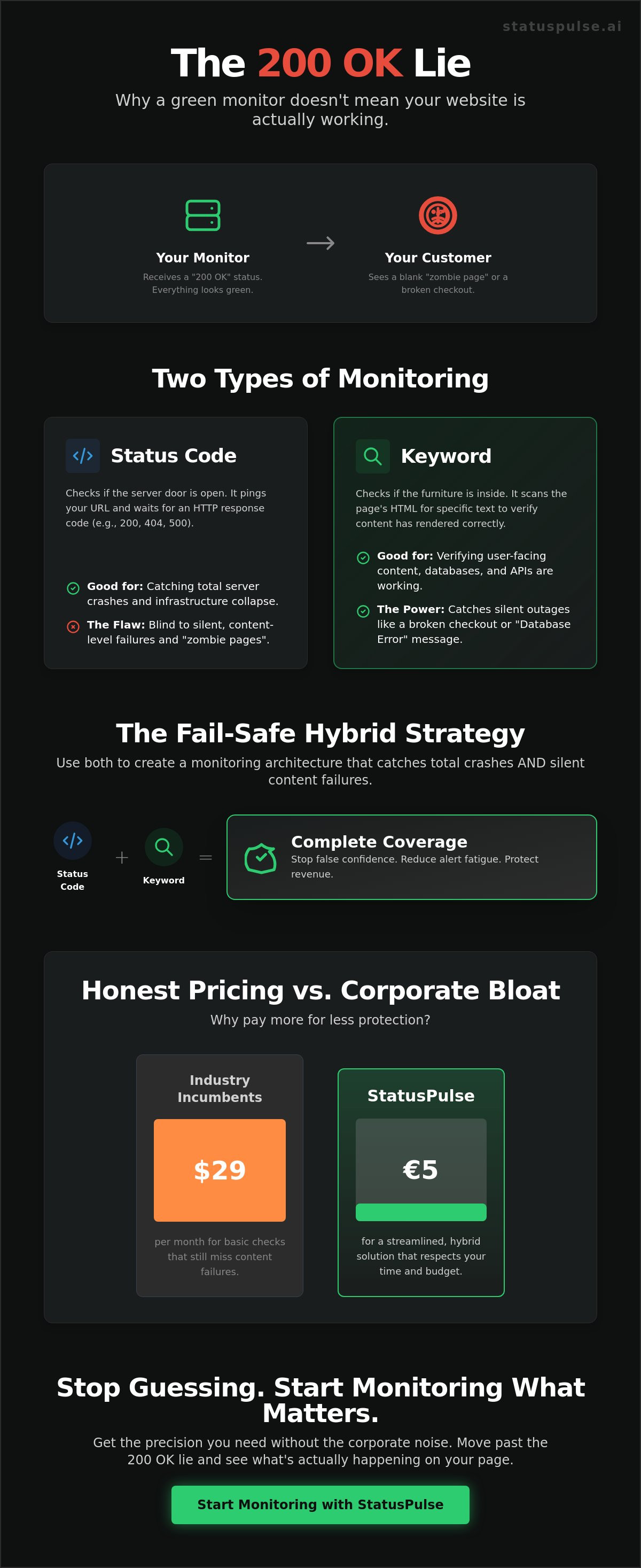
Building a Hybrid Monitoring Strategy Without Alert Fatigue
Building a monitoring stack shouldn't feel like a chore. Incumbents often suggest a "set it and forget it" approach that leads to 3:00 AM wake-up calls for minor network blips. You need a better blueprint. A successful strategy requires mapping your critical path from DNS to the database. This is the practical execution of Keyword Monitoring vs Status Code Monitoring: Why You Probably Need Both. By layering your defenses, you ensure that every alert is actionable and every outage is visible.
Follow these five steps to build a resilient architecture:
- Map the Path: Identify every touchpoint, from your domain provider to your final API response.
- Layer Reachability: Use status code checks for your load balancers and entry points. If these fail, your infrastructure is down.
- Layer Functionality: Use keyword monitors on your checkout and login pages. If the "Login" button disappears, your business is down.
- Consolidate: Group related monitors. You don't need ten alerts if a single data center goes offline.
- Automate Transparency: Link your monitors to a public status page. This reduces support tickets by informing customers before they complain.
Reducing the Noise
Alert fatigue is a productivity killer. As of May 2026, the average cost for basic network monitoring is $10 per month, but many tools lack the logic to prevent false positives. You should configure at least three retries before an alert fires. This filters out temporary latency spikes. Multi-region checks are also essential. If a monitor fails in London but passes in New York, it's likely a regional network issue rather than a site-wide crash. You can set higher sensitivity for status codes and a more relaxed threshold for keyword checks to ensure your team only wakes up for real emergencies. Start building your quiet, reliable dashboard today.
Automating the Response
Not all failures require the same response. A status code failure usually means a server is unresponsive. This should trigger an immediate DevOps alert. A keyword failure often indicates a logic error or a broken frontend. This might only require a "soft" warning for your product team during business hours. For deep-stack observability, link your frontend checks to API Monitoring. This allows you to trace a missing "Add to Cart" button back to a specific failed endpoint. It's about precision. You press send. We handle the complexity. No surprises.
StatusPulse: Monitoring That Respects Your Time and Budget
StatusPulse exists to kill the bloat. We saw the industry incumbents charging $29 or more for basic features, so we decided on a different path. Monitoring shouldn't be a luxury or a complex puzzle. It should be a quiet, reliable background process. We provide an honestly priced alternative that gives you professional-grade tools without the corporate overhead. Our platform integrates status codes, keyword monitoring, and SSL tracking into one clean dashboard. We have proven that Keyword Monitoring vs Status Code Monitoring: Why You Probably Need Both is the only way to truly protect your brand. Now, we've made that strategy accessible for everyone.
We don't believe in hidden fees or tier-based traps. Our pricing is simple: €5, not $29. No surprises. You get the same multi-region checks and high-frequency pings that the giants offer, but with a focus on what actually matters to developers. We built this for people who care about the details. Whether you are running a Jamstack site or a complex API, our monitors provide the precision you need to sleep soundly. You press send. We handle the rest. It is a streamlined experience designed to move you from problem to solution in seconds.
EU-Hosted, GDPR-Native
Regional compliance is a core virtue for us, not a marketing afterthought. StatusPulse is EU-hosted and GDPR-native. This matters for modern SaaS teams that prioritize privacy and data sovereignty. We are a small, principled team. We don't have a massive sales department or a bloated middle management layer. This allows us to focus entirely on the product. Our minimalist approach mirrors the efficiency of your own code. We provide high-level technical precision while remaining approachable and human. You get a tool that respects your regional requirements and your ethics.
From Alert to Update in Seconds
Most monitoring tools stop at the alert. They leave you to scramble during an outage, manually writing emails and updating status pages while under pressure. We bridge that gap with AI-powered incident management. When a monitor fails, Claude drafts your incident update based on the specific technical failure. You press send. This turns a stressful outage into a moment of transparent communication. Building trust requires honesty, not silence. By linking your monitoring directly to a public status page, you automate the heavy lifting. You keep your customers informed and your support inbox empty. Start monitoring for free with StatusPulse and experience monitoring that finally respects your time.
Take Control of Your Digital Presence
Relying on a simple response code is a gamble you don't need to take. You've seen how zombie pages can ruin customer trust while your monitors stay green. By combining reachability checks with content verification, you build a resilient system that catches every failure. This approach to Keyword Monitoring vs Status Code Monitoring: Why You Probably Need Both ensures your brand stays protected from infrastructure crashes and logic errors alike. It's about moving from basic connectivity to true functional reliability.
You shouldn't have to pay $29 for basic peace of mind. We built a tool that is honestly priced at €5 per month. It's EU-hosted and GDPR-native. Our AI incident management handles the stress of communication; Claude drafts the updates while you focus on the fix. You press send. We handle the rest. Stop guessing. Start monitoring honestly with StatusPulse for €5/mo.
Your users deserve a site that actually works. Build a monitoring stack that respects your time, your budget, and your customers. You've got this.
Frequently Asked Questions
Does keyword monitoring slow down my website?
Keyword monitoring does not slow down your website because it is a passive external check. The monitor makes a standard HTTP request, similar to a single user loading your page. It adds zero overhead to your server's internal processing or database load. It simply reads the HTML your server already generates. There is no code to install on your backend.
Can keyword monitoring detect failures in JavaScript-rendered content?
It depends on the tool's specific capabilities. Simple monitors only scan the raw HTML response from the server. However, modern Jamstack sites often require a tool that can execute JavaScript. If your site relies on React or Vue to display content, ensure your monitor can handle client-side rendering. This is a critical part of Keyword Monitoring vs Status Code Monitoring: Why You Probably Need Both.
How often should I run keyword checks compared to status code checks?
Run status code checks every 60 seconds for broad reachability. Keyword checks are slightly more resource intensive; every 5 minutes is standard for general pages. For critical paths like checkout or login, move to 1 minute intervals. This tiered approach provides high level technical precision without generating unnecessary noise. It ensures you catch logic failures as they happen.
What happens if my keyword changes during a routine update?
Your monitor will trigger an alert because it can no longer find the specified string. This is actually a feature; it ensures your deployment didn't accidentally remove critical UI elements or content. You should update your keyword monitors as part of your standard deployment pipeline. It acts as a final sanity check for your production environment after you press send.
Is keyword monitoring better than ping monitoring?
Keyword monitoring is not "better" than ping monitoring; they solve different problems. A ping only tells you the server is reachable at the network level. Keyword monitoring validates that the application layer is actually functioning. Combining them is the only way to avoid the silent failures and zombie pages that frustrate users. One confirms the door is open; the other confirms the store is stocked.
Can I monitor JSON responses with keyword monitoring?
Yes, you can scan JSON responses for specific keys or data values. This is essential for API monitoring. It allows you to verify that your backend is returning the correct data objects rather than an empty array or an error message. It is a vital layer in Keyword Monitoring vs Status Code Monitoring: Why You Probably Need Both for modern developers who value honest, precise data.


