

Most incident communication fails because it's treated as a PR exercise rather than a technical protocol. When an API endpoint goes down, your SREs shouldn't have to choose between fixing the bug and manually updating a status page. You've likely felt the friction of a support ticket storm while your team is still triaging the root cause. It's a drain on resources and a fast track to engineer burnout. Using a structured incident communication plan template ensures your response is as disciplined as your codebase.
We agree that manual reporting during a crisis is a waste of high-value talent. This guide provides a lean framework designed to automate the noise and restore customer trust. You'll learn how to build a repeatable protocol that aligns with the IEEE/ISO/IEC 23612-2026 standard without adding corporate bloat. We'll cover defining internal roles that actually work, setting up automated workflows to reduce manual toil, and using AI to draft technical updates. The goal is a unified approach that moves your team quickly from the problem to the solution.
Key Takeaways
- Reduce mean time to notify (MTTN) by implementing a standardized incident communication plan template that replaces manual status reporting with a repeatable protocol.
- Define clear internal roles to separate technical triage from stakeholder management, preventing engineer burnout during service disruptions.
- Categorize response times by severity levels, ensuring critical SEV 1 events get immediate attention while SEV 2 issues follow a disciplined 15-minute update window.
- Use the incident lifecycle framework to provide honest, technical updates that build trust without using corporate fluff or making unrealistic promises.
- Leverage automated monitoring and AI-assisted drafting to keep status pages updated without distracting your team from resolving the root cause.
What is an Incident Communication Plan and Why Do You Need One?
An incident communication plan is a pre-defined set of protocols for notifying stakeholders during service disruptions. It isn't just a document stored in a wiki; it's a technical workflow. While a broader incident response plan covers forensics and remediation, the communication plan focuses on the flow of information. The core objective is reducing Mean Time to Notify (MTTN). By establishing a repeatable framework, you lower the volume of support tickets and preserve customer trust.
Silence is a signal. During an SSL expiration or API failure, lack of information causes brand erosion. Customers assume the system is insecure or abandoned. There's also a critical distinction between internal technical logs and external status updates. Your internal logs are for the team to find the root cause. Your external updates are for the users to understand the impact. An incident communication plan template helps you translate one into the other without losing precision.
The Cost of Ad-Hoc Communication
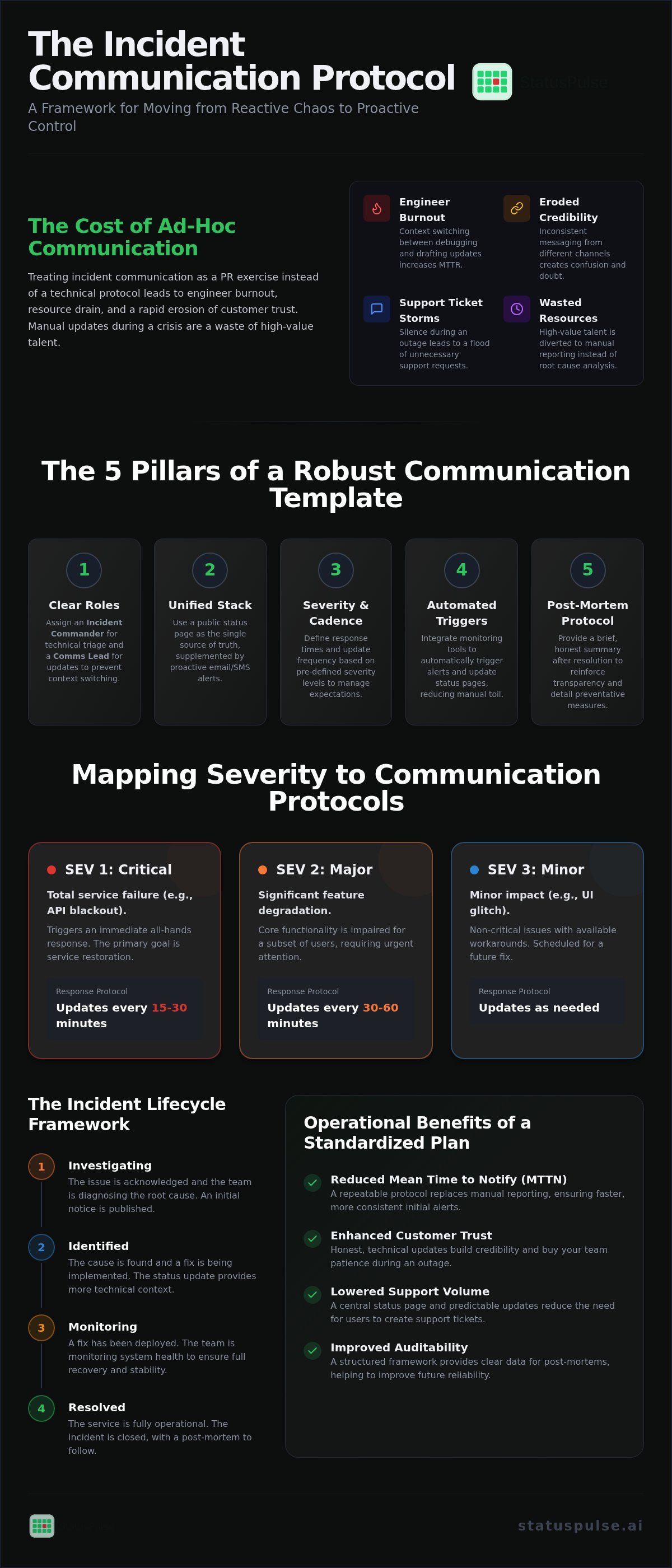
Manual updates are a distraction. When engineers have to stop debugging to draft status reports, they lose focus. This context switching increases the time it takes to fix the issue. Inconsistent messaging is another danger. If your support team says "it's a database issue" while your status page says "network latency," you lose credibility.
Consider a 15 minute outage with zero communication. Users feel ignored and frustrated. Now consider a 60 minute outage where the team provides transparent updates every 15 minutes. The longer outage often results in higher customer satisfaction because the users feel informed. Transparency buys you time and patience.
Operational Benefits of a Standardized Template
Predictability is the foundation of reliability. When you use a standardized incident communication plan template, customers know exactly where to look for information. They understand the frequency of updates they should expect. This reduces the urge for them to open a support ticket immediately.
Standardization also aids auditability. Using a set framework makes it easier to conduct post-mortems. You can review exactly what was said, when it was said, and how it matched the actual technical timeline. This data is vital for improving future reliability. For a deeper look at this logic, see our guide on The Architecture of Incident Communication Transparency.
The 5 Pillars of a Robust Incident Communication Template
A reliable incident communication plan template is built on five functional pillars. These aren't abstract concepts but specific operational requirements that dictate how your team behaves under pressure. Without these pillars, communication becomes a reactive scramble that drains engineering resources.
Assigning Technical Communication Roles
Clear ownership prevents redundant work. The Incident Commander (IC) acts as the single source of truth for the technical state of the system. They focus on triage and remediation. The Communications Lead takes the technical data from the IC and translates it into user-facing updates. On small teams, these roles often merge, but you should do this cautiously. If the person fixing the server is also drafting emails, the Mean Time to Resolution (MTTR) will inevitably climb.
Selecting Your Communication Stack
Your stack determines how fast you can reach stakeholders. Public status pages are the primary hub for transparency. They provide a centralized location for users to check service health without flooding your inbox. For high-value enterprise clients, you might supplement this with proactive email or SMS alerts. Choosing the right website uptime monitoring tools ensures that your communication stack is triggered by accurate, real-time data rather than manual discovery.
Severity, Cadence, and Closure
Mapping severity levels to protocols is essential. A minor UI glitch (SEV 3) doesn't require the same urgency as a total API blackout (SEV 1). Your protocol should dictate the update cadence. For a SEV 1 incident, an update every 15 to 30 minutes is standard until the situation stabilizes. This level of rigor aligns with the strategic approach seen in the National Emergency Communications Plan, which emphasizes resilience through structured information flow.
The final pillar is the post-mortem protocol. Communication doesn't end when the "green light" returns. A brief, honest summary of what happened and how you'll prevent it reinforces your commitment to integrity. This closing of the loop is what separates professional operations from amateur ones. If you want to streamline this process, you can automate your incident updates using tools that integrate monitoring directly with your status page.
Mapping Severity Levels to Communication Protocols
A generic incident communication plan template often fails because it treats every blip as a catastrophe. Over-notifying your users leads to alert fatigue, causing them to ignore your status page entirely. You need a technical logic for when a monitoring alert becomes a public incident. This requires mapping specific system behaviors to severity levels that dictate your response speed and channel selection.
The trigger for a public incident should be objective. In a professional framework, SEV 1 is defined as any event impacting more than 10% of your user base or core API functionality. If your authentication service is down, it's a SEV 1 regardless of user count. If a secondary reporting tool is slow, it's a SEV 3. Establishing these boundaries early prevents internal debates during a crisis.
The SEV Level Logic Table
Using a logic table helps your team make fast decisions without seeking approval from management. It's the most functional part of an incident communication plan template. It should clearly distinguish between "Degraded Performance" and "Partial Outage." Degraded performance typically means high latency while the service remains functional; a partial outage means specific endpoints are consistently returning 5xx errors for a subset of users.
| Severity | Definition | Notification Target | Frequency |
|---|---|---|---|
| SEV 1 | Total outage, data loss, or security breach. | All users and stakeholders. | Every 15-30 minutes. |
| SEV 2 | Core features unavailable for subset of users. | Affected users via Status Page. | Every 60 minutes. |
| SEV 3 | Performance degradation or non-critical UI bugs. | Status Page only. | At resolution. |
Thresholds for Escalation
Automation should handle the initial SEV 3 or SEV 2 detection. Modern uptime monitoring services can trigger an incident draft the moment a probe fails from multiple regions. This reduces the time your team spends on manual discovery. However, manual overrides remain necessary. A human might need to upgrade a SEV 3 to a SEV 2 if they realize a performance issue is actually a precursor to a database deadlock.
Effective escalation depends on the quality of your telemetry. If your monitoring is too noisy, your communication will be too. For teams focused on maintaining high uptime, understanding API Monitoring: The Developer’s Guide to High Availability provides the technical context needed to set accurate thresholds. Accurate thresholds ensure that your incident communication plan template only fires when there's a genuine problem to report.
Drafting Updates: The Incident Lifecycle Framework
Every incident follows a predictable lifecycle. Your incident communication plan template should provide pre-written stubs for each stage to ensure your updates remain consistent even under pressure. The goal is to move from the initial alert to a resolution summary without leaving users in an information vacuum. This framework prioritizes technical accuracy over marketing polish.
The lifecycle begins with the Investigating stage. You must acknowledge the issue immediately, even if the root cause is unknown. A simple statement that your team is looking into the problem reduces the volume of support tickets. Once you reach the Identified stage, state what is wrong with precision. Provide a rough ETA if possible, but always include caveats about recovery variables. After the fix is deployed, move to Monitoring to observe for stability before final Resolution.
Best Practices for Technical Writing
Technical transparency requires a specific vocabulary. Avoid marketing buzzwords like "seamless" or "effortless" because they feel dishonest during an outage. Use grounded terms like "stable," "functional," or "recovered." If your database is experiencing a deadlock, say so. If a fix requires a temporary read-only mode, explain the trade-off clearly.
- Be specific: Mention "latency in the EU-West region" rather than "some slowness."
- Be honest: Acknowledge if data recovery is still in progress.
- Be concise: Users want to know the impact and the timeline, not the corporate apology.
Leveraging AI for Incident Management
The 2026 trend in incident response is the deeper integration of AI agents with human teams. AI can summarize complex monitoring logs into a user-friendly update in seconds. This allows SREs to focus on the technical resolution rather than drafting status reports. However, human agency remains critical. An engineer must always verify AI-generated technical claims before they go public to prevent the hallucination of recovery times.
AI is also effective for drafting the "Post-Mortem" summary. By analyzing the incident timeline and communication logs, it can create a structured draft of what happened and why. This reduces the administrative burden on your team after a high-pressure event. You can use AI incident management to generate these summaries automatically, ensuring your documentation remains as precise as your code. This human-in-the-loop approach maintains the integrity of your brand while significantly reducing the Mean Time to Notify (MTTN).
Implementing Your Plan with StatusPulse
Implementing the logic defined in your incident communication plan template requires a platform that doesn't fragment your workflow. StatusPulse consolidates uptime monitoring and public status pages into a single environment. This reduces the friction of moving data between disparate tools when your team is under pressure. By hosting your telemetry in the same environment as your status updates, you ensure that detection leads directly to notification. This consolidation is a direct response to the "patchwork tooling" often found in enterprise environments, which increases cognitive load during a crisis.
Data sovereignty is a foundational requirement, not an afterthought. StatusPulse provides a choice between EU and US hosting, allowing you to meet regional compliance standards like GDPR or CCPA with precision. This regional control is paired with AI-assisted drafting that reads your monitoring logs to generate technical summaries. As established in our lifecycle framework, these drafts function as assistants that require a human-in-the-loop for final verification. This ensures that while you save time, you never lose technical integrity or human agency over your public messaging.
Setting Up Your Status Page in 5 Minutes
The setup process is built for developers who prioritize efficiency. You connect your active monitors to status components, ensuring that specific probe failures, such as a 5xx error on a core API, trigger the correct incident state on your page automatically. The UI is customizable to match your brand identity without the need for complex CSS or layout management. You can use the AI assistant to populate your initial "Investigating" post based on the telemetry data, allowing your SREs to stay focused on remediation while the platform handles the communication flow.
Why StatusPulse is the Ethical Choice
Many industry incumbents rely on corporate bloat and seat-based pricing models that penalize you as your team or user base grows. These models often include hidden fees for subscriber notifications or additional seats, which can make your monthly bill unpredictable. StatusPulse offers flat and transparent pricing with no per-subscriber fees. This ensures that your costs remain fixed, whether you are notifying ten users or ten thousand. We position ourselves as a principled underdog, built by specialists for specialists who value simplicity over enterprise complexity.
If you are tired of seat-based costs and fragmented toolsets, it is time to move to a consolidated platform. Start building your incident communication plan with StatusPulse today and establish a transparent, repeatable protocol for your service disruptions.
Build a Protocol That Scales With Your Infrastructure
Relying on ad-hoc updates during a service disruption is a technical risk. It leads to engineer burnout and customer churn. By adopting a structured incident communication plan template, you transform reactive chaos into a repeatable protocol. This framework ensures your SREs stay focused on the root cause while stakeholders receive the transparency they require.
A professional response requires clear severity mapping and an automated toolchain. You shouldn't have to choose between fixing a database deadlock and updating your status page. StatusPulse offers a logical, ethical alternative to bloated enterprise platforms. With EU and US data sovereignty options, AI-assisted incident drafting, and flat pricing with no per-subscriber fees, it's built for specialists who value technical precision.
The most reliable systems are those with the clearest communication loops. Start automating your response today to protect your brand integrity and your team's focus. Automate your incident communication with StatusPulse
Frequently Asked Questions
What should be included in an incident communication plan template?
An effective incident communication plan template includes defined roles, severity levels, communication channels, and pre-written message stubs for each stage of the lifecycle. It functions as a technical workflow that dictates how information moves from your engineers to your stakeholders. By standardizing these elements, you ensure that your response remains logical and consistent. This prevents the confusion that often occurs when team members give conflicting information during a crisis.
How often should you update customers during an active outage?
You should update customers every 15 to 30 minutes during a critical SEV 1 outage. For major SEV 2 issues, a 60-minute cadence is generally acceptable. The goal is to maintain a predictable rhythm that respects the user's time. Consistent updates are more valuable than long, detailed explanations. Regularity signals that your team is in control and prevents users from feeling ignored while you debug the root cause.
What is the difference between a SEV 1 and a SEV 2 incident?
A SEV 1 incident involves a total outage, data loss, or a security breach impacting more than 10% of your user base. A SEV 2 incident is a major issue where core features are unavailable for a subset of users. While SEV 1 requires immediate, wide-scale notification, SEV 2 allows for more targeted communication. Establishing these objective boundaries early prevents internal debates and ensures your response speed matches the actual technical impact.
Can I use AI to write my incident updates?
You can use AI to summarize monitoring logs and draft initial status updates, but human review is essential. AI serves as a high-speed assistant that reduces manual toil during an outage. However, an SRE must verify every technical claim before it goes public. This prevents the hallucination of recovery times and ensures the update remains accurate. Human agency is the final safeguard that maintains your brand's technical credibility and integrity.
Should I use a public or private status page?
Public status pages are best for building trust through transparency, while private pages are useful for internal stakeholders or enterprise clients with strict SLAs. Public pages provide a centralized hub for users to check service health without contacting support. Private pages allow you to share deeper technical data, such as internal service names, without exposing infrastructure details to the general public. Most professional teams use a combination of both for maximum efficiency.
How do I reduce support tickets during a service disruption?
Reducing support tickets requires immediate, proactive communication on a visible status page. When users see that you are already "Investigating" an issue, they are less likely to open a redundant ticket. Native integration between your monitoring tools and your status page allows you to post updates in seconds. This speed is critical for getting ahead of the ticket storm and preserving your support team's capacity for complex queries.
What is a post-mortem and why is it part of the communication plan?
A post-mortem is a structured summary of an incident's root cause and the steps taken to prevent recurrence. It's the final pillar of an incident communication plan template. Closing the communication loop with an honest post-mortem builds long-term trust. It shows that your team values precision and is committed to continuous improvement. Transparency about your failures is often what differentiates a professional team from a faceless corporation.


