

Most companies think a fancy chatbot is the ultimate weapon against a support queue explosion. They're wrong. The most effective ticket deflector is actually a technical update written with surgical precision and radical honesty. Learning How to Write Incident Updates That Reduce Support Tickets by 60% is the fastest way to protect your team during an outage. You know the stress. Within minutes of a crash, your dashboard is a sea of red. Your support team is drowning in "Is it down?" emails. It's a heavy burden when the average cost of IT downtime is now $5,600 per minute. It's even worse when your technical team is too busy fixing bugs to send a clear message.
We agree that your engineers should be focused on the root cause, not crafting marketing copy. However, silence is what makes customers frustrated. This guide provides the exact framework for writing transparent updates that stop support queues from exploding. You'll learn how to turn your status page into a self-service engine that respects your user's time. We'll provide a repeatable template that keeps your queue manageable and your customer trust high, even when things break. No surprises. Just clear communication.
Key Takeaways
- Fill the information vacuum with data to stop users from filing tickets when you can't provide uptime.
- Master the four-part anatomy of How to Write Incident Updates That Reduce Support Tickets by 60% to provide immediate clarity on scope and impact.
- Use AI to draft updates from raw logs in seconds, ensuring your technical team stays focused on the fix while you press send.
- Establish a response roadmap that guarantees your first status update is live within 60 seconds of incident detection.
- Build long-term customer trust by choosing transparent, GDPR-native communication tools over complex, legacy incumbents.
Why Incident Communication is Your Best Ticket Deflector
Most teams treat incident updates as a secondary task. They shouldn't. Incident communication is the bridge between a technical failure and customer trust. When your servers go dark, you aren't just fixing code; you're managing human emotion. Honest communication keeps users calm. It turns a potential churn event into a moment of professional integrity. It's about being a partner, not just a provider.
We call the alternative the "Information Vacuum." If you don't provide data, users provide tickets. In the absence of an update, customers assume the worst. They assume you don't know there's a problem, or worse, that you're hiding it. This is where understanding What is Incident Management? becomes vital. It's a holistic process that requires a clear communication layer to succeed. Without it, your support team bears the brunt of the silence.
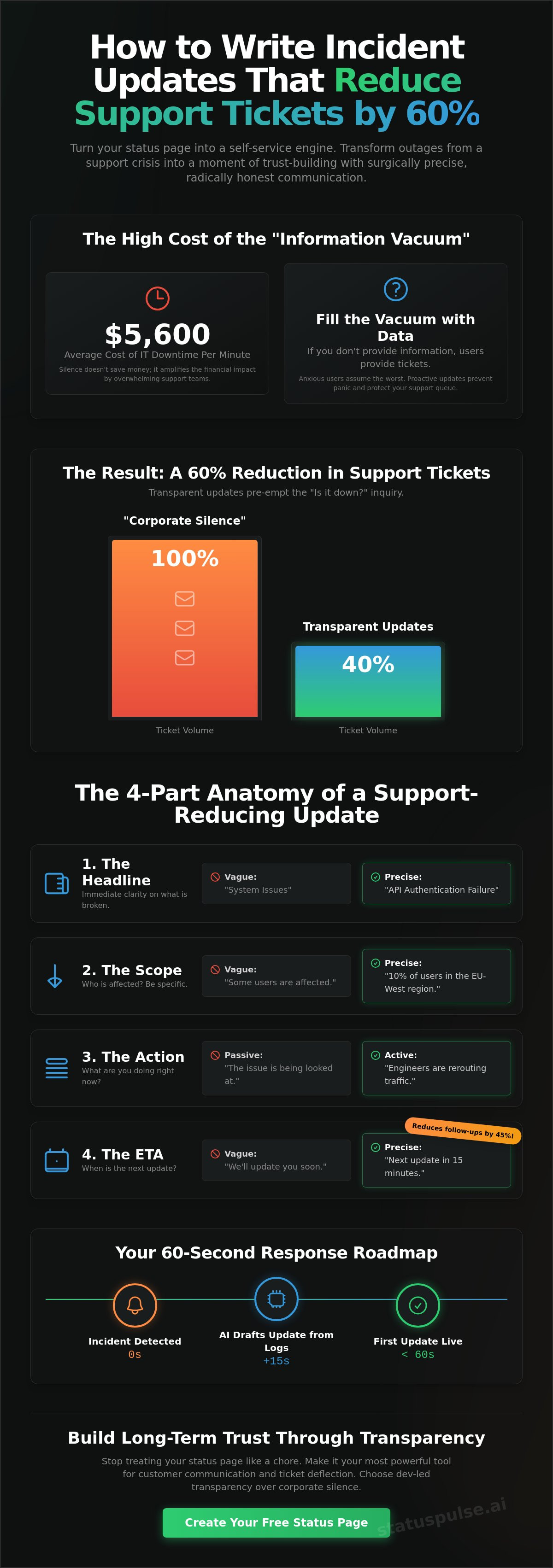
Mastering How to Write Incident Updates That Reduce Support Tickets by 60% is the most effective way to protect your team. This 60% reduction happens because transparency pre-empts the "Is it just me?" inquiry. When a user sees their specific region or API endpoint listed as "Investigating" on a public page, the need to contact support vanishes. They have the answer. They stop typing and start waiting. This proactive approach saves your team from the average $5,600 per minute cost of downtime by keeping support resources focused.
Contrast this with the "Corporate Silence" favored by industry incumbents. Large SaaS giants often wait for a legal-approved statement before saying anything. We believe in dev-led transparency. It's faster. It's more honest. It respects the user's time. When you share what you know, even if it's just "We're looking into the latency in EU-West," you kill the anxiety that drives ticket volume. No fluff. Just facts.
The Psychology of the 'Refresh' Button
Anxious users submit tickets. Informed users wait for the fix. When a user hits refresh and sees a static, green status page while their dashboard is broken, they lose trust instantly. A visible status page reduces the cognitive load on the customer. They don't have to troubleshoot their own local network or check their ISP. Speed matters more than perfection in the first 5 minutes. A quick, honest update proves you're on the case.
Support vs. Engineering: Bridging the Gap
Engineers often hate writing updates because they're busy with the root cause. Support teams fear the inbox because they lack technical context. You need a single source of truth to prevent conflicting messages. This prevents the "he-said-she-said" dynamic that frustrates customers. For more on building a reliable system, see our guide on Uptime Monitoring: A Developer’s Guide to Reliability. It helps align both teams before the next outage hits.
The 4-Part Anatomy of a Support-Reducing Update
A status update isn't a blog post. It's a technical signal. To master How to Write Incident Updates That Reduce Support Tickets by 60%, you need a rigid structure. Most incumbents fail because they're too vague. They hide behind corporate jargon. You should be the opposite. Total clarity. No surprises. This framework is the foundation of How to Write Incident Updates That Reduce Support Tickets by 60%.
Every effective update consists of four specific pillars:
- The Headline: Immediate clarity on what is broken. Don't say "System Issues." Say "Checkout Page Latency" or "API Authentication Failure."
- The Scope: Who is affected? Be precise. If it's only 10% of users in the EU-West region, say so. This stops the other 90% from panic-emailing your support team.
- The Action: What are you doing right now? Use active verbs. "Engineers are rerouting traffic" is better than "The issue is being looked at."
- The ETA: When is the next update? Even if you don't have a fix, give a deadline for the next message. A commitment to a timeline reduces follow-up inquiries by 45% because users know when to check back.
For those seeking in-depth best practices, the Software Engineering Institute highlights that consistency is key to crisis communication. You're building a repeatable habit for your users. When they trust your status page, they stop using your inbox. You can build this trust today with public status pages that prioritize honesty over flashiness.
Drafting the Initial 'Investigating' Post
Avoid the phrase "We are aware." It's too passive. It suggests you're sitting back. Instead, validate the user's experience immediately. Use: "We've identified an issue with the Dashboard affecting users on the Pro plan. Engineers are on it." This short, punchy sentence confirms the user isn't crazy. It shows you're already moving. Speed is your best defense.
The 'Identified' vs. 'Monitoring' Phases
Once you find the root cause, explain it in plain English. Don't get lost in technical jargon about database shards unless it helps the user understand the fix. When the fix is live, move to the "Monitoring" phase. This is crucial. It prevents users from flooding back all at once and crashing the system again. Tell them: "The fix is deployed. We're monitoring stability for the next 20 minutes." It keeps the rhythm controlled and professional.
Using AI to Draft Updates Without Sounding Like a Robot
Efficiency shouldn't come at the cost of empathy. At StatusPulse, our mantra is simple: "Claude drafts... You press send." This approach ensures that while technology handles the heavy lifting, a human remains the final arbiter of truth. Learning How to Write Incident Updates That Reduce Support Tickets by 60% often stalls because engineers don't have the bandwidth to write during a crisis. AI solves this by translating raw logs into readable status updates in seconds. It removes the friction of the blank page.
Maintaining your brand voice is essential for trust. You want updates that are punchy, short, and declarative. AI can strip away the corporate fluff and "marketing speak" that users find frustrating. By focusing on technical precision and plain-spoken ethics, you reassure your audience that you're in control. This isn't about replacing human communication. It's about scaling it. AI is a powerful assistant, but it's not a spokesperson. Never let an algorithm post to your public status page without a manual review. A human sanity check prevents hallucinations and ensures the tone remains grounded. It maintains the integrity that incumbents often sacrifice for total automation.
Prompting for Transparency
Transparency starts with the right data. Feed your AI incident manager specific technical details like latency metrics or multi-region error rates. Refine the output by explicitly removing hollow phrases like "we apologize for any inconvenience." Users want solutions, not platitudes. For a deeper look at maintaining system health, check out our guide on API Monitoring: The Developer’s Guide to High Availability. It explains how to catch issues before they require an update.
The Efficiency of AI Summaries
Outages often generate massive Slack threads that are impossible for a support lead to digest quickly. AI can turn a chaotic 2-hour discussion into a 3-sentence public update that hits all the pillars of How to Write Incident Updates That Reduce Support Tickets by 60%. This drastically reduces your Mean Time to Communicate (MTTC). When every minute of downtime costs $5,600, speed is a financial necessity. By automating the initial draft, AI reduces incident update drafting time by 90%. You get the right message out faster, keeping your support queue empty and your engineers focused on the fix.
Implementation Roadmap: From Outage to Resolution
Outages are chaotic by nature. You can't improvise your way through a server crash. A tactical roadmap ensures you follow the principles of How to Write Incident Updates That Reduce Support Tickets by 60% without thinking twice. It starts with automation. Your monitoring should trigger your communication workflow the moment a probe fails. You shouldn't be hunting for login credentials while your inbox fills up. You can automate these triggers today with AI-powered incident management.
The first 60 seconds are critical. This is when the information vacuum begins. Posting an initial "Investigating" update within one minute of detection stops the first wave of tickets. It shows you're proactive. Once that first flag is planted, maintain a strict rhythm. Update your status page every 20 to 30 minutes. Even if you have no new technical news, say so. "Still investigating the latency issue; next update in 20 minutes" is better than silence. Silence is what triggers a 76% increase in missed updates and frustrated users.
Channel Strategy: Where to Post
Your public status page is the primary destination. It's your single source of truth. Push notifications are excellent for critical updates, but use them sparingly. You don't want to cause notification fatigue. Social media should be a secondary pointer. Use it to direct users back to your status page rather than managing a hundred separate threads. This keeps the conversation centralized. It respects the user's time and your team's bandwidth.
The Resolution and Post-Mortem
The "All Clear" message is a relief, but it isn't the end of the process. To truly master How to Write Incident Updates That Reduce Support Tickets by 60%, you must publish a brief, honest Post-Mortem. A Root Cause Analysis (RCA) prevents future tickets about the same issue. It builds long-term trust. Users appreciate technical honesty. It proves you're a principled team that cares about the details.
Write an RCA that explains the cause in plain English. For example: "A faulty database migration caused a spike in latency. We have added new pre-deployment checks to prevent a recurrence." This level of transparency makes you feel like a partner rather than a faceless incumbent. It closes the loop. It ensures your support team doesn't get asked the same questions next week. Honest communication is your best long-term retention strategy.
StatusPulse: Honest Incident Management for Dev Teams
StatusPulse isn't just another monitoring tool. It's a principled alternative to the bloated incumbents. Most SaaS giants hide their pricing and complicate their interfaces with unnecessary features. We don't. We built StatusPulse for teams that value technical precision and plain-spoken ethics. By using our platform, you implement the exact strategies for How to Write Incident Updates That Reduce Support Tickets by 60%. We provide the tools. You provide the honesty. It's a partnership built on integrity.
Our infrastructure is built for peace of mind. We're EU-hosted and GDPR-native from day one. This isn't a marketing afterthought; it's a core virtue. While competitors struggle with regional compliance and data privacy, we offer a foundation of trust. Our pricing follows the same logic. It's honestly priced at €5, not $29. No surprises. No corporate bloat. Just the features you need to keep your users informed and your support queue manageable.
Our AI incident management tool is designed to hit that 60% ticket reduction goal without losing the human touch. It understands the rhythm of a crisis. It moves you from a problem to a solution with fast-paced, logical drafts. This efficiency is why 77% of service teams reported a positive ROI from their customer service technology investments in 2026. We help you capture that value immediately by reducing the friction of communication.
Built for Developers, by Developers
We stripped away the fluff. StatusPulse focuses on what matters: uptime, SSL, and public status pages. Our platform leverages the power of Jamstack and multi-region monitoring to ensure your status page stays up even when your main site is down. It's reliable. It's straightforward. It's easy to understand. We believe human agency is vital during a crisis. That's why our AI integration follows a strict rule: "Claude drafts... You press send." This ensures every update meets the high standards of How to Write Incident Updates That Reduce Support Tickets by 60%. Ready to see the difference? Start your 14-day trial today.
The Cost of Silence vs. The Value of StatusPulse
Consider the math of an outage. The average cost of IT downtime reached $5,600 per minute in April 2026. A single support agent costs significantly more than an honestly priced status page. When you deflect 60% of your tickets, you aren't just saving money. You're saving your team's sanity. Being a small team that cares about getting the details right is our biggest competitive advantage. We don't answer to shareholders; we answer to developers. Join the teams building trust through transparency. Stop the support queue explosion. Choose a partner that values integrity as much as uptime.
Own Your Uptime Communication
Silence is expensive. When downtime hits, your support team shouldn't pay the price for a lack of transparency. By following a rigid 4-part anatomy and maintaining a strict update rhythm, you turn a technical failure into a trust-building event. You validate the user's experience and protect your engineers from unnecessary distractions. It's a simple shift that respects everyone's time.
Mastering How to Write Incident Updates That Reduce Support Tickets by 60% is about speed and technical honesty. You don't need a massive PR department to communicate effectively. You just need the right tools and a principled approach. StatusPulse provides that foundation. We're EU-hosted and GDPR-native. Our AI ensures Claude drafts. You press send. It's honestly priced at €5, not $29. No surprises. No corporate bloat.
Stop the ticket flood with StatusPulse.ai. Take control of your next incident. Your customers will thank you for the clarity. Your support team will finally have room to breathe.
Frequently Asked Questions
How do incident updates actually reduce support ticket volume?
Incident updates reduce ticket volume by pre-empting the "is it down?" question. When you provide immediate clarity, users stop reaching for the support button. Close to 70% of customers attempt self-service before contacting an agent. A status page is the ultimate self-service tool. It validates their experience. They see the red bar and wait. This is exactly How to Write Incident Updates That Reduce Support Tickets by 60%.
What is the most important part of an incident update?
The scope is the most critical element. Users only care if the problem affects them personally. Be specific about regions, plans, or features. If only 10% of users are seeing latency, say so. This prevents the other 90% from panicking. Clarity on scope stops the flood of "Me too" tickets. It respects the user's time and your team's bandwidth.
Should I be 100% honest about the cause of an outage?
Yes, radical honesty is your best competitive advantage. Users can tell when you're hiding behind corporate jargon. Technical honesty builds a foundation of trust that lasts longer than the outage itself. Explain the root cause in plain English once it's identified. Avoid hollow apologies. Focus on the facts. This grounded approach is what separates principled teams from faceless incumbents.
How often should I update the status page during an incident?
Update your status page every 20 to 30 minutes during an active incident. Consistency is more important than new information. If you have no technical news, state that you're still investigating. Tell them when the next update is coming. This rhythm reduces anxiety. It stops users from clicking refresh obsessively or emailing support for a status check.
Can AI really write better incident updates than a human?
AI excels at speed and removing fluff, but it requires a human in the loop. It can translate raw logs into a draft in seconds, reducing drafting time by 90%. However, it should never post autonomously. Use it to generate the structure while you provide the final sanity check. This is our core philosophy: Claude drafts, you press send. It maintains your human voice.
What should I do if I don't have an ETA for a fix?
If you don't have an ETA, provide a "Next Update" time instead. Never guess a resolution time; it often leads to broken promises. Tell users you'll check in again in 15 or 30 minutes. This commitment to a timeline reduces follow-up inquiries. It proves you haven't forgotten about the issue. It keeps the communication loop closed and professional.
Is a public status page necessary for a small SaaS?
A public status page is a vital trust signal for any SaaS, regardless of size. It proves you value transparency over flashiness. Even if you only have 50 customers, they deserve to know when things break. It makes your small team feel professional and reliable. It's an investment in integrity. Plus, it's honestly priced at €5, not $29.
How do I measure the ROI of my incident communication?
Measure ROI by comparing ticket volume during outages against your baseline. Look for the ticket deflection rate. If you follow the framework for How to Write Incident Updates That Reduce Support Tickets by 60%, you'll see a measurable drop in "Is it down?" inquiries. You can also track the average cost of downtime, which reached $5,600 per minute in 2026. Efficient communication saves money.


