
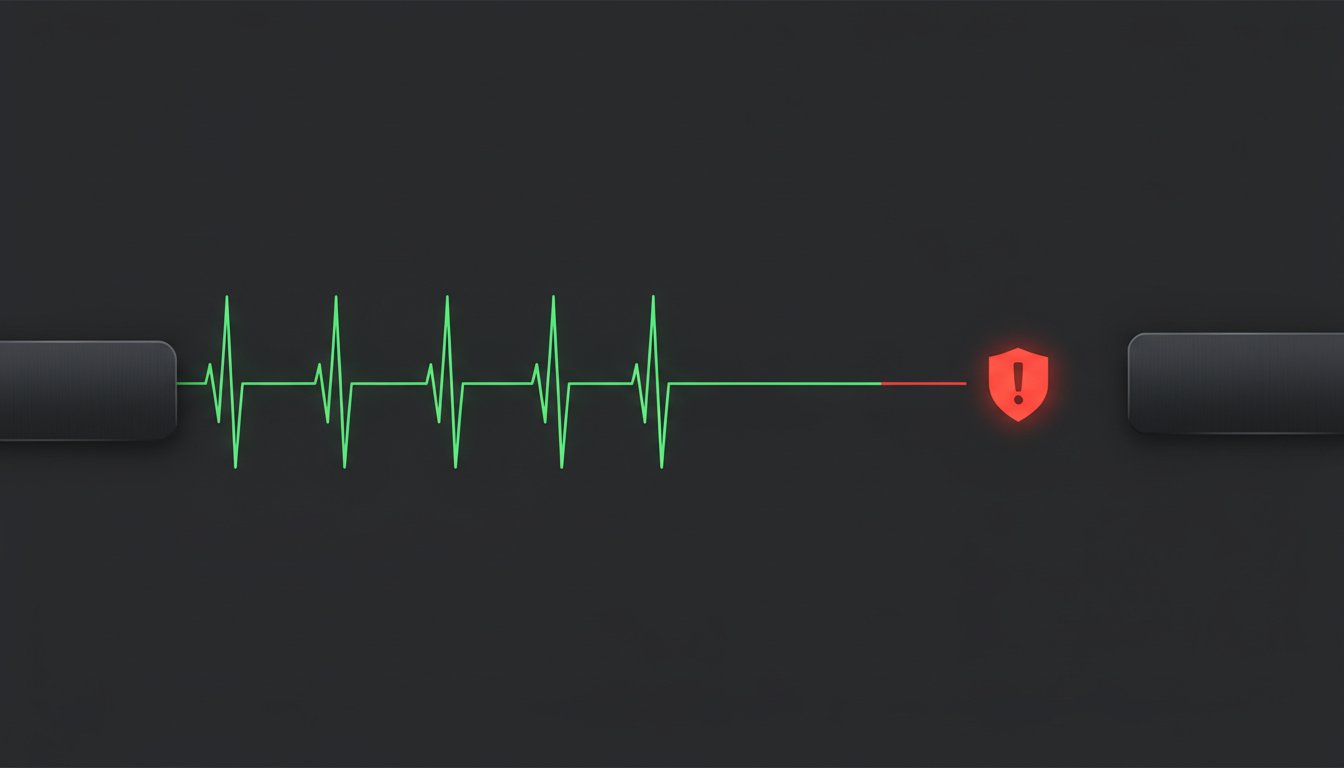
Your logs are lying to you. Most monitoring tools only bark when they see a specific error, but the most dangerous failures are the ones that make no sound at all. If your nightly backup script simply fails to start, your dashboard stays green while your data risk grows. It's a frustrating reality that often leads to days of silent data loss. Cron Job Monitoring with Heartbeat Endpoints: A Practical Guide is your roadmap to fixing this by monitoring the absence of success rather than the presence of errors.
We understand the headache of overlapping jobs and the massive overhead of traditional log analysis. While over 2.7 million users rely on massive incumbents, you don't need their corporate bloat or their $29 monthly fees to get results. This guide promises to help you achieve zero silent failures using simple, HTTP-based heartbeats. We'll show you how to set up immediate alerts that trigger the moment a task misses its scheduled window. It's honestly priced monitoring for developers who value integrity over flashiness. You get total reliability and a setup that stays out of your way.
Key Takeaways
- Stop trusting logs that only report errors. Learn why silent failures occur when your server reboots or the daemon hangs.
- Shift from reactive to proactive monitoring. This Cron Job Monitoring with Heartbeat Endpoints: A Practical Guide shows you how to implement a push system that alerts you when a ping is missing.
- Skip the complexity of DIY monitoring. Managed endpoints provide instant multi-channel alerts without the overhead of maintaining your own tracking database.
- Follow a simple two-step implementation process. Define your schedules and grace periods to ensure tasks run exactly when they should.
- Prioritize integrity and EU-hosted reliability. Get honestly priced monitoring that costs €5, not $29, for your production stacks.
The Silent Failure Problem: Why Your Cron Jobs Are Lying to You
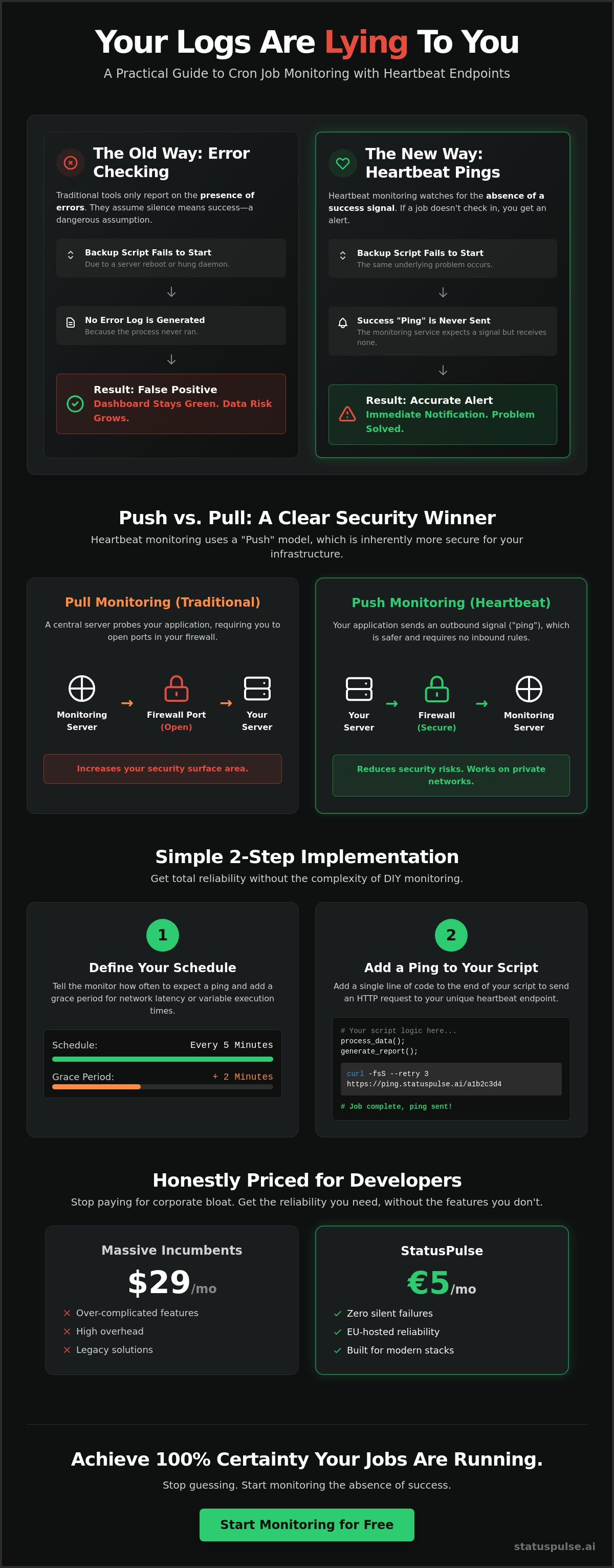
Standard cron jobs are built on a dangerous assumption: silence equals success. It's a lie. Most scheduled tasks only speak up when they crash mid-execution. If the job never starts at all, your logs stay empty. Your dashboard stays green. Your data remains unprocessed. This is the core challenge addressed in Cron Job Monitoring with Heartbeat Endpoints: A Practical Guide. We flip the script. We monitor the pulse, not the post-mortem.
Silent failures happen for boring, technical reasons. A server reboots after a security patch. The cron daemon hangs after a package update. A configuration error prevents the task from even entering the queue. Traditional logging requires you to go looking for trouble. You have to scrape logs or manually check timestamps. It's tedious work that most teams forget until a customer complains about missing reports or empty databases. By then, the damage is done. You need a system that expects success and screams when it doesn't arrive.
The Anatomy of a Silent Failure
A job can exit with code 0 and still fail. Maybe it hit an empty API response and finished early without processing a single row. Or perhaps it became a zombie process. This happens when a previous execution hangs, blocking the new one from starting due to file locks or resource limits. You see no error logs because no new process was ever created. A silent failure is a task that fails to start or finish without generating an error log. It's the ghost in the machine that leaves your infrastructure vulnerable while giving you a false sense of security.
Why Email Notifications Aren’t Enough
Emails are a legacy solution for a modern infrastructure problem. They only fire if your script actually runs and encounters a known exception. If your server is offline, no email is sent. You won't know there's a problem until you eventually realize your inbox is too quiet. Then there's the issue of alert fatigue. When you get 50 "Success" emails a day, you stop reading them. Spam filters often swallow these automated messages too. It's a fragile system built on hope, not engineering. If the server is down, the email will never be sent. You can't rely on a dead machine to tell you it's dead.
At StatusPulse, we believe in transparency over complexity. Our tools are built for developers who are tired of the bloated, expensive models used by industry incumbents. We focus on the details that matter. Monitoring the absence of a signal is the only way to be 100% sure your tasks are running. It's simple logic for a complex world. No surprises. Just honest, reliable monitoring that works when you need it most.
How Heartbeat Monitoring Works: The Power of the Push
Heartbeat monitoring is elegant because it relies on simple logic: if a task is healthy, it should tell you. Instead of waiting for a crash report, you set up your job to send a "ping" upon completion. A heartbeat is a simple HTTP GET or POST request sent at the end of a job. The monitoring service expects this signal within a specific timeframe. If the ping doesn't arrive, the system is officially "down." This shift from passive logging to active signaling is the foundation of Cron Job Monitoring with Heartbeat Endpoints: A Practical Guide.
This "Push" model is particularly effective for modern, distributed stacks. It works across firewalls and private networks easily because the server performing the task initiates the connection. You don't need to manage complex ingress rules or expose internal IP addresses. It's a clean, straightforward way to ensure your background processes are alive without adding unnecessary complexity to your infrastructure. You get total visibility without the security headaches.
Push vs. Pull Monitoring
Traditional monitoring often uses a "Pull" approach where a central server probes your applications. This requires an open port. Every open port is a potential entry point for an attacker. Push monitoring flips this. Your internal scripts only need outbound internet access to hit a monitoring endpoint. This is why Push is safer for internal database backups and sensitive local tasks. By using heartbeat endpoints, you effectively reduce your security surface area while maintaining total visibility. You keep your data private and your monitoring honest.
The Grace Period: Handling Expected Latency
Execution times aren't always consistent. A script that usually takes 30 seconds might take 45 seconds during high CPU usage. We define the "Grace Period" as the extra time allowed before an alert fires. It acts as a safety buffer. To calculate the perfect grace period for a 5-minute task, we recommend adding a 25% margin. If your job hasn't checked in by minute seven, then you have a real problem. This prevents "flapping" alerts where you get pestered by notifications due to minor network latency. You can configure these thresholds easily to match your specific workflow needs.
By focusing on the absence of a signal, you eliminate the "false green" dashboards that plague many dev teams. It's about quiet confidence in your systems. You don't need the bloated feature sets or the $29 price tags of industry incumbents to get this right. You just need a reliable endpoint and a logical schedule. StatusPulse provides this clarity for €5, not $29, ensuring your monitoring remains as efficient as your code.
Heartbeat Implementation: DIY vs. Managed Monitoring
Choosing how to build your safety net is a critical decision. You can build it yourself or use a dedicated service. While a DIY script might seem free at first, the real cost is hidden in the maintenance hours. Cron Job Monitoring with Heartbeat Endpoints: A Practical Guide aims to help you weigh these options logically. Managed services provide instant endpoints and multi-channel alerting right out of the box. You get historical uptime data and performance trends without writing a single line of database logic.
Managed heartbeats give you a clean view of your task performance over time. You can see if a job is gradually getting slower; this often signals an impending failure or a database that needs indexing. This level of insight is hard to achieve with a home-grown script. You need a system that works as hard as you do.
The Hidden Costs of DIY Heartbeats
Building your own monitoring system sounds simple. You just need a table to store timestamps and a cron job to check those timestamps. But then the questions start. Maintenance of the monitoring database and alerting logic becomes a job in itself. You have to handle the "Who monitors the monitor?" problem. If your central monitoring database goes down, you're flying blind again. Scaling this to hundreds of microservices requires significant infrastructure. You'll spend more time fixing your monitoring tool than building your product. It's a distraction most small teams can't afford.
Managed Heartbeat Endpoints: Setup in 60 Seconds
A managed heartbeat endpoint is a single URL. It replaces dozens of lines of custom logging code. You get external validation that internal logs simply cannot provide. If your entire server cluster goes dark, an external service will still trigger an alert. Setup takes 60 seconds. You can connect your heartbeats to Slack, Discord, or public status pages instantly. This ensures your stakeholders stay informed without you having to manually update a dashboard. Managed endpoints act as a neutral third party that verifies your tasks actually finished. You press send. The system handles the rest.
At StatusPulse, we provide honestly priced heartbeat monitoring for teams that care about details. We're a small, principled team that values privacy and regional compliance. Our pricing is transparent: €5, not $29. We don't believe in the corporate bloat or the complex pricing models of industry incumbents. You get a reliable, EU-hosted solution that respects your time and your budget. It's a straightforward approach to a technical problem. No surprises. Just integrity in every ping.
A Practical Implementation Guide for Dev Teams
Implementing a robust safety net shouldn't take all afternoon. Most developers can move from zero visibility to total confidence in under five minutes. Cron Job Monitoring with Heartbeat Endpoints: A Practical Guide is designed to be actionable, not academic. We focus on getting the job done with minimal friction. The process follows a logical path from your dashboard to your terminal. Four steps. No surprises.
- Step 1: Create a new heartbeat monitor in your StatusPulse dashboard. You'll receive a unique UUID for your endpoint immediately.
- Step 2: Define your schedule and grace period. If your job runs every hour, set a 10 minute grace period to account for network latency or heavy processing.
- Step 3: Append a curl command to your crontab or integrate it directly into your application code.
- Step 4: Test the failure. Temporarily disable the job or point it to a non-existent script to ensure your alerts fire when the ping is missed.
The One-Line Crontab Integration
The fastest way to monitor a shell script is the && operator. By appending && curl https://pulse.ai/ping/uuid to your crontab entry, you ensure the heartbeat only pings on success. If the script fails with a non-zero exit code, the second half of the command never runs. The monitoring service notices the missing signal and alerts you. For Python developers, a try/finally block is the gold standard. Use requests.get("URL", timeout=10) inside the finally block to ensure the ping is attempted even if the main logic encounters an exception. This provides the external validation your internal logs often miss.
Best Practices for Reliable Pinging
Monitoring should never break the thing it's watching. Always use timeouts on your curl requests. A command like curl --max-time 10 prevents a slow monitoring connection from hanging your entire job. If your service supports it, include the job name or a unique execution ID in the metadata. This helps you debug overlapping executions where two instances of the same job might be running simultaneously. Finally, compliance matters. Ensure your monitoring service is EU-hosted to stay GDPR-native. You keep your data in the region it belongs while maintaining 99.9% uptime accuracy.
You don't need to be a DevOps specialist to eliminate silent failures. You just need a principled approach and a reliable endpoint. Start monitoring your crons with StatusPulse for a straightforward, honest experience. We provide the technical precision you need for €5, not $29. It's simple logic for a complex stack. You press send. We do the rest.
StatusPulse: Transparent Cron Monitoring for Modern Stacks
Monitoring shouldn't be a black box. Most teams spend their time reacting to alerts without a clear plan for communication. StatusPulse changes that by connecting your heartbeat monitoring directly to your status page. It's a unified approach to reliability. We don't believe in the complex pricing models of industry incumbents. Our pricing is honestly priced at €5, not $29. You get technical precision without the corporate bloat. This is the final piece of Cron Job Monitoring with Heartbeat Endpoints: A Practical Guide. It's about moving from silent failures to quiet confidence.
Integrity is at our core. We are a small team that cares about getting the details right. Our platform is GDPR-native and EU-hosted. This ensures your metadata stays within a jurisdiction that respects privacy. You don't have to sacrifice compliance for visibility. We provide a straightforward tool for developers who value ethics as much as uptime. No surprises. Just a reliable pulse for your infrastructure.
From Failure to Transparent Update
Detecting a missed heartbeat is only half the battle. When StatusPulse notices a task has missed its window, it alerts your team immediately. But we go further. Our AI integration handles the stress of incident communication. Claude drafts the update for your stakeholders; you press send. It summarizes the impact of a missed backup or a failed data sync in plain English. This eliminates the panic of manual drafting during an outage. For broader coverage of your stack, check our API Monitoring Guide to see how we handle high availability.
Building Trust with Honest Communication
Transparency is a competitive advantage. Showing your cron status on a public page builds customer confidence. It proves that you have a meticulous eye on your background processes. Users appreciate honesty, especially when things go wrong. We build tools for small developer teams who need professional results on a fair budget. By using Cron Job Monitoring with Heartbeat Endpoints: A Practical Guide, you ensure your scheduled tasks are never a mystery to your users. Reliability shouldn't be a luxury. You can explore our Uptime Monitoring Pillar to learn more about our philosophy on honest communication. We stay out of your way so you can focus on building.
Take Control of Your Scheduled Tasks
You've seen how silent failures can compromise your data without leaving a trace. By shifting to a push based model, you turn uncertainty into clarity. You don't need to babysit logs or manage complex tracking databases anymore. This Cron Job Monitoring with Heartbeat Endpoints: A Practical Guide has shown that a simple HTTP ping is the most reliable way to verify success. It's about engineering for the absence of failure.
StatusPulse offers a developer first UI that cuts through the noise. It's a principled alternative to the bloated, overpriced tools usually found in the industry. Our platform is EU hosted and GDPR native, ensuring your compliance is never an afterthought. When a job misses its window, our AI powered incident drafting helps you communicate with stakeholders instantly. Claude drafts the update. You press send. It's that simple.
Stop letting your crons fail in the dark. It's time for honest monitoring that respects your budget and your time. Start monitoring your cron jobs honestly for €5 and see the difference a quiet, confident dashboard makes. You've built great software. Now, make sure it stays running.
Frequently Asked Questions
What is the difference between cron monitoring and heartbeat monitoring?
Heartbeat monitoring is a specific method within the broader category of cron monitoring. While traditional cron monitoring might involve checking local logs or the crond process, heartbeat monitoring relies on an external service. It expects a signal from your task. If the signal doesn't arrive, you get an alert. This is the core concept in Cron Job Monitoring with Heartbeat Endpoints: A Practical Guide. It ensures you aren't relying on a dead server to report its own death.
How do I monitor a cron job that runs every minute?
You monitor high frequency jobs by setting a tight grace period and a matching schedule. For a one minute job, set your monitoring threshold to 90 seconds. This allows for minor network latency without triggering false positives. It's a straightforward setup. StatusPulse handles these high frequency pings with 99.9% accuracy. You get immediate alerts the moment a single execution window is missed. No fluff. Just reliability.
Can heartbeat monitoring detect if a cron job is running too long?
Yes, advanced heartbeat systems can track execution duration. You send a "start" ping at the beginning and a "finish" ping at the end. If the gap between them exceeds your defined limit, the system triggers a "running too long" alert. This is vital for preventing zombie processes from consuming server resources. It's a simple way to maintain technical precision in your stack. You stay in control of every execution.
Is heartbeat monitoring better than log analysis?
Heartbeat monitoring is superior because it eliminates the silent failure problem. Log analysis requires your job to actually run and write data. If the server reboots or the daemon hangs, logs tell you nothing. Heartbeats flip this logic. They monitor for the absence of success. It's a more honest approach to reliability. You don't need the complex scraping tools or the $29 price tags that incumbents push on you.
What happens if the heartbeat monitoring service itself goes down?
We use multi region redundancy to ensure our service stays online. If a specific region experiences latency, our globally distributed network handles the pings. It's a grounded approach to high availability. We value transparency, so our own status page is always public. You can trust the pulse because we've built it to be as resilient as the tasks you're monitoring. Integrity is our foundation.
How do I monitor cron jobs on a private server without public IP?
You can monitor private servers easily because heartbeats only require outbound internet access. Your server doesn't need a public IP or open ingress ports. It simply sends an HTTP request to our endpoint. This is the "Push" model's greatest strength. It works across firewalls and secure VPCs without compromising your security posture. You get total visibility into your internal backups and scripts with zero configuration changes to your network.
Do I need to change my code to use heartbeat endpoints?
You don't need to touch your application logic to implement Cron Job Monitoring with Heartbeat Endpoints: A Practical Guide. You can simply wrap your existing commands in a shell script or append a curl command to your crontab. Using the "&&" operator ensures the ping only fires if your script exits successfully. It's a low friction way to add professional monitoring to legacy systems. You press send. The system does the rest.


