
A critical database failure hits at 3 AM. Your English-speaking customers get a clear update in seconds. Meanwhile, your users in Berlin and Paris are left staring at a "Major Outage" banner they cannot fully parse. Building a Multilingual Status Page: Lessons from Shipping 7 Locales has taught us that manual translation delays during a crisis do more than just hurt your support metrics. They erode the hard-earned trust of your global user base.
We agree that incident communication is high-stakes enough without the added friction of UI breakage or SEO cannibalization between regional pages. You need a system that works as fast as your engineers do. It shouldn't require a dedicated localization team to keep your customers informed in their native language.
This guide provides the technical architecture and communication strategies required to maintain transparent incident pages across multiple languages without increasing DevOps overhead. You will learn how to structure a scalable i18n architecture, manage varying string lengths, and implement a workflow that translates updates in seconds. We are sharing the specific lessons we learned while shipping seven native locales to help you build a more resilient communication stack.
Key Takeaways
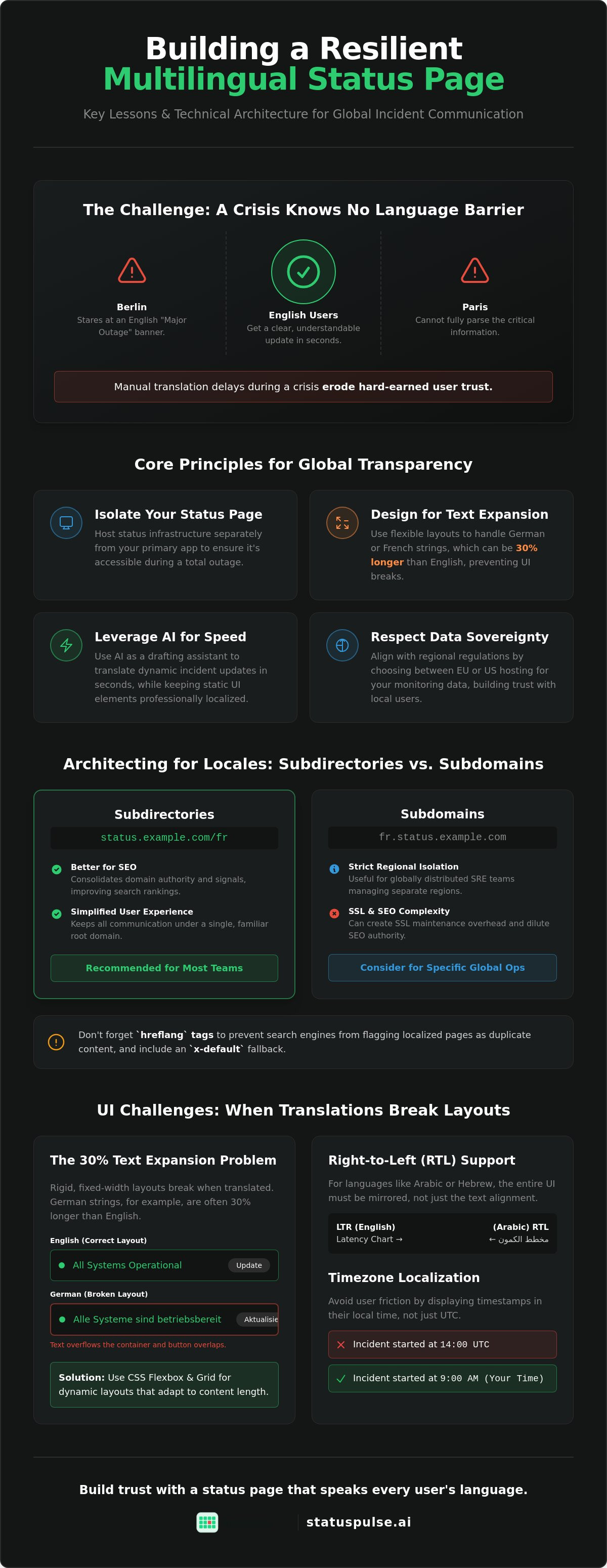
- Separate your status infrastructure from your primary application using subdomains or subdirectories to maintain visibility during total outages.
- Design flexible UI layouts that accommodate German or French text expansion; these strings often require 30% more horizontal space than English equivalents.
- Integrate AI as a drafting assistant to translate technical incident updates in seconds while keeping static UI elements professionally localized.
- Building a Multilingual Status Page: Lessons from Shipping 7 Locales involves balancing update speed with linguistic accuracy during the critical "Golden Hour" of a response.
- Align your incident pages with regional data sovereignty by choosing between EU or US hosting locations for your monitoring data.
Architecting for Locales: Subdirectories vs. Subdomains
A status page on the same infrastructure as your primary application is a single point of failure. If your main cluster goes down, your status page goes with it. We learned this early when Building a Multilingual Status Page: Lessons from Shipping 7 Locales. You must host your status page on a completely separate network and database. This isolation ensures you can communicate with users when your internal systems are dark. It's the difference between a controlled incident and total radio silence.
Choosing between subdomains and subdirectories is your first architectural hurdle. Subdomains like status.de.example.com offer strict regional isolation. This is useful if you have separate SRE teams for different continents. However, subdirectories like status.example.com/fr are generally better for SEO. They consolidate domain authority and simplify the user experience. Industry studies in 2026 confirm that subdirectories outperform subdomains in search rankings by keeping all signals on the primary domain.
Deciding between language-first and region-first pathing is a strategic choice for global SaaS. A language-first approach (e.g., /es) targets Spanish speakers globally. A region-first approach (e.g., /es-mx) targets specific locales like Mexico. For most teams, language-first reduces maintenance overhead. You don't want to manage 50 regional pages when 7 languages cover your entire user base. Focus on the language to keep your incident response lean.
The Hreflang Requirement for Status Pages
Search engines often flag regional status pages as duplicate content. You must use hreflang tags in the head of your page to prevent this. These tags tell Google which version of the page matches the user's location. It's a fundamental part of Internationalization and localization. Always include an "x-default" fallback. This ensures users from unsupported locales land on your primary English page instead of a blank screen.
SSL Certificate Management Across Multiple Locales
Managing dozens of regional subdomains creates an SSL maintenance burden. Wildcard certificates are the simplest path for multi-subdomain setups. If you rely on Let's Encrypt, be mindful of rate limits when shipping many regional subdomains at once. An expired certificate on a German status page is just as damaging as a site outage. Automating your SSL certificate monitoring is the only way to prevent localized page outages. It ensures your security layer remains active across every locale you support without manual checks.
UI Challenges: When German Strings Break Your Dashboard
English status pages are simple to design. Shipping in German or French reveals the limitations of rigid layouts. German strings are frequently 30% longer than their English equivalents. If your dashboard uses fixed-width containers, these translations will overflow and break the visual hierarchy. This was our first major design hurdle when Building a Multilingual Status Page: Lessons from Shipping 7 Locales.
Right-to-Left (RTL) support for Arabic or Hebrew adds more friction. It isn't just about flipping text alignment. You must mirror the entire UI. This includes the chronological direction of uptime bars and the axis of latency charts. A status page that renders incorrectly in a user's native script looks untrustworthy during a crisis. Users need to feel that the information is tailored to them, especially when your service is down.
Responsive Design for Technical Data
CSS Grid and Flexbox are essential for handling variable string lengths. Don't hardcode widths for status components. Use dynamic font sizing for long incident titles in European languages to ensure they don't wrap awkwardly. We recommend testing UI integrity with pseudo-localization before you ship. This process replaces English characters with accented versions to simulate text expansion. It helps you catch layout breaks early while following W3C internationalization best practices.
Localizing Timezones and 24-Hour Clocks
Time management is a common failure point in incident communication. UTC-only timestamps work for engineers, but they confuse non-technical end users. Showing "14:00 UTC" during a regional outage creates mental friction. Implement browser-based timezone detection to display updates in the user's local clock. Use ISO 8601 for your back-end data to maintain precision. On the front end, always transform these into localized strings that match the user's regional settings.
Uptime percentages and latency charts must remain readable in every language. If a label like "Historical Uptime" becomes "Historische Verfügbarkeit", your chart needs the padding to accommodate it. Building a Multilingual Status Page: Lessons from Shipping 7 Locales taught us that these small UI details define your professional image. Designing these components from scratch is time-consuming. You might find it more efficient to use a tool with native multilingual status pages that handle these technical UI edge cases automatically.
Translation Workflows: Speed vs. Linguistic Precision
Incident communication operates at two speeds. Static UI strings are permanent. They define your brand's professional floor. Phrases like "Service Under Maintenance" or "System Operational" should never be left to machine translation. We recommend hiring professional linguists for these core strings once. This establishes a high-quality foundation that doesn't change, ensuring your status page doesn't look like a low-effort template.
Active incident updates are different. You don't have hours to wait for a translation agency when your API is returning 500 errors. Building a Multilingual Status Page: Lessons from Shipping 7 Locales showed us that AI is the only tool capable of hitting the five-minute notification window across seven languages. It removes the bottleneck of manual translation without bloating your DevOps overhead. This strategy aligns with multilingual best practices by ensuring that information is available to all users simultaneously, regardless of their native tongue.
Establish a "Source of Truth" language, typically English, to prevent communication drift. Every regional update must be a direct descendant of the primary technical log. This ensures every customer receives the same facts, even if the phrasing is localized. Balancing the cost of professional linguists for static content with the speed of AI for real-time alerts is the only way to scale without a massive localization budget.
The Incident Update Translation Matrix
Not every update requires the same translation method. We use a matrix to decide between speed and precision. Scheduled maintenance is predictable. You can translate these updates days in advance using human reviewers. Unscheduled outages require an AI-first approach. Leveraging AI incident management allows you to draft technical summaries that are culturally and linguistically relevant in seconds. This ensures your initial response isn't wasted on manual copy-pasting.
Maintaining Technical Accuracy in Translation
Automated tools can struggle with technical nuances. A "cold start" in a serverless context might be translated literally, losing its meaning for a developer in Tokyo or Berlin. Consistency is key. Build a localized glossary for terms like "throughput", "latency", and "packet loss". This prevents communication drift between your English and regional pages. While AI handles the initial alert, a human should always review the final post-mortem. Technical accuracy is a debt you shouldn't accrue during an outage.
Managing Incident Communication Across 7 Locales
The first 60 minutes of an outage define your relationship with your customers. This is the "Golden Hour." When you are Building a Multilingual Status Page: Lessons from Shipping 7 Locales, the biggest operational question is whether to wait for translations or publish in English immediately. We recommend a staggered approach. Ship the English update the moment you confirm the issue. Push localized versions 120 seconds later. Silence is more damaging than a brief language gap.
Subscriber notifications must respect user preferences. If a customer in Madrid signed up for Spanish alerts, sending them an English SMS during a critical failure feels like an afterthought. It signals that they are a secondary market. Your notification system should map subscriber IDs to locale codes automatically. This ensures that every Email or SMS is delivered in the language the user expects, maintaining a professional standard even under pressure.
Automated Alerts vs. Manual Overrides
Automation is your best friend until it isn't. Setting up localized triggers for uptime monitoring ensures your status page reacts as fast as your probes. However, you need the ability to override these alerts manually. Use "Internal-only" updates to verify the localized phrasing before pushing to a global audience. This prevents technical jargon from being mistranslated into something confusing or alarming for your end users.
Reducing Support Tickets with Regional Clarity
Localized status pages are your most effective ticket deflection tool. When a user in Berlin sees a clear update in German, they are significantly less likely to open a support request. Every locale should include a "What happened" and "What we are doing" section. Don't just translate the status; translate the path to resolution. Linking to localized documentation directly from the incident log provides users with the self-service tools they need to wait out the fix. This operational efficiency is why many teams choose to build their status pages with StatusPulse, which handles these regional complexities natively.
Implementing Multilingual Transparency with StatusPulse
Most enterprise status tools treat localization as an afterthought or a paid add-on. We built our platform to handle these complexities natively. Building a Multilingual Status Page: Lessons from Shipping 7 Locales taught us that technical teams don't want to manage translation plugins or separate instances for every region. You need a single dashboard that controls your global presence. StatusPulse provides native support for seven languages, allowing you to activate regional views with a few toggles.
Data sovereignty is a non-negotiable requirement for modern engineering teams. We don't force you into a specific jurisdiction. You can choose between EU or US hosting for your monitoring data and status pages. This flexibility ensures you comply with regional privacy standards without sacrificing performance. It's a principled approach to hosting that avoids the corporate bloat of legacy providers who lock your data into a single region.
Our AI-assisted incident drafting acts as a technical assistant rather than a black box. It respects your pre-defined technical glossary to ensure terms like "latency" or "throughput" are translated accurately. You maintain final human agency over every update. This prevents the hallucinations common in generic translation tools. Our pricing is equally straightforward. We offer flat rates that don't penalize you for growing your global subscriber base or adding more languages.
Setting Up Your First 7 Locales
Enabling localized views is a direct process within the StatusPulse dashboard. You select your target languages and customize the static UI strings to match your brand's technical voice. This ensures that even your "All Systems Operational" messages feel authentic. We recommend testing the user experience across different regional subdomains to verify that your layout handles text expansion. It's a meticulous way to ensure your global transparency hub remains professional and readable.
Scaling Global Reliability
A status page is only as good as the data feeding it. Integrating API monitoring with localized status updates allows you to automate the first layer of communication. When a probe fails in a specific region, your page can trigger a localized alert immediately. This transitions your status page from a reactive document to a proactive reliability hub. Leveraging our transparent pricing allows you to provide dedicated status pages for every regional product team without worrying about per-subscriber fees or hidden costs.
Scaling Your Incident Response for a Global Audience
Scaling your incident communication shouldn't break your workflow or your budget. We have seen how subdirectory strategies protect your SEO and how flexible UI components prevent dashboard breakage in expanded locales. Building a Multilingual Status Page: Lessons from Shipping 7 Locales requires a precise balance between automated speed and technical accuracy. By prioritizing infrastructure isolation and regional data sovereignty, you ensure your status page remains a reliable source of truth during every outage.
Trust is built through transparency. If you are ready to move away from complex plugins and corporate bloat, you can build your global status page with StatusPulse. Our platform provides the choice of EU or US hosting alongside AI-powered incident drafting to keep your updates consistent across every region. We offer flat, transparent pricing with no per-subscriber fees, making it simple to support a global user base without technical overhead. Start shipping your updates in the languages your customers actually speak.
Frequently Asked Questions
Do I need a separate status page for every country?
You don't need a separate status page for every country; a single multi-locale page is more efficient for most teams. Managing dozens of standalone pages increases DevOps overhead and risks inconsistent messaging during a crisis. A unified architecture allows you to ship technical updates once and propagate them across all supported regions while maintaining a single source of truth.
How does a multilingual status page affect my SEO?
Can AI accurately translate technical incident updates?
AI is an excellent drafting tool for real-time incident updates, but it requires technical guardrails. It can translate technical logs in seconds, which is vital during the "Golden Hour" of an outage. However, you must maintain a technical glossary to prevent the AI from mistranslating specific jargon like "rate limiting" or "latency." A final human review is always recommended for post-mortems.
What is the best way to handle timezones on a global status page?
The best practice is to use browser-based detection to display timestamps in the user's local timezone. While your backend should standardize on ISO 8601 or UTC, end users find local time much more intuitive during a technical disruption. This approach reduces confusion and prevents users from opening support tickets just to ask when an incident actually occurred.
Should I use subdomains or subdirectories for localized status pages?
Subdirectories are the superior choice for most teams because they consolidate SEO signals and simplify SSL certificate management. Subdomains offer better infrastructure isolation for regional teams but require more complex maintenance. We generally recommend subdirectories unless your regional operations are completely siloed on separate networks or clusters.
How do I notify subscribers in their own language during an outage?
You notify subscribers in their own language by mapping their locale preference to their subscriber profile at the point of sign-up. Your notification engine then selects the corresponding translated template for Email or SMS alerts automatically. This ensures that a customer in France receives a French update even if the primary incident was drafted in English.
What happens if a user visits a status page in a language I don’t support?
Users visiting an unsupported language should be automatically routed to your primary "x-default" locale, which is typically English. This prevents 404 errors or broken layouts that could damage your brand's credibility. A professional status page should detect the unsupported locale and offer a clear UI message in the default language to maintain transparency.
Is GDPR compliance harder with a multilingual status page?
GDPR compliance isn't necessarily harder, but it requires intentional choices about where you host subscriber data. Choosing a provider that offers EU-based hosting helps you align with data sovereignty requirements more easily. You must ensure that your subscriber management and logging practices meet regional privacy standards regardless of the number of languages you support.


