
Google’s push to shrink certificate lifespans to just 90 days, and eventually 47 days, has turned a simple yearly chore into a monthly liability. Your old "check it once a year" routine is officially dead. It’s a stressful shift for small teams who don’t have time for manual audits or constant calendar reminders. We understand the frustration of seeing a "Your connection is not private" error on a live site. It’s embarrassing for your brand and confusing for your users. This article explores SSL Certificate Expiration: The 4-Alert Strategy That Stops Outages Before They Start. It’s a framework designed to replace manual tracking with a reliable, automated system that respects your time.
You deserve a monitoring setup that works without constant babysitting. We’ll show you how to master a proactive framework to eliminate SSL-related downtime and maintain user trust in this new, faster era. We’ll break down the four critical alert stages, explain how to handle Let’s Encrypt notification changes, and provide a clear plan for incident communication. You’ll walk away with a set-it-and-forget-it monitoring system that keeps your services online 24/7 and ensures you never miss a renewal window again.
Key Takeaways
- Prepare for the 2026 mandate where certificate validity shrinks to 200 days. Manual spreadsheets are now a liability.
- Master the framework behind SSL Certificate Expiration: The 4-Alert Strategy That Stops Outages Before They Start to eliminate downtime. One strategy. Zero surprises.
- Identify why native CA notifications are failing and how to build a redundant monitoring system. Stop trusting fragmented alerts.
- Learn to inventory your endpoints and configure multi-channel notifications across Slack and Webhooks. Get the right signal to the right team.
- Deploy an honest, EU-hosted monitoring solution that prioritizes integrity. Technical precision without the corporate bloat.
The 2026 SSL Crisis: Why Traditional Monitoring is Failing
The internet is getting stricter. The CA/Browser Forum has set a clear path that every developer must follow. By 2026, maximum certificate validity will shrink to 200 days. Google is pushing for even tighter windows; a 90-day limit is already on the horizon. This isn't just a minor technical tweak. It's a fundamental shift in how we manage every public key certificate across our infrastructure. Manual spreadsheets were already a liability for teams managing more than five domains. Now, they're a guaranteed path to downtime. This is why you need a proactive approach like the SSL Certificate Expiration: The 4-Alert Strategy That Stops Outages Before They Start.
Let's Encrypt, which secures over 300 million websites, has already shifted its stance. They've significantly reduced their reliance on automated email notifications for expiring certs. If your contact info is outdated or their mail server hits a spam filter, you're in the dark. Relying on an inbox is no longer a security strategy. It's a gamble with your uptime.
Then there's the "Invisible Outage." Users might see a green padlock because of browser caching, but your API integrations are already failing. If your backend cert expires, your mobile app stops talking to the server. Your Stripe webhooks fail. Your business stops, but your monitoring dashboard might still show "green" if it only checks the homepage. We built StatusPulse to provide the external, multi-region checks needed to catch these silent killers.
The Shrinking Validity Window
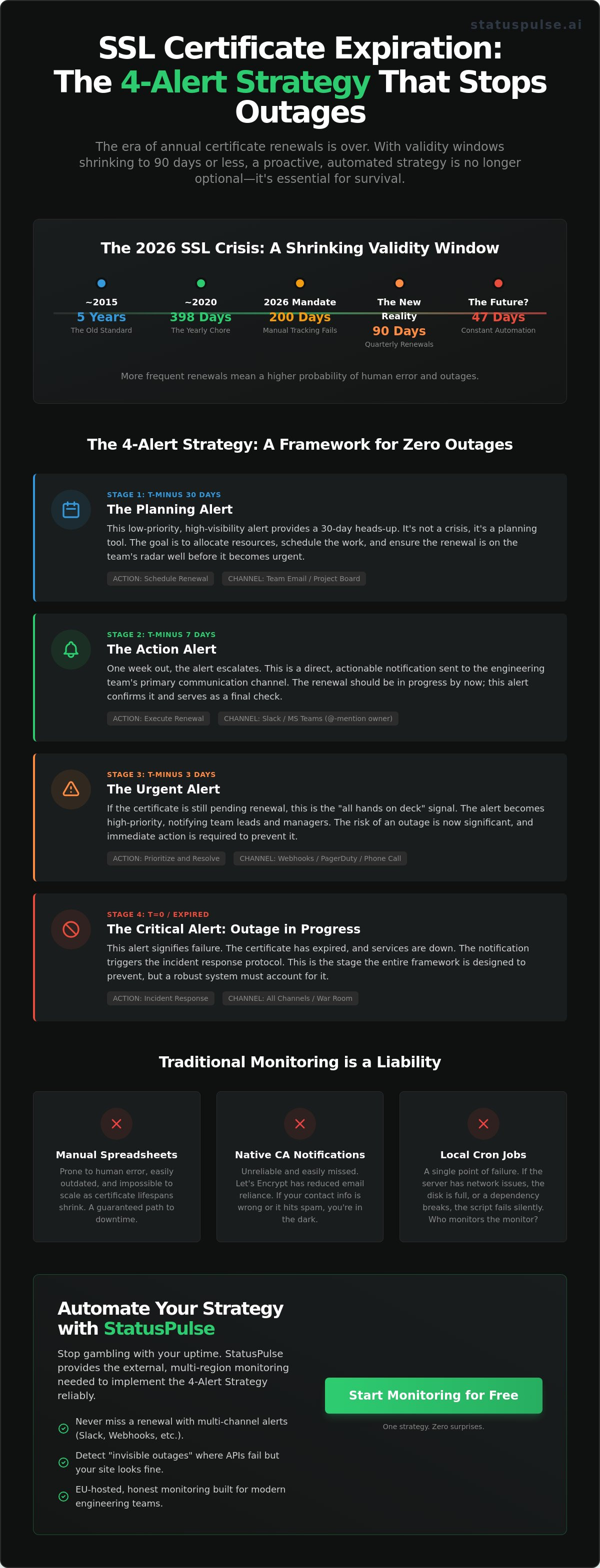
The transition is aggressive. We've moved from five-year certificates to two years, then to 398 days. By 2026, the 200-day limit takes over. Shorter lifespans mean more frequent rotations. More rotations mean a higher probability of human error. If you miss one renewal in a cycle that now happens twice as often, your site goes down. The 47-day mandate impact for 2026 means security teams must automate certificate lifecycles or face a constant, manual renewal grind every six weeks.
Why Your Cron Job Isn’t Enough
Local scripts are fragile. A cron job running on the same server it monitors is a single point of failure. If the server's outbound networking hangs, the script won't run. If the disk fills up, the logs won't write. You won't get an alert because the thing meant to alert you is dead. Local monitors also suffer from "Alert Fatigue." They fire too often for minor blips but stay silent during actual SSL handshaking failures. You need a system that's built for developers who value uptime over noise.
- Silent Failures: Scripts stop when dependencies break.
- Network Gaps: Local checks can't see regional routing issues.
- Maintenance Burdens: Who monitors the monitor?
The 4-Alert Strategy: A Framework for Zero Outages
SSL Certificate Expiration: The 4-Alert Strategy That Stops Outages Before They Start is built on a simple premise. Noise is the enemy of uptime. If you alert too early, teams ignore it. If you alert too late, you're already down. This framework creates a logical progression from planning to crisis management. It treats your infrastructure with the respect it deserves, ensuring that 100% of certificate renewals happen before they impact your users.
Stage 1 & 2: Proactive Renewal Windows
Stage 1 begins at T-minus 30 days. This is the Planning Alert. It's low priority but high visibility. At this point, the goal is resource allocation. You need to know which certificates are reaching their end of life, especially as the industry moves toward shorter cycles. Understanding recent SSL Certificate Validity Changes is essential here. Google's push for 90-day limits means your team will be doing this four times more often than they did in 2023. A 30-day head start provides the buffer needed for budget approvals or cross-departmental coordination.
Stage 2 triggers at T-minus 7 days. This is the Action Alert. We move from a general notification to a direct escalation. This alert should land directly in your Slack or Microsoft Teams engineering channels. Don't just send a generic message to a group. Tag the technical owners directly. If the DevOps lead isn't tagged, the alert doesn't exist. This stage is about execution. By day seven, the renewal process should be in the "in-progress" column of your sprint board.
Stage 3 & 4: Crisis Management and Transparency
Stage 3 is the Critical Alert at T-minus 24 hours. This is the red line. We configure this alert to bypass "Do Not Disturb" settings for on-call engineers. It's an emergency channel notification that demands immediate attention. At this stage, the risk of an outage is 95% or higher if no action is taken. It's the final fail-safe in the SSL Certificate Expiration: The 4-Alert Strategy That Stops Outages Before They Start.
Stage 4 is the Transparency Alert. It triggers only if the certificate expires. This is about owning the narrative. Instead of waiting for customer complaints to flood your inbox, an automatic update hits your status page. We believe in honesty. If a certificate expires, say so. You can use integrated tools where Claude drafts the "Certificate Maintenance" update and you simply press send. This keeps the message professional and the timeline clear. You can manage these public communications easily through StatusPulse to maintain trust even when things go wrong. It's better to tell your users you're fixing a problem than to let them discover it through a browser warning. Transparency is a competitive advantage.
Comparing Monitoring Methods: Native vs. Third-Party
Native Certificate Authority (CA) notifications are becoming a liability. If you manage a mix of Let's Encrypt, Sectigo, and DigiCert, you're juggling three different alert cadences. These emails often land in a forgotten "admin" inbox or a billing department's folder. By the time a human sees the warning, the certificate has already expired. This fragmentation is why a unified approach like the SSL Certificate Expiration: The 4-Alert Strategy That Stops Outages Before They Start is essential for modern dev teams.
Open-source monitoring scripts offer a DIY alternative, but they come with a high maintenance tax. A bash script running on a cron job lacks redundancy. If that specific monitoring server goes down, your entire visibility disappears. You're left maintaining the monitor instead of the production app. Dedicated platforms solve this by providing a centralized dashboard, but they often come with "Enterprise bloat" that complicates simple tasks.
The NIST Cybersecurity Practice Guide emphasizes that automated, centralized monitoring is the only way to manage large-scale certificate deployments effectively. Many "free" tools ignore this advice. They often come with hidden costs, such as selling your domain metadata or hosting data in jurisdictions that don't respect GDPR requirements. For European teams, data residency isn't a "nice to have" feature; it's a legal necessity.
The Problem with Incumbent Solutions
Industry incumbents love complex pricing. They often punish you for scaling, adding steep fees every time you add a new domain or subdomain. This creates a "monitoring tax" that discourages full coverage. StatusPulse offers a different path. We believe in being honestly priced. We don't hide our features behind a sales call or a $299 monthly minimum.
Privacy is another major differentiator. Most legacy monitors are US-hosted. If your company requires strict GDPR compliance, sending your infrastructure data across the Atlantic is a non-starter. StatusPulse is EU-hosted and GDPR-native. We built it for developers who value privacy as much as uptime. Simplicity wins every time. No complex tiers. No surprises.
Evaluating Reliability and Redundancy
Reliability isn't just about checking a date. You need multi-region checks to ensure your certificate is valid globally. A CDN misconfiguration might make your site look fine in London but throw a "Connection Not Private" error in Tokyo. StatusPulse verifies your status from multiple geographic locations to catch these edge cases early.
- OCSP Stapling: We check if your revocation status is being delivered correctly to improve load times and security.
- Chain Validation: We ensure the intermediate certificates are correctly installed, preventing "Incomplete Chain" errors.
- 1-Minute Intervals: For critical production apps, a daily check isn't enough. We offer high-frequency monitoring to catch issues the moment they happen.
Implementing the SSL Certificate Expiration: The 4-Alert Strategy That Stops Outages Before They Start requires a tool that stays out of your way. You can find that balance of technical precision and ethical pricing at https://statuspulse.ai. We focus on the details so you can focus on your code.
Implementation Guide: Setting Up Your 4-Alert System
Implementing the SSL Certificate Expiration: The 4-Alert Strategy That Stops Outages Before They Start turns a reactive panic into a controlled process. You can't fix what you can't see. Your first step is a full inventory of every public and private endpoint. Don't stop at your main domain. Include internal APIs, load balancers, and legacy sub-domains. Once you've mapped your infrastructure, configure multi-channel notifications. Email is a record; Slack and Discord are for action. Use webhooks to push alerts directly into your team's existing workflow.
Define clear escalation paths based on certificate tiers. A staging environment might only need a 30-day warning. Your primary checkout gateway needs a tiered response starting at 60 days and escalating to a "critical" status at 14 days. Finally, connect your SSL monitor to a public status page. This provides instant transparency for your users if a renewal delay occurs.
Inventory and Discovery
Automated domain discovery is essential to find shadow certificates. These are often created by individual developers or legacy departments without central oversight. Categorize every certificate by business impact. Production assets require immediate attention, while staging environments can follow a relaxed schedule. Finding every wildcard certificate is a top priority because a single forgotten sub-domain can break an entire ecosystem. In a 2023 study by Keyfactor, 74% of organizations reported unplanned outages caused by expired certificates. Don't let a hidden sub-domain be your downfall.
Closing the Communication Loop
Integrate your SSL alerts with StatusPulse API Monitoring to see exactly how certificate health affects your high-availability targets. When a certificate nears its end, speed matters. Our system follows a simple philosophy: Claude drafts the incident update, and you press send. This removes the friction of writing technical updates during a potential crisis.
To ensure your SSL Certificate Expiration: The 4-Alert Strategy That Stops Outages Before They Start is fully operational, run a fire drill every quarter. Manually trigger a 30-day alert for a non-critical service. Observe the flow. If the notification sits in a quiet Slack channel for more than four hours, your escalation path is broken. Testing your strategy ensures that when a real production certificate is at risk, the right person is already on the job. It's about building a system that respects your time and protects your uptime.
StatusPulse: Honest SSL Monitoring for Modern Teams
Monitoring shouldn't be a luxury or a complex puzzle. We built StatusPulse because we were tired of industry incumbents charging extra for basic security features. SSL monitoring is native to every plan we offer. There are no hidden fees, no surprise add-ons, and no tiered access to essential safety. You get full visibility into your certificate health from the moment you sign up.
We are proudly EU-hosted and GDPR-native. Your data lives on European servers, adhering to the strictest privacy standards globally. For modern teams, this isn't just a compliance checkbox; it's a commitment to regional integrity. StatusPulse combines technical precision with a straightforward setup. You add a domain, choose your notification channels, and stay secure. It's that simple.
Why Developers Choose StatusPulse
Developers value tools that respect their time and their intelligence. We've stripped away the corporate bloat to focus on what matters: uptime and honest communication. Our pricing is transparent and designed to scale with you, not against you. We don't believe in aggressive upsells or complex contracts. We believe in software that works.
Our approach to reliability goes beyond simple pings. You can see how our Uptime Monitoring works in tandem with SSL checks to provide a complete picture of your stack's health. By integrating these services, we eliminate the need for multiple, fragmented tools. We provide a rebellious alternative to the faceless corporations that dominate the market. We're a small team that cares about getting the details right for the 2,500+ developers who already trust us.
Get Started in Under 5 Minutes
Speed is a feature. You can connect your first domain and begin automating the SSL Certificate Expiration: The 4-Alert Strategy That Stops Outages Before They Start in less time than it takes to brew a coffee. Our dashboard is clean and intuitive, removing the friction from infrastructure management. Once your domains are connected, you can rest easy knowing our system is watching the clock for you.
When issues do arise, we don't leave you scrambling. Our AI incident management streamlines your response. Claude drafts the incident update for your public status page; you press send. This keeps your users informed while you focus on the fix. It's about human agency, not automated noise. You can start monitoring for €5, not $29. Experience the peace of mind that comes with the SSL Certificate Expiration: The 4-Alert Strategy That Stops Outages Before They Start today. Honestly priced, meticulously built, and ready for your next project.
Move Beyond Reactive Monitoring
The 2026 shift to 90-day certificate lifespans means the margin for error has vanished. You can't rely on manual spreadsheets or native tools that only bark when the house is already on fire. Implementing SSL Certificate Expiration: The 4-Alert Strategy That Stops Outages Before They Start gives your team the breathing room needed to handle renewals during business hours. It moves you from reactive panic to proactive maintenance. We believe monitoring should be a silent partner, not a source of constant noise.
StatusPulse was built for this new reality. We don't believe in the bloated, expensive monitoring offered by industry incumbents. We offer a lean, EU-hosted solution that's GDPR-native from the first line of code. If an issue does arise, our AI-powered incident drafting tool prepares your status updates. Claude drafts; you press send. It's that simple. We stay honestly priced with no surprises. You get professional authority without the corporate bloat.
Stop SSL outages with StatusPulse for €5/month
Keep your certificates valid and your nights quiet.
Frequently Asked Questions
What is the 47-day SSL certificate mandate?
The 47-day mandate refers to a proposal by Google in March 2023 to shorten maximum certificate lifespans to 90 days, with a recommended renewal window at the 47-day mark. This shift aims to reduce the window of opportunity for hackers to use compromised keys. It effectively forces teams to automate their processes, as manual renewals four times a year lead to human error. Shorter lifespans make it harder for old security vulnerabilities to persist on the web.
How do I check my SSL certificate expiration date via CLI?
You can check any domain's expiration date by running a simple OpenSSL command in your terminal. Use openssl s_client -connect yourdomain.com:443 -servername yourdomain.com | openssl x509 -noout -dates to see the "notAfter" date. This method pulls data directly from the live server. It's a great way to verify that a new certificate is active after implementing the SSL Certificate Expiration: The 4-Alert Strategy That Stops Outages Before They Start.
Why did Let’s Encrypt stop sending expiration emails?
Let’s Encrypt still sends automated notices, but they only trigger if a certificate isn't renewed 20 days before it expires. Many developers miss these because they go to an "admin" email that nobody checks or they get caught in aggressive spam filters. Relying on these emails is dangerous for production environments. A single missed 14-day warning can lead to a complete site shutdown and lost revenue.
Can I automate SSL certificate renewal and monitoring together?
Yes, you can use ACME clients like Certbot for renewals while using an external tool for monitoring. Automation handles the file replacement, but external checks verify that the web server actually loaded the new certificate correctly. This creates a fail-safe system. This layered approach is the foundation of the SSL Certificate Expiration: The 4-Alert Strategy That Stops Outages Before They Start, ensuring no single point of failure causes an outage.
What happens if my SSL certificate expires for just one hour?
An expired certificate triggers a "Your connection is not private" warning that blocks 100% of your visitors. Modern browsers like Chrome don't let users bypass this easily. Even a 60-minute outage can damage your brand's trust and cause search engines to lower your rankings. If a Google bot crawls your site during that hour, it may flag the page as insecure, which takes days to resolve in search results.
Is there a free SSL certificate monitoring tool that is reliable?
Many tools offer free tiers, but they often limit checks to once every 24 hours. StatusPulse provides an honest, transparent alternative to bloated enterprise monitors. We believe monitoring should be simple and accessible for small teams. While free scripts exist, they don't offer the reliability of a dedicated, EU-hosted platform. You need a tool that alerts you via Slack or email the second a check fails.
How does StatusPulse handle multi-region SSL checks?
StatusPulse verifies your certificates from multiple global locations to ensure consistency across all regional nodes. This prevents issues where a CDN in London might serve an expired certificate while the New York node is updated. We focus on technical precision and regional compliance. Since we're GDPR-native, your monitoring data stays within the EU while we check your global infrastructure for latency and security gaps.
What is the difference between SSL monitoring and domain expiry monitoring?
SSL monitoring tracks the 90-day or 398-day security certificate on your server, while domain monitoring tracks your ownership of the URL. Domains are usually renewed every 12 months, but SSL certificates require much more frequent attention. If a domain expires, your DNS records vanish and your site disappears. If an SSL certificate expires, your site stays up but displays a high-risk security warning to every visitor.


