

On October 22, 2023, a popular fintech platform went offline for six hours because a single renewal notice was buried in a marketing folder. It wasn't a technical failure. It was a simple administrative lapse. Relying on your inbox to manage critical infrastructure is a gamble you don't need to take. Industry data shows that 72 percent of tech teams manage domains across multiple registrars. This complexity makes it easy for a single domain expiration lookup to fall off the to-do list.
We agree that manual checks are a burden. You shouldn't have to set calendar reminders or hope your spam filter stays quiet just to keep your site online. This guide shows you how to move from risky, manual tracking to a system of automated, fail-safe monitoring. You'll master the domain lifecycle and learn how to remove human error from the equation entirely. We'll walk through the tools and tactics needed to ensure your domain health remains a quiet, background process rather than a recurring source of stress.
Key Takeaways
- Stop relying on fragile manual checks. Learn how human error and registrar notification failures turn simple tasks into critical risks.
- Master the three essential methods for a domain expiration lookup, from authoritative ICANN tools to efficient CLI commands.
- Decode the domain lifecycle. Understand the timeline from "Active" to "Available" so you never lose ownership by surprise.
- Graduate from spreadsheets to automated monitoring. Discover why pairing domain tracking with SSL checks is non-negotiable for fail-safe health.
- Meet StatusPulse. Experience an honest, EU-hosted alternative that automates your monitoring without the usual corporate bloat.
The Hidden Risks of Manual Domain Expiration Lookups
A domain expiration lookup is a query of registry databases to identify when a domain name is set to expire. It sounds simple. You check the date. You mark a calendar. You move on. But manual checks are a liability. Humans make mistakes. Calendars get ignored. Registrars fail to send notices. For a growing business, relying on a spreadsheet to track these dates is an invitation for disaster.
Manual tracking fails because it lacks a fail-safe. Understanding the Domain registration process is vital for anyone managing digital assets. It involves multiple layers of communication between registries, registrars, and owners. When this communication breaks, the business impact is severe. Brand hijacking is a real threat. Hijackers use automated bots to snatch expired domains in milliseconds. Your SEO rankings vanish. Your email services stop. We view "Domain Health" as a broader metric than just a date. It is the pulse of your digital identity, and it requires constant, automated attention.
Why "The Email" Isn’t Enough
Registrar emails are notoriously unreliable. They often land in spam folders or go to an inbox belonging to a former employee who left the company two years ago. Phishing is another risk. Attackers send fake renewal notices to steal registrar credentials. Even "Autorenew" features have a high failure rate. Credit cards expire. Banks flag transactions as fraudulent. An industry report from 2023 indicated that 15% of domain lapses occurred even when autorenewal was enabled. If you aren't performing a regular domain expiration lookup through an independent tool, you are flying blind.
The SEO and Reputation Fallout
Search engines are ruthless. If a domain expires, Google can begin de-indexing the site within 48 hours. You lose years of link equity and authority in a single weekend. Then comes the "Parking Page" effect. Customers see a generic ad page instead of your dashboard. Trust breaks instantly. This isn't just an IT problem; it's a revenue problem. For an average SaaS company, the cost of downtime is approximately $150 per minute in lost productivity and brand equity.
At StatusPulse, we believe in transparency and simplicity. We don't like surprises. Manual lookups are full of them. Automated monitoring ensures that your domain remains yours, your SEO stays intact, and your customers stay happy. It is about honesty in your infrastructure. You shouldn't have to worry about a date on a calendar when you have a business to run.
3 Ways to Perform a Domain Expiration Lookup
Finding the exact date a domain dies requires more than a guess. You need raw data from the source. Most users start with a manual domain expiration lookup to verify ownership or prepare for a renewal. It's a simple process, but the results vary based on the tool you choose. You have three primary paths: official registries, terminal commands, or specialized web apps. Each has a specific purpose and distinct limitations.
Using the WHOIS Protocol
The WHOIS database isn't a single file. It's a decentralized network of records managed by various registrars and registries. When you query a domain, you'll often see two dates. The Registry Expiry Date is the authoritative deadline set by the central database. The Registrar Registration Expiration Date is the local record. Always trust the registry date first. It's the final word on when the domain returns to the wild.
Privacy is a hurdle here. Since May 25, 2018, GDPR regulations have redacted most personal data from these records. You'll see the expiration date, but the owner's name and contact info are usually hidden. Understanding the domain name life cycle helps you interpret these dates. A domain doesn't just vanish on its expiry date. It typically enters a 30 day grace period followed by a 30 day redemption phase before it's actually deleted.
Browser-Based Tools vs. Command Line
Visual tools are convenient for one-off checks. Websites like ICANN's official lookup or dedicated expiry checkers provide a clean interface. They often calculate "days remaining" for you, which saves a trip to the calendar. These are perfect for a quick domain expiration lookup when you only have one or two URLs to verify. They're easy. They're visual. But they're also slow.
Developers and system admins prefer the command line. It's faster and scriptable. Running whois example.com in a Linux or macOS terminal returns raw text in milliseconds. You can even pipe this into a simple bash script to check 20 domains at once. It's a minimalist approach that avoids the ads and fluff of web interfaces. It's honest and direct.
- Official ICANN Lookup: Best for authoritative .com and .net data. No frills.
- CLI (whois): Best for bulk-adjacent queries and automation. High precision.
- Web-Based Checkers: Best for visual countdowns and "days remaining" logic.
Every manual method has a ceiling. Registry servers often cap queries at 50 per hour from a single IP address to prevent scraping. If you're managing a growing portfolio, manual checks become a liability. For those who value uptime and hate surprises, a native monitoring solution handles these lookups automatically, so you don't have to. It's about moving from reactive checking to proactive alerts.
Understanding the Domain Lifecycle: What Happens After Expiry?
Expiration isn't an instant loss of ownership. Your domain doesn't vanish into the void the second the clock hits midnight. It enters a structured, often expensive, bureaucratic cycle. Most owners assume they can perform a domain expiration lookup, see it's expired, and simply renew it for the standard $10 to $15 fee. This is a mistake. Incumbents in the registry space profit from this confusion. Once the date passes, the rules of the game change immediately.
The timeline from "Active" to "Available for Registration" typically spans 70 to 80 days. During this period, your rights as the owner diminish while costs escalate. You're no longer paying for a service; you're paying to fix a mistake. Registrars often hide these details in fine print. They rely on your panic to justify inflated fees. Understanding this sequence is the only way to protect your digital assets without overpaying.
The Grace Period: The 0-45 Day Window
The Auto-Renew Grace Period is your first safety net. It usually lasts 30 to 45 days for .com domains. Your website goes dark and email stops working immediately. Registrars often point your nameservers to ad-filled "parked" pages. While you can still renew, many providers add a "late fee" to the standard price. Be careful with TLDs like .io or .eu. They often have much shorter windows, sometimes moving straight to redemption without any grace period at all.
The Redemption Period and Pending Delete
The Redemption Grace Period is the last line of defense. It's expensive. Most registrars charge between $80 and $250 to recover a domain here. This isn't a technical cost; it's a penalty. After 30 days in redemption, the domain hits "Pending Delete." This 5-day phase is a point of no return. Professional drop catchers use automated scripts to monitor domain expiration lookup data. They snatch the domain the millisecond it becomes available. If your domain has traffic, you won't get it back for the original price.
Proactive monitoring is the only logical choice. Relying on registrar emails is risky. They often end up in spam or go to an unmonitored inbox. Tools like StatusPulse provide the transparency needed to avoid these traps. We believe in simple, honest systems that keep you informed before the "Pending Delete" phase even becomes a threat. No surprises. Just uptime.
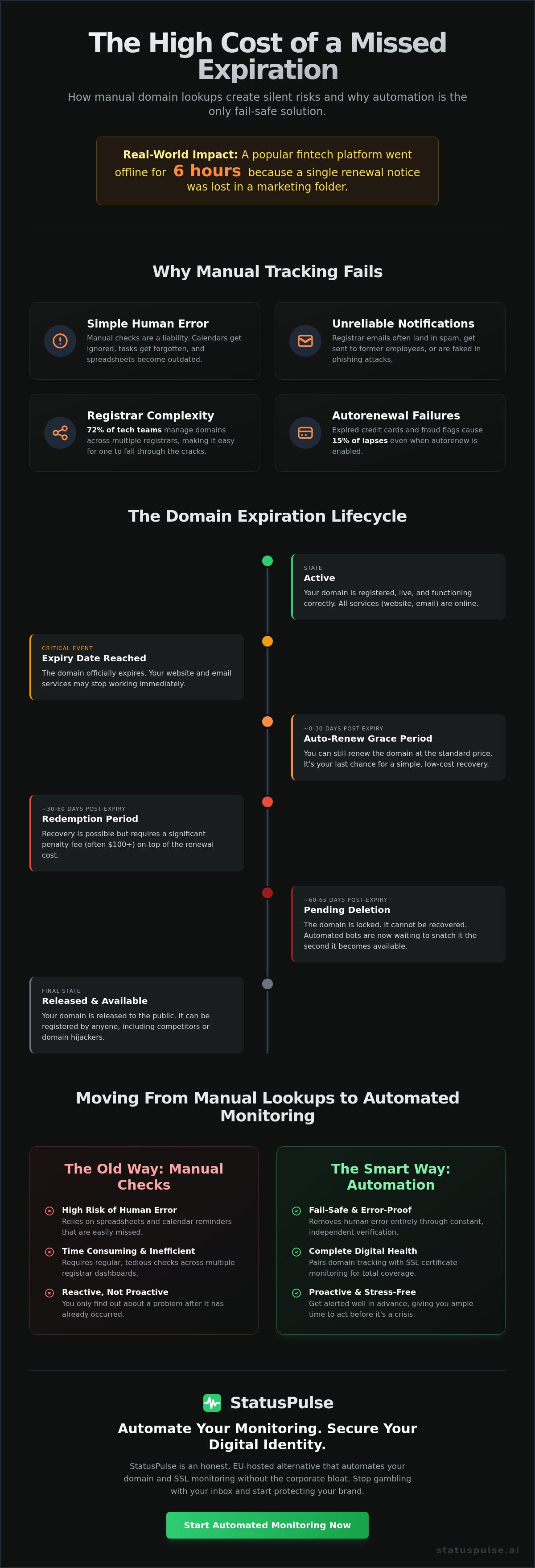
Moving from Manual Lookups to Automated Monitoring
Most teams follow a predictable path. They start with a single domain expiration lookup performed once a year. Then they grow. A spreadsheet follows. Eventually, that spreadsheet becomes a liability. We call this the Monitoring Maturity Model. It moves from manual checks to automated scripts, and finally to a centralized monitoring platform. Relying on memory is a risk. Relying on a shared document is a gamble. You don't need more "reminders" in a calendar that you'll eventually ignore. You need a system that acts when you don't.
A professional monitoring setup requires three specific criteria. First, frequency. Your tool should check status daily, not monthly. Second, alert channels. If your team lives in Slack, your alerts should too. Email is where notifications go to die. Third, multi-user support. Domain ownership shouldn't live in one person's inbox. If an admin leaves, the domain shouldn't leave with them. Use a "Warning System" that triggers at specific intervals:
- 60 Days: The planning phase. Use this to confirm the domain is still needed and check for budget approval.
- 30 Days: The action phase. Renewals should happen here. This avoids last-minute credit card failures.
- 7 Days: The emergency phase. This alert should be loud and persistent. If you reach this point, your internal process has a gap.
Scaling Your Domain Portfolio
Managing 10 or more domains across different departments creates silos. Marketing owns the landing pages, engineering owns the API, and a legacy project from 2021 owns the rest. This fragmentation is how domains slip through the cracks. Centralize these alerts into Slack or Discord to ensure team visibility. Integrating domain health into your existing DevOps or IT workflow means your domain expiration lookup isn't a separate chore. It's part of your heartbeat. It keeps the team informed without adding more noise to a crowded inbox.
The Synergy of Domain and SSL Monitoring
A domain lookup tells you who owns the name. It doesn't tell you if the site is reachable. An expired SSL certificate triggers the same user bounce rate as a total server outage. According to industry data, 81% of organizations experienced at least one certificate-related outage in the last 24 months. A valid domain with an expired SSL is still "down" for your users. Automate the lookup of both metrics simultaneously. You need to know the health of the entire stack, not just the registration date. Check out this uptime monitoring guide to see how reliability impacts your reputation.
Stop guessing when your assets expire. Monitor your domains honestly at statuspulse.ai.
Fail-Safe Domain Health with StatusPulse
Traditional monitoring tools often feel like they're working against you. They bury essential features behind expensive paywalls and complex menus. StatusPulse takes a different path. We're a small, meticulous team that cares about the details. Our platform automates every domain expiration lookup to prevent catastrophic downtime. You get alerts long before the crisis hits. No surprises. Just uptime. We're honestly priced at €5. Not $29. It's a fair deal for developers who value integrity over corporate flashiness.
Most incumbents focus on bloat. They add features that sound good in a boardroom but clutter your dashboard. We focus on what matters. StatusPulse provides a calm, reassuring experience. You'll know your assets are safe without having to babysit the software. It's reliable. It's straightforward. It's built for people who are tired of the SaaS status quo.
Native Monitoring for Modern Stacks
Modern stacks require precision. Whether you're running a Jamstack site or a complex multi-region architecture, latency and location matter. StatusPulse monitors your infrastructure from within the EU. This ensures your domain expiration lookup data and server checks stay within regional compliance boundaries. It's a principled choice for the 27 member states of the EU.
Regional compliance isn't a marketing afterthought for us. It's a core virtue. Being EU-hosted means we adhere to strict privacy standards. This provides a layer of legal certainty that many global incumbents can't match. When a domain check fails, our AI integration steps in. Claude drafts the incident summary. You review the text. You press send. It's a simple workflow that keeps you in control during high-pressure moments.
- GDPR-Native: Data stays in the EU, respecting user privacy by design.
- Jamstack Ready: Optimized for headless architectures and static deployments.
- Human-Centric AI: Claude handles the drafting; you make the decisions.
Setting Up Your First Monitor
Getting started shouldn't be a chore. Our setup process is a streamlined 5-minute walkthrough. You add your URL, select your notification channels, and let the system take over. There's no steep learning curve. You can also launch public status pages immediately. These pages act as a single source of truth for your users. If a renewal is pending or a server is down, your customers stay informed. This transparency builds long-term trust. It also reduces support tickets during maintenance windows.
We believe in tools that respect your time. StatusPulse doesn't demand your constant attention. It sits quietly in the background, guarding your digital assets. If you're ready to move away from bloated enterprise software, we're ready for you.
Take Control of Your Infrastructure
Manual tracking is a liability. Relying on a periodic domain expiration lookup leaves you vulnerable to the 30 day redemption grace period where recovery fees often exceed 200 dollars. You've seen how the domain lifecycle works. Once a name hits the pending delete phase, it's usually gone. Managing this process manually isn't just tedious; it's a gamble with your digital identity.
We built StatusPulse to eliminate that risk. It's an EU-hosted and GDPR-native platform designed for teams who value privacy and precision. Our AI-powered incident management handles the noise. Claude drafts the alerts; you press send. We don't do corporate bloat. Our service is honestly priced at €5, not the $29 charged by industry incumbents. It's a straightforward tool for a critical job.
Your uptime shouldn't be a guessing game. Secure your assets with a partner that respects your time and your budget. Stop worrying about expiry dates. Start monitoring with StatusPulse for €5.
Your domains are in good hands.
Frequently Asked Questions
How can I find out who owns a domain and when it expires?
You can find owner details and expiry dates by using a WHOIS database or a domain expiration lookup tool. ICANN requires all 1,500+ generic top-level domains to maintain these public records. Simply enter the URL into a search tool to see the registration history. Most registrars provide this data for free. It’s the standard way to track ownership across the web. This process ensures transparency in the digital marketplace.
Is it possible to hide my domain expiration date from a lookup?
You can’t hide your domain expiration date because it’s a public record required by registry protocols like RFC 3912. While privacy services hide your name and email, the expiration date remains visible to everyone. This transparency ensures the domain market functions correctly and fairly. It lets others know when a name might become available for purchase. Expect this data to stay public regardless of your specific privacy settings.
What is the difference between a registrar and a registry expiry date?
The registrar expiry date is when your contract with your provider ends, while the registry date is the official record held by the central database. These dates usually align, but a 45 day discrepancy can occur during renewal grace periods. Your registrar manages your billing and front-end settings. The registry manages the top-level domain itself. Check both if you notice a mismatch after a recent payment to avoid confusion.
Can I renew a domain after it has already expired?
You can typically renew a domain within a 30 day grace period after it expires. Most registrars allow this without charging extra fees. If you miss that window, the domain enters a 30 day redemption period where costs often increase significantly. After 60 total days of inactivity, the domain is usually deleted and released to the public. Act fast to avoid losing your digital identity or paying high recovery fees.
How often should I perform a domain expiration lookup?
You should perform a domain expiration lookup at least every 90 days to ensure your records match your registrar’s data. Manual checks are prone to human error and oversight. We recommend using automated tools that monitor these dates daily. This prevents accidental loss due to expired credit cards or missed notification emails. Staying proactive is the only way to guarantee 100% uptime for your brand and services.
Does domain expiration affect my website’s SEO?
Domain expiration hurts your SEO because your site goes offline immediately, causing search engines to de-index your pages. If a domain stays expired for more than 24 hours, you risk losing years of built-up authority. Crawlers will see a 404 error or a parked page. This signals to Google that your content is no longer reliable. Recovery can take months of consistent effort to regain your original search rankings.
What happens if my domain expires but I have auto-renew turned on?
If your domain expires despite having auto-renew enabled, your payment method likely failed or the registrar encountered a technical glitch. Industry data suggests payment issues cause 70% of accidental domain losses. Check your email for billing alerts immediately. Most providers send at least three warnings before the actual expiration date occurs. Don’t assume the system is infallible; verify your status regularly to keep your assets secure.
Why does my WHOIS lookup show "Redacted for Privacy"?
Your WHOIS lookup shows "Redacted for Privacy" because of GDPR regulations that took effect on May 25, 2018. These laws protect personal data for individuals, especially those within the EU. Registrars now hide names, addresses, and phone numbers by default. It prevents spammers from harvesting your contact info for malicious use. The expiration date and registrar name still appear because they aren’t considered protected personal data.


