

A login endpoint can return 200 OK while users still can’t authenticate. User login flow monitoring checks whether the sign-in journey works end to end, including identity-provider callbacks, MFA steps, and session creation, not just whether the login URL responds.
Testing the whole flow brings its own risks. A slow identity provider can trigger noisy alerts, and mishandled test accounts or secrets can expose credentials. The goal is reliable evidence of a real user-facing failure, not another source of false alarms.
This guide explains how to choose monitoring layers for your authentication architecture, from endpoint and API checks to browser-based journey tests. You’ll learn how to define useful failure signals, reduce alert noise, and protect test identities. It also clarifies where availability monitoring ends and security testing begins, so your checks help teams respond to login problems without claiming to assess the security of the authentication system.
Key Takeaways
- Check whether users can complete meaningful authentication steps, not just whether the login page or endpoint responds.
- Choose browser, API, or service-level checks based on the failure each needs to detect, and weigh realism against maintenance effort.
- Define user impact and success criteria before setting up user login flow monitoring.
- Reduce false alarms by assessing diagnostic value, credential exposure, and the limits of each monitoring method.
- Turn alerts into a clear response: verify the failure, assess its impact, mitigate the issue, and communicate only confirmed facts.
What User Login Flow Monitoring Actually Checks
The login page loads, but users can’t finish signing in. The identity provider accepts their credentials, then the browser stalls on a redirect. A page-availability check stays green because the page is reachable, even though the failure occurs later in the journey.
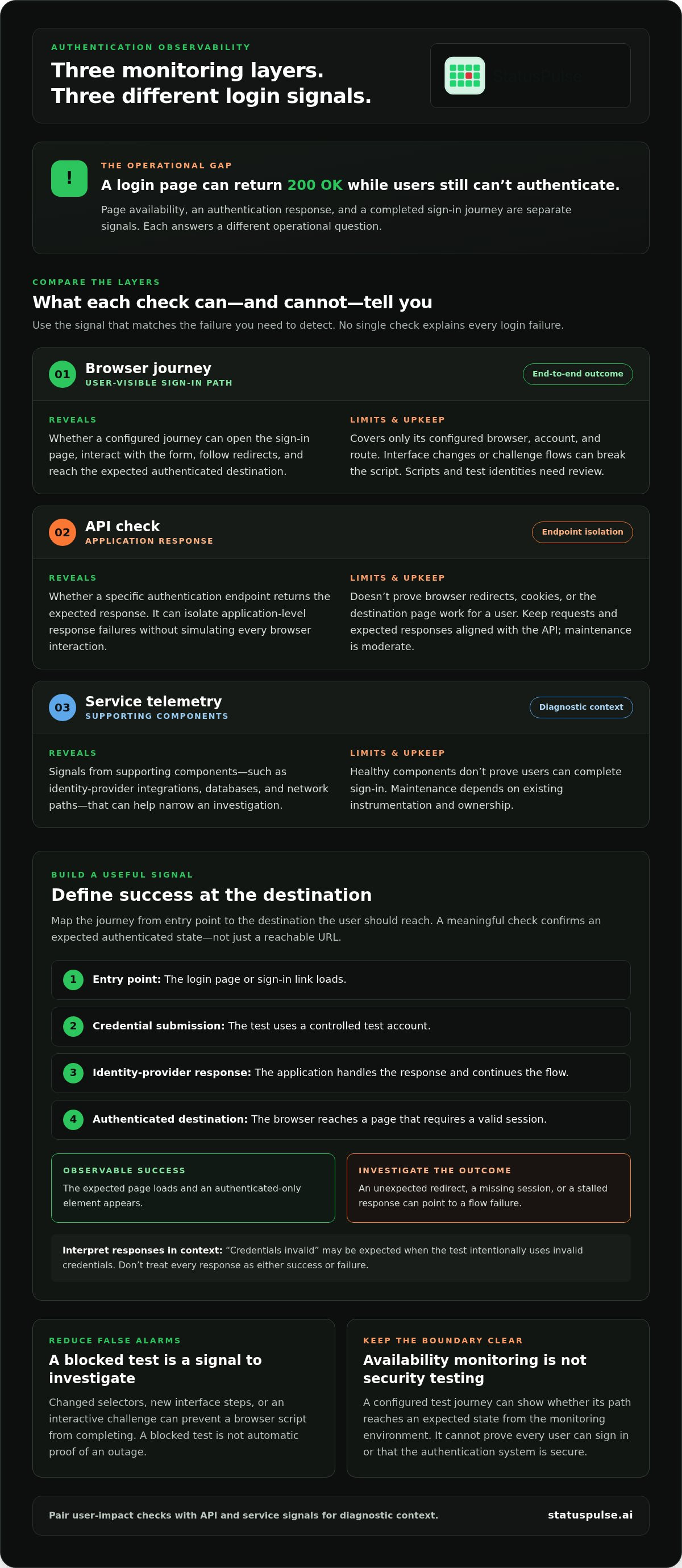
User login flow monitoring checks whether defined authentication steps complete and produce an expected result. It treats page availability, an authentication response, and a completed user journey as separate signals because each answers a different operational question.
In brief: Login-flow monitoring can show whether a configured test journey reaches an expected authenticated state from the monitoring environment. It can’t prove that every user, device, or network can sign in, or that the authentication system is secure.
What counts as a successful login journey?
Map the journey from its entry point to the destination the user should reach:
- Entry point: The login page or sign-in link loads.
- Credential submission: The test submits credentials using a controlled test account.
- Identity-provider response: The application handles the response and continues the flow.
- Authenticated destination: The browser reaches a page that requires a valid session.
Define success with observable assertions, such as the expected page loading and an authenticated-only element appearing. A “credentials invalid” message may be the expected result when the test intentionally uses invalid credentials. An unexpected redirect, a missing session, or a stalled response points to a flow failure. Distinguish these outcomes rather than treating every response as either success or failure.
Why a green login-page check can still miss failures
An HTTP 200 response confirms that a request received a successful response. It doesn’t confirm that authentication completed or that the application created a usable session. The flow may depend on redirects between domains, cookies being stored and sent correctly, and an identity provider responding as expected. A failure at any of these steps can leave the page available while blocking sign-in.
Endpoint availability alone does not prove users can authenticate.
Keep the scope clear. User Activity Monitoring (UAM) is a broader concept that concerns observing user activity; a login journey check focuses on whether a defined sign-in path works. The check is useful for availability and operations, but it isn’t a substitute for security testing or evidence about every user’s experience.
How to Monitor Authentication Across Browser, API, and Service Layers
No single check explains every login failure. Browser journeys show what a user experiences, API checks isolate application responses, and service telemetry helps locate faults in dependencies. Combining these layers provides an impact signal and diagnostic clues, but deeper checks take more setup and upkeep.
| Layer | Purpose and strengths | Blind spots | Maintenance burden |
|---|---|---|---|
| Browser journey | Follows sign-in through navigation, form interaction, redirects, and the destination state. Shows whether a configured user journey reaches its expected outcome. | Covers only its configured browser, account, and route. Interface changes or challenge flows can break the script. | Higher. Scripts and test identities need review. |
| API check | Checks a specific authentication endpoint or response. Can isolate application-level response failures without simulating every browser interaction. | Doesn’t prove redirects, browser cookies, or the destination page work for a user. | Moderate. Keep requests and expected responses aligned with the API. |
| Service telemetry | Inspects supporting components such as identity-provider integrations, databases, and network paths. Adds diagnostic context when a higher-level check fails. | Healthy components don’t prove users can complete sign-in. | Depends on existing instrumentation and ownership. |
Browser checks for end-to-end sign-in visibility
A browser check follows the path a person takes: open the sign-in page, interact with the form, follow redirects, and assert that the expected authenticated destination appears. This provides a direct user-journey signal, especially when failures occur between the application and an identity provider.
That realism comes with upkeep. Changed selectors, new interface steps, or an interactive challenge can make a script brittle or prevent it from completing. Keep assertions focused on stable outcomes, and treat a blocked test as a signal to investigate, not automatic proof of an outage.
API and component checks for faster diagnosis
An API check can help isolate whether an authentication endpoint returns the expected response. Service telemetry adds context: for example, a failed journey alongside identity-provider errors or database latency can narrow the investigation. For broader background on protecting sign-in, see Microsoft Login Security Best Practices.
Use user login flow monitoring alongside API and service signals when you need both user impact and diagnostic context. If uptime and API signals are part of that picture, StatusPulse uptime and API monitoring can help teams track service availability. These signals complement, but don’t replace, a browser journey check.
How to Choose Login Flow Checks Without Creating False Confidence
Start with the failure you need to detect, not the monitoring tool. A check should answer a clear operational question: can a user reach a protected page after signing in, does an authentication endpoint return the expected response, or is an identity-provider dependency failing?
Compare candidate checks across four dimensions:
- Coverage: Which steps and user-visible outcomes does the check exercise?
- Diagnostic value: Does a failure help locate the broken component, or only show that the journey failed?
- Maintenance: How often might interface changes, redirects, or flow updates require edits?
- Credential exposure: What secrets or test identities does the check need, and where are they stored?
A synthetic browser journey can verify a real outcome, but it represents only its configured path and test conditions. It can also break when the interface changes. Pair it with narrower API or service checks when your team needs diagnostic context. For broader availability signals beyond authentication, compare journey checks with uptime monitoring.
Choose checks that reflect your authentication architecture
List the actual steps in your sign-in design. Password-based flows may submit credentials directly to the application; federated sign-in may redirect through an identity provider and return through a callback. Multi-step authentication adds further states, such as a second factor or a challenge. Include only the steps that apply to your system.
Map dependencies to observable outcomes: identity-provider response, callback handling, session storage, and access to a protected route. Use OAuth 2.0 or OpenID Connect terms only if your implementation uses those protocols. A check aimed at the wrong layer can stay green while the user-facing path is broken.
Reduce false positives and protect test identities
Use dedicated test identities with the least privilege needed to exercise the journey. Define who owns each account, how credentials are stored and rotated, and how the account is disabled when it is no longer needed. Don’t use real customer credentials or let a routine check perform destructive actions.
Keep assertions stable and explicit. Verify the expected destination or an authenticated-only element, and document normal redirects and exceptional states such as an intentional access-denied response. A timeout, an unexpected redirect, and a valid rejection should produce distinct results where possible. This makes alerts easier to verify and reduces the risk that a brittle check creates noise or false confidence.
How to Set Up User Login Flow Monitoring Step by Step
Build the check around a user-impact question first. Choose the monitoring tool after you’ve defined what the check needs to prove. A clear setup makes it easier to distinguish a broken sign-in journey from an expected rejection or a problem limited to one dependency.
- Define the user impact. Decide which sign-in journey matters most, such as reaching a protected dashboard or account page. Record who relies on it and what failure would block them.
- Map the journey and success criteria. Document the entry URL, authentication steps, expected responses, redirects, and final authenticated destination. Set observable assertions, such as the protected page loading and a stable element appearing.
- Create a dedicated test identity. Give it only the access needed for the check. Document who owns it, where credentials are stored, and how they’re rotated and retired. Avoid real customer credentials and actions that change user data.
- Model expected failure states. Test cases such as invalid credentials or an intentionally denied route should produce understood outcomes, not be mistaken for an outage. Record normal redirects and exceptional states the journey can encounter.
- Set alert conditions and diagnostic context. Base thresholds on user impact and the check’s observed baseline, not a universal value. Define what triggers an alert separately from details that help diagnose it, such as the failing step or response information.
- Validate, route, and review. Confirm that success and failure cases produce the expected results. Send alerts with the check name, timestamp, failed step, and available response context. Review the check after interface, identity-provider, or authentication-policy changes.
A useful login alert is a reproducible, user-relevant failure signal, with enough context to identify where the journey stopped.
Keep response details useful but safe. Don’t include passwords, session cookies, or other secrets in alert payloads or logs. If a failure alert fires, verify the journey and use separate service telemetry to investigate possible causes. This keeps the alert focused on user impact without presenting a diagnosis as fact.
Pair the login check with broader availability monitoring when it helps explain impact across services. Explore uptime and API monitoring as complementary availability signals, not as a substitute for an end-to-end authentication check.
Connect Login Failure Detection to Clear Incident Response
A login alert is a starting point, not proof of a widespread outage. Verify the failure, assess who and what it affects, mitigate the issue, then communicate only what the evidence supports. Connecting these steps helps teams respond quickly without turning an isolated test failure into an inaccurate customer update.
Turn a login alert into a verified incident
First, rerun or independently verify the failing check. Correlate it with uptime and API signals, plus relevant dependency telemetry. If the login journey fails while other signals remain healthy, the impact may be limited to one path or component. Don’t declare broad impact until the evidence supports it.
Record the affected journey, when the failure started, its current status, and confirmed user impact. Assign an incident owner to coordinate technical investigation and customer communication. Keep internal diagnosis specific, such as a failing callback or identity-provider timeout. Customer-facing updates should state the verified effect, what the team is doing, and when the next update will be provided if that timing is known.
Authentication journeys often depend on APIs. Use API monitoring signals alongside the login check to help narrow the investigation, but don’t treat a healthy API response as proof that the full sign-in journey works.
Choose monitoring and communication tools around the workflow
Teams can combine separate monitoring and communication tools, or use a platform that brings related functions together. Separate tools may suit an established stack with clear ownership and existing integrations. A shared platform can reduce context switching, but compare its monitoring coverage, incident workflow, and pricing model against what your team actually needs.
Pricing structures also differ. Flat pricing without per-subscriber fees can make costs more predictable as the audience for status updates changes. Per-subscriber pricing ties cost to subscriber volume. Compare the models using your expected usage rather than assuming one is cheaper in every case.
Hosting location is another operational choice. EU hosting may suit teams prioritising EU data location; US hosting may fit teams whose data-sovereignty needs are centred in the US. Assess both against your own requirements, and don’t treat hosting location alone as proof of regulatory compliance.
StatusPulse combines uptime and API monitoring with public status pages and AI-assisted incident management. That can connect availability signals to incident communication, while dedicated authentication checks remain responsible for testing sign-in journeys. Explore StatusPulse monitoring and incident communication.
Make Login Signals Useful in Your Incident Workflow
Reliable user login flow monitoring starts with a defined user journey and observable success criteria. Choose browser, API, or service checks to answer specific operational questions, then balance coverage against maintenance and credential risk. Treat an alert as a signal to verify, assess impact, and communicate only confirmed facts.
Authentication checks work best alongside broader availability signals. Uptime, API, and SSL monitoring can add operational context, while public status pages and AI incident management help teams connect detection with incident communication. Keep the distinction clear: these signals complement login-flow checks, but don’t prove that users can complete authentication.
StatusPulse brings these monitoring and communication capabilities together. Its AI incident management tools can assist with drafting status updates and summarising outage impact. Explore StatusPulse monitoring and incident communication to see how it can support your incident workflow.
Start with one critical sign-in journey, make its failures actionable, and refine the check as your authentication architecture changes. Clear signals make it easier for teams to respond with confidence.
Frequently Asked Questions
What is user login flow monitoring?
User login flow monitoring checks whether a defined sign-in journey reaches its expected authenticated state. A check may follow the login page, credential submission, identity-provider response, redirects, and access to a protected destination. It helps detect failures that a page-availability check can miss. It tests a configured path from a particular environment, so it can’t prove every user, device, or network can sign in.
How do you monitor a login flow?
Map the critical sign-in journey and define observable success criteria before choosing a check. For example, assert that a test identity reaches a protected account page and that an authenticated-only element appears. Use a dedicated, least-privilege test account, protect its credentials, and document expected redirects and failure states. Combine browser, API, or service checks where they answer distinct user-impact or diagnostic questions.
Is an uptime check enough to monitor a login page?
No. An uptime check can confirm that a page or endpoint responds, but it won’t necessarily test credential submission, identity-provider callbacks, session creation, or access to a protected page. A site can remain available while sign-in is broken. Use uptime monitoring for reachability, then add an authentication-specific check for the user journey or a narrower API check for a particular response.
Can login monitoring use a real customer account?
Use a dedicated test identity instead of a real customer account. Give it only the permissions needed to exercise the intended journey, and define how the credentials are stored, rotated, and retired. Avoid putting passwords, session cookies, or other secrets in alerts and logs. A controlled test identity reduces the risk of exposing customer data or triggering actions on a real account.
What is the difference between synthetic login monitoring and API monitoring?
Synthetic login monitoring runs a scripted sign-in journey to check an expected user-facing outcome, such as reaching a protected page. API monitoring checks a defined API endpoint or response and can help isolate application or dependency issues. An API check is usually narrower, while a browser journey exercises more of the path but needs more upkeep and can be affected by interface changes.
How often should a login flow be monitored?
Set the monitoring frequency according to the user impact of a failure, the journey’s importance, and the operational cost of running and maintaining the check. There isn’t one interval that fits every authentication system. A critical sign-in path may need more frequent observation than a low-impact route. Use your observed baseline and response needs to choose a cadence, then review it as the system changes.
How can teams avoid false alarms from login monitoring?
Make assertions specific to stable outcomes, and document expected redirects and valid denial states so they aren’t mistaken for outages. Separate alert conditions from diagnostic details, and include the failed step and timestamp for verification. Use a dedicated test identity, then review the check after interface, identity-provider, or authentication-policy changes. Correlate failures with API and service signals before declaring broad user impact.


