

What if checkout is failing while every API check stays green? A cart endpoint can return HTTP 200 with stale prices, missing items, or inventory data that can’t support an order. Ecommerce API monitoring needs to test whether responses support a customer journey, not just whether an endpoint answers.
Uptime and latency checks matter, but they don’t show the whole picture. A payment dependency may fail on one route, or an order-confirmation event may never arrive while the storefront stays online. Alerts that report only a URL and status code leave responders guessing which function, customers, or team are affected.
This guide explains how to monitor the APIs behind product discovery, cart, checkout, payment, and order updates. You’ll learn to catch invalid responses and dependency failures, prioritize alerts by their impact on buying, and build a practical monitoring plan with useful evidence for responders and clear incident updates. Monitoring won’t replace application tests or validate every user journey, but it can help teams spot production failures and respond with context.
Key Takeaways
- Trace critical API dependencies across the customer journey to pinpoint where checkout or order processing can break.
- Use ecommerce api monitoring to validate response content and transaction outcomes, not just HTTP status codes.
- Choose signals and alert context based on customer impact, clear ownership, and the evidence responders need to act.
- Roll out checks in stages, and use staging or controlled test data when monitoring could create or change ecommerce records.
- Use verified alerts to guide investigation and impact assessment, then communicate confirmed facts without guessing at root cause.
Why ecommerce API monitoring must follow the customer journey
A checkout API returns HTTP 200, but the order record is missing its line items. The customer sees a confirmation screen, inventory remains unchanged, and the fulfilment team has nothing complete to process. The endpoint responded. The transaction did not succeed.
Ecommerce API monitoring tracks availability, response behavior, and customer-critical operations across the services that support buying. A Web API lets software communicate with other software. In an ecommerce journey, those connections may support product discovery, cart updates, checkout, payment authorization, and order confirmation.
Monitoring should follow that path. A catalog response can be available but stale; a cart update can omit an item; a payment can be authorized while order creation fails. Each signal describes a different part of the customer experience. Monitoring complements logs and traces, which help diagnose what happened inside the system. Application tests validate expected behavior before release, while real-user feedback shows what customers experience. None replaces the others, and external checks can’t validate every possible user journey.
Which ecommerce APIs deserve monitoring first?
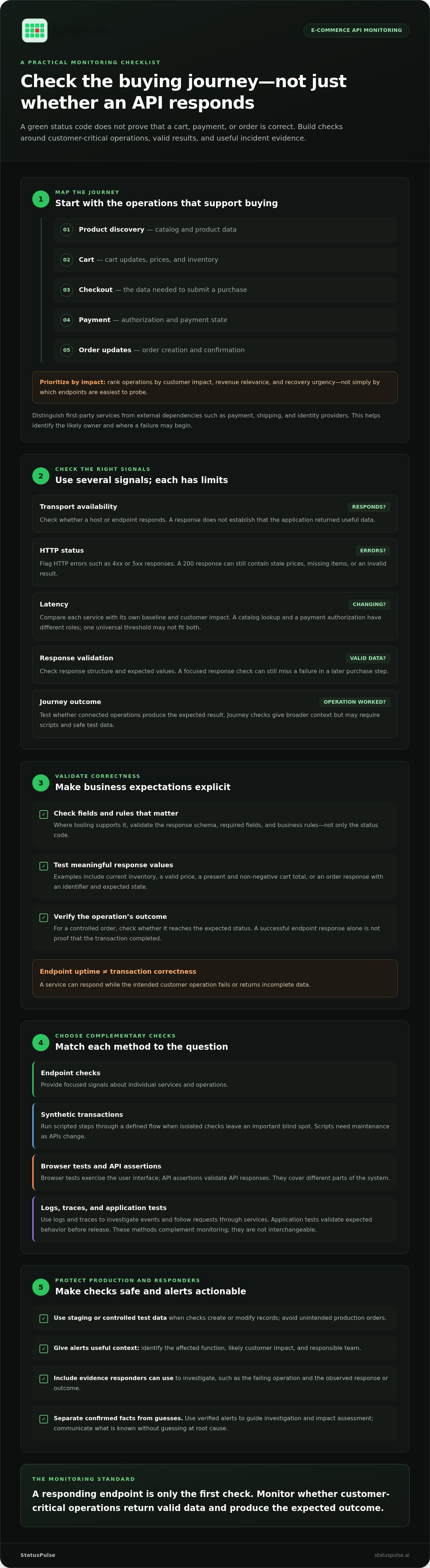
Start with catalog, inventory, cart, checkout, payment, and order-management dependencies. Rank each operation by customer impact, revenue relevance, and recovery urgency. A broken image endpoint may degrade product discovery; a failed payment authorization or order write can stop a purchase or leave its outcome unclear.
Separate first-party services from external dependencies such as payment, shipping, and identity providers. This helps route alerts to the right owner and shows whether a failure begins in your system or a dependency. Prioritize operations that block or corrupt orders, not simply the endpoints that are easiest to probe.
What availability checks reveal, and what they miss
A basic availability check can show whether an endpoint responds and whether its response time changes. It can’t establish that the response contains current inventory, a valid price, or the fields needed to create an order. A successful status code is evidence of a transport-level response, not proof of a completed business operation.
Endpoint uptime means an API responds; transaction correctness means it performs the intended customer operation with valid results. To test correctness, validate relevant response data or operation outcomes, such as whether a controlled order has the expected status. Use staging or controlled test data for checks that create or modify records, and keep production monitoring from generating unintended orders.
How ecommerce API monitoring detects failures beyond HTTP status codes
A useful monitoring plan checks more than whether a request reaches a server. Ecommerce API monitoring combines transport availability, status codes, latency, response validation, and journey-level outcomes. Each signal catches a different failure, and each has limits.
Transport availability: Confirms a host or endpoint responds. It doesn’t prove that the application returned useful data.
Status code: Flags HTTP errors such as 4xx or 5xx responses. A 200 response can still contain a broken result.
Latency: Shows whether response time is changing. A threshold that suits one service may be too strict or too loose for another.
Response validation: Checks structure and expected values. It can miss failures in later steps of a purchase.
Journey outcome: Tests whether connected operations produce the expected result. It gives broader context but may require scripts and safe test data.
Set latency thresholds from each service’s baseline and customer impact, rather than applying a universal target. A catalog lookup and a payment authorization have different roles. Compare each against its own normal behavior and define which changes matter to customers.
Why a 200 response may still break checkout
A response can be valid HTTP and still be wrong for checkout. Inventory may be missing, a total may omit a required adjustment, or a payment state may be unusable for creating an order. A check that only accepts status 200 won’t catch those failures.
Where your test tooling supports it, validate the response schema, required fields, and business rules. For example, confirm that an order response contains an identifier and the expected state, or that a cart total is present and non-negative. These checks make assumptions explicit, but they don’t guarantee that every purchase path works. A reliable e-commerce checkout system depends on connected cart, order, payment, and inventory operations, so a failure in one can change the overall outcome.
Combine endpoint checks with synthetic and application-level tests
Endpoint checks provide focused signals about individual services. Synthetic transactions run scripted steps through a defined flow, but scripts need maintenance as APIs change, and tests that create or modify records need controlled data. Browser tests exercise the user interface; API assertions validate API responses. Logs and traces help investigate events and follow requests through services. These tools complement one another, but they aren’t interchangeable.
Use endpoint checks for focused service signals, then add scripted journeys where isolated checks leave a meaningful blind spot. Keep test data controlled, review scripts as APIs evolve, and use application tests to validate behavior beyond what external monitoring can observe.
How to choose ecommerce API monitoring signals without creating alert noise
Choose checks by the customer impact they reveal, not by how many endpoints appear on a dashboard. Evaluate whether each check covers a critical operation, validates the result deeply enough, gives responders context, has a clear owner, and can be maintained safely.
Coverage: Which customer-critical operation or dependency does the check represent?
Validation depth: Does it confirm only that a request responds, or also that the result meets defined expectations?
Alert context: Does a notification identify the affected workflow and observed symptom?
Ownership: Is there an accountable team that can investigate and act?
Operational fit: Can the check run reliably without fragile scripts or unsafe changes to live data?
More checks aren’t automatically better. False positives can pull responders away from real issues; thresholds that are too loose can delay detection. Synthetic checks may reveal failures between services, but scripts require maintenance and test data. A check that reports failure without dependency context can also leave teams unsure where to start. The Akamai commerce attack report offers additional context on security risks affecting commerce APIs, which teams should distinguish from availability and correctness signals.
Match monitoring depth to the risk of each API
Use basic availability checks where an interruption has limited customer impact. Add response validation for critical operations, and reserve synthetic journey checks for workflows where isolated checks leave a material blind spot. Document what each check considers a valid result, which team owns it, and how it handles test data. Checks that create or change records need production-safe controls.
Design alerts responders can act on
An actionable alert names the affected endpoint or workflow, the observed symptom, its severity, and useful diagnostic context, such as the failed validation or dependency involved. Route it to an accountable team, with a clear escalation path if customer impact continues. Tune thresholds and group related notifications based on observed service behavior. No single latency threshold or grouping rule fits every ecommerce system.
Monitoring helps teams detect and investigate failures. It can’t guarantee that orders complete, cover every customer path, or replace application tests and production-safe validation. Review the signal, context, and ownership behind each alert so responders can make decisions from evidence rather than guesswork.
How to implement ecommerce API monitoring in a practical sequence
Roll out ecommerce API monitoring in stages. Start with customer-critical operations, define what a valid result means, then verify that alerts reach the people responsible for responding. Expand coverage as you learn which checks provide useful signals.
- 1. Map dependencies. Trace the services behind key customer journeys, including first-party APIs and external providers.
- 2. Select critical operations. Choose a representative operation for each high-impact journey, such as updating a cart or creating an order.
- 3. Define expected behavior. Record the expected status, response shape, business condition, and acceptable performance behavior for each check.
- 4. Configure alerts and ownership. Specify the symptom, severity, accountable team, runbook, and escalation path if customer impact continues.
- 5. Review and refine. Compare alerts with incidents and customer feedback. Remove checks that no longer represent a meaningful risk, and update those affected by system changes.
Run checks that create or modify ecommerce records in staging where practical, or use controlled test data and safeguards in production. Keep credentials out of test payloads and logs. Verify implementation-specific secret handling, access controls, and cleanup behavior rather than assuming the monitoring setup protects sensitive data by default.
Start with a small set of representative checks
For each critical journey, document what the check sends, what it expects back, and which business condition it validates. For example, an order-creation check might verify that the response includes an order identifier and an expected state. Keep the initial scope small enough that owners can understand failures and maintain checks as APIs evolve.
Test alert handling before relying on it
Trigger controlled failure scenarios and confirm that the right team receives an alert with the affected workflow, observed symptom, and relevant diagnostic context. Check that grouping reduces duplicate notifications without combining separate failures into one vague incident. Use missed incidents and noisy alerts to adjust validation, thresholds, routing, and runbooks.
Link monitoring signals to a clear incident communication architecture. Keep observed facts separate from hypotheses, and use verified information to guide updates. Monitoring still can’t guarantee order completion or replace application tests and production-safe testing.
Connect ecommerce API monitoring to transparent incident response
A monitor can confirm that a check failed. It can’t, by itself, confirm why it failed or how many customers are affected. Treat an ecommerce API monitoring alert as evidence for investigation, not as a root-cause verdict.
Build a response path from signal to communication:
- Verify the signal. Check the failing operation, observed symptom, and related logs or traces.
- Assess customer impact. Establish which functions are affected and whether customers can still browse, pay, or retrieve order details.
- Assign action. Route the issue to the accountable team and use a runbook to guide investigation or mitigation.
- Communicate confirmed facts. Share what is affected, what responders are doing, and when the next update will be provided.
Keep observed facts separate from hypotheses. An alert showing a failed payment dependency may justify investigating checkout, but it doesn’t prove every payment failed. Update the incident record as evidence changes, and avoid declaring resolution until checks and responders support that conclusion.
Turn monitoring evidence into clear status updates
Structure updates around four states: confirmed impact, current investigation, mitigation, and resolution. For example, say that checkout is affected only after confirming that impact. If the cause is still under investigation, state that plainly instead of speculating.
AI incident tools can help draft or summarize updates from incident information. Keep a person responsible for reviewing the wording, checking it against verified facts, and deciding whether to publish. For practical advice on communicating service health, see public status page guidance.
Evaluate platform fit, hosting, and pricing structure
A combined workflow can bring API monitoring, public status pages, and AI-assisted incident management into one platform. This can connect monitoring signals with customer communication, while teams retain the logs, traces, and tests needed for investigation and validation.
StatusPulse provides uptime and API monitoring, public status pages, and AI incident management tools that help technical teams draft status updates and summarize outage impact. Teams can use monitoring signals to investigate service issues, then share confirmed information through a public status page. AI can support the drafting process, while responders review updates against the evidence before publishing.
To connect monitoring signals with incident communication, explore the uptime and API monitoring platform.
Build checkout monitoring your team can act on
Reliable ecommerce API monitoring checks whether critical operations return correct, useful results, not just whether endpoints respond. Map checks to customer journeys, validate business-critical responses, and tune alerts so they show the affected workflow, evidence, and owner.
Monitoring is one part of reliability. Pair it with application tests, logs, traces, and real-user feedback, then use verified signals to investigate impact before communicating an incident. No check can guarantee every order will complete, but a clear monitoring and response process helps teams detect and handle failures with better context.
StatusPulse brings uptime and API monitoring, public status pages, and AI incident management into one platform. AI can assist with incident summaries and status-update drafts, while people retain review and publishing control.
Explore StatusPulse uptime and API monitoring to connect service checks with clear incident communication.
Frequently Asked Questions
Is HTTP 200 enough to prove an ecommerce API is working?
No. HTTP 200 confirms that the server returned a successful HTTP status, not that the response contains correct data or the intended operation completed. Validate required fields and business conditions, such as whether checkout created an order with the expected state. Use logs and traces to investigate failures, and application tests to check expected behavior. No single monitoring signal proves that an entire transaction worked.
How do you monitor an ecommerce checkout API?
Start by mapping checkout dependencies and identifying which operations can block a purchase. Define expected responses and outcomes, then combine focused endpoint checks with response validation or controlled synthetic tests. Protect test data, assign alerts to an accountable team, and use logs and traces to investigate. The right level of ecommerce API monitoring depends on customer impact, operational risk, and the effort needed to maintain each check.
What should ecommerce API monitoring check?
Check availability and response time, then validate the data and conditions that matter to each operation. Depending on the API contract, this may include catalog or inventory values, cart totals, payment state, and order confirmation. Define expected results from your application’s business logic. A generic status-code check can identify some failures, but it can’t verify every application-specific outcome or prove that a complete customer journey succeeded.
Can API monitoring detect failed payments?
API monitoring can detect observable symptoms, such as an unavailable payment endpoint, unexpected response data, or a failed scripted check. It may not identify the underlying cause or confirm whether a payment provider completed settlement. Correlate alerts with application records and provider responses before drawing conclusions. Design test scenarios carefully so they don’t create real charges or customer records, and communicate only what the available evidence supports.
What is the difference between API monitoring and synthetic monitoring?
API monitoring often checks individual endpoints for availability, response behavior, or expected data. Synthetic monitoring runs scripted requests or user-like workflows to test selected operations together. The terms can overlap, so compare what the checks actually do. Synthetic tests can expose gaps between services, but require maintenance and safe test data. Neither method replaces application tests, production telemetry, or feedback from real users.
How can ecommerce teams reduce noisy API monitoring alerts?
Alert on customer-relevant symptoms, set thresholds from observed service behavior, and assign each alert to an accountable team. Group repeated notifications when they relate to the same incident, but keep distinct failures visible. Test alert routing with controlled scenarios, then review both false positives and incidents that checks missed. Include useful diagnostic context, such as the affected workflow and failed validation, so responders can investigate without guessing.
Should ecommerce API monitoring include a public status page?
A public status page gives customers a consistent place to find confirmed service updates during an incident. Monitoring can surface technical symptoms, but responders still need to assess customer impact and decide what to publish. Don’t automatically expose every internal alert. Keep updates concise and factual: state what’s affected, what the team is investigating or doing, and when customers can expect another update. Mark resolution only when it’s confirmed.


