

A member tries to use a financial service, but the page won’t load. They don’t know whether the problem affects only them or everyone, and they still expect their membership fee to deliver value. A clear operational update replaces guesswork with useful context. The benefits of a public status page include giving members a visible way to understand service interruptions, though a status page cannot guarantee uninterrupted access.
That visibility can support trust, but it doesn’t explain membership pricing by itself. Members also need an honest account of what the service provides and how reliability work supports it.
This article explains how public status pages work, what to publish, the security trade-offs, and how to maintain a page. It also considers how service transparency fits into a straightforward explanation of membership value.
Key Takeaways
- Use a public page to give members a clear view of service health and incident progress, not to promise uninterrupted access.
- Choose updates that help people understand impact and recovery while keeping sensitive operational details private.
- Decide which updates belong on a public page and which should stay in a private channel for limited audiences.
- Set ownership and an update process before an incident, then review the page as services and dependencies change.
- Connect service-health monitoring with clear status communication so members can see what is affected and what happens next.
What is a public status page and how does it work?
A public status page reports the health of customer-facing services. A SaaS company might list sign-in, payment processing, and its application as separate components. Customers can see whether a problem affects one function or the whole product. The page provides a shared operational update rather than a private support conversation.
A status page usually combines the current state with an incident timeline. For example, a payment API might show “degraded performance,” followed by updates on investigation and recovery. Each entry should distinguish observed impact from a suspected cause. That distinction matters while engineers are still gathering evidence.
The page can receive signals from monitoring systems or updates from an incident responder. Monitoring might detect failed requests to an application endpoint. A responder then reviews the signal, checks related services, and decides whether customers are affected. Automated detection can speed up awareness, while human review helps prevent an internal alert from becoming a misleading public report.
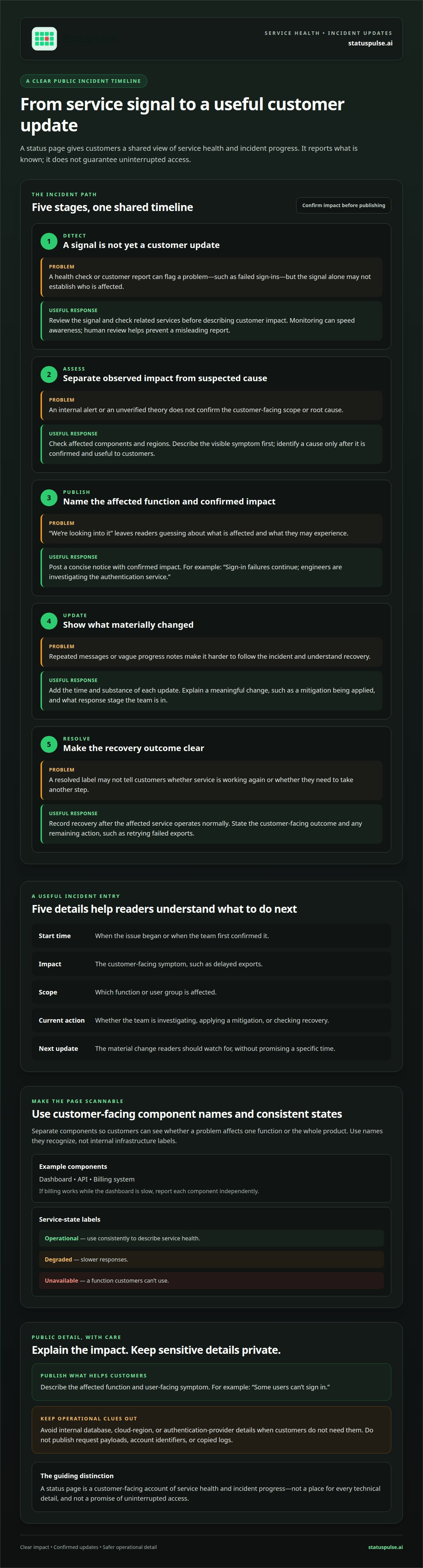
A typical incident moves through these steps:
- Detect: A health check or customer report flags a problem, such as failed sign-ins.
- Assess: The responder checks scope, including affected components and regions.
- Publish: The responder posts a concise incident notice with confirmed impact.
- Update: New entries explain material changes, such as a mitigation being applied.
- Resolve: The page records recovery after the affected service operates normally.
A timeline gives customers one place to follow an incident without repeatedly contacting support. Show the time and substance of each update. For example, “Sign-in failures continue; engineers are investigating the authentication service” is more useful than “We’re looking into it.” It identifies the affected function and the response stage.
Components make reports more precise. A company could separate its dashboard, API, and billing system, then report each component independently. If billing works while the dashboard is slow, customers can see the difference. Use component names customers recognize, not internal infrastructure labels such as cluster identifiers.
The benefits of a public status page depend on operational accuracy, not simply having a page online. A green indicator is useful only when it reflects a defined check or human assessment. A page cannot safely explain every technical detail or guarantee uninterrupted service. Its purpose is narrower: to provide a reliable, customer-facing account of service health and incident progress.
What information should a public status page include?
A useful status page helps customers identify the affected function and understand the practical impact. For example, “Report downloads are delayed” tells users more than “We’re experiencing issues.” Tie each component name to a customer task, such as account access, exports, or API requests. This makes the page easier to scan during a disruption.
Use service-state labels consistently. Define terms such as operational, degraded, and unavailable, then apply them the same way across components. If “degraded” means slower responses, reserve “unavailable” for a function customers can’t use. Consistent labels reduce confusion when readers compare current conditions with earlier incidents.
Each incident entry should give customers enough context to decide what to do next. Include:
- Start time: Show when the issue began or when the team first confirmed it.
- Impact: Describe the customer-facing symptom, such as delayed exports.
- Scope: Clarify which function or user group is affected.
- Current action: State whether the team is investigating, applying a mitigation, or checking recovery.
- Next update context: Explain what material change readers should watch for, without promising a specific time.
Separate confirmed observations from possible causes. If engineers suspect a queue backlog but haven’t verified it, describe the visible delay rather than naming the suspected cause. This keeps an early update useful without presenting an investigation theory as fact. Add a cause later if the team confirms it and the detail helps customers.
Consider what readers need to act. If an API response is delayed, tell developers whether requests are failing, slowing down, or processing later than expected. Avoid internal service names customers won’t recognize. Don’t include request payloads, account identifiers, or copied logs that could expose sensitive information.
Update entries when customer impact or the response changes. For example, explain that a workaround restored exports for new jobs while older jobs remain delayed. Avoid entries that merely repeat the previous message. A concise timeline helps readers follow progress without interpreting internal engineering commentary.
For resolved incidents, record the customer-facing outcome and any remaining action. For example, say that report downloads are working again and whether customers need to retry failed exports. This closing note gives support teams a consistent reference and helps customers distinguish full recovery from partial restoration.
What are the risks and security concerns of publishing a public status page?
A public incident update can help customers, but it can also give attackers useful operational clues. Naming an internal database, cloud region, or authentication provider may reveal dependencies customers don’t need to know. Describe the user-facing impact instead. “Some users can’t sign in” communicates more safely than publishing hostnames, network paths, or detailed failure logs.
Incident updates can also expose sensitive information accidentally. A copied log line might include an email address, session token, or request identifier. Before publishing, remove credentials, customer identifiers, internal IP addresses, and unreviewed screenshots. For example, describe delayed account statements without attaching a customer’s statement or an unredacted support ticket.
Accuracy is another security concern. An incorrect “resolved” notice can prompt customers to retry a failing workflow, while an inaccurate cause can mislead responders and users. Separate verified impact from investigation hypotheses. If engineers suspect an identity provider but haven’t confirmed it, report the sign-in issue and keep the suspected dependency internal.
Reduce publication risks with a defined review process:
- Limit posting access: Give publishing permissions only to incident roles, not every employee account.
- Protect accounts: Use strong authentication and remove access when a person changes roles.
- Review content: Check each update for secrets, personal data, and sensitive infrastructure details.
- Use precise scope: Name affected customer functions, not internal service names or network components.
- Keep an audit trail: Record who changed a status and what wording they published.
The status page itself needs an availability plan. If it runs on the same infrastructure as the application, an outage could take both offline. For example, a failed application deployment might also disrupt a status page hosted within it. Keep the publishing path operationally separate where practical, and test access during incident exercises.
Public visibility also creates a risk of false or unauthorized updates. A compromised publishing account could post fabricated recovery information or direct readers to a malicious destination. Restrict account privileges, review changes, and avoid embedding untrusted links in incident messages. During an exercise, test who can publish, who approves sensitive wording, and how the team corrects inaccurate updates.
A simple rule balances transparency and safety: publish what customers need to act, and keep exploit-enabling details private. “API requests are failing for some users” helps customers make decisions. Stack traces, unpatched component names, and exact defensive controls belong in restricted incident channels, not on the public page.
Public status page vs private status page: what are the differences
A public status page is open to anyone, while a private page limits access to an authorized audience. That changes who can see updates and how teams distribute them. A SaaS provider might publish broad service availability publicly, then share account-specific maintenance details through a private customer portal.
| Decision point | Public status page | Private status page |
|---|---|---|
| Audience | Customers, prospects, and other visitors | Approved users or selected customer groups |
| Access | Open without an invitation | Restricted through an access method |
| Typical update | Broad service availability or disruption | Customer-specific changes or targeted notices |
| Distribution | One page that anyone can find | Access and updates managed for a defined group |
Use a public page when an update applies to a broad audience. For example, an outage affecting every customer’s login flow belongs in a public update. A private page is better for a change affecting one organization’s integration or a limited test environment. Match the audience to the scope of the information.
The choice also affects how customers find updates. A public page can be linked from a product’s help menu, letting visitors check service health without signing in. A private page needs a clear route for its intended readers. For example, an account manager could share the relevant page with customers affected by a planned integration change.
Both formats can support the same communication process, but each needs clear audience rules. Decide which events warrant a public notice and which belong in customer-specific communication. A broad payment-processing issue may merit a public update, while an individual account’s configuration change can remain private. This distinction keeps messages relevant to each reader.
Some teams use both page types. The public page gives a general service view, while a private page carries information for a specific group. Define how they relate before an incident. If a public update points to a private page, ensure the intended customers can access it. If a private notice concerns a broader disruption, publish a matching general update so customers aren’t left with conflicting accounts.
Choose based on the information’s audience, not a blanket preference for openness or restriction. A public page makes broad service information easy to find. A private page gives teams more control over targeted communication. Clear rules help staff select the right channel without delaying updates.
How do companies set up and maintain a public status page
Start by mapping customer-facing services to the systems that support them. A SaaS team might connect account access to its authentication service, then connect report exports to a separate processing queue. This map helps engineers identify meaningful components without exposing internal infrastructure names. It also clarifies which checks can represent each customer workflow.
Next, define how the page will detect and report service conditions. A check against a sign-in endpoint can reveal failed requests, while a human responder assesses whether customers face a wider issue. Set thresholds and ownership before enabling automated signals. Otherwise, a temporary test failure could trigger a public alert that doesn’t reflect actual customer impact.
Build the page around a consistent component model. Group services by customer task, such as signing in, viewing records, or using an API. Avoid creating a separate component for every internal microservice. Too much detail makes the page harder to scan and leaves customers unsure which status matters to them.
Before launch, establish a simple operating procedure:
- Assign roles: Name the incident lead, update writer, and backup publisher.
- Set publishing rules: Define who can change component states and approve sensitive wording.
- Prepare templates: Draft short investigation, mitigation, monitoring, and resolution messages.
- Test access: Open the page from a customer network and a mobile browser.
- Run an exercise: Simulate an API slowdown and practise publishing each update.
Integrate monitoring carefully. For example, a failed API check can notify an on-call responder, who confirms the impact before publishing. Keep the alert condition, component name, and public wording aligned. If an endpoint measures only one region, don’t imply that it represents every customer location.
Maintenance means reviewing the page as the product changes. When a new billing workflow launches, decide whether it needs its own component or belongs under an existing one. Remove retired services, update customer-facing names, and review access permissions when incident responsibilities change. These regular reviews prevent stale labels and unused accounts from lingering.
Test the publishing path during routine incident exercises, not just during outages. Confirm that a responder can reach the page if the primary application is unavailable. Check that timestamps, status changes, and notifications work as expected. Record problems after each exercise and assign a clear owner to resolve them.
If you’re setting up this workflow, use public status page tools to support publishing and service-health visibility.
StatusPulse: Public Status Pages
StatusPulse provides Public Status Pages for SaaS teams that need a clear place to share service updates. When customers rely on financial workflows or identity services, a public page makes incidents and recovery progress easier to follow. It supports transparent communication, but it doesn’t replace security controls or prevent outages.
Teams can pair status communication with Uptime Monitoring, SSL Certificate Monitoring, and API Monitoring. Each supports a different part of service visibility: monitoring detects availability or certificate issues, while a status page gives customers a place to read updates. Your team still decides what to publish and when.
If you’re planning a customer-facing status page, visit StatusPulse’s public status page site to explore the service.
Make service transparency part of membership value
A public status page can help members understand how a service communicates when operations change. The benefits of a public status page are greatest when updates are accurate, useful, and consistent with the experience your membership promises. Treat the page as part of ongoing service communication, not proof that disruptions won’t happen.
StatusPulse offers Public Status Pages, Uptime Monitoring, and SSL Certificate Monitoring. Together, these offerings support service visibility and customer-facing updates, while your team decides what to publish. A clear status page can make your approach to membership value more visible without overstating what a subscription guarantees.
If you’re ready to explore a status page for your SaaS service, contact StatusPulse about status pages. Start with a communication process your team can maintain, then build member trust through clear, accurate updates.
Frequently Asked Questions
How does a public status page improve customer trust and transparency?
A public status page builds trust by giving customers a consistent place to check service conditions, even when there’s no active incident. For example, a member evaluating a financial app can see which customer functions the company tracks and how it communicates changes. Clear, accurate records make operational communication visible. Trust still depends on the service’s security and reliability, so the page should support those qualities rather than stand in for them.
How can a status page reduce support tickets during outages?
A status page can reduce duplicate “Is the service down?” questions by giving customers and support agents a shared reference. For example, a support reply can point to an update about delayed account access instead of repeating the same explanation across separate tickets. Make the page easy to find in help materials and relevant product screens. Customers with account-specific problems may still need direct support, so the page complements rather than replaces support channels.
How do status pages improve incident communication and response times?
Status pages improve communication by separating customer updates from internal investigation discussions. A responder can publish confirmed impact while engineers continue testing possible causes in incident channels. This avoids turning every technical detail into customer-facing language and can help support teams provide a consistent reference sooner. The page doesn’t fix the underlying fault; engineering diagnosis, mitigation, and recovery determine the technical response time.


