

A green uptime badge can hide a broken checkout. Free tools can be a useful starting point for ecommerce uptime monitoring, but checking only the homepage won’t tell you whether customers can complete a purchase.
| Monitoring approach | What it helps reveal |
|---|---|
| Basic availability check | Whether a selected page or endpoint responds |
| Store-journey checks | Whether key shopping steps work across the platform |
Free tools may provide enough visibility for basic needs. Their usefulness depends on the checks they run, the locations they use, and whether alerts reach someone who can respond. A dashboard alone is of little help if nobody sees the notification.
This guide explains how to assess free monitoring, review dashboards, and tailor checks for WooCommerce, Shopify, and custom stores. It also shows how uptime targets relate to customer-facing functions, so you can decide what to measure as your store changes.
Key Takeaways
- Free tools can be a useful starting point, but test an alert and check whether monitoring covers visitors in different regions.
- Monitor the full buying journey, from product discovery and search through cart and checkout, not just the homepage.
- Choose check frequency and alert routing to match your store’s traffic, platform, and incident response needs.
- WooCommerce, Shopify, and other platforms have different dependencies, so tailor checks to the services and workflows each store relies on.
- Use an uptime target as a planning measure, then pair it with checks that reveal which customer-facing functions are failing.
Are free uptime monitoring tools reliable?
Free tools can provide reliable basic checks, but their value depends on what they monitor and whether alerts reach someone able to act. Set a threshold, route alerts to the right people, and test an alert from detection to delivery before relying on it during an incident.
Global Checks and Monitoring Locations
Global monitoring runs checks from locations in different regions to show whether a store responds to visitors worldwide. A homepage that loads from one location may still time out elsewhere because of routing, DNS, or regional service issues.
Choose check locations that reflect your customer base, then compare the results in the dashboard. If one location reports a failure while others succeed, investigate the affected route before declaring the whole store unavailable. A second independent check can help distinguish a regional issue from a broader outage.
Free tools can cover basic availability, but a plan may limit the number of monitoring locations or check types. Make sure the checks cover the homepage and critical endpoints. A homepage response alone does not confirm that commerce functions are working.
Alert Channels and Integrations
Alert channels deliver monitoring results to the people or systems responsible for incidents. Depending on the tool, these may include email, team chat, or an incident workflow.
Assign each alert to someone who can assess the failure. A product endpoint timeout may need a developer, while an expired certificate may need the person responsible for domain operations. Clear routing cuts delays and avoids sending every notification to the same team.
Set thresholds to distinguish a brief slow response from a sustained failure. Where the tool allows it, include the affected check, location, and observed result in the notification. The dashboard shows availability trends; alerts prompt investigation when a threshold is crossed.
Alert Testing and Escalation
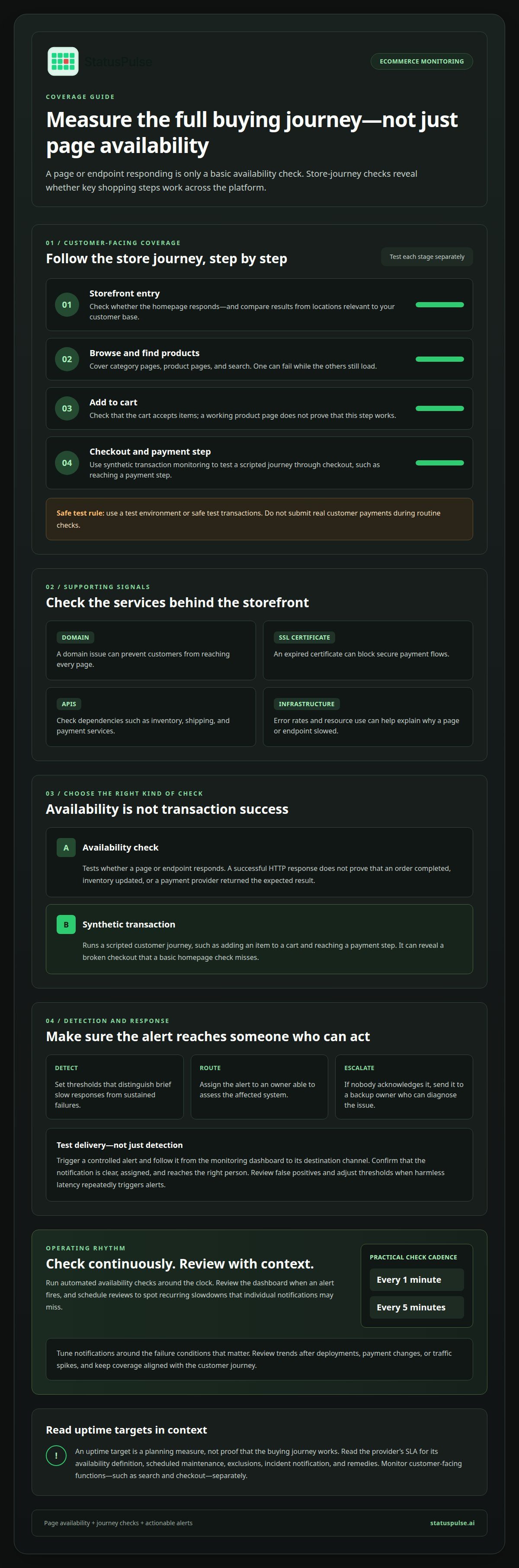
Alert testing confirms that a detected problem becomes a notification someone receives. Trigger a controlled test, follow it from the monitoring dashboard to the destination channel, and make sure the alert is clear and assigned.
Set escalation rules so an unacknowledged alert reaches a backup owner. For example, send an initial checkout availability alert to the on-call developer, then escalate it if nobody acknowledges it. Make sure each step reaches someone able to diagnose the affected system.
Review false positives and adjust thresholds when harmless latency repeatedly triggers alerts. A practical cadence is to check a store every 1 minute or 5 minutes, then tune notifications around the failure conditions that matter. Free tools can be enough for simple checks, but teams needing more locations, integrations, or escalation controls should assess those limits before depending on them.
How often should I check my ecommerce monitoring dashboards?
Run automated availability checks around the clock, ideally every 1 minute or 5 minutes. Review the dashboard when an alert fires, then use scheduled reviews to spot recurring slowdowns that individual notifications may miss.
For a storefront, monitor the homepage, category and product pages, search, cart, and checkout. A product page may load while search returns errors; the cart may accept items while checkout fails to create an order. Separate checks help pinpoint the affected step instead of treating every issue as a full-store outage.
Add supporting checks for the storefront’s domain, SSL certificate, APIs, and infrastructure. A domain issue can keep customers from reaching every page, while an expired certificate can block secure payment flows. API checks can catch failures in inventory, shipping, or payment dependencies. Infrastructure signals, such as error rates and resource use, can help explain why a page or endpoint slowed.
Uptime checks test whether a page or endpoint responds. Synthetic transaction monitoring runs a scripted customer journey, such as adding an item to a cart and reaching a payment step. It can reveal a broken checkout that a basic homepage check misses. Use a test environment or safe test transactions, and don’t submit real customer payments during routine checks.
In the dashboard, distinguish availability from transaction success. A successful HTTP response doesn’t prove that an order completed, inventory updated, or a payment provider returned the expected result. Track each meaningful step and assign its alert to an owner. This clarifies whether the storefront developer, infrastructure team, or payment integration owner should act.
The right ecommerce monitoring service in the US should match your store’s critical paths: checks from relevant global locations, synthetic checkout coverage, useful alert integrations, and clear escalation controls. Compare these capabilities with your platform and the payment or fulfilment services your store depends on.
Hosting SLAs and monitoring requirements depend on the provider’s contract. Read how it defines availability, scheduled maintenance, exclusions, incident notification, and remedies, and distinguish those commitments from your own checks. The provider’s SLA won’t show whether product search or checkout works, so monitor those customer-facing steps separately.
Review dashboard trends after deployments, payment changes, or traffic spikes, not only during incidents. For stores with API-dependent checkout flows, monitoring checkout dependencies can help surface failures beyond the storefront itself.
Keep dashboard coverage aligned with the whole customer journey. Ecommerce uptime monitoring can cover product detail and category pages, search, add-to-cart, checkout steps, and supporting endpoints. Monitor the homepage, product pages, login, and checkout too. Group related checks so you can distinguish a failure on one page or step from a broader storefront issue, and make sure the relevant alert reaches the person responsible for investigating it.
Run uptime monitoring 24/7, then use dashboard reviews to assess patterns and whether alerts point to customer-facing problems. Synthetic transaction monitoring can run automated tests to identify bottlenecks in the transaction process without affecting customers. Store infrastructure monitoring can track server resources, disk, memory, CPU, queue depth, logs, and error rates using thresholds suited to the store. Review those signals alongside transaction results: a resource threshold may help explain a slowdown, while a failed transaction test can show where the customer journey is breaking down.
Can I monitor an ecommerce store if I am not technical?
Yes. Monitoring tools can show whether a store responds and alert you when a check fails. You don’t need to read server logs to get started: monitor the storefront, a key product page, and checkout, then route alerts to a named technical owner who can investigate.
Uptime targets describe the share of a measurement period when a service is available. A 99.9% target allows 0.1% downtime, 99.95% allows 0.05%, and 99.99% allows 0.01% of that period. The actual time depends on whether the provider measures availability monthly, annually, or over another stated window.
The revenue impact depends on which part of the customer journey breaks. These examples show why a response check alone cannot confirm that customers can complete purchases.
Shopify stores can rely on external services for payments, shipping, and inventory; a typical Shopify store depends on 15 or more external services. WooCommerce stores may face issues involving plugins, themes, hosting, or payment integrations. A custom store adds its own server, API, and deployment dependencies. Monitor the functions customers use, plus the endpoints those functions depend on.
Map the critical journey in plain language: open a product, add it to the cart, start checkout, and reach the payment step. For a custom store, add API checks for inventory or order creation, and server checks for resource pressure or error spikes. A failed journey shows the customer impact; supporting checks help developers locate the cause.
Monitoring also supports customer trust. If payment fails while product pages remain available, customers may retry, abandon the order, or wonder whether their payment went through. Track checkout errors alongside order completion, then communicate confirmed incidents clearly. A status update gives customers a consistent account of the disruption while technical owners investigate.
Keep the setup manageable with a dashboard that labels checks by customer function, such as “search,” “cart,” and “payment.” Send each alert to the responsible owner and document what it means. During a promotion or traffic spike, monitor slow responses and timeouts so the team can investigate before a partial failure spreads.
Monitoring needs by ecommerce platform
Your platform affects which failures you can see directly and which dependencies need separate checks. Shopify, WooCommerce, and custom stores all need coverage for customer journeys, integrations, and the hosting layer they rely on.
Shopify stores
For Shopify, use uptime checks at 1-5 minute intervals, as recommended for Shopify stores. Monitor the storefront and key paths such as product selection, cart, and checkout. A successful homepage response does not confirm that those steps work.
Shopify stores may also depend on external payment, inventory, shipping, or analytics services. Monitor the APIs or customer-facing functions connecting those services to checkout. An inventory integration, for example, can fail while the storefront still loads. Label each check by function so an alert points to a specific dependency.
WooCommerce stores
WooCommerce runs on WordPress, so monitoring should cover both the storefront and its supporting components. Check product and category pages, search, cart, and checkout. A theme or plugin change can affect one route without taking the whole site offline.
Include SSL certificate and domain checks, along with relevant payment and order-processing endpoints. If checkout errors start after a WooCommerce plugin update, compare their timing with deployment records. This context can help distinguish a store-level issue from an external payment or hosting problem.
Custom ecommerce platforms
A custom platform gives teams more control, but makes their own APIs and servers central monitoring targets. Check endpoints for product data, inventory, order creation, and payment hand-offs. Pair these checks with server signals, such as error rates or resource pressure, to help trace a failed customer journey.
Whatever the platform, distinguish a page response from a completed transaction. A checkout page that loads doesn’t prove that an order was created or payment confirmed. Use synthetic tests that stop before real payment submission, or run controlled tests in a safe environment.
Choose checks based on the platform’s dependency map, not a generic template. A Shopify store may prioritize integration endpoints; WooCommerce may need closer monitoring after plugin or theme changes; a custom store often needs API and server coverage. Review results after deployments and payment changes, then tune alerts to distinguish customer-facing failures from isolated component errors.
Finally, connect monitoring to communication. If customers can’t complete checkout, a status page can explain which function is affected while technical teams investigate. Name checks clearly, such as “WooCommerce checkout” or “Shopify inventory API,” so responders can identify the scope without decoding an ambiguous alert.
What uptime percentage should an ecommerce store target
Reliable ecommerce websites commonly aim for at least 99.9% uptime. High-traffic online stores often target 99.99%, while 100% uptime isn’t possible because no system is entirely failsafe. Treat these figures as planning targets, not proof that every customer journey works.
An availability percentage only makes sense alongside its measurement window and service scope. A hosting provider may measure its platform, while a store team measures the storefront, checkout, and connected APIs. These are different boundaries: a green hosting report can coexist with broken payment integration or product search.
Define “available” before setting a target. Decide whether it means the homepage responds or customers can also open a product and reach checkout. The second definition covers more of the buying journey, but requires checks beyond a basic page request.
Separate service availability from transaction health. A checkout page can load while an order fails to submit, so a page-only measure may overstate practical availability. Pair uptime measurement with transaction outcomes, API responses, and customer-facing checks. This gives teams distinct signals for “site unreachable” and “purchase flow broken.”
Set a target that reflects the store’s operating needs and the failures it can tolerate. A high-traffic retailer may choose a more demanding goal than a small catalogue site, especially for checkout. Assign owners to review misses, identify recurring causes, and decide whether the target needs adjustment. A percentage without an owner or response process won’t guide useful action.
Read a provider’s availability definition before comparing its commitment with your own target. Check which services it covers, how it treats planned maintenance, and how it records incidents. Keep your store-side dashboard separate from provider reporting: Shopify hosting availability, for example, doesn’t establish that every app or payment dependency is working.
Review the target against actual incident records. If outages repeatedly affect search or payment but barely change the overall uptime score, track those functions with separate indicators. This makes the measure more useful to developers and operations teams and helps customer-facing updates describe the affected service clearly.
For a target tied to real storefront checks, use uptime monitoring to track availability and identify when a customer-facing service needs investigation.
Compare a provider’s availability commitment with your target by checking the services covered, how planned maintenance is treated, and how incidents are recorded. Monitor the storefront, checkout, connected APIs, and transaction outcomes separately: provider uptime alone may not reveal broken customer journeys or payment flows.
StatusPulse: Uptime Monitoring
StatusPulse brings Uptime Monitoring, SSL Certificate Monitoring, and Public Status Pages together for ecommerce teams tracking availability and customer-facing updates. AI Incident Management helps technical teams draft status updates and summarize outage impact, giving responders a clearer starting point during an incident.
Choose US or EU hosting, with the selected region supporting your DPA, your SOC 2 review, or just peace of mind. The setup can help teams align monitoring and incident communication with their operational needs.
To discuss monitoring for your store, contact StatusPulse. Start by identifying the customer-facing checks and dependencies that matter most to your team.
Make monitoring part of every store change
Store reliability changes as checkout flows, integrations, and infrastructure evolve. Treat ecommerce uptime monitoring as an ongoing operational practice: review checks after deployments, add coverage when a new dependency enters the buying journey, and include incident communication in your response.
StatusPulse offers Uptime Monitoring, SSL Certificate Monitoring, and Public Status Pages to help teams track availability, certificate issues, and customer-facing updates. These tools give technical owners a clear way to detect service problems and communicate their impact, while keeping monitoring signals distinct from customer communication.
Choose the next step that fits your current gaps. If you want to discuss monitoring for your store, contact StatusPulse about monitoring. A clearer view of service health gives your team a stronger starting point for the next change.
Frequently Asked Questions
Can downtime affect SEO rankings?
Yes, repeated or extended downtime can prevent search crawlers and visitors from accessing pages. After service recovers, check that key product URLs load normally and don’t lead to error pages.
How often should a website be monitored?
Run checks continuously. Ecommerce checks can run every 1 minute or 5 minutes. Review results after deployments, especially changes affecting product pages or order processing.
Is my store up?
This page can’t verify your store’s live status. Open your store and test a purchase journey, then compare the result with an external availability check.
What about self-hosted monitoring?
Self-hosted monitoring gives your team control, but also makes you responsible for maintaining the server and alerts. Run checks outside your store’s hosting environment to avoid shared failures.
What are the best tools for monitoring the services your store runs on?
Choose tools that monitor the services your store depends on, such as APIs, certificates, and order processing. Make sure alerts identify the affected component and reach its owner.
What causes most website downtime?
Common causes include hosting or network failures, configuration changes, software defects, certificate issues, and third-party outages. Group incident records by component to spot recurring problems in your environment.
What is a good uptime percentage for an e-commerce website?
At least 99.9% is a common target; high-traffic stores often aim for 99.99%. Define availability around customer-facing functions, not only whether the homepage responds.
What is ecommerce uptime monitoring and why does it matter?
Automated checks detect when a store or its dependencies become unavailable. Monitoring helps teams identify affected services, investigate incidents, and understand the impact on customers.


