

A deployment starts failing, alerts multiply, and three engineers begin investigating the same service. Meanwhile, nobody knows who should update stakeholders or decide whether to roll back. Clear incident commander roles and responsibilities prevent that coordination gap: one person keeps the response aligned while technical responders diagnose and mitigate the fault.
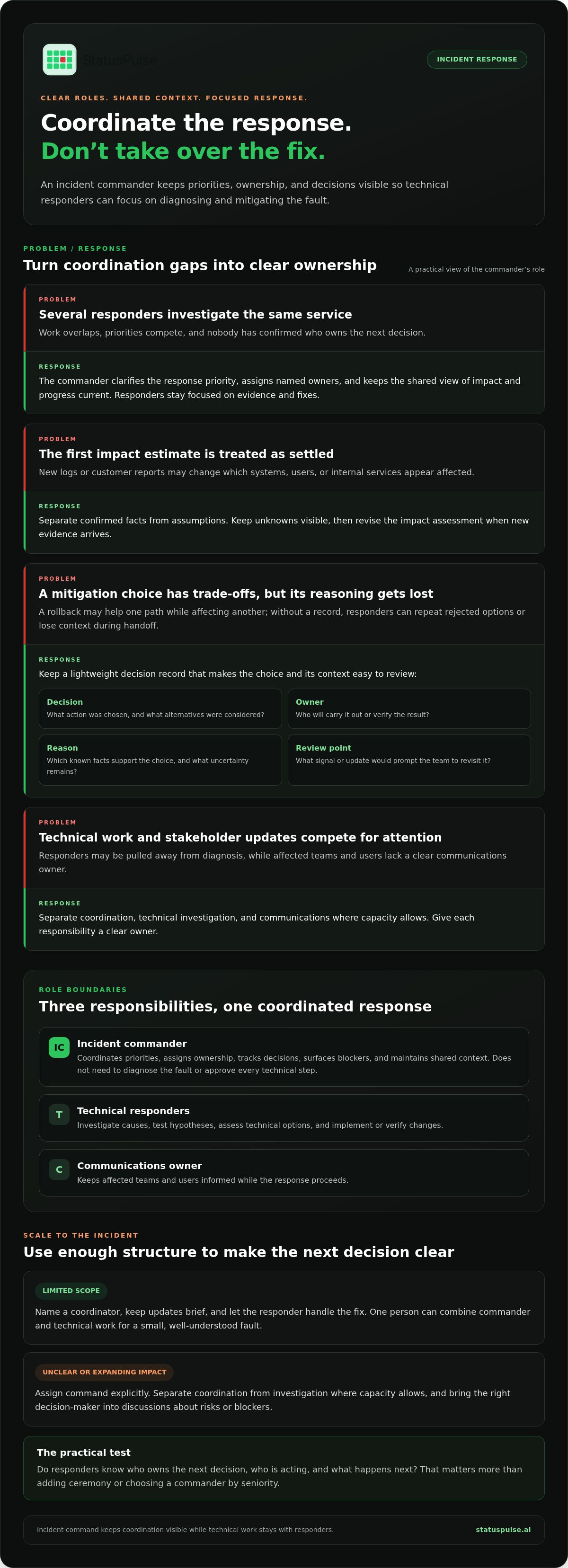
The commander takes charge of coordination, but shouldn’t become the lead investigator or make every technical decision. Their job is to set priorities, assign ownership, track decisions, and maintain a reliable picture of impact and progress. Responders focus on evidence and fixes. A communications owner keeps affected teams and users informed.
This guide explains what the incident commander owns, where the role ends, and how to divide command, investigation, and communications without slowing the response. You’ll also see how to adapt the structure to a small team or a larger incident, so people know who is deciding, who is acting, and what happens next.
Key Takeaways
- Use an incident commander to set response priorities, assign ownership, and keep decisions visible while responders investigate and mitigate.
- Separate command decisions from technical diagnosis and stakeholder communications to make incident commander roles and responsibilities clear.
- Choose the commander based on coordination needs, not seniority or who is most familiar with the affected system.
- Scale the command structure to the incident: establish impact, name owners, review decisions, and hand off clearly without imposing a fixed meeting cadence.
- Use monitoring signals and public status pages to support incident awareness and updates, while keeping assessment and approval with people.
What does an incident commander do during a technical incident?
A production release causes checkout requests to fail. One responder checks application logs, another considers rolling back the release, and a third investigates a database alert. All three are working, but nobody has confirmed the incident’s scope or decided which action takes priority. The team needs coordination, not another person duplicating the investigation.
An incident commander coordinates response priorities, decisions, and shared context so responders can focus on diagnosing and mitigating the technical fault. The commander tracks the response as a whole: clarifies ownership, surfaces decisions that need to be made, and keeps the team’s view of impact current. They don’t need to identify the faulty query, change a deployment, or approve every technical step.
The incident commander’s purpose in a software incident
Command creates one coordination point without turning the response into a chain of approvals. The commander can confirm who is investigating the application, who is assessing rollback risk, and what evidence each person needs. If the database alert proves unrelated, that finding can redirect effort before several responders spend time on the same lead.
This role is distinct from incident command in emergency services. Emergency services coordinate people and resources at a physical scene, where safety and operational conditions shape decisions. In a software incident, the commander coordinates a technical response across services, teams, and communication channels. The shared word “command” doesn’t make the operating environments or responsibilities interchangeable.
When should a team assign an incident commander?
Name a commander when coordination starts to compete with investigation. Useful signals include multiple responders working across system boundaries, uncertainty about customer or service impact, and mitigation options with different risks. A proposed rollback, for example, may restore one path while affecting another. Someone should make sure the trade-offs are understood and the decision has an owner.
That doesn’t mean every alert requires a formal incident process. For a small, well-understood fault, one person can take the commander role while also doing technical work. Naming the role still helps others know who is tracking priorities and making sure an important decision doesn’t disappear in chat.
- Limited scope: Name a coordinator, keep updates brief, and let the responder handle the fix.
- Unclear or expanding impact: Assign command explicitly and separate coordination from technical investigation where capacity allows.
Scale the structure to the incident and the people available. A small team may combine roles; a larger response may need dedicated coordination. The useful measure is whether responders know who owns the next decision, not whether the team has added ceremony. That practical boundary is central to incident commander roles and responsibilities: the commander organizes the response, while technical responders own the investigation and implementation of fixes.
Incident commander responsibilities across the response lifecycle
An incident changes as responders gather evidence. The initial alert may point to one service, then logs or customer reports reveal a wider impact. The commander keeps the response aligned as that picture develops, from first assessment through mitigation and handoff.
The incident commander owns coordination of the response, not the technical execution of the fix. Technical responders investigate causes, test hypotheses, and implement changes. The commander helps them work against shared priorities and keeps decisions, owners, and unresolved questions visible.
Assessment, prioritization, and decision tracking
At the start, separate confirmed facts from assumptions. Record which systems appear affected, what users or internal services may be experiencing, what remains unknown, and which immediate risks need attention. Treat impact as an evolving assessment: revise it when new evidence arrives rather than treating the first estimate as settled.
The commander doesn’t need to independently validate every technical hypothesis. Instead, they can ask the relevant responder to explain the evidence, likely consequences, and next check. A lightweight decision log might capture:
- Decision: What action was chosen, and what alternatives were considered?
- Owner: Who is carrying it out or verifying the result?
- Reason: Which known facts support the choice, and what uncertainty remains?
- Review point: What signal or update would prompt the team to revisit it?
This record reduces the chance that the team repeats a rejected option or loses the reason behind a change as responders join or hand off work. It also gives the commander a practical way to check whether the response is moving forward without directing each technical step.
Coordination, escalation, and closure
During the response, the commander assigns work to named owners, checks for dependencies, and surfaces blockers. If a database specialist is waiting on access or an application responder needs a decision about rollback risk, the commander makes that constraint visible and brings the right decision-maker into the discussion. They don’t take over the specialist’s task.
Escalation is useful when the incident’s impact or uncertainty exceeds the current team’s ability to assess or manage it. That might mean involving a service owner, another technical specialist, or someone authorised to make a broader operational decision. Escalate to fill a clear gap, not simply to add more people to the response.
Mitigation needs confirmation. Ask the responsible responder to report what changed and which signals show whether service behavior has improved. Then make the next step explicit: continue monitoring, attempt another mitigation, or begin handoff. Closure should include an owner for remaining work, such as investigating the trigger or completing follow-up actions, so those tasks don’t vanish when active response ends.
A clear record of priorities and decisions is the working core of incident commander roles and responsibilities. Keeping those details current gives the team a useful account of what happened and what still needs attention after active response ends.
Incident commander vs. technical lead: who owns which decisions?
Role confusion often appears when a team debates a rollback while stakeholders ask for an update. The commander, technical lead, and communications owner may all contribute, but they shouldn’t make the same decisions. Clear boundaries let responders investigate without leaving coordination or messaging unattended.
| Role | Owns | Doesn’t own by default |
|---|---|---|
| Incident commander | Response priorities, coordination, decision tracking, and shared incident context | Diagnosing or implementing the technical fix |
| Technical lead or responder | Technical investigation, assessment of options, and implementation or verification | Incident-wide coordination or stakeholder updates |
| Communications owner | Drafting and distributing approved updates to relevant audiences | Setting technical priorities or making incident-wide decisions |
Incident commander and technical lead
The commander doesn’t have to be the most senior engineer. Seniority can help when authority or system context matters, but command depends on the ability to coordinate the response. A technically capable responder may be better placed to investigate than to track owners, decisions, and dependencies.
The technical lead examines evidence, develops options, and explains likely consequences. The commander connects those options to incident priorities, makes sure a decision has an owner, and records what the team chose. They share information at decision points, not through constant status requests. For example, the technical lead might recommend a rollback and describe its risks; the commander ensures the relevant decision-maker is present and that the team knows who will execute and verify it.
This separation shouldn’t become a new approval layer. Clear ownership can protect responder focus: the technical lead can work through logs or deployment history while the commander handles coordination questions and tracks decisions. The incident commander roles and responsibilities are about keeping work aligned, not directing each command or code change.
Communications lead and stakeholder coordination
A communications owner turns verified incident information into clear updates and distributes them to the right audience. The commander provides current impact, confirmed facts, and realistic timing context. The communications owner handles the wording and delivery; the commander remains accountable for the overall response. Neither should present an unverified cause or recovery estimate as settled fact.
In a small team, one person may cover command and communications, or the commander may also act as technical lead. That’s workable if the responsibilities stay explicit and the person can keep up with each task. If updates start interrupting investigation or decisions go untracked, split the roles. A communication structure such as The Architecture of Incident Communication Transparency can help teams think through how information moves without confusing updates with command.
How to run an incident command structure without slowing response
A command structure should remove uncertainty, not add a meeting layer. Start by naming the commander, establishing known impact, assigning owners, and keeping decisions visible. Then make the next decision or handoff explicit. An incident commander should name the coordination owner, summarize what’s known, assign clear actions, and make the next decision or handoff explicit.
A first-response sequence for the commander
Start with one shared place for current facts, open questions, owners, and decisions. It might be an incident channel or another team workspace. The important part is that responders can find the latest context without searching through separate conversations.
- Name the commander. Make clear who is coordinating and how responders should raise decisions or blockers.
- Establish known impact. Separate confirmed symptoms from assumptions. Note which services or users appear affected and what still needs investigation.
- Assign work. Give each investigation or mitigation task a named owner, a specific outcome, and an expected update point. For example: check recent API errors and report whether they correlate with the failed requests.
- Review decisions and evidence. Keep the current choice and its rationale visible. Reassess impact when monitoring signals or responder findings change the picture.
- Hand off deliberately. Pass on the current impact, actions in progress, decisions made, and unresolved risks. Confirm who owns the next step.
Consider an illustrative case: an API health check fails after a deployment, but the team hasn’t confirmed whether all customers are affected. The commander can assign one responder to inspect deployment changes and another to check request errors, while recording the impact as uncertain. If evidence later points to a broader outage, the commander updates priorities and brings in the owners needed to assess mitigation. The sequence is useful; it isn’t a universal diagnosis or prescribed fix.
Adapting roles for small and distributed teams
Staffing and incident scope should shape the structure. In a small team, one person might coordinate and investigate, but they should state which task they’re doing at each point. If a decision or coordination duty is at risk of being missed, assign that responsibility to someone else, even temporarily.
Distributed responders don’t need a standing meeting cadence. Use concise asynchronous updates that identify new evidence, current owners, decisions needed, and the next review point. Keep the shared record current so people joining later can understand the situation without interrupting active work.
Monitoring helps establish awareness, but a signal needs human interpretation. An uptime check can show that an endpoint is failing from a particular vantage point; it can’t establish the full customer impact or choose a mitigation. Record when the signal began and compare it with responder findings to distinguish a continuing failure from a delayed or isolated check.
How monitoring and status tools support the incident commander
Monitoring and status tools give the commander useful evidence and a place to share confirmed information. They don’t determine the cause, set incident severity, or make response decisions. Those remain human responsibilities.
What tools can make visible during an incident
Different signals help answer different questions. Uptime monitoring can show whether a service endpoint responds. API monitoring can reveal changes in API behavior, while SSL certificate monitoring can surface certificate validity issues. The commander can use these signals to guide questions and investigation, not treat an alert as a complete diagnosis.
A failed check might indicate a service problem, a network path issue, or a monitoring vantage point that can’t reach the endpoint. Responders need to assess the evidence alongside logs, architecture, and user reports. An alert alone doesn’t establish cause, customer impact, or severity.
Keep confirmed impact, unresolved questions, and approved updates easy to find. A public status page can give users a consistent place to see what the team has confirmed and when it last shared an update. It supports communication, not command: it doesn’t assign responders, track technical decisions, or replace the incident record used by the team.
Keep incident decisions human-owned
AI assistance can help draft an update from incident notes or summarize reported impact. A person still needs to check that the wording matches verified facts, remove unsupported causes or timelines, and approve it before publication. A concise update is useful only if it’s accurate.
Tools can reduce context switching by bringing monitoring, public updates, and incident information together. But the team still needs clear ownership of assessment, decisions, and approval. Those boundaries are central to incident commander roles and responsibilities: technology can make information easier to see, while people decide what it means and what to do next.
Data sovereignty can shape where incident information is stored. Define your organisation’s requirements for data location, access, and retention, then assess tools against those requirements. A hosting location alone doesn’t establish compliance with any particular law or standard.
StatusPulse combines uptime, API, and SSL certificate monitoring with public status pages and AI-assisted incident management. These tools can support incident awareness and communication without acting as the commander or approving updates. Learn more about StatusPulse’s monitoring and status page platform and how its capabilities can fit into your response workflow.
Make the response structure part of routine operations
A role chart only helps if the team can use it under pressure. Before the next disruption, test your response process with a short scenario. Ask someone who wasn’t part of the exercise to take over midway through. Can they identify current priorities, active owners, and unresolved decisions without restarting the discussion? Use any gaps to refine your runbook while the stakes are low.
That rehearsal turns incident commander roles and responsibilities into a practical team habit. Keep the process light, review it after incidents, and adjust it when your systems or team structure change.
If you’re improving how your team detects and communicates service issues, explore StatusPulse monitoring and status pages as part of your response workflow.
Frequently Asked Questions
Does an incident commander need to be the most senior engineer?
No. Choose the person best able to coordinate under the incident’s current conditions. A senior engineer may have the deepest system knowledge but also be essential to investigating a production regression. In that case, assign technical investigation to that engineer and command to someone else. Choose based on the work the incident needs now, not job title.
Can one person act as both incident commander and technical lead?
Yes, especially when an incident is contained and the team is small. Make the dual role explicit so others know who is coordinating and investigating. For example, the person might state that they’re checking a deployment diff and will also track the decision to roll back. If they stop updating the shared record or miss incoming decision requests, split the roles and transfer ownership clearly.
When should an incident commander hand over the role?
Hand over when the current commander becomes unavailable, a shift changes, or the incident’s demands outgrow their capacity. A useful handoff includes the latest status, what has changed since the last update, decisions still pending, and who is waiting on them. The incoming commander should confirm they’ve taken ownership in the shared incident space. That acknowledgement prevents responders from relying on two different people for direction.
What information should an incident commander track?
Keep a concise, time-stamped record that separates observations from hypotheses. For example, write “requests to the billing endpoint are returning errors” as an observation, and “the latest deploy caused them” as a hypothesis until evidence supports it. Add links to relevant dashboards or logs rather than copying technical output. This helps the team revisit its reasoning without turning the incident record into a duplicate of every investigation.
Should an incident commander join every technical troubleshooting discussion?
No. The commander can stay out of detailed debugging if responders share findings and flag decisions that affect broader priorities. Agree on what needs to come back to the incident channel, such as a proposed production change, a newly affected dependency, or evidence that changes the expected impact. This keeps technical discussion focused while giving the commander enough context to coordinate the response.
Is an incident commander responsible for writing every customer update?
Not necessarily. A communications owner can draft and publish updates while the commander supplies checked facts and confirms what has changed. Before an update goes out, verify that its service impact and recovery language match current evidence. For instance, if a fix is deployed but recovery hasn’t been confirmed, say that mitigation is underway rather than implying the service is fully restored.


